
XTRONS PX8446BLHG
XTRONS 8.8 Inch Android 14 Car Stereo User Manual
Model: PX8446BLHG
Introduction
This manual provides detailed instructions for the installation, operation, and maintenance of your XTRONS 8.8 Inch Android 14 Car Stereo. Please read this manual thoroughly before using the product to ensure proper functionality and safety. This head unit is designed to enhance your in-car entertainment and navigation experience with advanced features and connectivity options.
Applicable Models & Years
This XTRONS car stereo is compatible with the following vehicle models:
- For BMW E46 4-door Sedan (1998-2005)
- For BMW E46 2-door Coupe (1999-2006)
- For BMW E46 2-door Convertible (1999-2006)
- For BMW E46 M3 (2000-2006)
- For Rover 75 (1999-2005)
- For MG ZT (2001-2005)

Figure 1: Comparison of the dashboard before and after the installation of the XTRONS 8.8 Inch Android 14 Car Stereo, demonstrating the integrated fit.
Main Features
The XTRONS PX8446BLHG unit offers a range of advanced features for an enhanced driving experience:
- Latest Android 14 with Octa Core: Equipped with 4GB RAM and 64GB ROM for responsive performance and ample storage for applications.
- 8.8" Premium HD IPS Screen: A 1280x720 resolution G+G high-resolution touch screen with 178° viewing angle for clear visuals without color shifts.
- Global 4G LTE Connectivity: Supports Micro-SIM card for mobile broadband access anywhere, with download speeds up to 300Mbps.
- Wireless CarPlay and Android Auto: Seamless smartphone integration for navigation, calls, and music with voice control via "Hey Siri" or "Hey Google".
- Built-in DSP (Digital Sound Processor): Enhances audio quality and allows for advanced sound customization.
- Dual Band Wi-Fi: Supports both 2.4GHz and 5GHz bands for faster and more stable wireless connections.
- Bluetooth 5.0: Provides stable audio transmission for hands-free calls and music streaming.
- Off-Road Inclinometer Function: Built-in gyroscope sensors accurately display vehicle pitch and roll angles, useful for off-road driving.
- Optimized CANbus Decoding: Ensures original vehicle features like steering wheel control, ACC control, and door status work perfectly after upgrade.
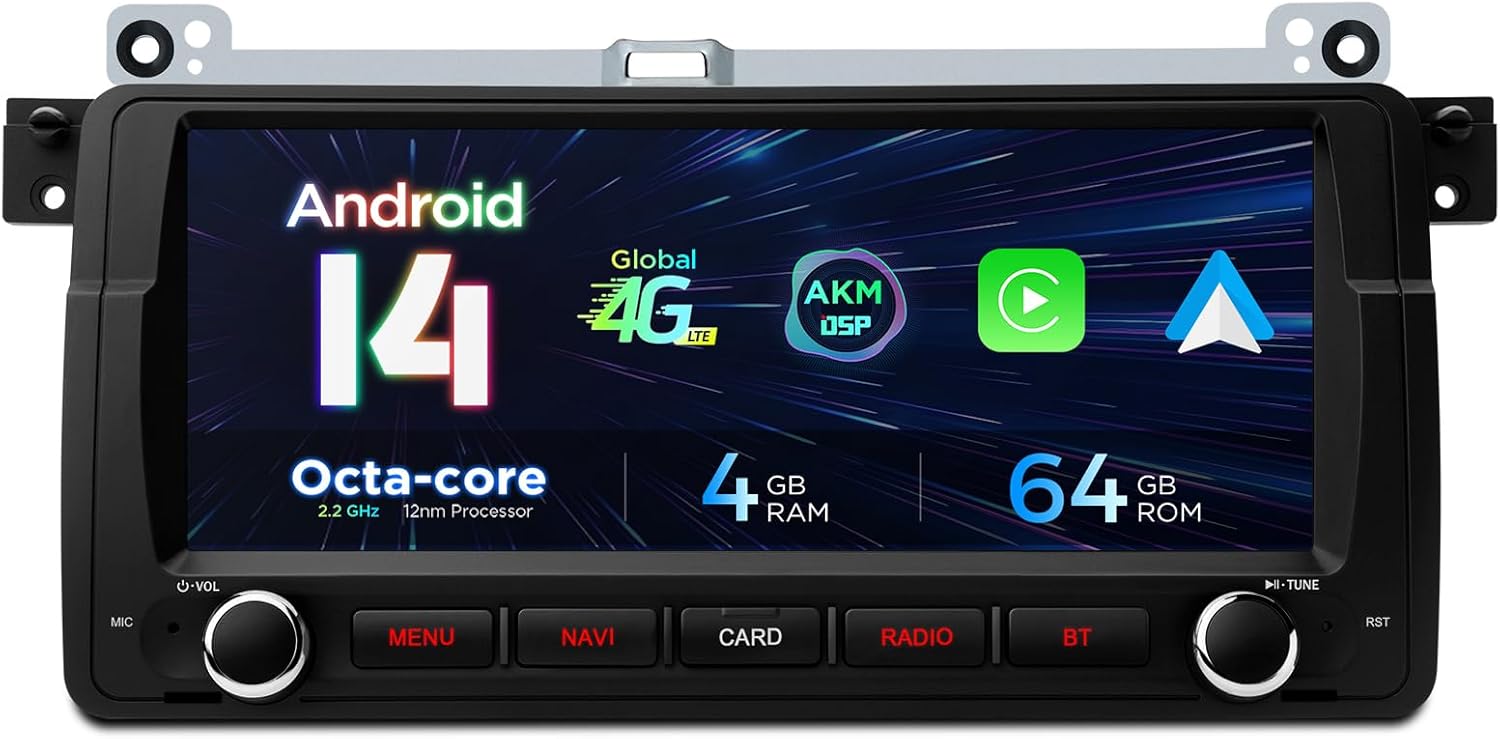
Figure 2: Front view of the XTRONS 8.8 Inch Android 14 Car Stereo highlighting its core specifications.

Figure 3: Illustration of the global 4G LTE modem, dual band WiFi (2.4GHz and 5GHz), and mobile network sharing capabilities.

Figure 4: Overview of smartphone connectivity features: Wireless CarPlay, Wireless/Wired Android Auto, and Screen Mirroring.

Figure 5: Details of the 8.8 inch Premium HD IPS screen and the Bluetooth 5.0 interface for stable audio transmission and phone synchronization.

Figure 6: Display of the off-road inclinometer function, providing real-time pitch and roll angles of the vehicle.
What's in the Box (Accessories)
Please check the contents of your package against the list below:
- 1 × ISO Wiring Harness
- 1 × SIM Card Slot Cable
- 1 × 4G Antenna
- 1 × Camera Cable
- 1 × GPS Antenna
- 1 × Radio Cable Adapter
- 2 × Fitting Key
- 1 × Microphone
- 2 × USB Cable
- 1 × Radio Antenna Cable
- 1 × CANbus Box
- 1 × User Manual
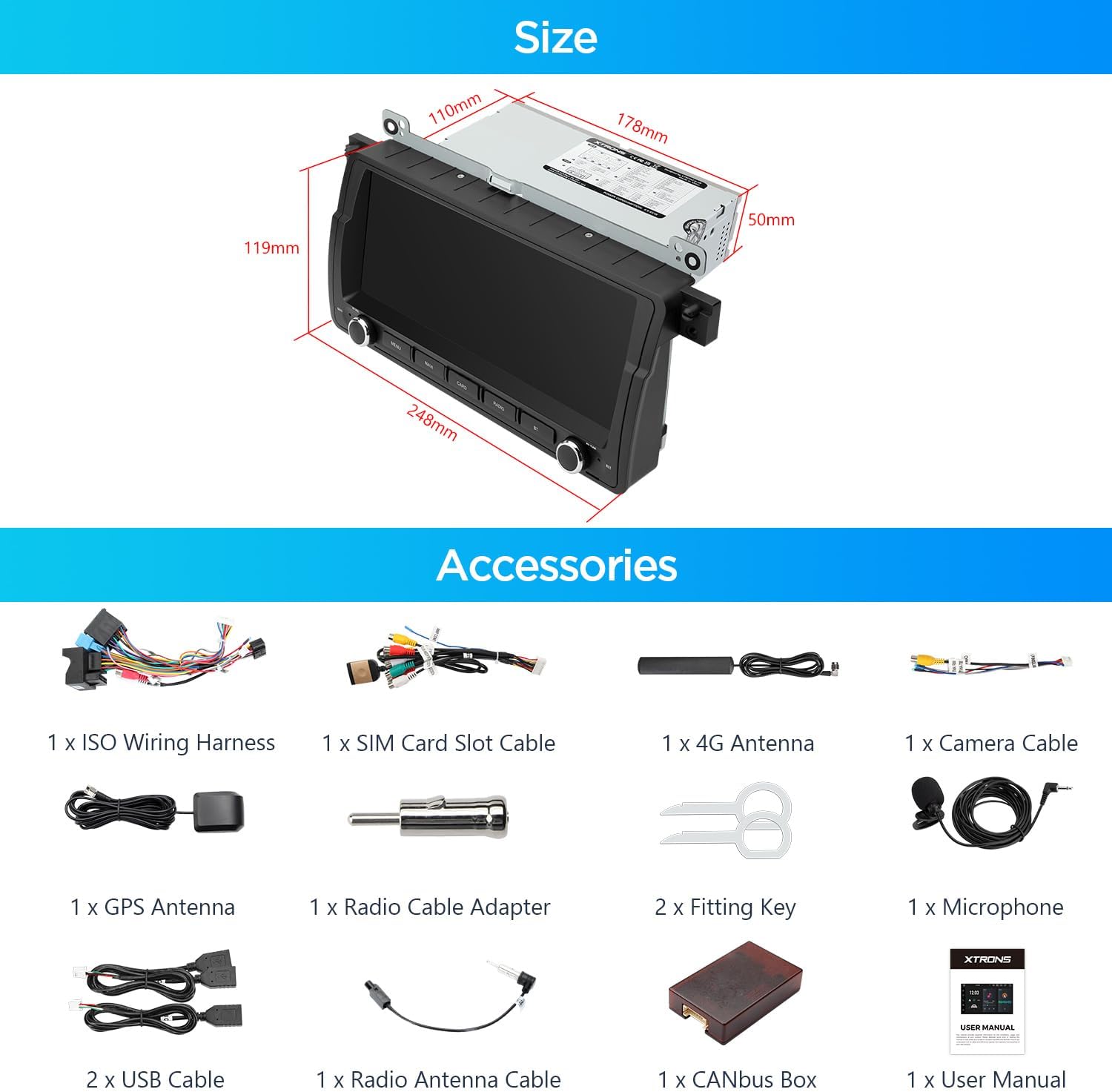
Figure 7: A visual representation of all accessories included with the XTRONS 8.8 Inch Android 14 Car Stereo.
Installation Guide
Wiring Diagram
Refer to the wiring diagram below for proper connection of the head unit to your vehicle's electrical system. Ensure all connections are secure before powering on the device.

Figure 8: Comprehensive wiring diagram for the XTRONS car stereo, detailing each port and its function.
Wiring Legend:
| No. | Description |
|---|---|
| 1 | 4G Antenna |
| 2 | GPS Antenna |
| 3 | Radio Antenna Port |
| 4 | 4G SIM Card Slot |
| 5 | Microphone Port |
| 6 | CVBS-IN-2, Front Camera Input |
| 7 | SUBWOOFER, Subwoofer Output |
| 8 | AUX IN L, Audio Input Left |
| 9 | AUDIO OUT L, Audio Output Left |
| 10 | 2176, Amplifier Control Cable |
| 11 | AUX IN R, Audio Input Right |
| 12 | AUDIO OUT R, Audio Output Right |
| 13 | CVBS-IN-1, Video Input1 |
| 14 | RR OUT, Rear Right Audio Output |
| 15 | RL OUT, Rear Left Audio Output |
| 16 | BRAKE, Brake In Cable |
| 17 | Back, Reversing Control Cable |
| 18 | BT-ANT, Bluetooth Antenna |
| 19 | Wi-fi Antenna |
| 20 | CAM IN, Camera Video Input |
| 21 | USB Port1 |
| 22 | USB Port2 |
| 23 | USB Port3 |
| 24 | CANbus Box |
| 25 | ACC |
| 26 | ACC |
| 27 | Reversing Control Cable |
| 28 | BRAKE, Brake-in Cable |
| 29 | KEY1, Steering Wheel Control Key1 |
| 30 | KEY2, Steering Wheel Control Key2 |
| 31 | ISO Wiring Harness 1 |
| 32 | ISO Wiring Harness 2 |
| 33 | ISO Wiring Harness 3 |
Operating Instructions
Smartphone Connectivity (Wireless CarPlay & Android Auto)
The unit supports both Wireless CarPlay and Wireless/Wired Android Auto. To connect, ensure Bluetooth is enabled on your smartphone and pair it with the head unit. Follow the on-screen prompts to activate CarPlay or Android Auto. This allows for seamless access to navigation, music, calls, and messaging directly from the head unit's display, enhancing driving safety by minimizing phone interaction.
Global 4G LTE Connectivity
Insert a Micro-SIM card into the designated slot (refer to the wiring diagram for location). Once inserted, the unit will automatically detect the network. This feature provides independent internet access for streaming, navigation, and app usage without relying on a Wi-Fi hotspot from your phone.
Off-Road Inclinometer Function
Access the inclinometer application from the main menu. This feature utilizes built-in gyroscope sensors to display real-time pitch and roll angles of your vehicle. It is designed to provide critical information for off-road driving, helping you monitor vehicle stability on uneven terrain.
Bluetooth 5.0 Operation
To pair a Bluetooth device, navigate to the Bluetooth settings on the head unit. Enable Bluetooth on your phone and search for the XTRONS device. Select it to pair. Once connected, you can make hands-free calls, stream audio, and synchronize your phone book. The Bluetooth 5.0 standard ensures a stable and high-quality wireless connection.
Maintenance
To ensure the longevity and optimal performance of your XTRONS car stereo, follow these maintenance guidelines:
- Cleaning the Screen: Use a soft, lint-free cloth to gently wipe the screen. For stubborn smudges, slightly dampen the cloth with water or a screen-safe cleaner. Avoid abrasive materials or harsh chemicals.
- General Cleaning: Keep the unit free from dust and debris. Use a soft brush or compressed air to clean vents and button crevices.
- Software Updates: Periodically check the XTRONS official website or contact support for available software updates. Keeping the firmware updated can improve performance and add new features.
- Avoid Extreme Temperatures: Do not expose the unit to extreme heat or cold for prolonged periods, as this can affect electronic components.
Troubleshooting
If you encounter issues with your XTRONS car stereo, refer to the following common troubleshooting steps:
- No Power: Check all power connections, including the ISO wiring harness and ACC wire. Ensure the vehicle's ignition is on. Check the fuse.
- No Sound: Verify speaker connections. Check volume levels and ensure the mute function is not activated. Confirm audio output settings in the system menu.
- GPS Signal Loss: Ensure the GPS antenna is properly installed and has a clear line of sight to the sky. Avoid placing it under metal objects.
- Bluetooth Connection Issues: Ensure Bluetooth is enabled on both the head unit and your smartphone. Try unpairing and re-pairing the devices. Clear Bluetooth cache on your phone if necessary.
- Touchscreen Unresponsive: Try restarting the unit. If the issue persists, a factory reset might be necessary (note: this will erase all user data).
- Apps Crashing/Slow Performance: Close background applications. Clear app caches. If the issue persists, consider a factory reset or check for system updates.
For more complex issues, please contact XTRONS customer support.
Technical Specifications
| Feature | Specification |
|---|---|
| Item Weight | 5.64 pounds |
| Package Dimensions | 12.5 x 9.8 x 8.2 inches |
| Item Model Number | PX8446BLHG |
| Display Size | 8.8 Inches |
| Operating System | Android 14 |
| Processor | Octa-core |
| RAM | 4GB |
| Internal Storage | 64GB |
| Screen Resolution | 1280x720 (HD) |
| Screen Type | IPS Touch Screen (G+G) |
| Connectivity Technology | Bluetooth 5.0, USB, Wi-Fi (2.4GHz & 5GHz), 4G LTE |
| Special Features | Built-in DSP, Wireless CarPlay, Android Auto, Off-Road Inclinometer |
| Mounting Type | Dashboard Mount |
Warranty and Support
XTRONS products are designed for reliability and performance. For any support inquiries or warranty claims, please refer to the following information:
- Manufacturer: XTRONS
- Protection Plans: Additional protection plans may be available for purchase, offering extended coverage beyond the standard manufacturer's warranty. Please check with your retailer for details on 2-Year or 3-Year protection plans.
- Customer Service: For technical assistance, troubleshooting, or warranty service, please visit the official XTRONS website or contact their customer support directly.
Related documentsPX8446BLHG


Ask a question about this manual
Ask about setup, troubleshooting, compatibility, parts, safety, or missing instructions. Manuals+ will review the question and use this page’s manual context to help answer it.