1. Introduction
This manual provides detailed instructions for the installation, operation, and maintenance of your WEILAILIFE 4K 8MP PoE PTZ Security Camera System. Please read this manual thoroughly before using the product to ensure proper functionality and safety. Keep this manual for future reference.
2. Product Overview
2.1. Package Contents
- 4K 8MP 8-Channel Network Video Recorder (NVR) with 1TB HDD: x 1
- 4K 8MP PTZ Camera: x 4
- LAN Cable for Camera (18.2 meters): x 4
- Instruction Manual: x 1
- Warning Label: x 1
- Camera Mounting Screws Pack: x 4
- NVR Power Supply (48V2A): x 1
- Remote Control: x 1
- USB Mouse: x 1
- HDMI Cable (1 meter): x 1
- LAN Cable (1 meter): x 1
2.2. Key Features
- 4K 8MP Ultra High Resolution: Captures video at 3264 x 2488 pixels for clear surveillance.
- PTZ Control: Pan 355° horizontally and Tilt 90° vertically for comprehensive area coverage.
- Auto-Tracking: Automatically detects and follows human movement, ensuring critical events are recorded.
- Two-Way Audio: Enables real-time communication through the camera via the mobile application.
- PIR & AI Dual Detection: Advanced human detection technology reduces false alarms by distinguishing people from other moving objects.
- 130° Ultra-Wide Angle Lens: Provides a broad field of view to minimize blind spots.
- H.265 Compression: Efficient video compression saves storage space and bandwidth while maintaining video quality.
- IP66 Weatherproof: Designed for both indoor and outdoor use, resistant to dust and water.
- PoE (Power over Ethernet): Simplifies installation by providing power and data through a single Ethernet cable.
- Free Mobile App: Access live view and recordings without monthly fees using the 'Honestview' or 'Eseecloud' app.

Image 2.1: Overview of the WEILAILIFE 4K 8MP PoE PTZ Security Camera System, including the NVR, four cameras, 1TB HDD, and remote control.
3. Setup Guide
3.1. Initial Connection
- Connect NVR to Power: Plug the NVR power adapter (48V2A) into the NVR and a power outlet.
- Connect NVR to Monitor: Use the provided HDMI cable to connect the NVR to a monitor or TV.
- Connect USB Mouse: Plug the USB mouse into a USB port on the NVR for navigation.
- Connect Cameras: Connect each camera to an available PoE port on the NVR using the provided LAN cables. The cameras will power on automatically.
- Connect NVR to Internet (Optional for Remote Access): Connect the NVR's LAN port to your router using an Ethernet cable.

Image 3.1: Illustration showing the simple connection of a camera to the NVR using a single LAN cable for both power and data, supporting up to 200 meters of transmission distance.
3.2. Mobile App Setup
- Download App: Search for 'Honestview' or 'Eseecloud' in your smartphone's App Store (iOS) or Play Store (Android) and install it.
- Register Account: Open the app and follow the on-screen instructions to register a new account.
- Add Device: On the NVR's monitor, locate the device ID (usually found in the system settings or on a label). In the app, select 'Add Device' and scan the QR code or manually enter the device ID.
- Live View: Once added, you should be able to view live footage from your cameras and access NVR settings remotely.

Image 3.2: The system supports remote monitoring from various devices including smartphones, tablets, laptops, and desktop computers.
4. Operating Instructions
4.1. Live View and Playback
- On Monitor: Use the USB mouse to navigate the NVR interface. Click on camera feeds to view them in full screen. Access playback options from the main menu.
- On Mobile App: Select a camera from the device list to view its live feed. Use the playback function to review recorded footage stored on the NVR.
4.2. PTZ Control
The PTZ (Pan-Tilt-Zoom) cameras can be controlled remotely via the mobile app or NVR interface.
- Pan/Tilt: In live view, use the directional controls to rotate the camera horizontally (355°) and vertically (90°).
- Digital Zoom: Use the zoom controls to digitally magnify the image up to 5x.
- Auto-Tracking: Enable auto-tracking in the camera settings. The camera will automatically follow detected human movement within its field of view.

Image 4.1: Demonstrates PTZ control (355° pan, 90° tilt) and 10x digital zoom functionality managed through a smartphone application.

Image 4.2: Visual representation of the automatic tracking feature, where the camera follows a person's movement.
4.3. Two-Way Audio
The cameras are equipped with a microphone and speaker for two-way communication.
- Activate: In the mobile app's live view, tap the microphone icon to speak through the camera. Tap the speaker icon to hear audio from the camera's location.
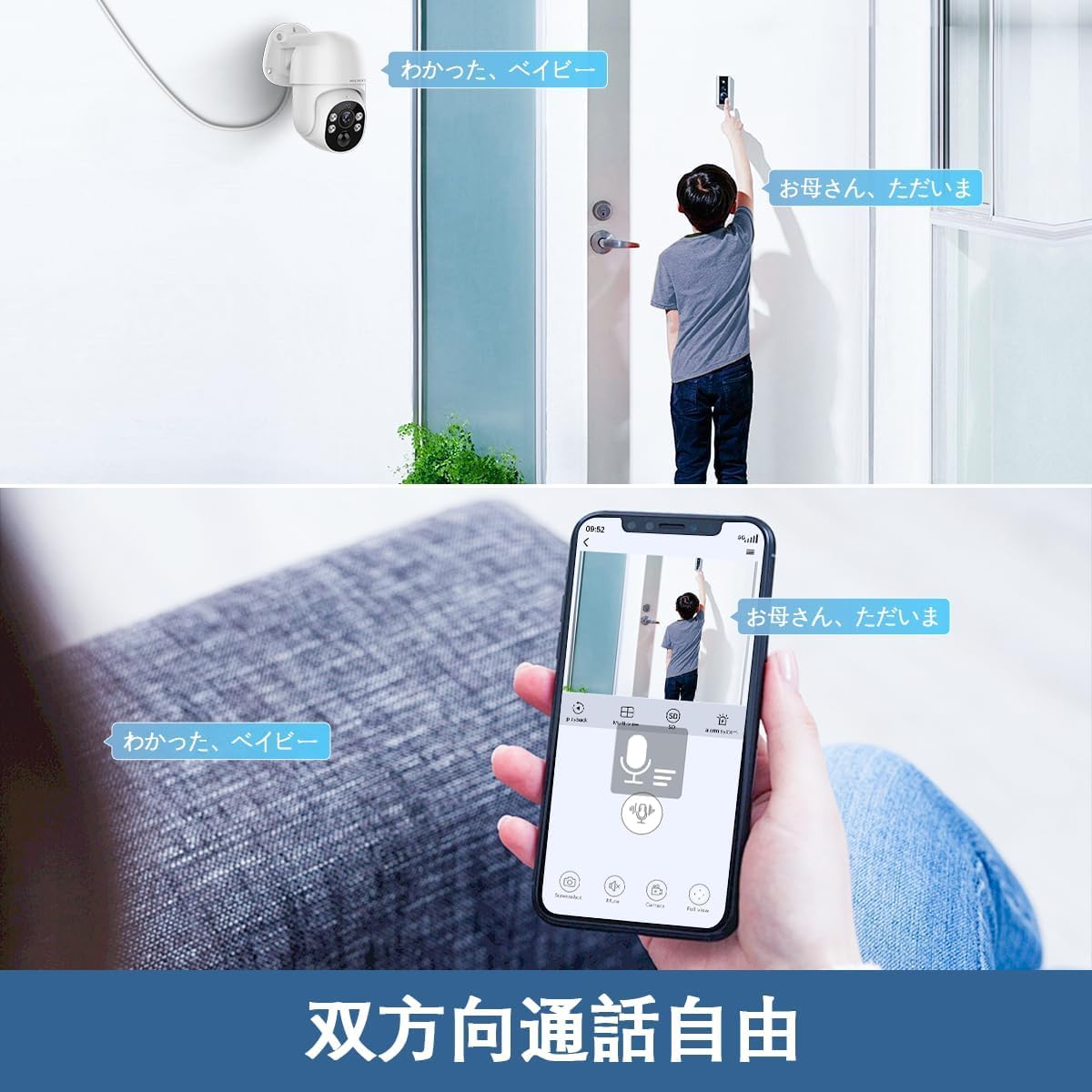
Image 4.3: A user communicating through the camera's two-way audio feature using a smartphone app, allowing interaction with someone at the door.
4.4. Motion Detection and Alerts
The system uses PIR and AI dual detection to accurately identify human movement and send alerts.
- Configure Detection Zones: In the NVR or app settings, you can define specific areas for motion detection to avoid unnecessary alerts.
- Alert Notifications: When motion is detected, the system can send real-time notifications to your smartphone, email alerts, or trigger a siren.

Image 4.4: Visual explanation of PIR and AI dual detection, highlighting how the system differentiates human movement from other objects like cars to reduce false alarms.

Image 4.5: An example of a real-time alert notification displayed on a smartphone when an intruder is detected by the security camera.

Image 4.6: Diagram illustrating how users can define specific motion detection areas to focus surveillance on critical zones and ignore irrelevant movements outside the designated area.
5. Maintenance
- Regular Cleaning: Periodically clean the camera lenses with a soft, damp cloth to ensure clear image quality. Do not use harsh chemicals.
- Firmware Updates: Check the WEILAILIFE website or app for available firmware updates to ensure optimal performance and security.
- Cable Inspection: Regularly inspect all cables for any signs of wear or damage, especially for outdoor installations.
- Storage Management: The 1TB HDD provides ample storage. Periodically review and back up important footage. The H.265 compression helps maximize storage efficiency.

Image 5.1: The camera is designed to withstand various weather conditions, operating effectively between -10°C and 50°C, and is IP66 waterproof.

Image 5.2: Detail of the waterproof connector design, ensuring the LAN connection remains protected from rain and moisture when installed outdoors.
6. Troubleshooting
| Problem | Possible Cause | Solution |
|---|---|---|
| No image from camera | Power issue, loose cable, NVR port issue | Check power supply to NVR and camera. Ensure LAN cable is securely connected. Try a different NVR port. |
| Cannot connect to app | NVR not connected to internet, incorrect device ID, app issues | Verify NVR internet connection. Double-check device ID. Restart app or NVR. |
| Poor image quality | Dirty lens, low light, network bandwidth | Clean camera lens. Ensure adequate lighting or check night vision settings. Verify network speed. |
| False motion alarms | Incorrect detection zone, sensitivity too high | Adjust motion detection zones to exclude irrelevant areas. Lower sensitivity settings. |
| PTZ control unresponsive | Network delay, camera malfunction | Check network connection. Restart camera/NVR. If issue persists, contact support. |
7. Specifications
- Video Capture Resolution: 4K 2160P, 800 million pixels (3264×2488)
- Color: White
- Number of Items: 1 (System)
- Number of Channels: 8
- Form Factor: Dome
- Field of View: 130 degrees
- Night Vision Range: 20 meters
- Frame Rate: 15 fps
- Material: Aluminum
- Voltage: 110 Volts (AC)
- Wattage: 60 W
- Product Dimensions (LxWxH): 28 x 16 x 31 cm
- Water Resistance Level: IP66 (Waterproof and Dustproof)
- Imaging Sensor: CMOS
- Zoom Ratio (Digital): 5:1
- Lens Configuration: Wide Angle
- Motor Type: Digital Zoom
- Product Model Number: WL-POE-PTZ80041T
- Recommended Use: Indoor Security, Outdoor Security
- Connectivity Technology: Wired (PoE)
- Features: 130° Ultra-Wide Angle, H.265 Compression, PIR & AI Dual Detection, Two-Way Audio, Free APP & No Monthly Fees
- Indoor/Outdoor Use: Indoor, Outdoor
- Compatible Devices: Camera, Smartphone, Tablet, TV, Desktop
- Power Source: Corded Electric
- Connection Protocol: ONVIF
- Controller Type: APP Control, Remote Control
- Mounting Type: Wall Mount
8. Warranty and Support
8.1. Warranty Information
WEILAILIFE provides a 12-month quality warranty for this product. This warranty covers manufacturing defects and ensures stable, high-quality performance. Please retain your proof of purchase for warranty claims.
8.2. Customer Support
For any questions, concerns, or technical assistance regarding your WEILAILIFE security camera system, please contact our support team:
- Email Support: info-jp@weilailifetech.com (24-hour response time)
- Official Website: jp.weilailifetech.com
- LINE Service: For quick support, add us on LINE: https://lin.ee/EqPKtnq

Image 8.1: Details on the 12-month warranty, official website, and email support for WEILAILIFE products.


