
1. Product Overview
The Skazeke AD2 Mini UPS is a versatile uninterruptible power supply designed to provide continuous power to various low-voltage DC devices during power outages. Equipped with a digital display and multiple output ports, it ensures your essential devices like routers, modems, cameras, and more remain operational. Its compact design and high-capacity battery also allow it to function as a portable power bank.
2. Key Features
- Uninterrupted Power Supply: Automatically switches to battery power during outages, keeping connected devices running for several hours.
- Multi-Voltage Output: Supports 5V/3.6A USB, 5V/2A DC, 9V DC, 12V DC, 15V PoE, and 24V PoE outputs, compatible with a wide range of devices.
- Power Sharing Function: Allows selection of 9V or 12V for any port. Maximum current is 3A when all ports are set to one voltage, or 2A when devices with different voltages are used simultaneously.
- High Capacity & Portability: Features a built-in 10400mAh (74Wh) battery, also usable as a standard 5V/2A USB power bank. Compact and easy to transport.
- Intelligent Protection: Includes short circuit, voltage fluctuation, overcharging, over-discharge, temperature, and overcurrent protection for safe operation.
- Digital Display: Provides real-time information on input voltage, output voltage, and battery level.
3. Package Contents
The Skazeke AD2 Mini UPS package includes:
- 1 x Skazeke AD2 Mini UPS (10400mAh)
- 4 x DC Cables
- 1 x Charger (Max 19V/4.74A)
- 9 x DC Adapters
- 1 x User Manual
4. Product Components & Interface
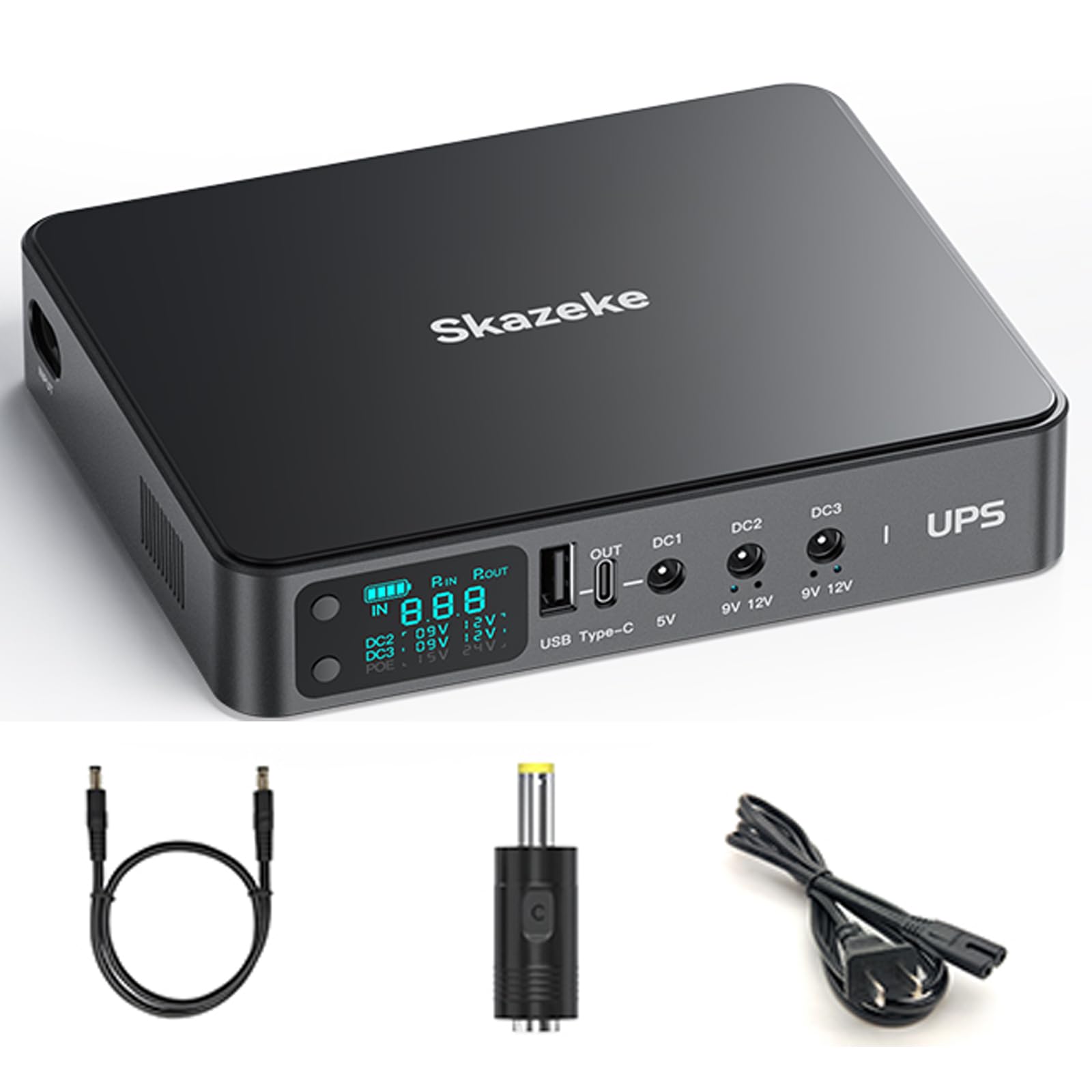
Figure 4.1: Front view of the Skazeke AD2 Mini UPS, highlighting its various output ports and included accessories. The display shows input/output voltage and battery status.

Figure 4.2: Detailed view of the high-definition digital display, showing battery charge level, input voltage, and selected output voltages for DC2, DC3, and PoE ports.
The UPS features a user-friendly interface with clearly labeled ports and a digital display for monitoring. Key interfaces include:
- Power On/Off Button: Controls the main power to the unit.
- USB Output: 5V/3.6A for charging mobile devices.
- DC Outputs (DC1, DC2, DC3): Adjustable voltage outputs for various devices.
- PoE Output: Power over Ethernet for compatible network devices (15V/24V selectable).
- LAN Port: For network connectivity.
- Input Port: For connecting the charger to recharge the UPS.
5. Setup Instructions
Follow these steps to set up your Skazeke AD2 Mini UPS:
- Charge the UPS: Before first use, connect the provided charger to the UPS input port and a power outlet. The battery indicator lights on the display will show the charging progress.
- Identify Device Voltage: Check the power specifications of your device (e.g., router, modem) to determine its required input voltage and current. This information is usually found on the device's label or power adapter.
- Select Output Voltage: If your device requires 9V or 12V, use the toggle key on the UPS to select the appropriate voltage for the corresponding DC output port (DC2 or DC3). For PoE devices, select 15V or 24V.
- Connect Your Device: Use one of the provided DC cables and appropriate DC adapters to connect your device to the selected output port on the UPS. For USB devices, use the USB output port.
- Power On: Press the Power On/Off button to activate the UPS. Your device should now receive power.

Figure 5.1: Visual guide on how to properly use the UPS, from checking device current to connecting and powering on.
Video 5.1: An overview of the Skazeke Mini UPS, demonstrating its features and how to connect it to various devices for backup power.
Video 5.2: This video provides a general overview of a Mini UPS, showcasing its functionality and typical use cases for various electronic devices.
6. Operating Instructions
The Skazeke AD2 Mini UPS is designed for simple operation:
- Power On/Off: Press and hold the Power On/Off/Toggle Key for 2 seconds for manual power on and off. Note: The UPS cannot be manually shut down when an external input is connected.
- Switch Voltage Options: Short press the Power On/Off/Toggle Key to cycle through available voltage options for adjustable ports (DC2, DC3, PoE).
- Confirm Selection: Press and hold the Confirm Key for 1 second to confirm your voltage selection.
- Automatic Backup: Once connected and powered, the UPS will automatically provide power to your devices and seamlessly switch to battery backup during a power interruption.
Video 6.1: This video demonstrates the basic operation of a mini UPS, including powering on, selecting voltage, and connecting to a router.
7. Device Compatibility
The Skazeke AD2 Mini UPS is compatible with a wide array of small DC-powered devices, including but not limited to:
- Routers
- Modems
- Security Cameras
- Raspberry Pi
- Breast Pumps
- LED Lights
- Smartphones (via USB)
- Tablets (via USB)
- Small Switches/Hubs
Important Note: This UPS is not designed for higher power products such as laptops.

Figure 7.1: The UPS is compatible with a wide range of 5V, 9V, 12V, 15V, and 24V output devices.

Figure 7.2: The UPS can power up to five devices simultaneously, including routers, cameras, and smartphones.
8. Safety & Protection
The Skazeke AD2 Mini UPS incorporates multiple intelligent protection mechanisms to ensure safe and reliable operation:
- Short Circuit Protection: Prevents damage from electrical shorts.
- Voltage Fluctuation Protection: Stabilizes output voltage.
- Overcharging Protection: Prevents battery damage from excessive charging.
- Over-discharge Protection: Protects the battery from deep discharge.
- Temperature Protection: Monitors and regulates internal temperature.
- Overcurrent Protection: Safeguards against excessive current draw.
- Restoration Protection: Ensures safe recovery after a fault.
- Timed Shutdown Protection: Additional safety measure.

Figure 8.1: Overview of the 8 intelligent safety protections integrated into the Skazeke AD2 Mini UPS.

Figure 8.2: The innovative dual electrical isolation design protects the battery and extends its lifespan by separating input, charging, and load circuits.
9. Maintenance
To ensure optimal performance and longevity of your Skazeke AD2 Mini UPS:
- Store the unit in a cool, dry place away from direct sunlight and extreme temperatures.
- Avoid exposing the unit to water or excessive humidity.
- Clean the exterior with a soft, dry cloth. Do not use harsh chemicals or abrasive cleaners.
- For prolonged storage, charge the unit to approximately 50-75% every 3-6 months to maintain battery health.
10. Troubleshooting
If you encounter issues with your Skazeke AD2 Mini UPS, refer to the following common indicators:
- Battery Indicator Light Flashing Continuously: This indicates that the input adapter voltage does not match the UPS voltage. Ensure you are using the correct charger.
- Voltage Indicator Light Flashing Continuously: This suggests that your connected device is drawing more than 3A of current, exceeding the UPS's capacity. Disconnect the device or reduce the load.
- No Power Output: Ensure the UPS is sufficiently charged and the Power On/Off button is pressed. Verify that the correct voltage is selected for your device.
- Device Not Charging (USB): Confirm the USB cable is securely connected and the device is compatible with 5V/3.6A USB output.
For further assistance, please contact customer support.
11. Specifications
| Feature | Specification |
|---|---|
| Model Number | AD2 |
| Battery Capacity | 10400mAh (74Wh) |
| USB Output | 5V/3.6A |
| DC Output 1 | 5V/2A |
| DC Output 2 | 9V/2A or 12V/2A (Adjustable) |
| DC Output 3 | 9V/2A or 12V/2A (Adjustable) |
| PoE Output | 15V or 24V (Adjustable) |
| Input Voltage | 110 Volts (AC) |
| Battery Cell Composition | Lithium Polymer |
| Item Weight | 9.6 ounces |
| Package Dimensions | 10 x 7 x 2 inches |
12. Warranty & Support
Skazeke is committed to providing high-quality products and customer satisfaction. Your Skazeke AD2 Mini UPS comes with a standard manufacturer's warranty. For specific warranty details, please refer to the warranty card included in your package or visit the official Skazeke website.
If you have any questions, require assistance with setup or operation, or encounter any issues with your product, please do not hesitate to contact our customer support team. We are dedicated to helping you and ensuring your satisfaction.
Customer Support Contact: Please refer to the contact information provided in your product packaging or on the official Skazeke website.