
Introduction
This manual provides detailed instructions for the proper use and maintenance of your Kassionel ARCS52A replacement remote control. This remote is designed to be compatible with various Daikin FTXS and FTXL series room air conditioners. Please read this manual thoroughly before use to ensure optimal performance and longevity of your device.
Compatible Daikin Air Conditioner Models:
- FTXS15LVJU
- FTXS12LVJU
- FTXS09LVJU
- FTXL15QMVJU
- FTXL12QMVJU
- FTXL09QMVJU
- ARC452A3
- FTXS20J2V1B
- FTXS25J2V1B
- FTXS35J2V1B
- FTXS42J2V1B
Setup
1. Battery Installation
The remote control requires two (2) AAA alkaline batteries (not included). Follow these steps to install them:
- Locate the battery compartment cover on the back of the remote control.
- Slide the cover downwards to open the compartment.
- Insert two new AAA alkaline batteries, ensuring the positive (+) and negative (-) terminals align correctly with the markings inside the compartment.
- Slide the battery compartment cover back into place until it clicks securely.

Image: The remote control with its battery cover removed, illustrating the correct placement for two AAA batteries. The battery type (AAA) is indicated.
2. Initial Use
This replacement remote control is pre-programmed and does not require any setup or pairing with your Daikin air conditioner. Once batteries are installed, it is ready for immediate use.

Image: A hand holding the remote control, pointing towards an air conditioning unit. A wireless signal icon is visible, emphasizing that no programming is required for immediate use.
Operating Instructions
1. Power On/Off
Press the ON/OFF button (typically yellow) to turn the air conditioner on or off.
2. Temperature Adjustment and Unit Switching (°C/°F)
Use the TEMP ▲ and TEMP ▼ buttons to adjust the desired temperature. The remote supports display in both Celsius and Fahrenheit.
To switch between Fahrenheit (°F) and Celsius (°C) display:
- Press and hold both the TEMP ▲ and TEMP ▼ buttons simultaneously for approximately 5 seconds.
- The display will switch between Fahrenheit and Celsius.
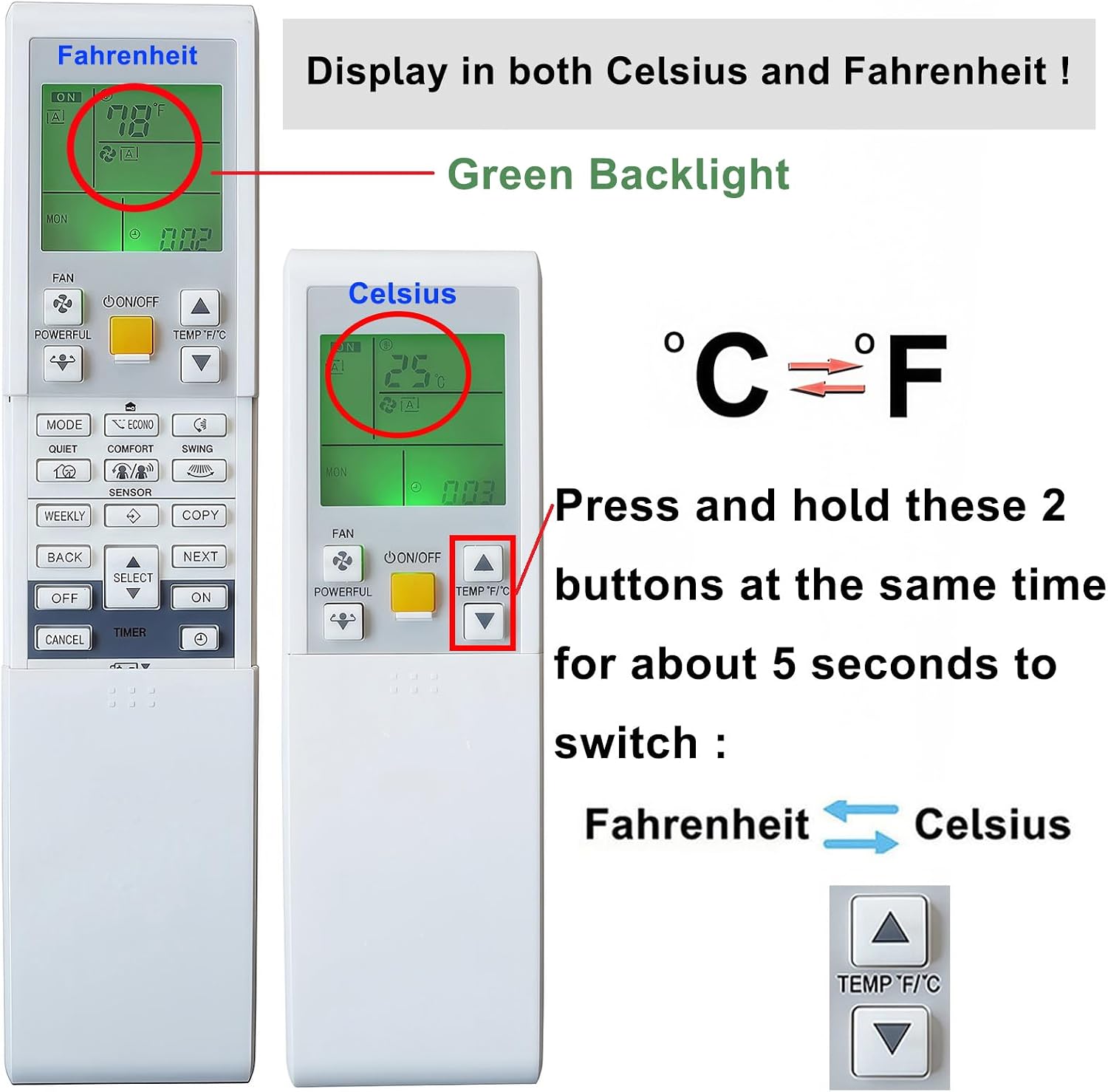
Image: Two remote control displays, one showing Fahrenheit and the other Celsius. Instructions highlight pressing the temperature up and down buttons simultaneously to toggle between temperature units.

Image: The back of the remote control, showing a label that instructs users to press the temperature up and down buttons for approximately 5 seconds to switch between Celsius and Fahrenheit.
3. Mode Selection
Press the MODE button to cycle through available operating modes (e.g., Cool, Heat, Fan, Dry, Auto).
4. Fan Speed Adjustment
Use the FAN button to adjust the fan speed settings (e.g., Low, Medium, High, Auto).
5. Clock Setting
To set the current time and day:
- Press the CLOCK button (often marked with a clock icon). The week display on the screen will start flashing.
- Use the SELECT ▲ or SELECT ▼ buttons to adjust the day of the week (e.g., Monday, Tuesday, etc.).
- Press the CLOCK button again. The time display will start flashing.
- Use the SELECT ▲ or SELECT ▼ buttons to adjust the hour and minute.
- Press the CLOCK button one more time to confirm and save the settings.

Image: A detailed view of the remote control's display and buttons, illustrating the step-by-step process for setting the clock, including adjusting the day and time.
6. Timer Functions
The remote control may include timer functions such as TIMER ON and TIMER OFF. Refer to your air conditioner's main manual for specific instructions on setting these timers, as their functionality can vary.
Maintenance
1. Cleaning the Remote Control
To clean the remote control, wipe it gently with a soft, dry cloth. Do not use liquid cleaners, abrasive materials, or chemical solvents, as these can damage the remote's surface or internal components.
2. Battery Replacement
Replace the batteries when the remote control's operating range decreases or if the display becomes dim or unresponsive. Always replace both batteries at the same time with new AAA alkaline batteries. Do not mix old and new batteries or different types of batteries.
Dispose of used batteries according to local regulations.
Troubleshooting
Remote Control Not Responding
- Check Batteries: Ensure batteries are inserted correctly with the correct polarity (+/-). Replace with new AAA alkaline batteries if necessary.
- Obstruction: Make sure there are no obstructions between the remote control and the air conditioner's receiver.
- Distance: Ensure you are within the maximum operating range (approximately 10 meters or 33 feet) of the air conditioner.
- Infrared Sensor: Verify that the infrared sensor on both the remote and the air conditioner is clean and unobstructed.
Display Issues
- Dim Display: This usually indicates low battery power. Replace the batteries.
- No Display: Check battery installation and ensure batteries are new.
Specifications
| Feature | Detail |
|---|---|
| Brand | Kassionel |
| Model Number | ARCS52A |
| Compatible Devices | Daikin FTXS and FTXL Series Air Conditioners |
| Connectivity Technology | Infrared |
| Controller Type | Button Control |
| Special Feature | No Programming Required |
| Maximum Range | 10 Meters (approx. 33 feet) |
| Batteries Required | 2 x AAA Alkaline Batteries (not included) |
| Item Weight | 98 Grams |
| Dimensions (L x W x H) | 7.36" x 2.27" x 0.8" |
Warranty and Support
Warranty Information
This Kassionel remote control comes with a 1-year warranty from the date of purchase. This warranty covers manufacturing defects under normal use. It does not cover damage caused by misuse, accidents, unauthorized modifications, or battery leakage.
Please retain your proof of purchase for warranty claims.
Customer Support
For any questions, technical assistance, or warranty claims, please contact Kassionel customer support through the retailer where the product was purchased. Provide your product model number (ARCS52A) and details of the issue for faster service.