
Introduction
This manual provides detailed instructions for the XINFUTE RC6001PM replacement remote control. This remote is designed to be compatible with Marantz CD Integrated Amplifier models PM6001 and RC6001SA, offering full functionality as an original unit. Please read this manual thoroughly before use to ensure proper operation and longevity of your remote control.
Package Contents
- 1 x XINFUTE RC6001PM Remote Control
- Note: Batteries are not included.
Setup
1. Battery Installation
- Locate the battery compartment on the back of the remote control.
- Slide the battery compartment cover downwards or press the latch and lift to open.
- Insert two (2) AAA batteries, ensuring the positive (+) and negative (-) terminals align correctly with the markings inside the compartment.
- Replace the battery compartment cover by sliding it back into place until it clicks securely.

Figure 1: Back of the remote control with the battery compartment open, illustrating the correct orientation for AAA battery insertion.
The remote control is now ready for use with your compatible Marantz CD Integrated Amplifier.
Operating Instructions
The XINFUTE RC6001PM remote control provides comprehensive control over your Marantz CD Integrated Amplifier. Below is a general guide to its functions.
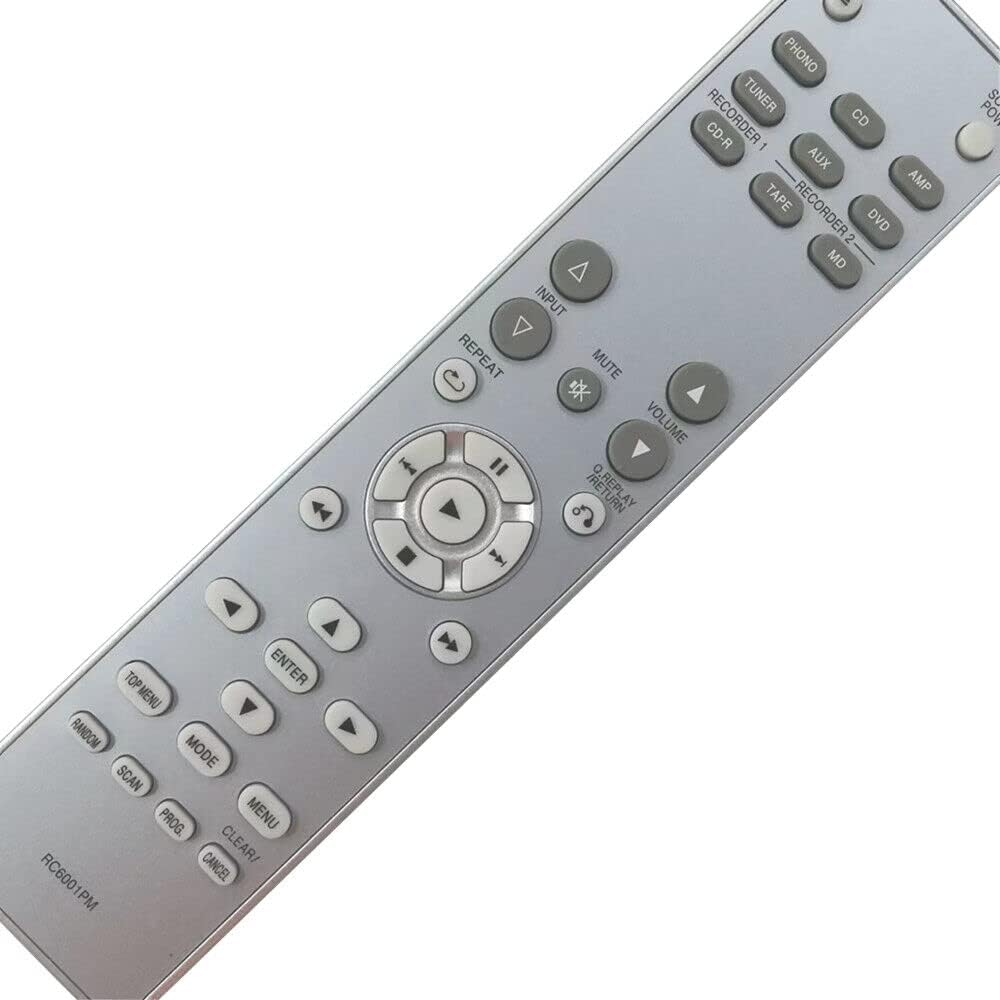
Figure 2: Front view of the RC6001PM remote control, displaying all control buttons.
Key Functions Overview:
- Power Button: Turns the amplifier on or off.
- Input Selectors (PHONO, TUNER, CD, AUX, AMP, DVD, TAPE, MD): Selects the desired audio input source.
- Volume Up/Down: Adjusts the master volume level.
- Mute: Silences the audio output.
- Navigation Buttons (Up, Down, Left, Right, Enter): Used for menu navigation and selection on compatible devices.
- Playback Controls (Play, Pause, Stop, Skip Forward, Skip Backward, Fast Forward, Rewind): Controls CD playback functions.
- Repeat: Toggles repeat playback mode.
- Menu/Top Menu: Accesses the device's main menu or top-level menu.
- Clear/Cancel: Clears current selections or cancels operations.
- Random/Scan/Prog: Specific functions for CD playback, such as random play, scanning tracks, or programming a playlist.
For detailed functionality of each button, please refer to your Marantz CD Integrated Amplifier's original user manual.
Maintenance
- Cleaning: Wipe the remote control with a soft, dry cloth. Do not use liquid cleaners or abrasive materials.
- Battery Replacement: Replace batteries when the remote's response becomes sluggish or stops working. Always replace both batteries at the same time with new ones of the same type (AAA).
- Storage: If the remote control will not be used for an extended period, remove the batteries to prevent leakage and potential damage.
- Avoid Exposure: Keep the remote control away from direct sunlight, heat sources, and moisture.
Troubleshooting
| Problem | Possible Cause | Solution |
|---|---|---|
| Remote not responding. | Dead or incorrectly inserted batteries. | Replace batteries with new AAA batteries, ensuring correct polarity. |
| Remote has limited range or intermittent response. | Weak batteries; Obstruction between remote and amplifier; Remote sensor on amplifier is blocked. | Replace batteries. Ensure a clear line of sight to the amplifier's IR sensor. Remove any obstructions. |
| Specific buttons not working. | Button malfunction; Remote not compatible with specific amplifier function. | Clean the remote surface. Verify compatibility with your amplifier model (PM6001, RC6001SA). If issues persist, contact support. |
Specifications
- Model: RC6001PM
- Brand: XINFUTE
- Compatible Models: Marantz PM6001, Marantz RC6001SA (CD Integrated Amplifiers)
- Material: ABS Material
- Color: As Shown (typically silver/grey with black buttons)
- Power Source: 2 x AAA Batteries (not included)
- Product Dimensions: 6 x 3 x 1 inches (approximately)
- Item Weight: 2.82 ounces (without batteries)
- Special Feature: Ergonomic design
- Max Number of Supported Devices: 1 (Marantz CD Integrated Amplifier)
Warranty Information
XINFUTE offers a one-year warranty on all purchases of the RC6001PM remote control. This warranty covers manufacturing defects and ensures the product functions as intended under normal use.
For warranty claims or issues, please retain your proof of purchase and contact our customer support within the warranty period.
Support
If you encounter any problems or have questions regarding your XINFUTE RC6001PM remote control, please contact us. All goods are inspected before shipment. If you are not satisfied with your purchase, you can contact us within 24 hours of receipt.
For further assistance, please visit the XINFUTE Store on Amazon or refer to the contact information provided with your purchase.