
1. Introduction
The AUTOOL BT360 is an advanced automotive battery tester designed to accurately and quickly assess the health and performance of 12V and 24V vehicle batteries. Utilizing conductivity testing technology, it provides comprehensive analysis of battery condition, cranking system, and charging system. This manual provides detailed instructions for the proper use, maintenance, and troubleshooting of your BT360 tester.

Image: The AUTOOL BT360 Car Battery Tester, showing the device itself with its red and black clamps, alongside its retail packaging and included user manual.
2. Safety Information
Always observe the following safety precautions when using the AUTOOL BT360 battery tester:
- Eye Protection: Always wear appropriate eye protection (safety goggles) when working near batteries.
- Ventilation: Ensure adequate ventilation when testing batteries, as they can produce explosive gases.
- No Smoking/Sparks: Avoid smoking or creating sparks near batteries.
- Reverse Polarity Protection: The BT360 features reverse polarity protection. However, always double-check connections to prevent accidental damage to the battery or vehicle's electrical system.
- Insulated Clamps: The test clamps are insulated. Do not touch uninsulated parts of the clamps or battery terminals during testing.
- Clean Connections: Ensure battery terminals are clean and free of corrosion for accurate readings.
- Keep Dry: Do not expose the tester to rain or moisture.

Image: Illustration demonstrating the reverse connection protection feature of the AUTOOL BT360, showing how the device prevents damage by cutting off power if clamps are connected incorrectly to a car battery.
3. Package Contents
Verify that all items are present in the package:
- AUTOOL BT360 Battery Tester Unit
- Insulated Test Clamps (attached to unit)
- User Manual
4. Product Overview
The BT360 features a robust design with a clear color display and intuitive controls.
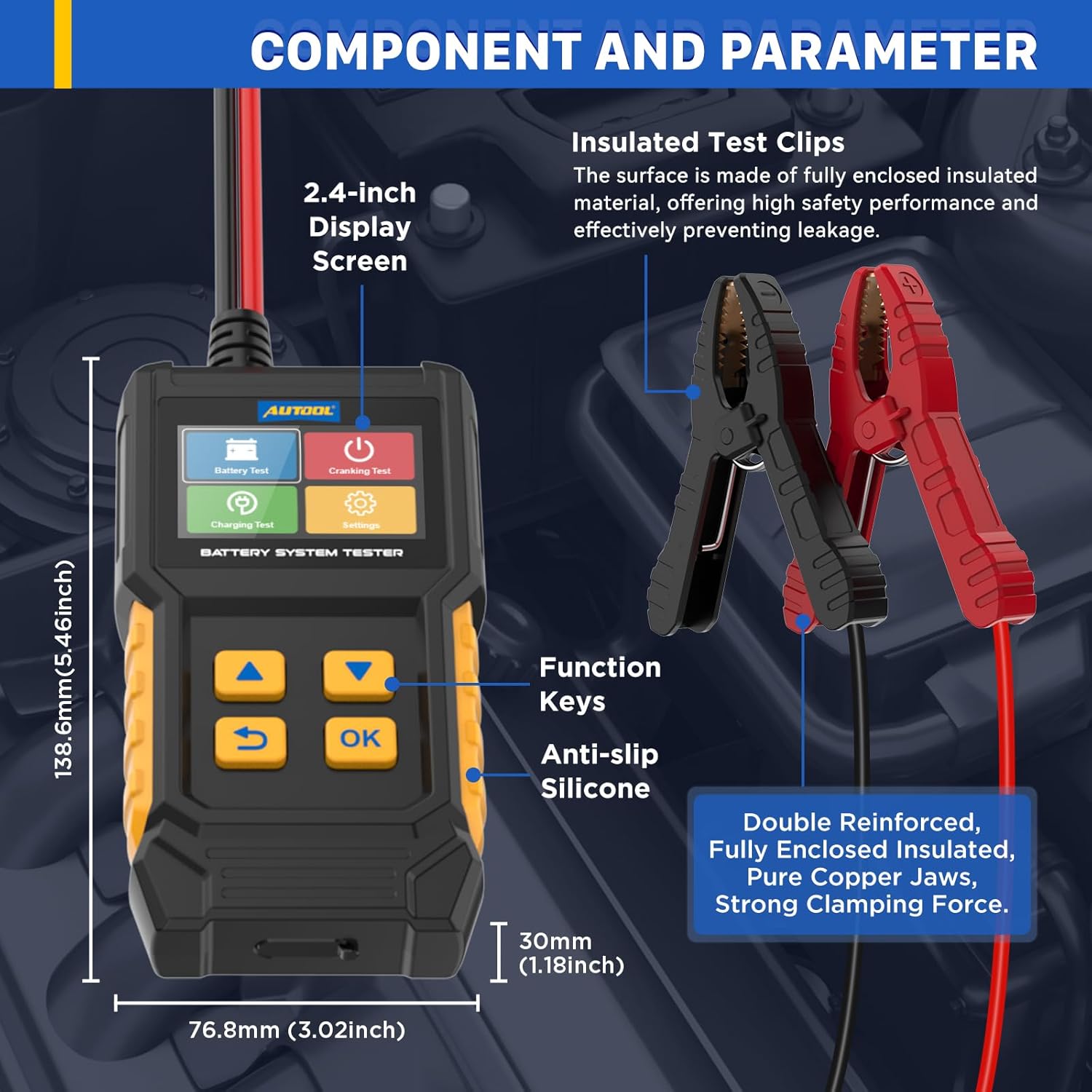
Image: Detailed view of the AUTOOL BT360 highlighting its components: 2.4-inch Display Screen, Function Keys, Anti-slip Silicone, and Insulated Test Clips with fully enclosed, pure copper jaws for strong clamping force. Dimensions are also indicated.
4.1. Key Components
- 2.4-inch Color Display Screen: Provides clear and efficient messaging for test results and menu navigation.
- Function Keys: Intuitive buttons for navigation (Up, Down, Return, OK).
- Insulated Test Clamps: Heavy-duty, fully enclosed insulated clamps made of pure copper for secure and safe connection to battery terminals.
- Anti-slip Silicone: Ergonomic design for comfortable and secure handling.

Image: Close-up of the AUTOOL BT360's 2.4-inch color screen, displaying the main menu with options for Battery Test, Cranking Test, Charging Test, and Settings, emphasizing its clear visual experience.
5. Setup and Connection
The BT360 can perform tests on batteries both inside and outside the vehicle.

Image: Two scenarios showing the AUTOOL BT360 in use: one testing a battery outside the vehicle, and another testing a battery installed inside the vehicle, illustrating its versatility for both on-board and off-board testing.
5.1. Connecting the Tester
- Ensure the vehicle's ignition is off and all accessories are turned off.
- Clean the battery terminals to ensure good electrical contact.
- Connect the red positive (+) clamp to the positive (+) battery terminal.
- Connect the black negative (-) clamp to the negative (-) battery terminal.
- The tester will power on automatically once connected correctly.
6. Operating Instructions
Navigate through the menus using the Up/Down arrow keys and confirm selections with the OK button. Use the Return button to go back to the previous screen.
6.1. Main Menu Options
- Battery Test: Evaluates the overall health of the battery.
- Cranking Test: Assesses the vehicle's starting system.
- Charging Test: Checks the vehicle's charging system (alternator).
- Settings: Configure language, review historical data, and access help/about information.

Image: Screen display of the AUTOOL BT360 showing the core testing functions: Battery Test (monitoring voltage, capacity, CCA, life, internal resistance, condition), Charging Test (detecting charge in battery voltage), and Cranking Test (detecting cranking capability).
6.2. Battery Test
This test measures the battery's Cold Cranking Amps (CCA), State of Health (SOH), State of Charge (SOC), voltage, and internal resistance.
- From the main menu, select "Battery Test".
- Select the battery type (e.g., Regular Flooded, AGM Flat Plate, AGM Spiral, GEL, EFB).
- Enter the rated CCA value of your battery (usually found on the battery label).
- The tester will display the results, including SOH, SOC, actual CCA, voltage, and internal resistance, along with a recommendation (e.g., "Good Battery", "Replace Battery").
6.3. Cranking Test
This test evaluates the vehicle's starting system by measuring the minimum cranking voltage.
- From the main menu, select "Cranking Test".
- Follow the on-screen prompts to start the vehicle's engine.
- The tester will record the minimum voltage during cranking and display the result, indicating if the cranking system is performing adequately.
6.4. Charging Test
This test checks the output of the vehicle's charging system (alternator, regulator, diodes).
- From the main menu, select "Charging Test".
- Follow the on-screen prompts to start the engine and rev it to the specified RPM (if prompted).
- The tester will display the charging voltage and ripple, indicating the health of the charging system.
6.5. Historical Data Review
The BT360 stores previous test results, allowing you to review them for diagnostic purposes.
- From the main menu, select "Settings".
- Select "Review" to access the historical test data.
- Use the Up/Down keys to scroll through past test records.
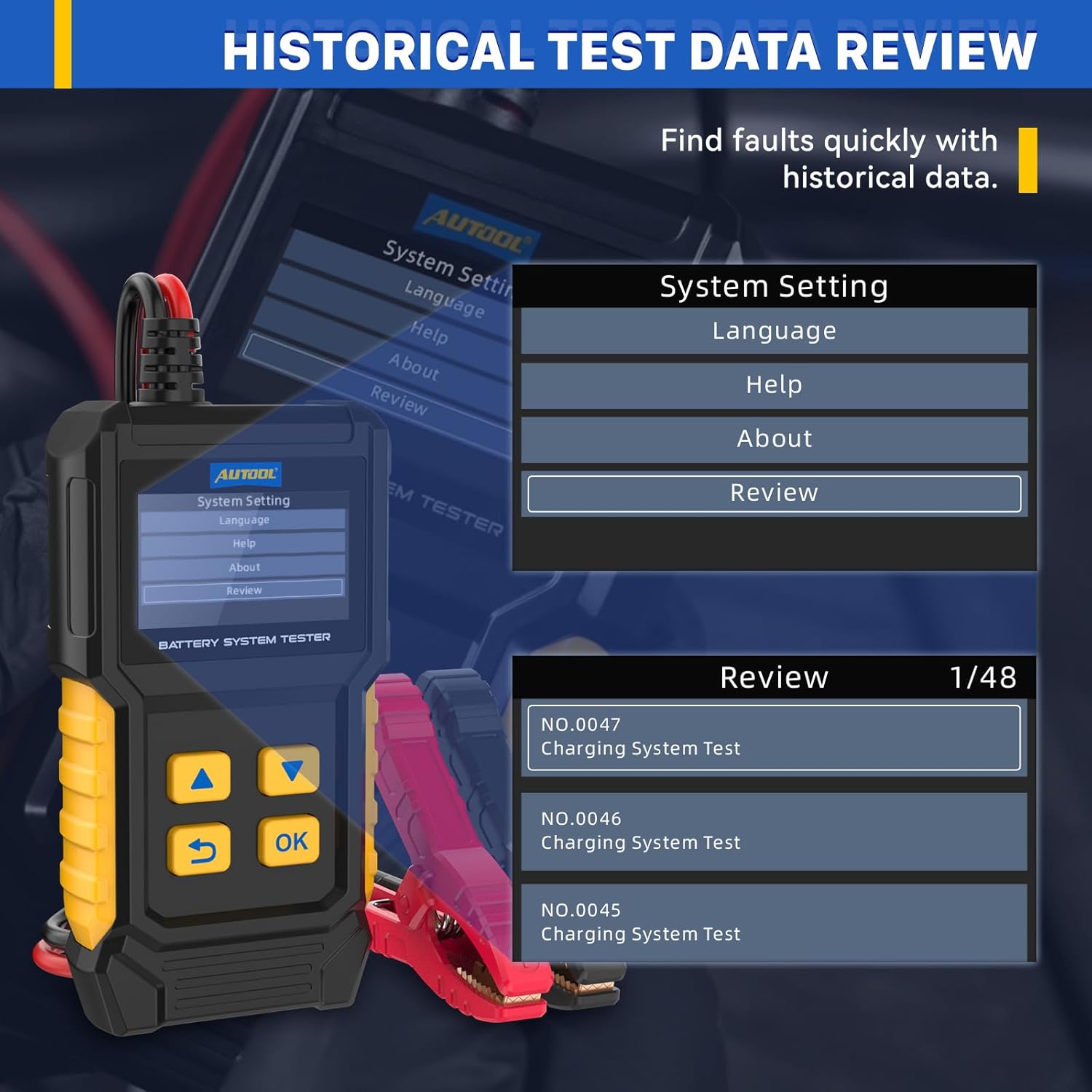
Image: The AUTOOL BT360 display showing the "System Setting" menu with "Review" selected, and a separate panel illustrating the "Review" screen with a list of historical test data entries, allowing users to find faults quickly.
6.6. Language Settings
The BT360 supports multiple languages for user convenience.
- From the main menu, select "Settings".
- Select "Language".
- Choose your preferred language from the list using the Up/Down keys and press OK.
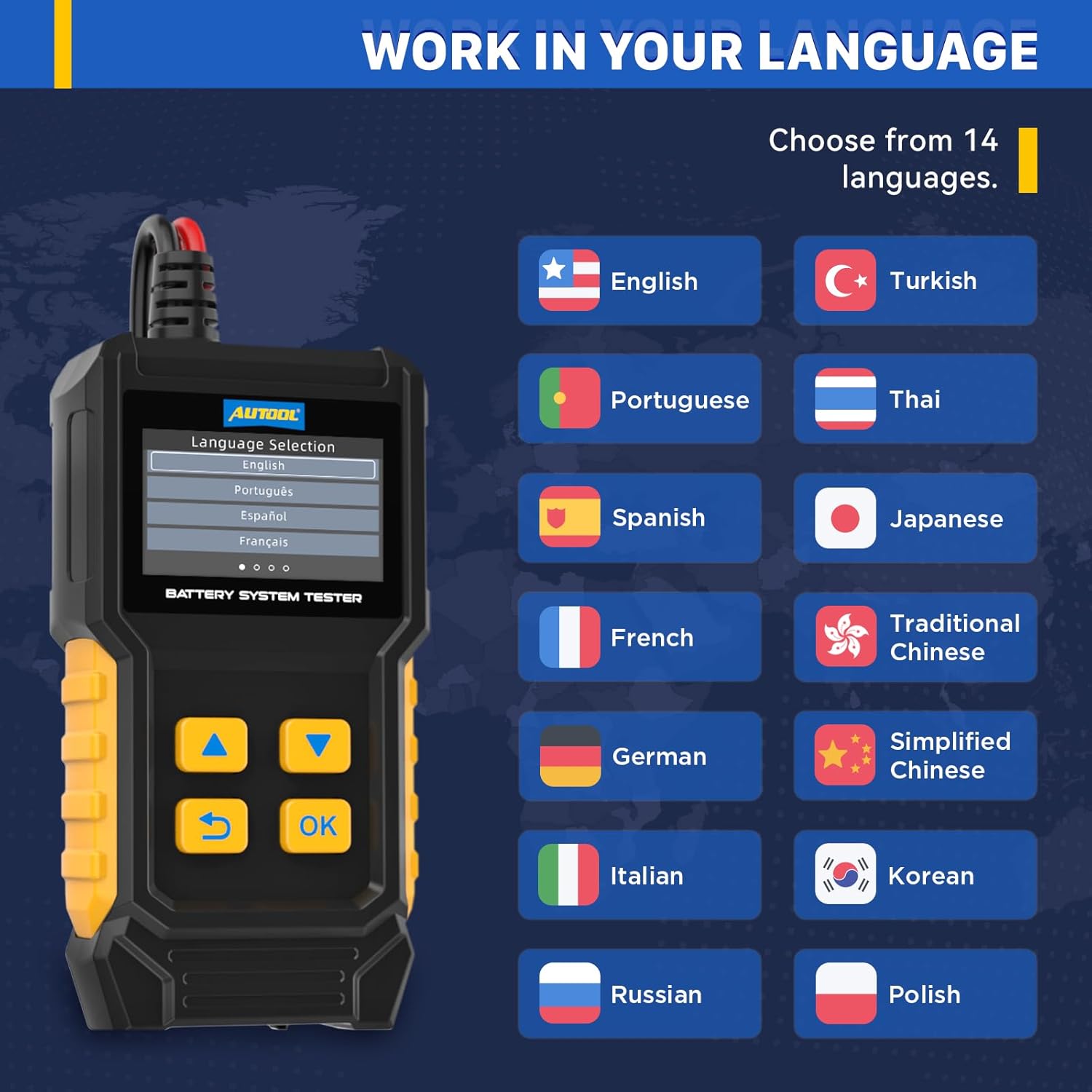
Image: The AUTOOL BT360 display showing the "Language Selection" menu with English highlighted, alongside a visual list of 14 supported languages including Turkish, Italian, Portuguese, Thai, Russian, Spanish, Japanese, Korean, French, Traditional Chinese, Polish, Simplified Chinese, and German.
7. Applicable Batteries and Test Standards
The AUTOOL BT360 is compatible with a wide range of 12V and 24V automotive batteries and supports various testing standards.
7.1. Supported Battery Types
- Regular Flooded Batteries
- AGM Flat Plate Batteries
- AGM Spiral Batteries
- GEL Batteries
- EFB Batteries

Image: The AUTOOL BT360 display showing the "SELECT BATTERY TYPE" menu, listing options such as Regular Flooded, GEL, AGM Flat Plate, AGM Spiral, and EFB, indicating the range of battery types the tester can assess.
7.2. Supported Test Standards and Ranges
The BT360 supports the following international battery testing standards:
| Standard | Range |
|---|---|
| CCA (Cold Cranking Amps) | 30-2000 |
| BCI (Battery Council International) | 30-2000 |
| CA (Cranking Amps) | 30-2000 |
| MCA (Marine Cranking Amps) | 30-2000 |
| DIN (German Auto Industry Committee) | 30-2500 |
| IEC (Internal Electrical Technical Commission) | 30-2000 |
| EN (European Automobile Industry Association) | 30-3000 |
| SAE (Society of Automotive Engineers) | 30-2000 |
| GB (China National Standard) | 4-300AH |
| JIS (Japan Industrial Standard) | 26A17R-N135 |

Image: The AUTOOL BT360 display showing a list of supported test standards and their corresponding CCA ranges, including CCA, BCI, CA, MCA, DIN, IEC, EN, SAE, GB, and JIS, for comprehensive battery assessment.
8. Maintenance
- Cleaning: Wipe the tester with a soft, damp cloth. Do not use abrasive cleaners or solvents.
- Storage: Store the device in a dry, cool place away from direct sunlight and extreme temperatures.
- Clamp Care: Keep the test clamps clean and free of debris to ensure proper contact.
9. Troubleshooting
| Problem | Possible Cause | Solution |
|---|---|---|
| Tester does not power on. | Poor connection to battery; Battery voltage too low. | Ensure clamps are securely connected to clean battery terminals. Charge battery if voltage is below 8V. |
| Inaccurate readings. | Corroded terminals; Incorrect battery type/CCA entered. | Clean battery terminals. Verify correct battery type and CCA input. |
| "Battery Damaged" message. | Battery is indeed faulty or severely discharged. | Charge the battery fully and retest. If message persists, battery likely needs replacement. |
| Screen freezes or unresponsive. | Temporary software glitch. | Disconnect the tester from the battery, wait a few seconds, and reconnect. |
10. Specifications
| Parameter | Value |
|---|---|
| Model Number | BT360 |
| Operating Voltage | 12V / 24V |
| CCA Range | 30-2000 CCA |
| Supported Battery Types | Regular Flooded, AGM Flat Plate, AGM Spiral, GEL, EFB |
| Display | 2.4-inch Color Backlit Screen |
| Protection | Reverse Polarity Protection |
| Housing Material | Acid-resistant ABS shell |
| Item Weight | 0.66 Pounds (approx. 10.56 ounces) |
| Package Dimensions | 6.85 x 3.46 x 2.13 inches |
11. Warranty and Support
AUTOOL provides comprehensive support for the BT360 battery tester.
11.1. Warranty Information
The AUTOOL BT360 comes with a Three Years Warranty. If the BT360 has any defect due to manufacturing or material issues, AUTOOL will provide a new replacement or suitable solution to ensure customer satisfaction without delay.
11.2. Technical Support
AUTOOL offers lifetime technical support for the BT360. For any technical assistance, questions, or concerns, please contact AUTOOL customer service. They aim to respond within 24 hours.
For contact information, please refer to the official AUTOOL website or the contact details provided with your product packaging.


