
1. Introduction
Thank you for choosing the Zyerch Robotic Pool Vacuum, Model SAT 20-3P5S. This advanced pool cleaner is designed to provide efficient and thorough cleaning for inground pools up to 2100 sq.ft. With smart navigation, multiple cleaning modes, and a long-lasting battery, it simplifies pool maintenance, allowing you to enjoy a pristine swimming environment.

The Zyerch Robotic Pool Vacuum, Model SAT 20-3P5S, featuring a tire design and blue finish.
2. Safety Information
Read all instructions carefully before using the pool vacuum.
- Ensure the unit is fully charged before first use.
- Do not operate the cleaner out of water.
- Keep hands and loose clothing away from moving parts.
- Only use the provided charging adapter.
- Store the cleaner in a cool, dry place when not in use.
3. What's in the Box
Upon unpacking, please verify that all the following components are present:
- Zyerch Robotic Pool Vacuum Unit (Tire Design)
- Charging Adapter
- 3L Top-Load Filter Basket (pre-installed)
- Retrieval Hook
- User Manual (this document)
4. Setup
- Initial Charging: Before first use, fully charge the robotic pool vacuum. Connect the charging adapter to the unit and a power outlet. The charging indicator will show progress. A full charge takes approximately 4 hours.
- Prepare the Pool: Ensure the pool is free of large debris that could obstruct the cleaner's path.
- Place in Pool: Gently lower the cleaner into the pool. It will sink to the bottom. Ensure no air bubbles are trapped inside.

The robotic pool vacuum connected to its charging adapter, indicating the charging process.
5. Operating Instructions
The Zyerch Robotic Pool Vacuum features simple one-button operation and intelligent navigation for comprehensive cleaning.
- Starting a Cleaning Cycle: Press the power button on the top of the unit to begin cleaning. The cleaner will automatically select a cleaning mode or you can choose one manually.
- Cleaning Modes: The unit offers specific cleaning modes for different needs:
- Overall Cleaning: Cleans both floor and walls.
- Floor Cleaning: Focuses solely on the pool floor.
- Wall Cleaning: Climbs and cleans pool walls and waterline.
- Intelligent Navigation: The cleaner utilizes precise positioning and navigation technology to clean the pool according to an N-shaped path, ensuring comprehensive coverage and increased efficiency.
- Self-Parking Technology: When the battery level drops below 5%, the cleaner will automatically return to the edge of the pool for easy retrieval and recharging.
- Runtime: The cleaner can operate for up to 180 minutes on a single charge, suitable for pools up to 2100 sq.ft.

The robotic pool vacuum offers three distinct cleaning modes: Automatic, Wall, and Floor, selectable via a single button.
The robotic pool vacuum features self-parking technology, automatically returning to the pool edge for easy retrieval when its battery is low.

The robotic pool vacuum is capable of cleaning pools up to 2100 sq.ft. with a runtime of 180 minutes on a single charge.
6. Maintenance
Regular maintenance ensures optimal performance and longevity of your Zyerch Robotic Pool Vacuum.
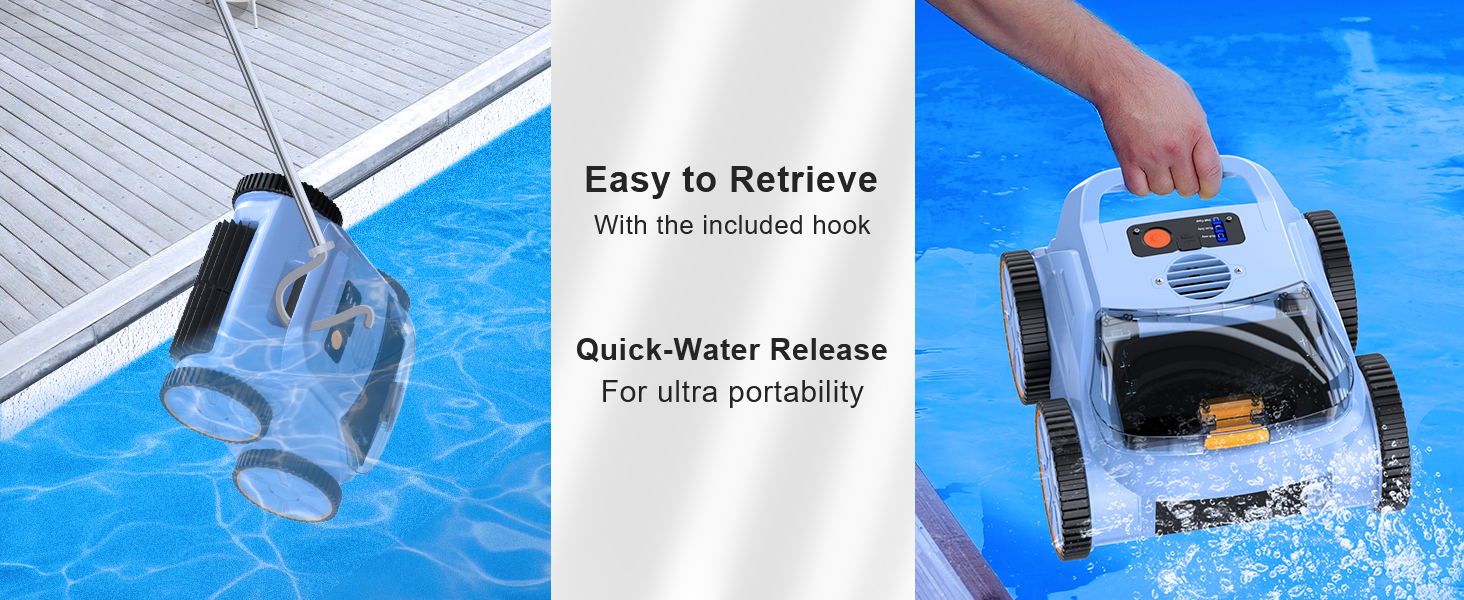
- Retrieving the Cleaner: Use the provided retrieval hook to carefully lift the cleaner from the pool. The quick water release feature allows water to drain rapidly for easy removal.
- Cleaning the Filter Basket: The 3L top-load filter basket is designed for easy access and cleaning. Open the top cover, remove the basket, and rinse it thoroughly with a hose to remove collected debris.
- Cleaning the Unit: Wipe down the exterior of the cleaner with a soft, damp cloth. Do not use harsh chemicals.
- Storage: When not in use for extended periods, ensure the cleaner is clean, dry, and fully charged. Store it in a cool, dry place away from direct sunlight.

The robotic pool vacuum being retrieved from the pool using the included hook, demonstrating its quick water release ability.

The 3L top-load filter basket being removed from the robotic pool vacuum for cleaning, showing collected leaves and debris.
7. Troubleshooting
If you encounter issues with your Zyerch Robotic Pool Vacuum, refer to the following common solutions:
- Cleaner not moving or operating:
- Check if the battery is charged. Recharge if necessary.
- Ensure the power button is pressed correctly.
- Verify there are no obstructions in the wheels or brushes.
- Poor cleaning performance:
- Clean the filter basket. A clogged filter reduces suction.
- Check for debris stuck in the suction inlet.
- Ensure the pool water chemistry is balanced.
- Cleaner gets stuck:
- Remove any large objects from the pool.
- The cleaner is not recommended for steps, which may cause it to get stuck.
For persistent issues, please contact Zyerch customer support.
8. Specifications
| Feature | Detail |
|---|---|
| Model Name | Pool Vacuum for Inground Pools |
| Item Model Number | SAT 20-3P5S |
| Power Source | AC/DC |
| Battery Type | Lithium Ion (7800 mAh) |
| Charging Time | 4 Hours |
| Runtime | Up to 180 minutes |
| Max Pool Area | 2100 Sq.ft |
| Filter Density | 300 µm |
| Filter Basket Capacity | 3 Liters |
| Motor Power | 180W Brushless Motor |
| Item Weight | 12.12 Pounds |
| Product Dimensions | 13"L x 9"W x 14"H |
| Control Method | Touch |
| Compatible Pool Surfaces | PVC, Tile, Mosaic, Glass, Fiberglass, Vinyl, Ceramic Tiles, Pebble Stone, Concrete |
9. Warranty and Support
Zyerch is committed to providing high-quality products and customer satisfaction. For detailed warranty information, please refer to the official user guide PDF provided with your purchase or visit the Zyerch Store on Amazon.
For technical support, troubleshooting assistance, or warranty claims, please contact our customer service team:
- Email: zyerch@outlook.com
- User Manual (PDF): Download Here

