
1. Product Overview
The BAJAJ Shield Skive Nios Tower Air Cooler is designed to provide efficient cooling for your living space. Its sleek tower design optimizes space utilization while complementing modern interiors. Featuring a 36-liter water tank capacity, advanced honeycomb cooling pads, and a DuraTuff PRO motor, this cooler delivers reliable performance and consistent airflow.
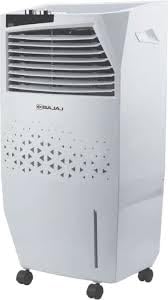
Image of the BAJAJ Shield Skive Nios Tower Air Cooler, showcasing its sleek white tower design.
2. Safety Instructions
Please read and understand all safety instructions before operating the appliance to prevent injury or damage.
- Always ensure the power supply voltage matches the appliance's rating (230 Volts).
- Do not immerse the appliance, power cord, or plug in water or other liquids.
- Unplug the cooler from the power outlet before cleaning, maintenance, or when not in use.
- Keep the appliance out of reach of children and pets.
- Do not operate the cooler with a damaged cord or plug. Contact authorized service personnel for repairs.
- Place the cooler on a stable, level surface to prevent tipping and water leakage.
- Do not block the air inlet or outlet grilles during operation.
3. Package Contents
Verify that all items are present in the package:
- Air Cooler Unit
- User Manual
- Warranty Card
- Honeycomb Cooling Pads
4. Setup
- Placement: Position the air cooler on a firm, level surface in the desired room. Ensure there is adequate space around the unit for proper airflow.
- Water Filling: Locate the water inlet cap, typically at the top or rear of the unit. Open it and carefully fill the 36-liter water tank with clean, fresh water. Do not exceed the 'MAX' fill line indicator to prevent overflow.
- Honeycomb Pads: Ensure the honeycomb cooling pads are correctly inserted into their designated slots within the cooler. These pads are crucial for the cooling process.
- Power Connection: Plug the power cord into a standard 230 Volt, 1.5 Amp electrical outlet. Ensure the connection is secure.
5. Operating Instructions
The BAJAJ Shield Skive Nios Tower Air Cooler features manual controls for straightforward operation.
- Power On/Off: Use the main power knob or button on the control panel to turn the unit on or off.
- Fan Speed Control: Rotate the fan speed knob or press the speed buttons to select one of the three available fan speeds (Low, Medium, High) according to your comfort level.
- Cooling Function: To activate the cooling effect, ensure the water tank is filled and then engage the cooling function switch. This will start the water pump, circulating water over the honeycomb pads.
- Swing Function: If your model includes a swing function, activate the swing switch to enable automatic oscillation of the air louvers, distributing cool air more widely across the room.
6. Maintenance
Regular maintenance ensures optimal performance and longevity of your air cooler.
- Water Tank Cleaning: Drain the water tank regularly, especially if the cooler is not used daily. Clean the tank with a soft cloth and a mild detergent to prevent the buildup of algae, mold, and mineral deposits. Rinse thoroughly with clean water.
- Honeycomb Pad Cleaning: Periodically remove the honeycomb cooling pads. Rinse them under running water to remove dust and debris. Allow the pads to dry completely in a shaded area before reinstalling them. Do not use harsh chemicals.
- Exterior Cleaning: Wipe the exterior surfaces of the cooler with a soft, damp cloth. Avoid using abrasive cleaners, solvents, or waxes, as these can damage the finish.
- Storage: Before storing the cooler for an extended period, ensure the water tank is completely drained and cleaned. Clean the honeycomb pads and the exterior. Store the unit in a dry, dust-free environment.
7. Troubleshooting
Refer to this section for common issues and their solutions.
- No Power:
- Check if the power cord is securely plugged into a working electrical outlet.
- Ensure the main power switch on the cooler is in the 'ON' position. - No Cooling Effect:
- Verify that the water tank is filled to an adequate level.
- Ensure the cooling function is activated.
- Check if the honeycomb pads are wet and properly installed. - Reduced Airflow:
- Clean the honeycomb pads and air filter (if applicable) to remove dust accumulation.
- Ensure that the air inlet and outlet grilles are not obstructed by furniture or other objects. - Water Leakage:
- Confirm that the water tank is not overfilled beyond the 'MAX' line.
- Ensure the cooler is placed on a perfectly level surface.
- Check for any cracks or damage to the water tank or drainage plug. - Unusual Noise:
- Ensure the cooler is placed on a stable and level surface.
- Check for any loose parts inside the unit or obstructions in the fan area.
8. Specifications
| Feature | Specification |
|---|---|
| Brand | Bajaj |
| Model Name | Shield Series Skive Nios 36 |
| Model Number | 480157 |
| Water Tank Capacity | 36 Litres |
| Motor | DuraTuff PRO Motor |
| Cooling Pads | Honeycomb Cooling Pads |
| Power Consumption | 85 Watts (0.18 Kilowatts) |
| Voltage | 230 Volts |
| Amperage | 1.5 Amps |
| Noise Level | 65 Decibels |
| Number of Speeds | 3 |
| Dimensions (D x W x H) | 30D x 35W x 85H Centimeters |
| Item Weight | 7.8 Kilograms |
| Material | ABS Plastic, Polymer |
9. Warranty and Support
Your BAJAJ Shield Skive Nios Tower Air Cooler comes with a 3 Years Warranty on Pump from the date of purchase. Please retain your purchase receipt and warranty card for future reference.
For technical assistance, service requests, or warranty claims, please contact:
Bajaj Electricals Limited45/47, Veer Nariman Road
Mumbai - 400001, India
For more information, you may visit the official Bajaj store: Bajaj Store on Amazon