
1. Introduction
This manual provides essential information for the safe and efficient operation of your ZAFRO 10000BTU Portable Air Conditioner. This 3-in-1 unit offers cooling, dehumidification, and fan functions. Please read this manual thoroughly before use and retain it for future reference.
2. Safety Instructions
Observe the following safety precautions to reduce the risk of fire, electric shock, or injury.
- Always connect the unit to a grounded electrical outlet with the correct voltage.
- Do not operate the unit with a damaged power cord or plug.
- Do not block the air inlets or outlets. Maintain at least 20 inches (50 cm) clearance around the unit.
- Do not insert objects into the air vents.
- Keep the unit away from flammable materials and heat sources.
- Unplug the unit before cleaning or servicing.
- Do not use the unit in wet environments such as bathrooms or laundry rooms.
- This appliance is not intended for use by persons (including children) with reduced physical, sensory or mental capabilities, or lack of experience and knowledge, unless they have been given supervision or instruction concerning use of the appliance by a person responsible for their safety.
3. Package Contents
Verify that all components are present upon unpacking. If any items are missing or damaged, contact customer support.
- ZAFRO Portable Air Conditioner Unit
- Remote Control
- User Manual (this document)
- Exhaust Hose
- Hose Adapter
- Window Seal Plate Kit (includes connectors and screws)

Image 3.1: ZAFRO Portable Air Conditioner and accessories.
4. Product Features
- 3-in-1 Functionality: Offers Cooling, Dehumidifier, and Fan modes for versatile climate control.
- Powerful Cooling: 10000 BTU cooling capacity suitable for rooms up to 400 sq. ft.
- Adjustable Temperature: Cooling range from 62°F to 86°F (17°C to 30°C).
- 24-Hour Timer: Program the unit to turn on or off automatically.
- Sleep Mode: Gradually adjusts temperature for comfortable sleep and reduced noise.
- LED Control Panel: Clear display for settings and status.
- Remote Control: Convenient operation from a distance.
- Portable Design: Compact size (13.19"D x 15.94"W x 34.65"H) with smooth-rolling casters for easy movement.
- Washable Air Filter: Removable and reusable filter for maintaining air quality.

Image 4.1: Unit dimensions and 3-in-1 functionality.

Image 4.2: Cooling area and capacity illustration.
5. Setup and Installation
Proper installation is crucial for optimal performance. Follow these steps carefully.
5.1 Unit Placement
- Place the unit on a flat, stable surface.
- Ensure there is at least 20 inches (50 cm) of space around the unit for proper airflow.
- Position the unit near a window for exhaust hose installation.
5.2 Window Kit Installation
- Assemble the window seal plate kit to fit your window opening. The kit is adjustable for both sliding and double/single-hung windows, typically fitting openings from 26 to 50 inches.
- Secure the assembled window kit in the window opening.
- Attach the exhaust hose adapter to one end of the exhaust hose.
- Connect the other end of the exhaust hose to the exhaust outlet on the back of the air conditioner unit.
- Insert the adapter end of the exhaust hose into the opening of the window seal plate. Ensure a tight seal to prevent air leakage.
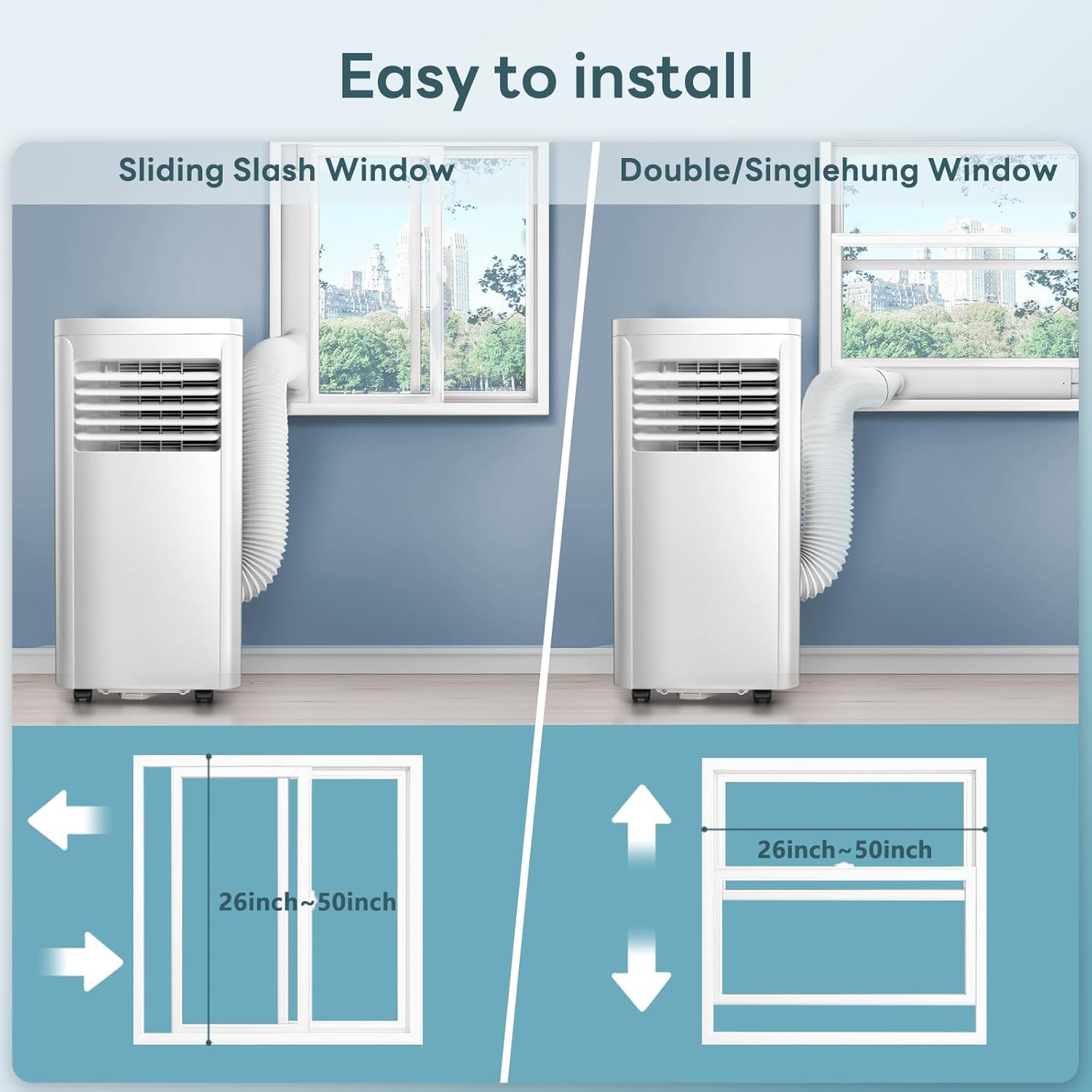
Image 5.1: Window kit installation for various window types.
5.3 Drainage Setup
The unit collects condensed water during operation. There are two drainage methods:
- Manual Drainage: The internal water tank will collect water. When full, the unit will stop operating and indicate that the tank needs to be emptied. Carefully move the unit to a drain or place a shallow pan under the drain plug, then remove the plug to empty.
- Continuous Drainage: For continuous operation in high humidity, attach a drain hose (not always included, check package contents) to the continuous drain port and direct it to a floor drain or a larger container. Ensure the hose is sloped downwards for proper drainage.
6. Operating Instructions
Familiarize yourself with the control panel and remote control for easy operation.
6.1 Control Panel
The LED control panel on top of the unit displays current settings and allows direct control.
- Power Button: Turns the unit on or off.
- Mode Button: Cycles through Cooling, Dehumidifier, and Fan modes.
- Temperature Up/Down Buttons: Adjusts the desired temperature in Cooling mode.
- Fan Speed Button: Selects fan speed (Low, Medium, High).
- Timer Button: Sets the auto-on/off timer.
- Sleep Button: Activates Sleep Mode.
6.2 Remote Control
The remote control provides access to all functions from a distance.

Image 6.1: Remote control in use.
6.3 Operating Modes
- Cooling Mode: Select 'Cool' mode. Use the temperature buttons to set your desired temperature. The unit will cool the room to the set temperature.
- Dehumidifier Mode: Select 'Dry' mode. The unit will remove moisture from the air. The fan speed is typically fixed in this mode.
- Fan Mode: Select 'Fan' mode. The unit will circulate air without cooling. Adjust fan speed as desired.
6.4 Timer Function
Press the 'Timer' button to set the desired operating duration (1-24 hours) for auto-on or auto-off. Press the button repeatedly to adjust the hours.
6.5 Sleep Mode
Activate 'Sleep' mode for quieter operation and gradual temperature adjustment during sleep. The unit's noise level is approximately 50 dB, and Sleep Mode further optimizes for comfort.

Image 6.2: Sleep Mode and Timer functions.
7. Maintenance
Regular maintenance ensures efficient operation and extends the lifespan of your unit.
7.1 Cleaning the Air Filter
The air filter should be cleaned every two weeks or more frequently depending on usage and air quality.
- Unplug the air conditioner from the power outlet.
- Locate and remove the air filter from the back or side of the unit.
- Wash the filter with warm, soapy water. Rinse thoroughly.
- Allow the filter to air dry completely before reinstalling. Do not expose to direct sunlight.
7.2 Draining Water
If using manual drainage, empty the water tank when the 'Full' indicator lights up. For continuous drainage, ensure the hose is clear and properly sloped.
7.3 Storage
Before storing the unit for an extended period:
- Drain all condensed water from the unit.
- Clean the air filter.
- Run the unit in fan-only mode for a few hours to dry the internal components.
- Unplug the power cord and coil it neatly.
- Store the unit in a dry, cool place, preferably in its original packaging.
8. Troubleshooting
Refer to this section for common issues and their solutions.
| Problem | Possible Cause | Solution |
|---|---|---|
| Unit does not turn on | No power; Power cord not plugged in; Circuit breaker tripped; Water tank full. | Check power connection; Reset circuit breaker; Empty water tank. |
| Insufficient cooling | Air filter dirty; Exhaust hose blocked or disconnected; Room too large; Doors/windows open; Temperature setting too high. | Clean air filter; Check exhaust hose connection; Close doors/windows; Lower temperature setting. |
| Unit is noisy | Unit not on a level surface; Air filter dirty; Internal components vibrating. | Place on a level surface; Clean air filter; Contact support if noise persists. |
| Water leakage | Drain plug loose; Continuous drain hose not properly connected or blocked. | Secure drain plug; Check continuous drain hose for proper connection and clear any blockages. |
9. Specifications
Technical details for the ZAFRO 10000BTU Portable Air Conditioner.
| Specification | Detail |
|---|---|
| Brand | ZAFRO |
| Model Info | NPLB2-06C/X1E |
| Part Number | A5407-10K-ZA |
| Cooling Power | 10000 British Thermal Units (BTU) |
| Product Dimensions | 13.19"D x 15.94"W x 34.65"H (33.5 x 40.5 x 88 cm) |
| Item Weight | 1 pounds (Note: This appears to be an error in source data, actual weight is likely closer to 48.62 pounds as per 'Capacity' field) |
| Capacity (Unit Weight) | 48.62 Pounds |
| Annual Energy Consumption | 700 Kilowatt Hours Per Year |
| Noise Level | 50 dB |
| Installation Type | Window (with included kit) |
| Special Feature | Fast Cooling |
| Color | White |
| Voltage | 115.0 V |
| Wattage | 880 W |
| Seasonal Energy Efficiency Ratio (SEER) | 13 |
10. Warranty and Support
Your ZAFRO Portable Air Conditioner is covered by a manufacturer's warranty. Please refer to the warranty card included in your package for specific terms and conditions.
For technical assistance, troubleshooting beyond this manual, or warranty claims, please contact ZAFRO customer support through the retailer where the product was purchased or visit the official ZAFRO website for contact information.


