
1. Product Overview
The Hitachi MRO-S8CA W is a 31-liter superheated steam oven range designed for versatile cooking. It features a wide, flat interior, a weight sensor for automatic cooking adjustments, and various heating methods including microwave, oven, grill, steam, and superheated steam.

Image Description: A front view of the Hitachi MRO-S8CA W Superheated Steam Oven Range in white. The control panel with a digital display and various function buttons is visible below the oven door.
2. Setup and Installation
2.1 Dimensions and Placement
Ensure adequate space for proper ventilation and operation. Refer to the diagram below for external dimensions and required clearances.
- Body Size: Width 487mm x Depth 430mm x Height 365mm
- Depth (including handle): 461mm
- Depth (with door open): 695mm
- Effective Interior Dimensions: Width 401mm x Depth 344mm x Height 218mm
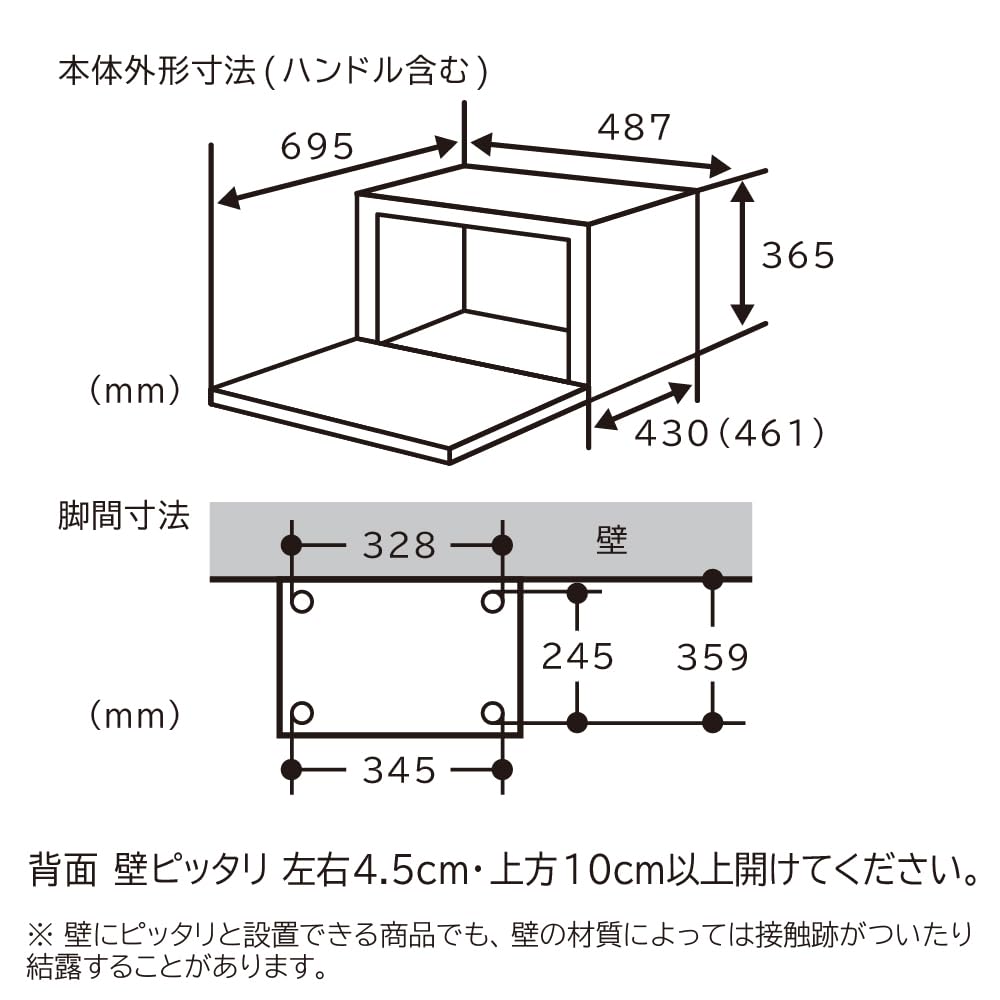
Image Description: A technical diagram illustrating the external dimensions of the oven range (width 487mm, depth 430mm, height 365mm, depth with handle 461mm, depth with door open 695mm). It also shows recommended clearances for installation: 4.5cm on the left and right sides, and 10cm or more above the unit, especially for rear wall placement. A note advises that contact marks or condensation may occur depending on wall material, even with flush installation.
2.2 Power Requirements
The unit operates on 100V AC power. Ensure a dedicated power outlet is available.
3. Operating Instructions
3.1 Wide & Flat Interior
The oven features a spacious 31L capacity with a wide, flat interior (41.5cm opening width), making it easy to insert and remove large dishes and pizzas.
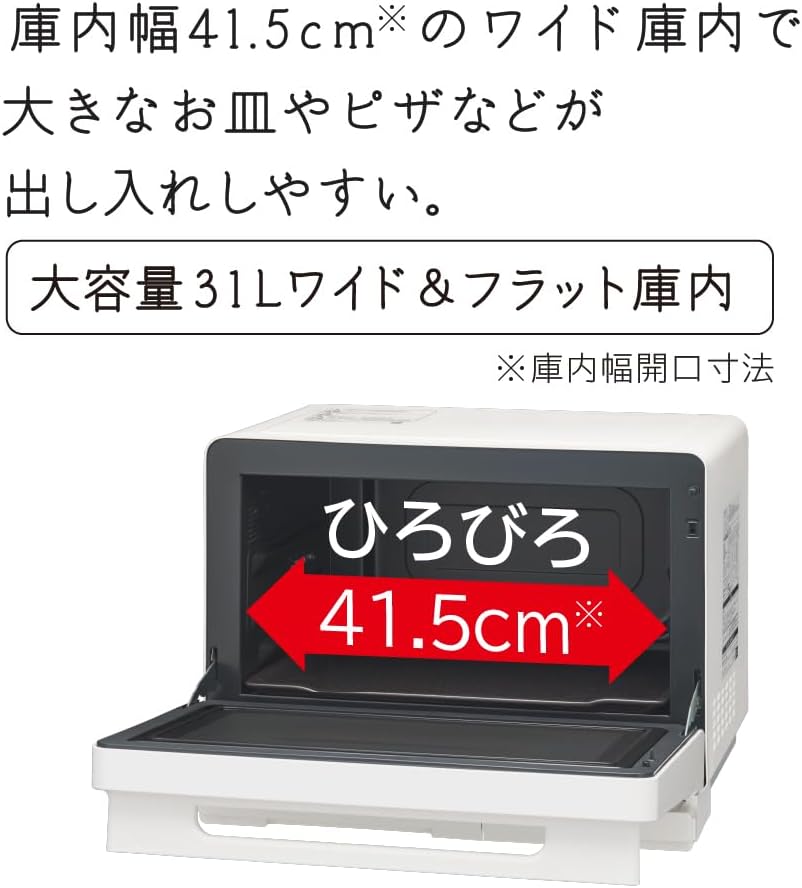
Image Description: An image showing the interior of the oven range with a red arrow indicating the wide opening of 41.5cm. The text highlights the large 31L capacity and wide, flat interior, emphasizing ease of use for large dishes.
3.2 Weight Sensor for Automatic Cooking
The integrated weight sensor automatically measures the food's weight (including the container) and calculates the optimal heating amount, eliminating the need for manual portion settings for reheating and defrosting.

Image Description: An illustration of the oven interior highlighting the weight sensor at the bottom, which measures food weight, and the steam/temperature sensor at the top, which detects steam generation and temperature. This system allows for automatic heating and defrosting based on food weight. A note indicates that continuous automatic reheating is possible after oven cooking, but caution should be exercised due to high internal temperatures.
3.3 Superheated Steam Functions
Utilize superheated steam for healthier and crispier results:
- Non-Fry: Achieve crispy fried dishes without using oil, thanks to high-temperature superheated steam.
- Superheated Steam Cooking: Bake dishes at high temperatures with superheated steam for fluffy and thoroughly cooked results.
- Reheat Fried Foods: Reheat previously fried foods using superheated steam to restore their crispiness.

Image Description: A collage of images demonstrating the superheated steam functions. It shows crispy shrimp (Non-Fry), a baked hamburger steak with vegetables (Superheated Steam Cooking), and crispy fried chicken (Reheat Fried Foods). An illustration of steam being generated from a water tank (boiler type) is also included.
3.4 Automatic Menus
The oven offers various automatic menus for convenient cooking, from main dishes to side dishes:
- Bowl Menu: Easily prepare dishes in a single heat-resistant glass bowl. Includes Crispy Vegetable, Curry/Stew, and Pasta menus.
- Easy Frozen Food Menu: Cook pre-prepared frozen ingredients or commercially available frozen foods automatically.
- Crispy Frozen Food Cooking: Achieve crispy results for frozen foods using a combination of microwave and oven heating.
- Speed Menu: Prepare main dishes or side dishes in under 10 minutes (preparation time not included).

Image Description: An image showing a person placing a bowl of vegetables wrapped in plastic into the oven. Below, three examples of dishes prepared with the Bowl Menu are displayed: a crispy vegetable stir-fry, a curry/stew, and a pasta dish. A note specifies compatibility only with heat-resistant glass bowls.

Image Description: A collage of images showcasing various automatic cooking menus. It includes examples for 'Easy Menu from Frozen' (vegetables and cheese grill, tandoori chicken), 'Crispy Frozen Food Cooking' (fried chicken, fried rice, takoyaki, pizza, imagawayaki, taiyaki), and 'Speed Menu' (nikudofu, yakiudon, kinpira gobo, simple steamed chicken).
3.5 250°C Oven (1-Stage)
Easily prepare sweets and baked goods. The oven operates at 250°C for approximately 5 minutes, then automatically switches to 210°C.

Image Description: A collage of three images showing food items that can be easily prepared using the 250°C oven function: oatmeal cereal bars, icebox cookies, and roast beef. A note explains that the 250°C operation lasts for about 5 minutes before automatically switching to 210°C.
3.6 Simultaneous Reheating
Reheat two items of the same quantity to the appropriate temperature simultaneously. This function supports both refrigerated and room temperature items.

Image Description: An illustration showing two plates of food inside the oven, demonstrating the ability to reheat two items simultaneously. The text indicates that this function is suitable for two items of the same quantity and supports both refrigerated and room temperature foods.
3.7 Table Plate Usage
Both reheating and oven cooking can be performed using a single table plate. There is no need to remove the table plate from the oven, simplifying storage.
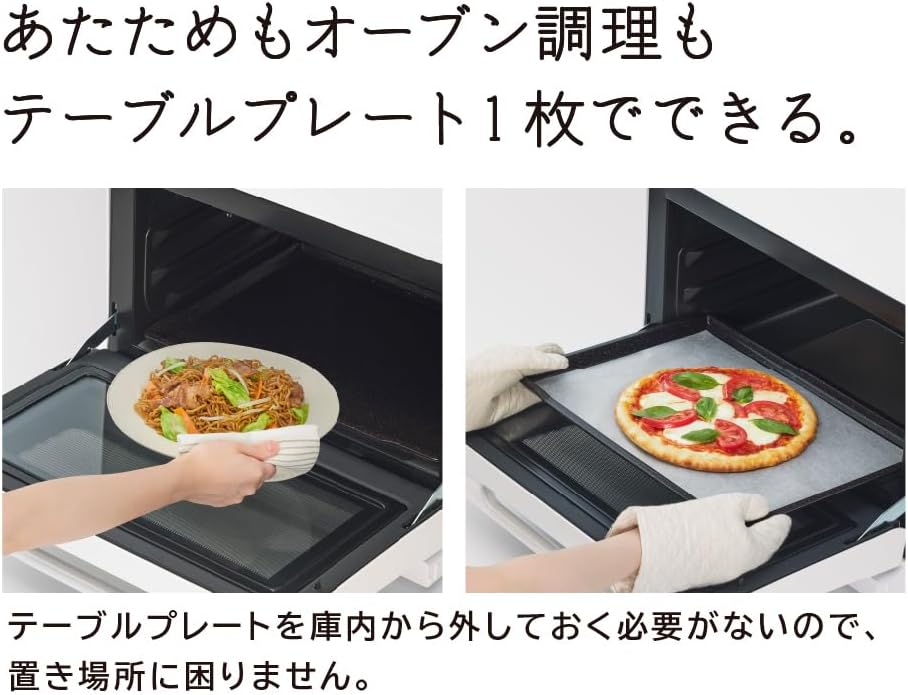
Image Description: Two images side-by-side. The left image shows a person placing a plate of food onto the table plate inside the oven for reheating. The right image shows a person removing a pizza from the table plate after oven cooking. The text explains that a single table plate can be used for both functions, eliminating the need to remove it for storage.
3.8 Menu Seal
An included menu sticker can be affixed to the bottom of the main unit door for easy reference. Please only attach it to the specified position.

Image Description: An image of the oven range with a dashed red line indicating the recommended attachment position for the menu sticker on the lower part of the door. A table next to it lists various menu options for reheating, defrosting/parboiling, and maintenance, along with a QR code for the MRO-S8CA recipe collection.
4. Maintenance
4.1 Easy Maintenance Features
The oven is designed for easy cleaning after cooking:
- Removable and Washable Table Plate: The Hitachi original table plate can be easily removed and washed.
- Easy-to-Clean Interior: The interior sides and back are designed to easily shed dirt.
- Flat Top Surface: The flat top surface is easy to wipe clean.
- Cleaning Course: Utilize the 'Clean' course, which uses a large amount of steam to help remove dirt.

Image Description: A collage of four images illustrating the oven's easy maintenance features. Top left shows a person removing the table plate. Top right shows the table plate being washed under running water, with a 'Washable OK' stamp. Bottom left shows a person wiping the flat top surface of the oven. Bottom right shows an illustration of steam being released inside the oven for the 'Clean' maintenance course.
5. Troubleshooting
If you encounter any issues with your oven range, please refer to the following general troubleshooting steps:
- No Power: Check if the power cord is securely plugged into a working outlet. Ensure no circuit breakers have tripped.
- Food Not Heating: Verify that the correct cooking mode and time/temperature settings are selected. Ensure the door is fully closed.
- Error Codes: If an error code appears on the display, consult the full user manual (available online) or contact customer support for specific guidance.
- Unusual Noises/Smells: Discontinue use immediately and contact customer support.
For detailed troubleshooting or issues not covered here, please contact Hitachi customer support.
6. Specifications
| Feature | Specification |
|---|---|
| Manufacturer | Hitachi |
| Model Number | MRO-S8CA W |
| Body Size (W x D x H) | 487 x 430 x 365 mm |
| Depth (including handle) | 461 mm |
| Depth (door open) | 695 mm |
| Effective Interior Dimensions (W x D x H) | 401 x 344 x 218 mm |
| Color | White |
| Capacity | 31 Liters |
| Heating Methods | Microwave, Oven, Grill, Steam, Superheated Steam |
| Sensor Types | Weight Sensor + Steam/Temperature Sensor |
| Microwave Output (Auto Max) | 1,000 W |
| Microwave Output (Manual) | 1,000W, 600W, 500W, 200W equivalent, 100W equivalent |
| Power Consumption | 1000 W |
| Voltage | 100 V (AC) |
| Product Weight | 15.5 kg |
| Package Weight | 18 kg |
7. Warranty and Support
7.1 Manufacturer's Warranty
This product comes with a 12-month manufacturer's warranty from the date of purchase. Please retain your proof of purchase for warranty claims.
7.2 Customer Support and Resources
For further assistance, detailed recipes, or specific inquiries, please visit the official Hitachi website or contact their customer support.
- Official Recipe Collection: Hitachi MRO-S8CA Recipe Collection
- Hitachi Brand Store: Visit the Hitachi Brand Store on Amazon