Introduction
This instruction manual provides essential information for the proper setup, operation, and maintenance of your RUIGE A3 Large Dial Hollow Men's Fully Automatic Mechanical Watch. Please read this manual carefully to ensure optimal performance and longevity of your timepiece.
Product Overview
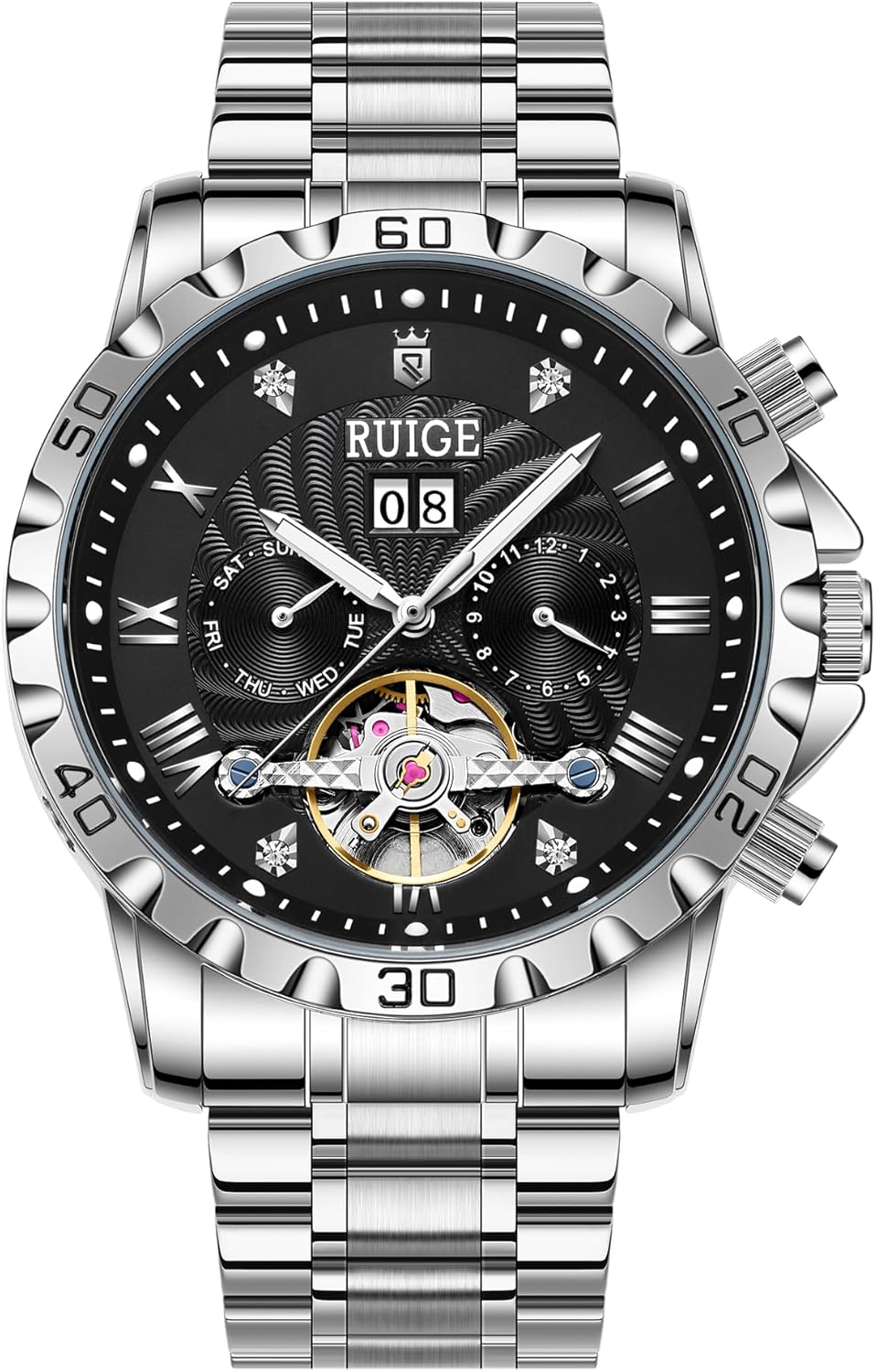
Figure 1: Front view of the RUIGE A3 Automatic Mechanical Watch, showcasing its large dial, hollow design, and stainless steel bracelet.
The RUIGE A3 is a sophisticated automatic mechanical watch featuring a distinctive hollow dial design, multiple sub-dials for day, date, and month, and luminous hands for visibility in low light. It is powered by your natural wrist motion, eliminating the need for batteries.
Setup and Initial Use
1. Initial Winding
As an automatic mechanical watch, the RUIGE A3 is powered by the movement of your wrist. If the watch has stopped or its power reserve is low, it needs to be manually wound to initiate operation.
- Ensure the crown is in position 0 (fully pushed in).
- Rotate the crown clockwise approximately 30-40 times. This will build up sufficient power reserve to start the watch.
- Wear the watch regularly to maintain its power reserve through natural wrist motion.
2. Setting the Time
- Pull the crown out to position 2 (farthest out).
- Rotate the crown to set the hour and minute hands to the desired time.
- Push the crown back into position 0 to engage the movement and start the watch.
3. Setting Date, Day, and Month

Figure 2: Side view of the watch indicating the crown and function buttons for adjustments.
- Calendar Window (Date): The calendar window displays the current date. Use the Calendar Adjustment Button (often located at the 2 o'clock position) to advance the date.
- Week Small Dial (Day): The sub-dial at the 9 o'clock position indicates the day of the week. Use the Left Function Button (often at the 8 o'clock position) to adjust the day.
- Month Small Dial (Month): The sub-dial at the 3 o'clock position indicates the month. Use the Month Adjustment Button (often at the 4 o'clock position) to adjust the month.
Important: Avoid adjusting the date, day, or month between 9:00 PM and 3:00 AM, as this can damage the movement's gears. Adjust these functions when the hour hand is outside this period.
Operating Your Watch
Automatic Movement
Your RUIGE A3 watch is equipped with an automatic mechanical movement. This means it is powered by the natural motion of your wrist. As you wear the watch, an oscillating weight inside the movement rotates, winding the mainspring and storing energy. If worn daily for approximately 8-10 hours, the watch should maintain its power reserve.
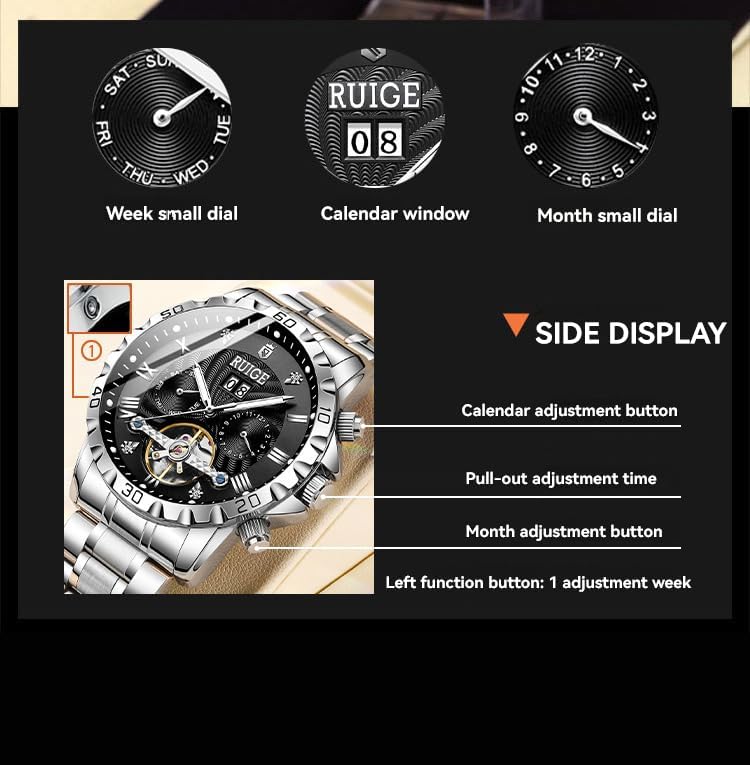
Figure 3: Transparent case back revealing the automatic mechanical movement.
Watch Functions

Figure 4: Close-up of the watch dial showing the week, calendar, and month indicators.
- Time Display: Central hour, minute, and second hands.
- Day Indicator: Sub-dial at 9 o'clock.
- Date Indicator: Window at 12 o'clock.
- Month Indicator: Sub-dial at 3 o'clock.
- Hollow Design: The open-heart design at 6 o'clock allows a view of the balance wheel, a key component of the mechanical movement.
- Luminous Hands: The hour and minute hands, along with hour markers, are treated with luminous material for readability in low light conditions.
Video 1: Demonstration of the RUIGE A3 Automatic Mechanical Watch's features, including its luminous hands, automatic movement, and strap clasp. This video is provided by the seller, RIQINES.
Maintenance and Care
- Water Resistance (3ATM): Your watch is rated for 30 meters (3 ATM) water resistance. This means it is suitable for daily use and can withstand splashes or brief immersion in water. It is not suitable for swimming, showering, or diving. Ensure the crown is fully pushed in before any contact with water.
- Cleaning: Wipe the watch regularly with a soft, dry cloth to remove dust and fingerprints. For the stainless steel bracelet, a slightly damp cloth can be used, followed by immediate drying.
- Avoid Shocks: Mechanical watches are delicate. Avoid dropping the watch or subjecting it to strong impacts.
- Magnetic Fields: Keep the watch away from strong magnetic fields (e.g., speakers, refrigerators, certain electronic devices) as these can affect the accuracy of the mechanical movement.
- Temperature Extremes: Avoid exposing the watch to extreme temperatures, both hot and cold, as this can affect lubricants and components.
- Servicing: For optimal performance and longevity, it is recommended to have your mechanical watch serviced by a qualified watchmaker every 3-5 years.
Troubleshooting
| Problem | Possible Cause | Solution |
|---|---|---|
| Watch has stopped or runs intermittently. | Insufficient power reserve. | Manually wind the watch by rotating the crown clockwise 30-40 times. Wear the watch regularly (8-10 hours daily). |
| Time is inaccurate. | Exposure to magnetic fields or strong impact. | Demagnetize the watch (professional service recommended). Reset the time accurately. If problem persists, seek professional service. |
| Date/Day/Month not changing correctly. | Adjusted during the "danger zone" (9 PM - 3 AM) or mechanical issue. | Ensure adjustments are made outside the 9 PM - 3 AM period. If the issue persists, professional service may be required. |
| Condensation under the crystal. | Water ingress. | Immediately seek professional watch repair. Do not attempt to dry it yourself. |
Specifications
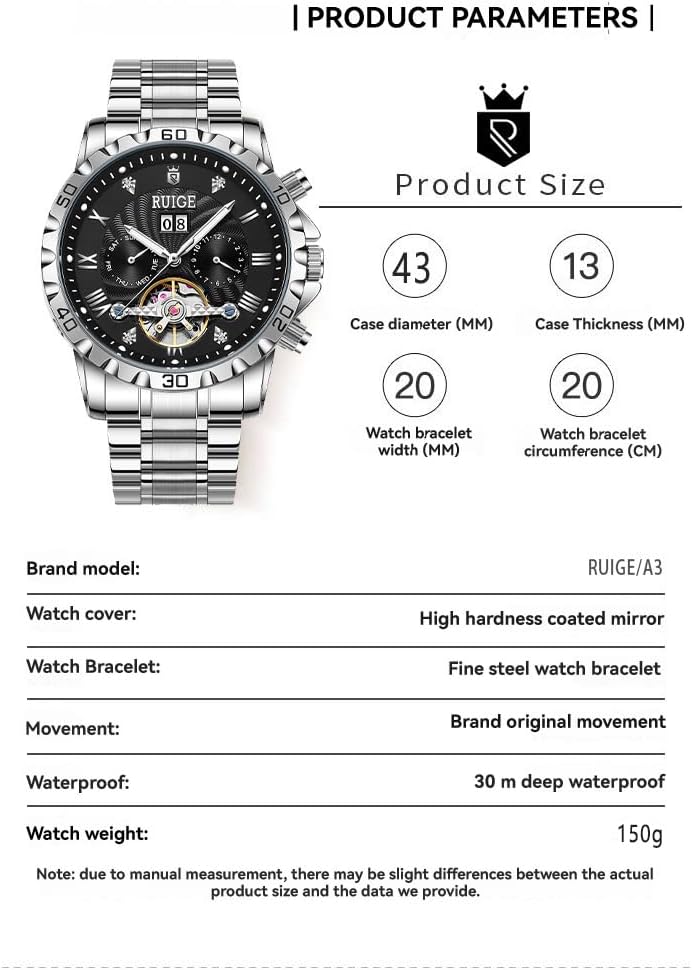
Figure 5: Product parameters including dimensions and materials.
- Brand Model: RUIGE / A3
- Movement: Brand Original Automatic Mechanical Movement
- Case Material: Stainless Steel
- Watch Cover: High Hardness Coated Mirror
- Watch Bracelet: Fine Steel Watch Bracelet
- Clasp Type: Buckle
- Case Diameter: 43 mm
- Case Thickness: 13 mm
- Watch Bracelet Width: 20 mm
- Water Resistance: 30 meters (3 ATM)
- Watch Weight: Approximately 150g
- Features: Hollow design, Day, Date, Month display, Luminous hands.
Note: Due to manual measurement, there may be slight differences between the actual product size and the data provided.
Warranty and Support
Your RUIGE A3 Automatic Mechanical Watch is covered by a manufacturer's warranty against defects in materials and workmanship. Please refer to the warranty card included with your purchase for specific terms and conditions, including the warranty period and coverage details.
For technical support, service, or warranty claims, please contact the retailer where you purchased the watch or visit the official RUIGE website for contact information.
Always ensure that any repairs or servicing are performed by authorized service centers to maintain the validity of your warranty.


