
1. Introduction
This manual provides essential information for the safe and efficient operation of your BLACK+DECKER EM044K6CF-BK 1.7 cu. ft. Over-the-Range Microwave Oven. Please read all instructions carefully before use and retain this manual for future reference.
The BLACK+DECKER EM044K6CF-BK is a 1000-watt microwave oven designed for over-the-range installation, featuring a spacious 1.7 cubic feet interior and a 12.4-inch turntable. It includes a 300 CFM vent fan with integrated lighting to enhance your cooking experience.

Image: Front view of the BLACK+DECKER EM044K6CF-BK Over-the-Range Microwave Oven.
2. Important Safety Instructions
To reduce the risk of fire, electric shock, injury to persons, or exposure to excessive microwave energy when using your appliance, follow basic safety precautions, including the following:
- Read all instructions before using the appliance.
- Do not operate the oven if the door or door seals are damaged.
- Do not heat liquids or other foods in sealed containers as they are liable to explode.
- Do not attempt to tamper with, or make any adjustments or repairs to the door, control panel, safety interlock switches, or any other part of the oven.
- Close supervision is necessary when the appliance is used by or near children.
- Only use utensils that are suitable for use in microwave ovens.
- Do not use corrosive chemicals or vapors in this appliance.
- Ensure proper ventilation during operation.
3. Product Features
- Large Capacity: The microwave features a spacious 1.7 cubic feet interior, measuring 15.4"D x 29.9"W x 16.4"H, and includes a 12.4-inch turntable.
- 10 Cooking Levels: With a 1000-watt output, this oven offers 6 quick menus for daily meals, including Popcorn, Beverage, Melt/Soften, Reheat, and Defrost.
- Speedy Cooking: For quick action, press numbers 1, 2, or 3 to initiate 1-3 minutes of cooking at 100% power level.
- Multi-stage Cooking: Save time by programming sequential cooking stages, such as 10 minutes at 90% microwave power followed by 5 minutes at 50% power in a single setting.
- 300 CFM Vent Fan with Light: A 2-speed strong suction vent fan effectively removes fumes and odors, while an integrated light provides focused illumination over your cooking surface.
- Child Safety Lock: The control panel can be disabled to prevent accidental operation, enhancing safety in homes with children.
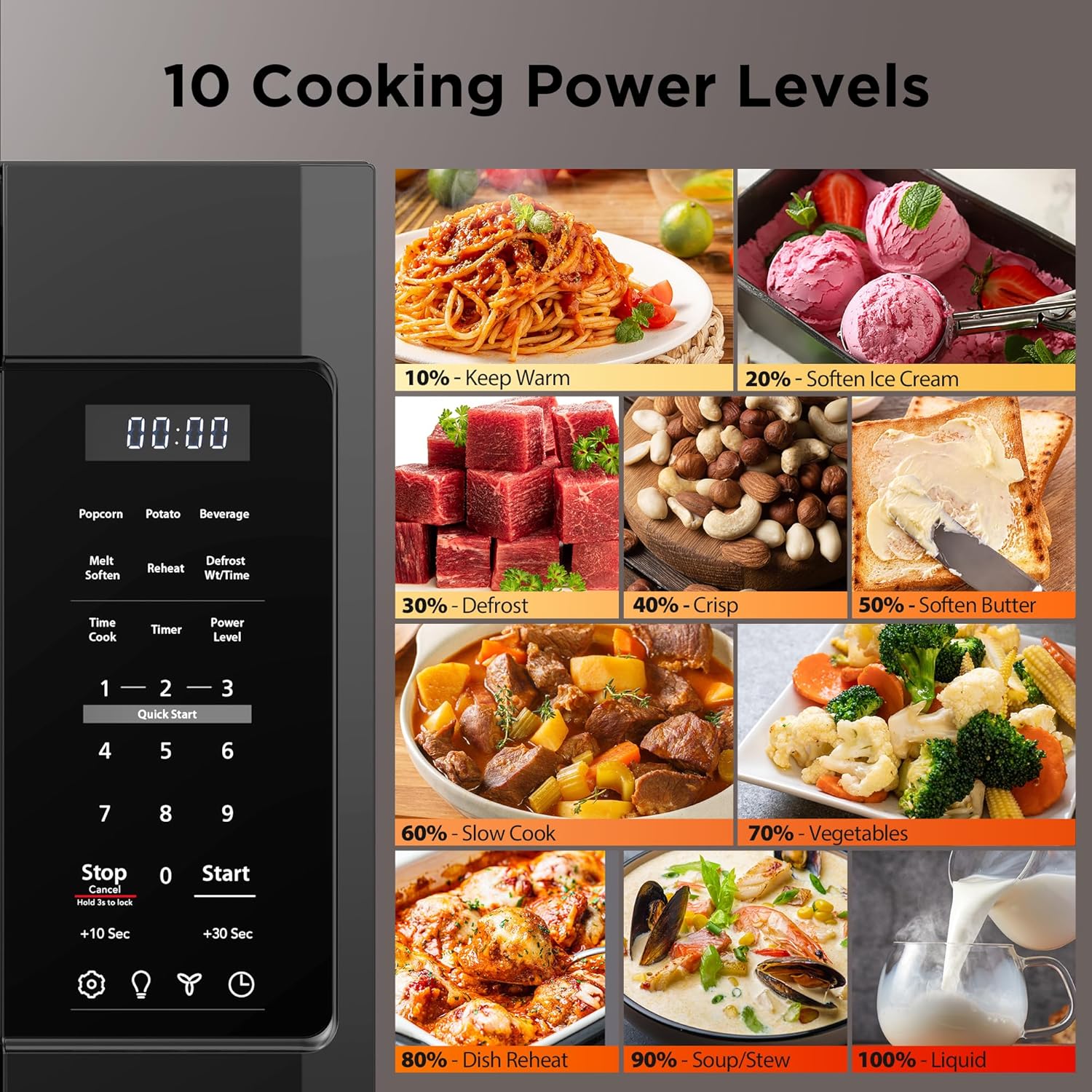
Image: Control panel illustrating 10 cooking power levels.

Image: Quick Start buttons for speedy cooking.

Image: Microwave with 300 CFM Vent Fan and Light.

Image: Multi-stage cooking illustration.

Image: Child Safety Lock feature.

Image: Product dimensions for installation planning.
4. Setup & Installation
Proper installation is crucial for the safe and efficient operation of your over-the-range microwave. It is recommended to have two people for installation due to the weight and size of the unit.
4.1 Mounting Bracket Installation
The microwave comes with a mounting bracket that needs to be securely attached to the wall studs above your stove. Use the provided templates to mark drill points accurately.
4.2 Ventilation Setup
Determine if your installation requires top or rear ventilation. The microwave's internal fan motor may need to be reoriented to match your home's ducting. Follow the detailed instructions in the installation guide for proper fan motor adjustment and damper installation.
4.3 Securing the Microwave
Once the mounting bracket is in place and ventilation is configured, lift the microwave onto the bracket, ensuring it hooks securely. Then, secure the top of the microwave to the cabinet above using the provided screws and any necessary spacer blocks to ensure a flush and stable fit.
Video: General guide for over-the-range microwave installation, including bracket mounting and ventilation setup. While this video features a different brand, the installation principles for over-the-range microwaves are broadly similar.
5. Operating Instructions
5.1 Basic Operation
- Setting Cook Time: Enter the desired cooking time using the number pad.
- Setting Power Level: Press the 'Power Level' button, then use the number pad to select a power level from 1 (lowest) to 10 (highest).
- Start/Stop: Press 'Start' to begin cooking. Press 'Stop/Cancel' to pause or end a cooking cycle.
5.2 Quick Menus
The microwave features 6 pre-programmed quick menus for common food items:
- Popcorn: Select the appropriate bag size.
- Potato: Select the number of potatoes.
- Beverage: Select the number of cups.
- Melt/Soften: For melting butter, chocolate, or softening ice cream/cream cheese.
- Reheat: For reheating various food quantities.
- Defrost: Choose between defrost by weight or by time.
5.3 Speedy Cooking
For quick heating, simply press the '1', '2', or '3' button to instantly start cooking for 1, 2, or 3 minutes respectively at 100% power.
5.4 Multi-stage Cooking
This feature allows you to program two consecutive cooking stages with different power levels and times. For example, you can set the microwave to defrost at 90% power for 10 minutes, then automatically switch to cook at 50% power for 5 minutes.
5.5 Vent Fan & Light
- Vent Fan: Press the 'Vent' button to cycle through 2 fan speeds (High, Low) or turn it off.
- Light: Press the 'Light' button to turn the integrated light on or off.
5.6 Child Safety Lock
To activate the child safety lock, press and hold the 'Stop/Cancel' button for 3 seconds. The display will indicate that the lock is active. To deactivate, press and hold the 'Stop/Cancel' button again for 3 seconds.
6. Maintenance & Cleaning
Regular cleaning and maintenance will ensure the longevity and optimal performance of your microwave oven.
- Interior: Clean the oven cavity after each use with a damp cloth and mild detergent. For stubborn stains, boil a cup of water with lemon juice inside the microwave for a few minutes to loosen residue.
- Exterior: Wipe the exterior surfaces with a soft, damp cloth. Avoid abrasive cleaners.
- Turntable: The glass turntable and its support ring can be removed for cleaning. Wash them in warm, soapy water or in the dishwasher.
- Vent Filters: The grease filters for the vent fan should be cleaned regularly. Refer to the full product manual for instructions on how to remove and clean these filters.
7. Troubleshooting
If you encounter any issues with your microwave oven, refer to the following common troubleshooting tips:
- Microwave not operating: Ensure the power cord is securely plugged into a grounded outlet. Check your household fuse or circuit breaker. Make sure the door is closed securely.
- Food not heating: Verify that the cook time and power level are set correctly. Ensure the door is fully closed.
- Turntable not rotating: Check that the turntable is correctly placed on its support ring and that the ring is properly seated. Ensure there is no obstruction.
- Excessive noise: This may occur during fan operation, especially at higher speeds. Ensure the microwave is installed level and securely.
- Display not working: Unplug the microwave for a few minutes, then plug it back in to reset the control panel.
For more complex issues or if troubleshooting steps do not resolve the problem, please contact BLACK+DECKER customer support.
8. Specifications
| Feature | Specification |
|---|---|
| Brand | BLACK+DECKER |
| Model Number | EM044K6CF-BK |
| Product Dimensions (D x W x H) | 15.4" x 29.9" x 16.4" |
| Item Weight | 55.9 pounds |
| Capacity | 1.7 Cubic Feet |
| Wattage | 1000 watts |
| Voltage | 120 Volts |
| Color | Black |
| Material | Stainless Steel |
| Installation Type | Over-the-Range |
| Special Feature | Auto Cook |
9. Warranty & Support
For warranty information, product registration, or technical support, please refer to the documentation included with your product or visit the official BLACK+DECKER website. Keep your purchase receipt as proof of purchase for any warranty claims.


