
Hitachi MRO-S8CA
Contents
Hitachi Superheated Steam Oven Range Healthy Chef MRO-S8CA User Manual
Model: MRO-S8CA
Introduction
This manual provides essential instructions for the safe and efficient operation, maintenance, and troubleshooting of your Hitachi Superheated Steam Oven Range, model MRO-S8CA. Please read this manual thoroughly before using the appliance and keep it for future reference.

Image Description: A front view of the Hitachi MRO-S8CA Superheated Steam Oven Range, showcasing its sleek black design and control panel.
Important Safety Information
Always follow basic safety precautions when using electrical appliances to reduce the risk of fire, electric shock, burns, or injury. This section outlines critical safety guidelines.
- Do not operate the oven if the door is damaged or not closing properly.
- Ensure proper ventilation around the appliance.
- Do not heat sealed containers, as they may explode.
- Always use oven mitts when handling hot dishes or components.
- Keep children away from the appliance during operation.
Setup and Installation
Unpacking
Carefully remove all packaging materials from the oven and its accessories. Check for any damage during transit. Retain packaging for potential future transport or service.
Placement
Place the oven on a stable, level surface. Ensure adequate clearance for ventilation. For the Hitachi MRO-S8CA, leave at least 4.5 cm clearance on the left and right sides, and 10 cm or more above the unit. The back can be placed flush against a wall, but be aware that wall material may affect contact marks or condensation.

Image Description: A technical diagram illustrating the external dimensions of the oven (Width 487mm, Depth 430mm (461mm including handle), Height 365mm) and recommended installation clearances (4.5cm left/right, 10cm top).
Power Connection
Connect the power cord to a grounded electrical outlet. Ensure the voltage matches the appliance's requirements.
Operating Instructions
Control Panel Overview
The control panel features various buttons for different cooking modes and settings. Refer to the menu seal for quick access to common functions.

Image Description: An illustration demonstrating where to attach the provided menu seal on the lower part of the oven door for easy reference to cooking programs.
For a comprehensive list of recipes and detailed menu instructions, please visit the official Hitachi recipe website: Hitachi MRO-S8CA Recipe Site
Cooking Modes
- Microwave (Range): For quick heating and cooking. Max output 1000W (automatic), manual settings include 1000W, 600W, 500W, 200W equivalent, 100W equivalent.
- Oven: For baking and roasting. Features a 250°C 1-stage oven function. Note: 250°C operation lasts approximately 5 minutes, then automatically switches to 210°C.
- Grill: For browning and crisping.
- Steam: For steaming dishes.
- Superheated Steam: Utilizes high-temperature superheated steam for various cooking methods.
Key Features and Functions
Weight Sensor for Reheating and Defrosting
The built-in weight sensor automatically calculates the appropriate heating amount based on the weight of the food (including the container). This ensures precise reheating and defrosting without manual quantity settings.
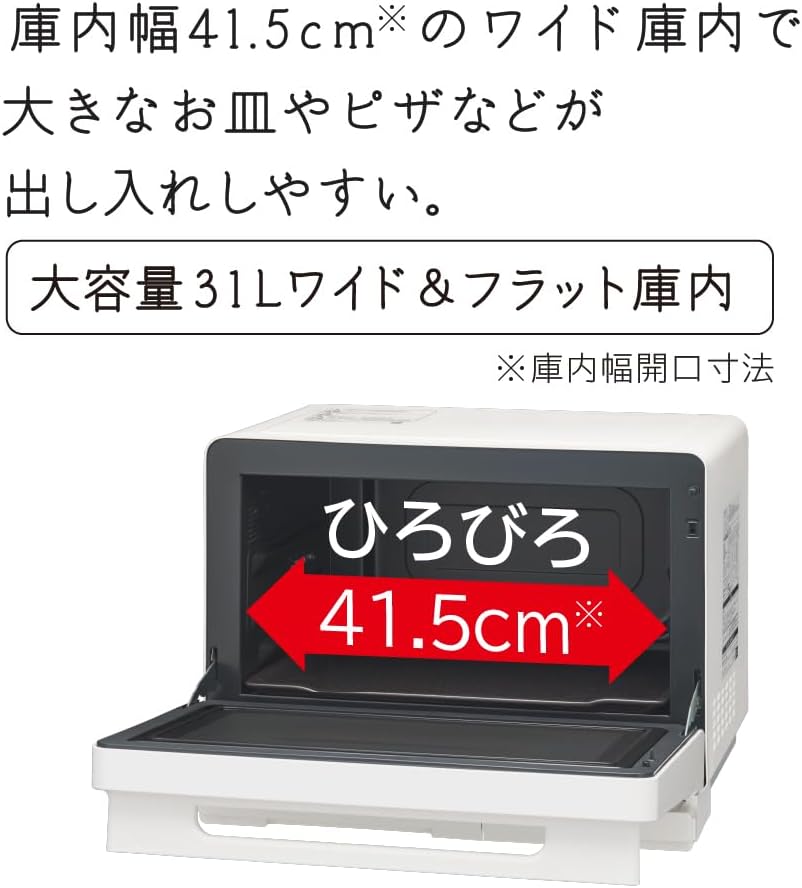
Image Description: An internal view of the oven highlighting the weight sensor, which measures food weight, and the steam/temperature sensor, which detects steam generation and temperature for optimal cooking.
Non-Fry and Superheated Steam Cooking
Achieve crispy, fried-like results without oil using superheated steam. This function also allows for baking and roasting with superheated steam, resulting in fluffy textures.

Image Description: A collage showing various dishes prepared using superheated steam, such as crispy non-fried shrimp, fluffy baked hamburger steak, and reheated fried chicken, demonstrating the versatility of the cooking method.
Bowl Menu for Easy Auto Cooking
Prepare main dishes and side dishes easily in a single heat-resistant glass bowl. This feature minimizes washing up and offers convenient auto-cooking for various recipes like vegetable stir-fries, curries, stews, and pasta dishes.

Image Description: A visual guide to the 'Bowl Menu' function, showing a user placing a bowl of ingredients into the oven, followed by examples of completed dishes such as vegetable stir-fry, curry/stew, and pasta, all prepared using this convenient method.
Wide & Flat Interior (31L Capacity)
The spacious 31-liter interior with a width of 41.5 cm allows for easy insertion and removal of large plates and pizzas.

Image Description: An open view of the oven's interior, highlighting its wide 41.5cm space, designed for accommodating larger dishes and ease of use.
250°C Oven 1-Stage
Easily prepare sweets and baked goods with the 250°C oven function. (Note: Operation at 250°C is for approximately 5 minutes, then it automatically switches to 210°C).

Image Description: A display of various baked items and a roast prepared using the oven's 250°C single-stage oven function, including oatmeal cereal bars, icebox cookies, and roast beef.
Simultaneous Reheating of Two Items
The oven can reheat two items of the same quantity to an appropriate temperature simultaneously. This function supports both refrigerated and room-temperature items.

Image Description: An image depicting two separate plates of food being reheated at the same time inside the oven, demonstrating the '2-item simultaneous reheating' feature.
Table Plate for Both Reheating and Oven Cooking
The unique table plate can be used for both reheating and oven cooking. It is removable for easy cleaning and does not require a separate storage space.
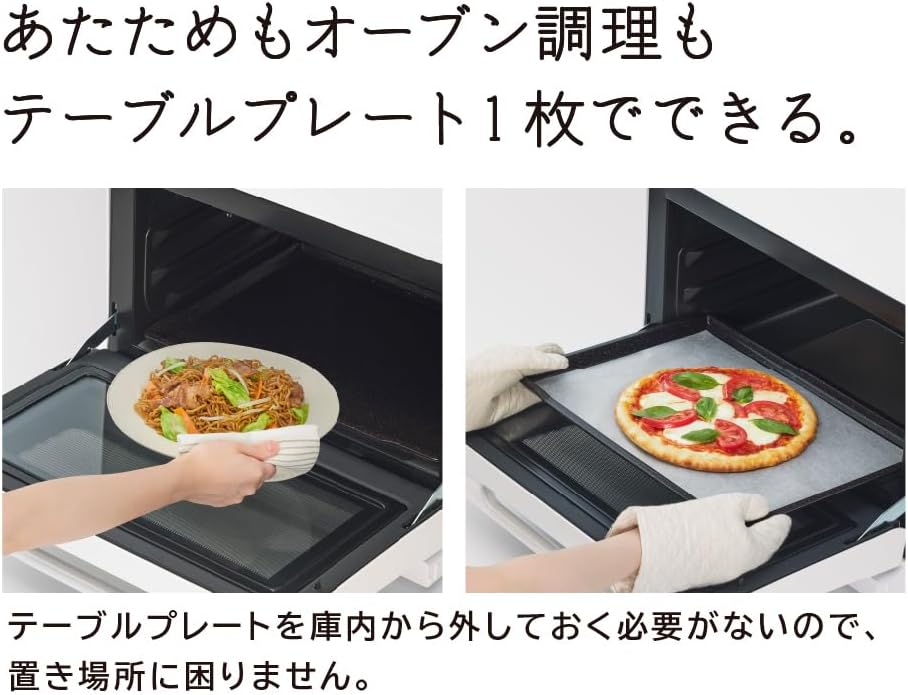
Image Description: Two images illustrating the versatility of the oven's table plate: one showing a dish being reheated on it, and another showing a pizza being baked on it, emphasizing its dual functionality.
Maintenance and Cleaning
Regular cleaning ensures optimal performance and longevity of your oven range.
Easy Maintenance Features
- Removable Table Plate: The table plate can be easily removed and washed entirely.
- Easy-to-Clean Interior: The interior side and back walls are designed to easily shed dirt.
- Flat Top Surface: The flat top surface is easy to wipe clean.
- Cleaning Course: A dedicated cleaning course uses a large amount of steam to loosen dirt, making cleanup easier.

Image Description: A series of images showcasing the oven's easy maintenance features, including the removable and washable table plate, the simple wiping of interior surfaces, and the steam cleaning function.
General Cleaning Tips
- Always unplug the appliance before cleaning.
- Wipe the exterior with a soft, damp cloth.
- For stubborn stains, use a mild detergent. Avoid abrasive cleaners.
- Regularly clean the water tank for steam functions to prevent mineral buildup.
Troubleshooting
This section addresses common issues you might encounter. For problems not listed here, please contact customer support.
| Problem | Possible Cause | Solution |
|---|---|---|
| Oven does not turn on. | Power cord not properly plugged in; power outage. | Check power connection; verify power supply. |
| Food not heating evenly. | Incorrect power level or cooking time; food placed improperly. | Adjust settings; ensure food is centered and not overcrowded. |
| Excessive steam or condensation. | Normal for steam functions; door not fully closed. | Ensure door is securely closed. This is often normal during steam cooking. |
| Unusual noise during operation. | Fan operation; loose components. | Some fan noise is normal. If excessive or unusual, contact service. |
Specifications
- Model: MRO-S8CA
- Brand: Hitachi (HITACHI)
- Capacity: 31 Liters
- External Dimensions (W x D x H): 487mm x 430mm (461mm including handle) x 365mm
- Internal Dimensions (W x D x H): 401mm x 344mm x 218mm
- Heating Methods: Microwave, Oven, Grill, Steam, Superheated Steam
- Sensor Types: Weight Sensor + Steam/Temperature Sensor
- Microwave Output: Automatic Max 1,000W; Manual 1,000W, 600W, 500W, 200W equivalent, 100W equivalent
- Oven Temperature: 250°C (approx. 5 min, then 210°C automatic)
- Product Weight: 15.5 kg
- Color: Black (K) / White (W) - This manual refers to the Black (K) model.
Warranty and Support
Manufacturer's Warranty
This product comes with a 12-month manufacturer's warranty from the date of purchase. Please retain your proof of purchase for warranty claims. The warranty covers defects in materials and workmanship under normal use.
Customer Support
For technical assistance, service requests, or inquiries regarding your Hitachi Superheated Steam Oven Range, please contact Hitachi customer support. Contact information can typically be found on the official Hitachi website or in the warranty card included with your product.
You can also visit the Hitachi brand store on Amazon for more product information: Hitachi Brand Store
Documents and downloads
Ask a question about this manual
Ask about setup, troubleshooting, compatibility, parts, safety, or missing instructions. Manuals+ will review the question and use this page’s manual context to help answer it.