
Introduction
Thank you for choosing the FEDOUR Aquarium LED Light, Model ED6S-400. This instruction manual provides essential information for the safe and efficient operation of your new aquarium lighting system. Designed for 40-60cm aquariums, this light features full-spectrum 4-color LEDs, a built-in timer, and extendable metal brackets to promote healthy aquatic plant growth and enhance the vibrant colors of your fish. Please read this manual thoroughly before use and retain it for future reference.
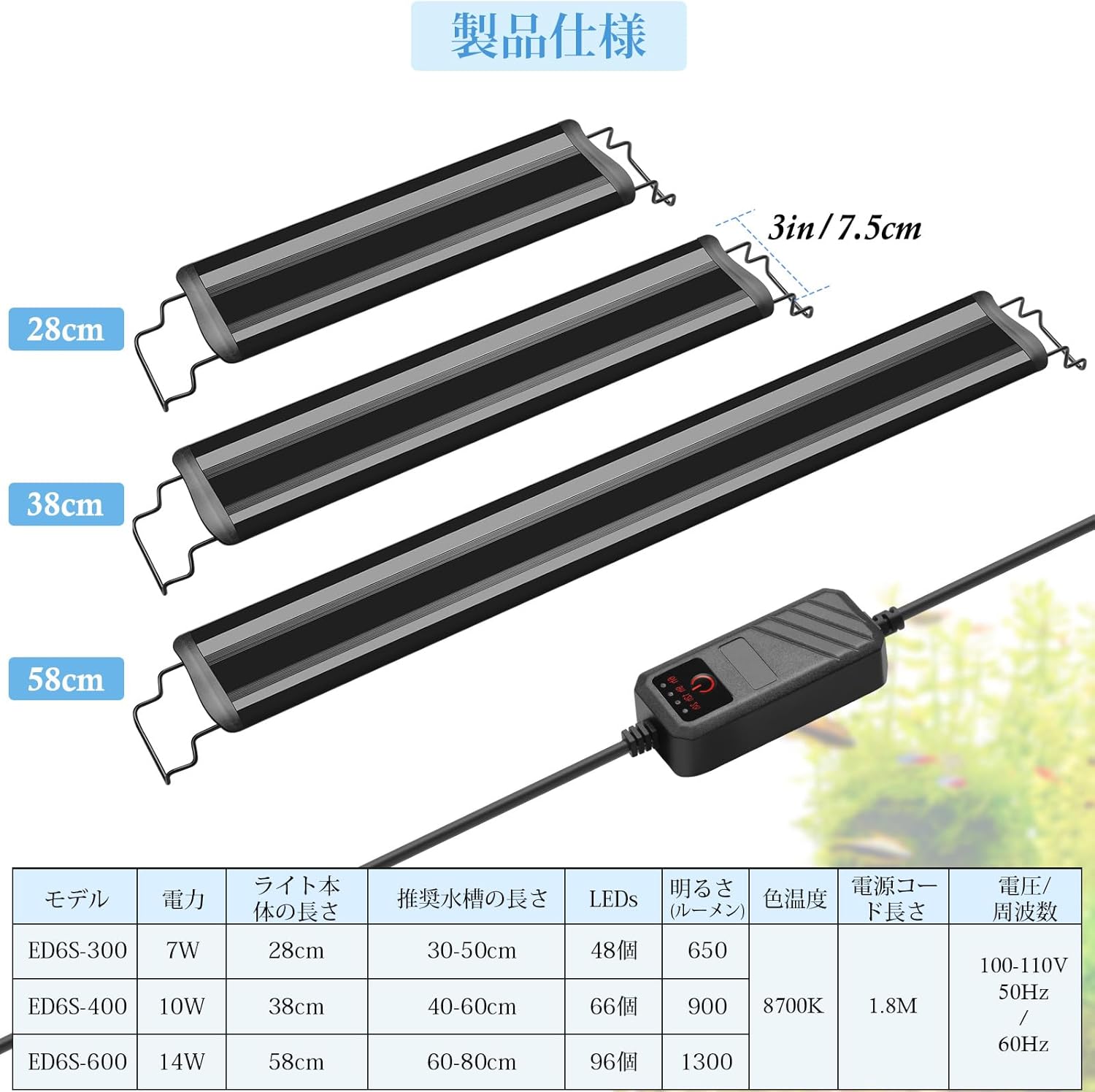
Image: The FEDOUR Aquarium LED Light, Model ED6S-400, showcasing its sleek design and extendable brackets.
Product Features
- Full Spectrum Illumination: Equipped with 66 high-brightness 4-color LED beads (27 white, 18 red, 15 blue, 6 green) to effectively simulate natural sunlight. This promotes robust aquatic plant growth and enhances the natural coloration of fish, creating a dynamic and vibrant underwater environment.
- Integrated Timer Function: Features an external controller for easy ON/OFF control and timer settings. Users can select lighting durations of 6, 9, 12, or 24 hours with a simple button press, offering flexible and convenient operation.
- Durable and Adjustable Design: Comes with two extendable metal brackets (17cm each side) for stable and easy installation on various aquarium types. Constructed with high-quality 5730 LED beads, ensuring high color rendering (82 CRI), high brightness, and a long lifespan of over 36,000 hours.
- Optimal Performance: Specifically designed for 40-60cm aquariums, providing 10W power and 900lm brightness with an 8700K color temperature. The 1.8m power cable offers flexibility in placement.

Image: Detailed view of the 5730 LED beads and the spectral distribution graph, illustrating the full-spectrum output for plant growth and fish coloration.

Image: Examples of aquariums illuminated by the FEDOUR LED light, showcasing vibrant aquatic plants and colorful fish.
Specifications
| Feature | Detail (Model ED6S-400) |
|---|---|
| Manufacturer | Ibay |
| Product Model Number | ED6S-400 |
| Power Consumption | 10W |
| Lamp Body Length | 38 cm |
| Recommended Aquarium Size | 40-60 cm |
| Number of LEDs | 66 (27 White, 18 Red, 15 Blue, 6 Green) |
| Brightness | 900 lm |
| Color Temperature | 8700K |
| Color Rendering Index (CRI) | 82 |
| Lifespan | > 36,000 hours |
| Power Cable Length | 1.8 m |
| Voltage/Frequency | 100-110V / 50Hz / 60Hz |
| Product Dimensions (L x W x H) | 40 x 7.5 x 4 cm |
| Item Weight | 0.4 kg |
| Base Material | Plastic |

Image: A comprehensive table detailing specifications for various models of the FEDOUR Aquarium LED Light, including the ED6S-400.
Setup Instructions
- Unpack the Product: Carefully remove all components from the packaging. Verify that all parts are present: LED light unit, two extendable metal brackets, and power adapter with controller.
- Attach the Brackets: Slide the two extendable metal brackets onto each end of the LED light unit. Ensure they are securely fitted.
- Position on Aquarium: Place the assembled light unit on top of your aquarium. Adjust the extendable brackets to fit the width of your tank (recommended for 40-60cm tanks). The brackets are designed for both framed and frameless aquariums.
- Connect Power: Plug the power adapter into a suitable electrical outlet. Connect the light unit's cable to the power adapter's controller. Ensure all connections are secure before powering on.

Image: Close-up view of the extendable metal brackets, demonstrating their adjustability for different aquarium sizes.
Operating Instructions
The FEDOUR Aquarium LED Light features an external controller for easy operation and timer settings.
- Power On/Off: Press the power button on the controller to turn the light ON. Press it again to turn the light OFF.
- Setting the Timer: While the light is ON, press the timer button on the controller to cycle through the preset lighting durations:
- First press: 6 hours
- Second press: 9 hours
- Third press: 12 hours
- Fourth press: 24 hours (continuous lighting)
- Canceling the Timer: To cancel the timer function, press the timer button until no duration indicator light is illuminated, or simply press the power button to turn off the light manually.

Image: The external controller showing timer options (6h, 9h, 12h, 24h) and a visual comparison of the aquarium with the light off versus on.
Maintenance
- Cleaning: Regularly wipe the LED light surface with a soft, damp cloth to remove dust, water spots, and algae buildup. Ensure the light is unplugged from the power source before cleaning. Do not use abrasive cleaners or solvents.
- Inspection: Periodically check the power cord and controller for any signs of damage. If any damage is observed, discontinue use immediately and contact customer support.
- Water Contact: While the light is designed for aquarium use, avoid submerging the light unit or the controller in water. Ensure the power adapter is kept dry.
Troubleshooting
| Problem | Possible Cause | Solution |
|---|---|---|
| Light does not turn on. |
|
|
| Timer function is not working correctly. |
|
|
| Light appears dim or flickers. |
|
|
Warranty and Support
The FEDOUR Aquarium LED Light comes with a 12-month warranty from the date of purchase. This warranty covers manufacturing defects and malfunctions under normal use.
If you encounter any issues or have questions regarding your product, please do not hesitate to contact our customer service team. Our dedicated after-sales service team is committed to resolving your concerns within 24 hours.
For support, please refer to the contact information provided on your product packaging or the retailer's website.