
1. Introduction
Thank you for purchasing the ZAFRO Portable Spot Cooler. This manual provides important information for the safe and efficient operation of your appliance. Please read this manual thoroughly before use and keep it for future reference.
This portable air conditioner is designed to provide cooling, dehumidification, and fan functions for indoor spaces, offering a convenient and flexible solution for personal comfort.
2. Safety Information
To reduce the risk of fire, electrical shock, or injury when using your air conditioner, follow these basic precautions:
- Read all instructions before using the appliance.
- Only use the appliance for its intended purpose as described in this manual.
- Do not operate the air conditioner if it has a damaged cord or plug, or if it is not working properly or has been dropped or damaged.
- Keep the appliance away from heat sources and direct sunlight.
- Ensure the power supply matches the voltage specified on the rating label.
- Do not block air inlets or outlets. Maintain adequate clearance around the unit.
- Always unplug the unit before cleaning or servicing.
- This appliance is not intended for use by persons (including children) with reduced physical, sensory or mental capabilities, or lack of experience and knowledge, unless they have been given supervision or instruction concerning use of the appliance by a person responsible for their safety.
- Do not use chemical solvents (e.g., benzene, alcohol, gasoline) to clean the unit.
- Ensure the unit is placed on a stable, level surface.

The unit includes features like child lock for enhanced safety around children and pets.
3. Package Contents
Please check the package contents upon unpacking:
- ZAFRO Portable Spot Cooler Unit
- Exhaust Hose
- Window Panel Kit
- Remote Control
- User Manual

Image showing the main unit and included accessories.
4. Product Features
- 3-in-1 Functionality: Offers Cooling, Fan, and Dehumidification modes.
- No Installation Required: Portable design allows for easy movement and setup without complex installation.
- Efficient Cooling: Provides 2.6kW (9000 BTU) cooling capacity, suitable for 8-10 tatami mats (approx. 13-16.5 sq meters).
- Quiet Operation: Operates at a low noise level of 54dB.
- 24-Hour Timer: Program the unit to turn on or off automatically.
- Remote Control: Conveniently adjust settings from a distance.
- Window Panel Kit: Includes accessories for easy exhaust duct installation in various window types.
- Sleep Mode: Adjusts temperature and fan speed for comfortable sleep.
- Child Lock: Prevents accidental changes to settings.

The unit features Cooling (16-32°C), Fan (weak/strong), and Dehumidification (up to 19L/day) modes.

The 2.6kW cooling capacity ensures effective temperature reduction in designated areas.
5. Setup
5.1 Placement
Place the unit on a firm, level surface in the desired location. Ensure there is adequate space around the unit for proper airflow and heat dissipation.
- Maintain at least 50cm clearance from walls or obstacles on the top and sides.
- Maintain at least 30cm clearance from walls or obstacles on the front and back.
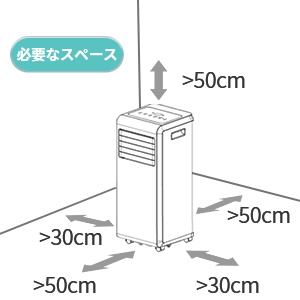
Ensure proper clearance for optimal performance.
5.2 Exhaust Hose and Window Panel Installation
The exhaust hose is crucial for expelling hot air outside, ensuring efficient cooling.
- Attach the exhaust hose adapter to the unit's exhaust outlet.
- Connect the exhaust hose to the window panel adapter.
- Assemble the window panel kit to fit your window opening (suitable for both horizontal and vertical sliding windows).
- Insert the window panel adapter into the assembled window panel.
- Extend the exhaust hose and connect it to the window panel, ensuring a secure fit to prevent hot air from re-entering the room.
- Seal any gaps around the window panel to maximize cooling efficiency.

The unit dimensions are approximately 31.5cm (W) x 31cm (D) x 70cm (H). The window panel is adjustable from 63.5cm to 125cm.

Step-by-step installation guide for the exhaust system.
6. Operating Instructions
6.1 Control Panel and Remote Control
The unit can be operated using the control panel on top of the unit or the included remote control.

Control panel and remote control layout.
6.2 Basic Operation
- Power On/Off: Press the Power button to turn the unit on or off.
- Mode Selection: Press the Mode button to cycle through Cooling, Fan, and Dehumidification modes.
- Temperature Adjustment: In Cooling mode, use the Up/Down arrows to set the desired temperature (16-32°C).
- Fan Speed: In Fan mode, select between low and high fan speeds.
- Timer: Press the Timer button to set the auto-on or auto-off time (1-24 hours).
- Sleep Mode: Activates a quiet operation mode with gradual temperature adjustments for comfortable sleep.
- Child Lock: Press and hold the Child Lock button to activate/deactivate.
6.3 Louver Adjustment
The horizontal louvers can be manually adjusted to direct airflow as desired.

Manually adjust the louvers to direct airflow.
7. Maintenance
Regular maintenance ensures optimal performance and longevity of your unit.
7.1 Cleaning the Air Filter
The air filter should be cleaned every two weeks or more frequently depending on usage and air quality.
- Unplug the unit from the power outlet.
- Remove the air filter from the back of the unit.
- Wash the filter with warm, soapy water. Rinse thoroughly.
- Allow the filter to air dry completely before reinserting it into the unit.
7.2 Draining Water
In Dehumidification mode or high humidity conditions, water will accumulate in the internal tank. The unit will stop operating when the tank is full. Drain the water as follows:
- Turn off the unit and unplug it.
- Place a shallow pan or tray under the drain port at the bottom rear of the unit.
- Remove the rubber stopper from the drain port.
- Allow all water to drain out.
- Replace the rubber stopper firmly.
For continuous drainage, connect a drain hose (not included) to the drain port and direct it to a floor drain or suitable container.

Instructions for convenient dehumidification and water drainage.
7.3 Cleaning the Unit Exterior
Wipe the exterior of the unit with a soft, damp cloth. Do not use harsh chemicals or abrasive cleaners.
8. Troubleshooting
Before contacting customer service, please check the following common issues:
| Problem | Possible Cause | Solution |
|---|---|---|
| Unit does not turn on | No power supply Power cord not plugged in Water tank full | Check power outlet Plug in power cord securely Drain water tank |
| Unit not cooling effectively | Window/door open Air filter dirty Exhaust hose not properly installed Room too large | Close windows/doors Clean air filter Ensure exhaust hose is sealed Unit may be too small for the space |
| Loud noise | Unit not on a level surface Obstruction in fan | Place on a level surface Check for and remove any obstructions |
| Remote control not working | Batteries dead/incorrectly inserted Obstruction between remote and unit | Replace batteries/check polarity Remove obstruction |
9. Specifications
| Specification | Value |
|---|---|
| Brand | ZAFRO |
| Model | J0A4217-9K-ZA |
| Cooling Capacity | 2.6 kW (9000 BTU) |
| Power Supply | 100V, 50/60Hz |
| Power Consumption | 860 W |
| Operating Noise Level | 54 dB |
| Refrigerant | R410A (340g) |
| Dimensions (D x W x H) | 31 x 31.5 x 70 cm |
| Weight | 22 kg |
| Applicable Area | 8-10 Tatami Mats |
| Temperature Setting Range | 16-32°C |
| Dehumidification Capacity | Up to 19L/day |
10. Warranty and Support
ZAFRO products come with a standard warranty. For specific warranty terms and conditions, please refer to the warranty card included with your purchase or visit the official ZAFRO website.
If you encounter any issues or have questions regarding your ZAFRO Portable Spot Cooler, please contact our customer support team:
- Online Support: Visit the ZAFRO Store on Amazon for FAQs and contact options.
- Email Support: Refer to your warranty documentation for the dedicated support email address.
Please have your model number (J0A4217-9K-ZA) and purchase date ready when contacting support.