1. Introduction
This manual provides comprehensive instructions for the setup, operation, and maintenance of your EZVALO Under Cabinet Lighting Remote, designed for use with EZL2414A lighting systems. Please read this manual carefully before using the remote control to ensure proper functionality and to maximize your user experience. Keep this manual for future reference.
2. Product Overview
The EZVALO remote control provides convenient wireless operation for your under cabinet lighting. It features dedicated buttons for power, brightness adjustment, and timer settings.
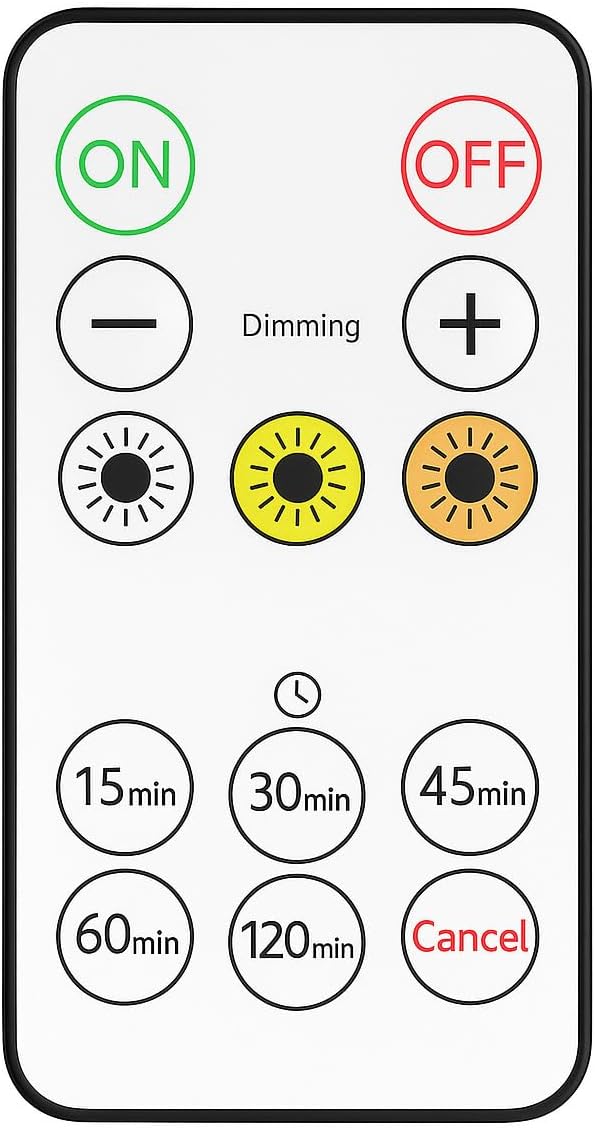
Image 1: EZVALO Under Cabinet Lighting Remote Control. This image displays the white remote control with various circular buttons for 'ON', 'OFF', brightness adjustment ('-' and '+'), three brightness level presets (indicated by sun icons), and timer settings (15min, 30min, 45min, 60min, 120min, Cancel).
3. Features
- Easy ON/OFF Control: Quickly turn your lights on or off with a single press.
- Adjustable Brightness: Use the '+' and '–' buttons to increase or decrease light intensity.
- Three Brightness Levels: Select from low, medium, or high preset lighting options.
- Timer Options: Set the light to automatically turn off after 15, 30, 45, 60, or 120 minutes. A 'Cancel' button is available to deactivate the timer.
- Simple & User-Friendly: Clear icons and a clean layout ensure ease of use for all users.
4. Setup
4.1 Battery Installation
- Locate the battery compartment on the back of the remote control.
- Slide open the battery compartment cover.
- Insert the required battery type (e.g., 1x CR2025 coin cell battery, not included) ensuring the correct polarity (+ and -) as indicated inside the compartment.
- Close the battery compartment cover securely.
Note: Ensure the battery is inserted correctly. Incorrect installation may prevent the remote from functioning.
5. Operating Instructions
5.1 Power Control
- Press the ON button to turn on the connected EZVALO under cabinet lights.
- Press the OFF button to turn off the connected EZVALO under cabinet lights.
5.2 Brightness Adjustment
- Press the + button to increase the brightness of the lights.
- Press the – button to decrease the brightness of the lights.
- The remote also features three preset brightness level buttons (indicated by sun icons) for quick selection of low, medium, or high illumination.
5.3 Timer Function
- To set an automatic shut-off timer, press one of the timer buttons: 15min, 30min, 45min, 60min, or 120min. The lights will turn off automatically after the selected duration.
- To cancel an active timer, press the Cancel button.
6. Troubleshooting
| Problem | Possible Cause | Solution |
|---|---|---|
| Remote not responding | Dead or incorrectly installed battery. | Replace the battery, ensuring correct polarity. |
| Limited remote range | Obstructions between remote and lights; low battery. | Ensure a clear line of sight. Replace battery if low. |
| Lights not pairing with remote | Initial pairing not completed or lost. | Refer to your EZL2414A lighting system manual for pairing instructions. |
7. Specifications
- Brand: EZVALO
- Model: Remote for EZL2414A
- Product Dimensions: 3.35"L x 1.54"W x 0.24"H (8.5 cm x 3.9 cm x 0.6 cm)
- Item Weight: 0.494 ounces (14 Grams)
- Maximum Range: 12 Feet (approximately 3.6 meters)
- Color: White
- Power Source: 1x Coin Cell Battery (e.g., CR2025, not included)
8. Maintenance
- Cleaning: Wipe the remote control with a soft, dry cloth. Do not use abrasive cleaners or solvents.
- Battery Replacement: Replace the battery when the remote's performance diminishes or it stops responding. Refer to Section 4.1 for battery installation instructions.
- Storage: Store the remote in a cool, dry place away from direct sunlight and extreme temperatures.
9. Warranty and Support
EZVALO products are designed for reliability and performance. For specific warranty information regarding your EZVALO Under Cabinet Lighting Remote or the EZL2414A lighting system, please refer to the warranty card included with your product or visit the official EZVALO website. For technical support or customer service inquiries, please contact EZVALO customer support through the contact information provided on the product packaging or their official website.


