
Introduction
The Genwiss GN-T41 Scuba Diving Flashlight is designed for underwater activities, offering powerful illumination and robust waterproof construction. This manual provides essential information for the safe and effective use, maintenance, and troubleshooting of your dive torch.
Key Features:
- Bright LED Illumination: Utilizes an XM-L2 LED to provide a super bright, even spotlight for various activities.
- High Brightness: Delivers 2000 lumens, allowing visibility up to 100 meters underwater.
- Easy Operation: Features a side magnetic switch for simple control.
- Durable Construction: Made from compact 6061 aircraft-grade aluminum alloy with a toughened glass lens, ensuring shock-resistance and crash-proof performance.
- Waterproof: Designed for underwater use up to 80 meters.
What's in the Box
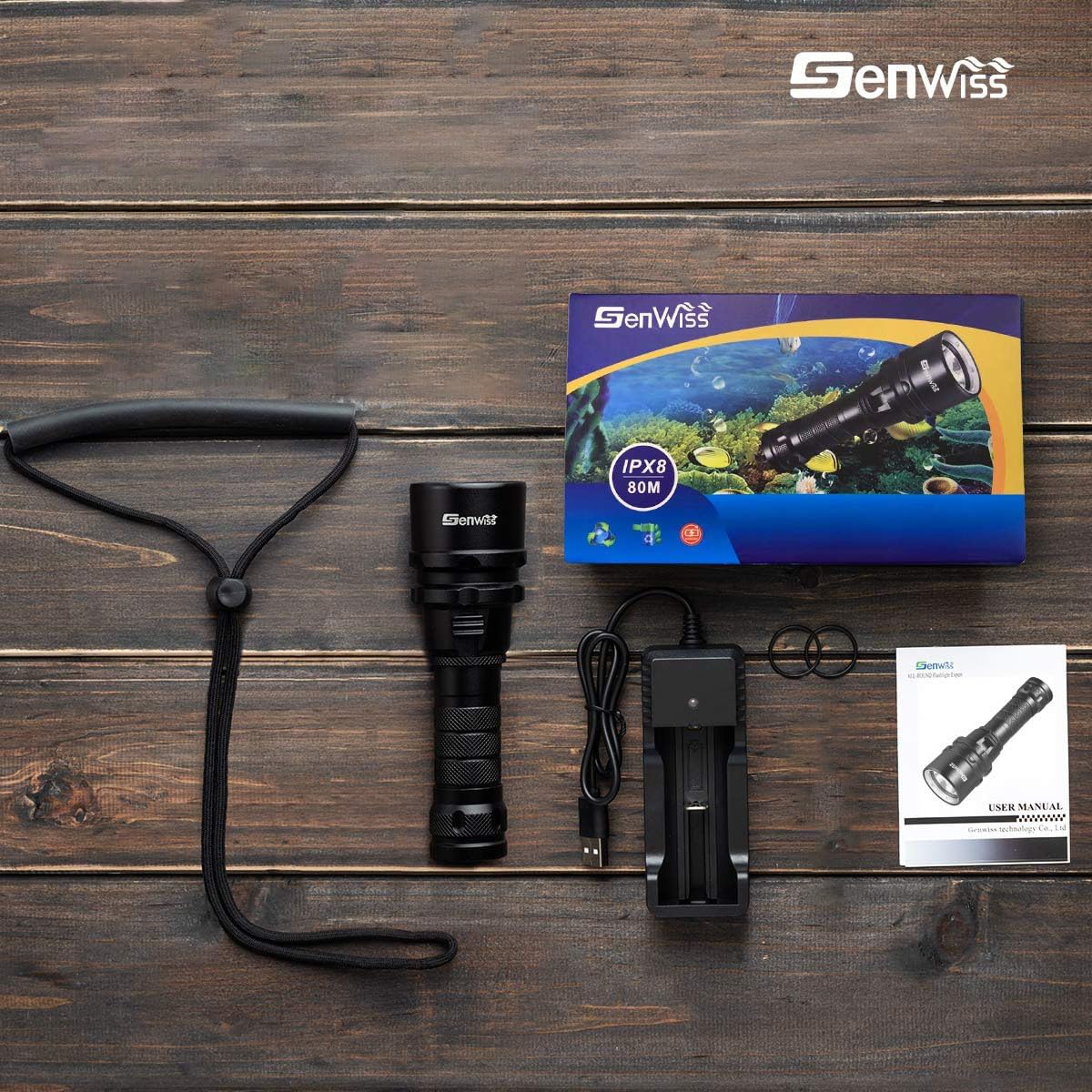
Upon opening your Genwiss GN-T41 package, please verify that all the following components are included:
- Genwiss GN-T41 Dive Light
- Battery Charger
- Lanyard
- Spare O-rings (2)

Setup
Follow these steps to prepare your Genwiss GN-T41 dive flashlight for first use:
- Battery Installation: Unscrew the tail cap of the flashlight. Insert the included Lithium Ion battery with the positive (+) end facing towards the head of the flashlight. Ensure the battery is seated correctly.
- O-ring Lubrication: Before screwing the tail cap back on, apply a small amount of silicone grease (not included) to the O-rings. This ensures a watertight seal and prevents damage to the O-rings. Do not add extra O-rings; the included spare O-rings are for replacement only.
- Secure Tail Cap: Carefully thread the tail cap back onto the flashlight, ensuring it is tightened securely to prevent water ingress. Do not overtighten.
- Charging: Use the provided charger to charge the battery. The charger typically indicates charging status (e.g., red for charging, green for fully charged). Connect the charger to a USB power source (computer, power bank, car charger, or wall adapter).

Operating Instructions
The Genwiss GN-T41 features a simple magnetic slide switch for operation.
- Power On/Off: Slide the magnetic switch to the 'on' position to turn the flashlight on. Slide it to the 'off' position to turn it off.
- Brightness Mode: The flashlight operates in a single high-light mode.
- Switch Lock: The magnetic switch can be locked to prevent accidental activation. Slide the button to the right to engage the lock. In the locked position, the switch cannot be toggled. To unlock, slide the button to the left.

Maintenance
Proper maintenance ensures the longevity and performance of your dive flashlight.
- Post-Dive Care: After each dive, rinse the exterior surface of the flashlight thoroughly with fresh water to remove salt and debris. Allow it to air dry completely before storage.
- O-ring Inspection: Regularly inspect the O-rings for any signs of wear, cracks, or damage. Replace them with the provided spare O-rings if necessary. Always ensure O-rings are clean and lightly lubricated with silicone grease before each use.
- Battery Storage: When storing the flashlight for extended periods, remove the battery to prevent slow discharge or potential damage. Store the battery in a cool, dry place.
- Cleaning: Clean the lens with a soft, lint-free cloth. Avoid abrasive materials that could scratch the lens.
Troubleshooting
If you encounter issues with your Genwiss GN-T41, refer to the following common problems and solutions:
| Problem | Possible Cause | Solution |
|---|---|---|
| Flashlight does not turn on or flashes. | Tail cap not fully tightened; battery not making proper contact. | Ensure the tail cap is tightened securely so the spring makes full contact with the battery bottom. |
| Light turns on accidentally in bag. | Magnetic switch is not locked. | Engage the switch lock by sliding the button to the right when not in use. Consider using a rubber band around the switch for added security during transport. |
| Reduced brightness or short battery life. | Low battery charge; aging battery. | Recharge the battery fully. If the issue persists after charging, the battery may need replacement. |
| Water inside the flashlight. | Damaged or improperly seated O-rings; tail cap not tightened. | Immediately open the flashlight, remove the battery, and dry all components. Inspect O-rings for damage and replace if necessary. Ensure O-rings are clean, lubricated, and the tail cap is securely tightened before next use. |
Specifications
Detailed technical specifications for the Genwiss GN-T41 Dive Torch:
- Model: GN-T41
- Light Source: XM-L2 LED
- Brightness: 2000 Lumens
- Effective Distance: Up to 80 meters underwater
- Power Source: Battery Powered (1 Lithium Ion battery included)
- Voltage: 3.7 Volts
- Wattage: 10 Watts (Light Source Wattage: 25 Watts)
- Material: Durable aircraft-grade aluminum alloy
- Lens: Toughened glass
- Water Resistance Level: Waterproof (IPX8)
- Dimensions (D x W x H): 5.59" x 1.69" x 1.69" (142mm x 43mm x 43mm)
- Weight: 0.42 Pounds (191g)
- Color: Black

Warranty and Support
Warranty:
The Genwiss GN-T41 Scuba Diving Flashlight comes with a 2-year worry-free protection plan. This plan provides free replacement if the item stops working under any circumstances within the warranty period. For warranty claims, please contact Genwiss customer support.
Support & FAQs:
For additional support or frequently asked questions, please refer to the following:
- Q: How can I maintain the flashlight to extend its working life?
A: After each dive, rinse the outer surface of the flashlight with fresh water and store it properly after it is dried. - Q: The light flashes then shuts off. What should I do?
A: Please tighten the flashlight tail cover to ensure the spring of the tail cover is fully connected to the battery bottom. Otherwise, the light may not turn on or may flash. - Q: There are two O-rings included in the box. Where exactly are they supposed to go?
A: The O-rings in the box are replacements. Do not add them together; doing so may prevent the flashlight from working properly.
For further assistance, please visit the Genwiss Store on Amazon or contact their customer service directly.