1. Introduction
Thank you for choosing the POROMETISTO WTS01Pro Pin & Pinless Moisture Meter. This dual-mode device is designed for accurate and non-destructive measurement of moisture content in various materials such as wood, drywall, concrete, and more. It also provides ambient temperature and humidity readings, making it an essential tool for homeowners, woodworkers, and professionals. This manual provides detailed instructions for proper setup, operation, and maintenance to ensure optimal performance and longevity of your device.
2. Safety Information
- Read all instructions carefully before using the device.
- Keep the device away from water and high humidity environments to prevent damage.
- Do not attempt to disassemble or modify the device. Repairs should only be performed by qualified personnel.
- When using the pin sensor, be aware that it will leave small marks on the surface.
- Avoid contact with metal surfaces when using the pinless spherical sensor, as this can lead to inaccurate readings.
- Store the device in a dry, cool place when not in use. Remove batteries if storing for extended periods.
- Keep out of reach of children.
3. Package Contents

The image displays the complete kit, including the POROMETISTO WTS01Pro Moisture Meter, its remote probe, batteries, screwdriver, and storage case.
- 1 x POROMETISTO WTS01Pro Digital Moisture Meter
- 1 x 40-inch Remote Probe
- 3 x 1.5V AAA Batteries
- 1 x User Manual
- 1 x Screwdriver
- 1 x Storage Cloth Case
4. Product Overview and Features
4.1 Dual-Mode Measurement: Pin & Pinless
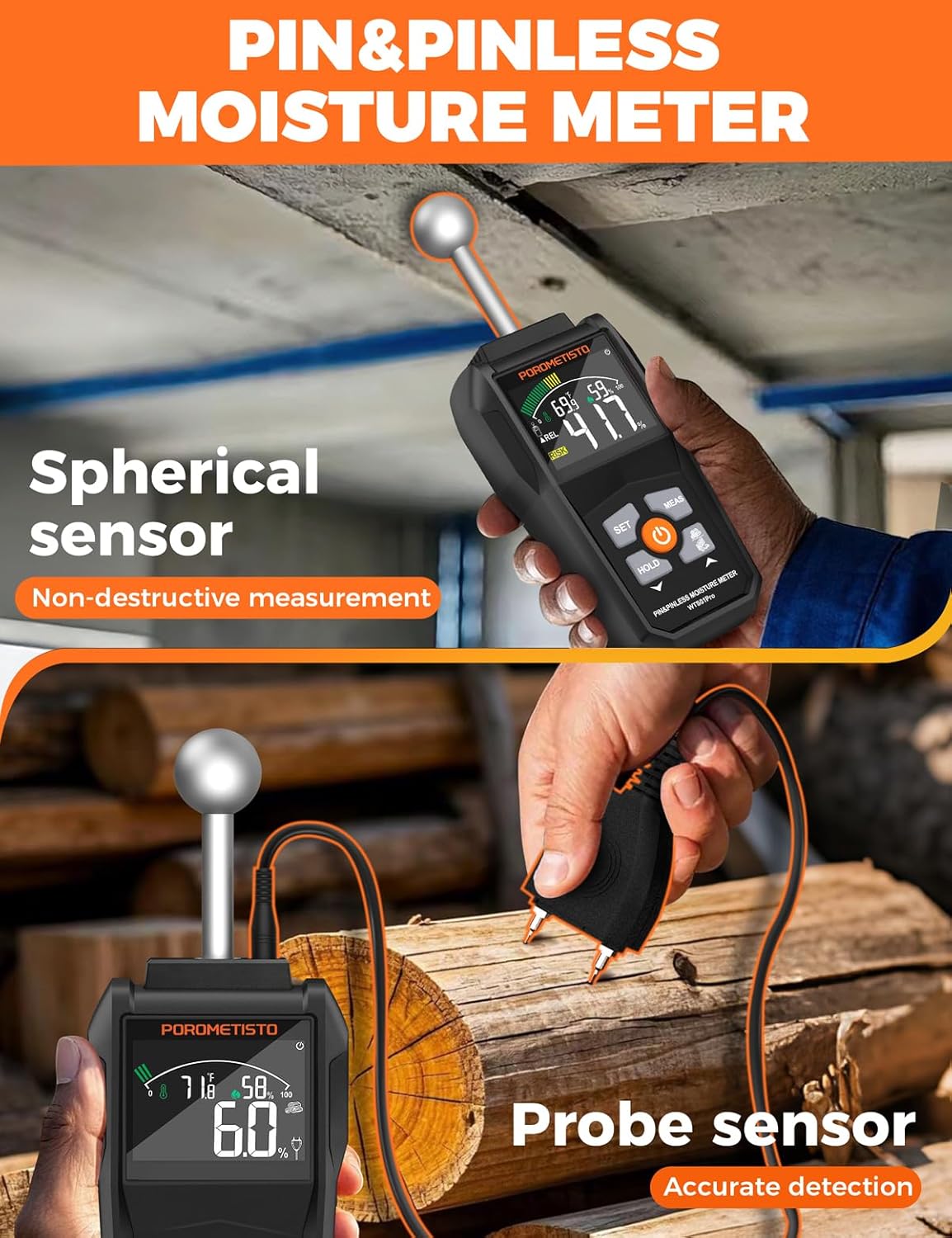
The WTS01Pro offers both pin and pinless measurement capabilities. The pin sensor provides precise surface readings, ideal for wood (6%-60%) and brick (1.5%-33%). The non-invasive spherical sensor scans up to 20-40 mm (0.79-1.57 in) deep, perfect for wood floors, drywall, and walls without causing damage. This versatility makes it suitable for a wide range of applications.
4.2 High-Definition Color Screen and Intuitive Display
The device features a VA color screen with a digital, analog, and prompt text triple display. This ensures clear and intuitive analysis of moisture levels. The screen includes 3-color bar graphs (Green for Dry, Yellow for Risk, Red for Wet) and audible/visual alerts for instant feedback. It also displays ambient temperature and humidity.

4.3 Self-Calibration and Customizable Alarm Settings

The WTS01Pro includes two self-calibration modes for consistent accuracy. Users can also adjust the default alarm values for 'Risk' and 'Wet' conditions (default range: Risk 2-50, Humidity 51-100) to suit specific needs. This allows for personalized alerts based on your project requirements.
4.4 Additional Functions
- Backlit Display: Improves visibility in low-light conditions.
- Reading Hold: Freezes the current reading on the screen for easy recording.
- Automatic Shutdown: Conserves battery life (cancelable).
- Low Battery Indicator: Alerts when batteries need replacement.
- Temperature Unit Switching: Toggle between Fahrenheit (°F) and Celsius (°C).
4.5 Rugged and Portable Design
Built with a shockproof rubber casing and a compact design (7.8x2.9x1.3in, 192g), the moisture detector is durable enough for job sites and easy to carry. It is designed for versatile applications including woodworking, home repair, building construction, and more.
5. Setup
5.1 Battery Installation
The device requires 3 x 1.5V AAA batteries (included). Use the provided screwdriver to open the battery compartment cover on the back of the device. Insert the batteries according to the polarity indicators (+/-). Close the cover and secure it with the screw.
5.2 Remote Probe Connection
To use the pin sensor, connect the remote probe cable to the designated port on the top of the moisture meter. Ensure the connection is secure. The remote probe allows for precise measurements in hard-to-reach areas.
6. Operating Instructions
6.1 Power On/Off
Press the Power button (orange button with power symbol) to turn the device on. Press and hold the Power button to turn it off.
6.2 Mode Selection (Pin vs. Pinless)
The device automatically detects whether the remote pin probe is connected. If connected, it operates in pin mode. If not connected, it operates in pinless mode using the spherical sensor.
6.3 Self-Calibration
The WTS01Pro features two self-calibration modes. For accurate readings, especially in pinless mode, ensure the device is calibrated. Refer to the on-screen prompts or the detailed user manual for specific calibration steps. Typically, this involves holding the device in the air away from any objects and pressing a calibration button (often the 'MEAS' button or a combination with 'SET').
6.4 Taking Measurements
6.4.1 Pinless Mode (Spherical Sensor)

Ensure the remote probe is disconnected. Place the spherical sensor flat against the surface of the material you wish to measure. The device will display the relative moisture content (0-100 REL). This mode is non-destructive and ideal for quick scans of large areas like walls, floors, and ceilings. The measurement depth is approximately 20-40mm (0.79-1.57 inches).
6.4.2 Pin Mode (Remote Probe)
Connect the remote probe. Gently push the pins into the material until they are fully inserted. The device will display the percentage of moisture content. This mode provides precise readings for specific points, particularly useful for wood (6%-60%) and brick (1.5%-33%).
6.5 Understanding Readings and Display

The VA color screen provides a comprehensive display:
- Numerical Display: Shows the exact moisture percentage or relative value.
- Color Bar Graph: Visually indicates moisture levels:
- Green: Dry (0.0-29.9)
- Yellow: Risk (30.0-59.9)
- Red: Wet (60.0-100.0)
- Ambient Temperature: Displays current room temperature in °F or °C.
- Ambient Humidity: Shows current relative humidity (RH%).
- Icons: Indicate battery status, hold function, and selected units.
6.6 Setting Alarm Values (Spherical Sensor Only)
Press the SET button to enter the alarm setting mode. Use the MEAS and HOLD buttons to adjust the thresholds for 'Risk' and 'Wet' categories. Confirm your settings by pressing SET again. The device will provide audible and visual alerts when readings exceed these set values.
6.7 Data Hold Function
Press the HOLD button to freeze the current reading on the display. Press HOLD again to release the function and resume live measurements.
6.8 Temperature Unit Switching
To switch between Fahrenheit (°F) and Celsius (°C) for ambient temperature display, refer to the user manual for the specific button combination, usually involving a long press of a specific button or a combination with the 'SET' button.
6.9 Automatic Shutdown
The device is equipped with an automatic shutdown feature to conserve battery life. If no operation is performed for a certain period (e.g., 5 minutes), the device will automatically power off. This feature can typically be disabled or enabled through the settings menu, as described in the full user manual.
6.10 Important Measurement Considerations

When using the pinless spherical sensor, it is crucial to avoid contact with metal objects or areas with hidden wiring/pipes. Metal interference can lead to inaccurate or false high readings. Always ensure the measurement area is clear of such obstructions for reliable results.
7. Maintenance
- Cleaning: Wipe the device with a soft, dry cloth. Do not use abrasive cleaners or solvents.
- Storage: Store the moisture meter in its provided cloth case in a cool, dry place, away from direct sunlight and extreme temperatures.
- Battery Care: If the device will not be used for an extended period, remove the batteries to prevent leakage and corrosion.
- Probe Care: Keep the pin probe clean and free of debris. Ensure the protective cap is on when not in use to prevent damage and accidental injury.
8. Troubleshooting
| Problem | Possible Cause | Solution |
|---|---|---|
| Device does not power on. | Low or dead batteries; incorrect battery installation. | Replace batteries with new 1.5V AAA batteries. Ensure correct polarity. |
| Inaccurate readings. | Not calibrated; metal interference (pinless mode); pins not fully inserted (pin mode); sensor dirty. | Perform self-calibration. Avoid metal objects. Ensure pins are fully inserted. Clean sensors. |
| Display is dim or flickering. | Low battery. | Replace batteries. |
| No audible alarm. | Alarm setting is off or volume is low. | Check alarm settings and ensure it is enabled and volume is adequate. |
9. Specifications
- Model: WTS01Pro
- Measurement Modes: Pin & Pinless
- Pin Sensor Range: Wood: 6%-60%, Brick: 1.5%-33%
- Pinless Sensor Depth: 20-40 mm (0.79-1.57 in)
- Pinless Sensor Range: 0-100 REL (Relative)
- Ambient Temperature Range: 14-140°F (-10-60°C)
- Ambient Humidity Range: 0-100% RH
- Display: VA Color Screen with 3-color bar graphs
- Power Source: 3 x 1.5V AAA Batteries
- Product Dimensions: 7.87 x 2.91 x 1.3 inches
- Item Weight: 14.2 ounces
- Included Components: Remote probe, 3x1.5V batteries, screwdriver, storage cloth case, user manual
10. Warranty and Support
POROMETISTO stands behind the quality of its products. For warranty information, technical support, or any inquiries regarding your WTS01Pro Moisture Meter, please refer to the contact information provided in the original product packaging or visit the official POROMETISTO website. Please retain your purchase receipt for warranty claims.


