Introduction
Thank you for choosing the EUQQ Open Ear Bluetooth 5.4 Earbuds. This manual provides detailed instructions on how to set up, operate, and maintain your new wireless headphones. Designed for comfort and situational awareness, these earbuds feature an open-ear design, Bluetooth 5.4 connectivity, and extended playtime, making them ideal for various activities including sports, business, and entertainment.
Please read this manual thoroughly before using the product to ensure proper function and to maximize your listening experience.
What's in the Box
Upon opening the package, please verify that all the following components are included:
- 2 x EUQQ Open Ear Bluetooth Headphones (Left and Right)
- 1 x Charging Case
- 1 x USB Type-C Charging Cable
- 1 x User Manual (this document)
- 1 x Product Box

Image: The EUQQ Open Ear Bluetooth Earbuds displayed within their charging case, showcasing the earbuds and the case's LED display.

Image: A visual representation of the complete package contents, including the earbuds, charging case, USB-C cable, and user manual, laid out next to the product box.
Product Overview
Key Features:
- Open-Ear Design: Allows awareness of surroundings while listening.
- Bluetooth 5.4: Ensures stable and fast wireless connection.
- Extended Playtime: Up to 10 hours on a single charge, 50 hours total with charging case.
- LED Digital Display: Shows battery levels for both earbuds and charging case.
- Lightweight & Ergonomic: Each earbud weighs approximately 0.26 ounces (7.5g) with a memory-flex titanium alloy frame and skin-friendly silicone for comfortable, secure fit.
- IPX7 Waterproof: Resistant to sweat and rain, suitable for workouts.
- 14.2mm Dynamic Drivers: Delivers clear and impactful audio.
- Touch Controls: Intuitive control for music playback, calls, and voice assistant.
Components and Controls:
Familiarize yourself with the various parts of your earbuds and their functions.

Image: An exploded view highlighting the 14.2mm dynamic drivers responsible for the earbud's audio performance.

Image: A detailed view of the earbud's internal structure, emphasizing the advanced Bluetooth 5.4 chip for enhanced connectivity.

Image: A comprehensive guide to the touch controls on the earbuds, illustrating single taps, double taps, and long presses for various functions like volume, track control, calls, and voice assistant.
The touch control area is located on the outer surface of each earbud. Refer to the diagram above for specific functions.
Setup
1. Charging the Earbuds and Case:
Before first use, fully charge the earbuds and the charging case.
- Place the earbuds into the charging case. Ensure they are correctly seated; the LED indicators on the earbuds will light up.
- Connect the USB Type-C charging cable to the charging port on the case and the other end to a USB power source (e.g., wall adapter, computer USB port).
- The LED digital display on the charging case will show the battery percentage. When fully charged, it will display "100".
- A full charge for the case takes approximately 1 hour. The earbuds will charge automatically when placed in the powered case.

Image: The charging case with its LED display indicating battery levels, alongside the earbuds, illustrating the charging process and total playtime capabilities.
2. Pairing with a Bluetooth Device:
The earbuds will automatically enter pairing mode when taken out of the charging case.
- Open the charging case and remove both earbuds. They will automatically power on and attempt to connect to each other.
- On your Bluetooth-enabled device (smartphone, tablet, computer), go to the Bluetooth settings.
- Search for available devices. You should see "YYK-Q16S" or a similar name in the list.
- Select "YYK-Q16S" to connect. Once connected, you will hear a confirmation tone, and the earbuds' indicator lights will turn off or flash slowly.
- If pairing fails, place the earbuds back into the case, close the lid, wait a few seconds, and then repeat the steps.
The earbuds will automatically reconnect to the last paired device when removed from the case, if the device's Bluetooth is enabled and within range.
Wearing Instructions
For optimal comfort and sound quality, follow these steps to properly wear your EUQQ Open Ear Earbuds:
- Step 1: Take out earphones. Carefully remove both earbuds from the charging case.
- Step 2: Hang the end of the earphones on the ear bone. Position the ear hook over the top of your ear, resting the main body of the earbud near your ear canal opening.
- Step 3: Turn the earphones and slide it behind the ear. Gently rotate the earbud to ensure the speaker is aligned with your ear canal, and the ear hook sits comfortably behind your ear.
- Step 4: Adjust ear hook, wear and pull down ear hook for secure fit. Make minor adjustments to the ear hook to ensure a snug and secure fit that remains comfortable during movement.
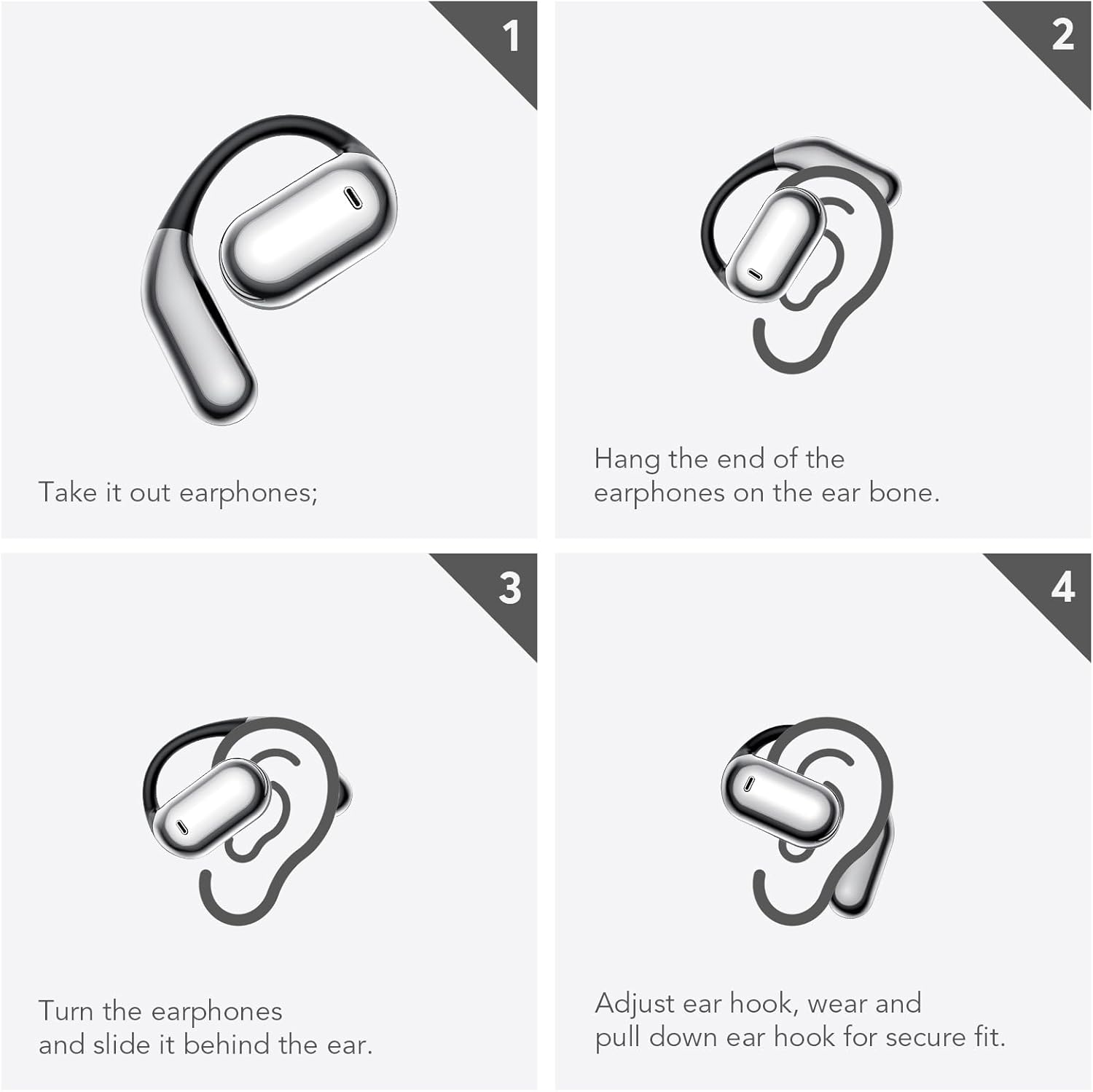
Image: A visual four-step guide demonstrating the correct method for wearing the open-ear earbuds, from taking them out to securing them comfortably on the ear.

Image: A person wearing the EUQQ open-ear earbuds, illustrating their ergonomic design and comfortable fit for extended use.
Operating Instructions
Power On/Off:
- Power On: The earbuds automatically power on when removed from the charging case.
- Power Off: Place the earbuds back into the charging case and close the lid. They will automatically power off and begin charging.
Music Playback:
- Play/Pause: Single tap either the Left (L) or Right (R) earbud.
- Volume +: Double tap the Right (R) earbud.
- Volume -: Double tap the Left (L) earbud.
- Next Song: Long press the Right (R) earbud for 1 second.
- Previous Song: Long press the Left (L) earbud for 1 second.
Call Management:
- Answer Call: Single tap either the Left (L) or Right (R) earbud.
- Reject Call/Hang Up: Long press either the Left (L) or Right (R) earbud for 1 second.
Voice Assistant:
- Activate Siri/Voice Assistant: Triple tap either the Left (L) or Right (R) earbud.
Maintenance
Proper maintenance ensures the longevity and optimal performance of your earbuds.
- Cleaning: Use a soft, dry, lint-free cloth to clean the earbuds and charging case. Do not use abrasive cleaners, alcohol, or chemical solvents.
- Water Exposure: While the earbuds are IPX7 waterproof, meaning they can withstand sweat and light rain, they are not designed for swimming or submersion. Ensure they are completely dry before placing them back in the charging case to prevent damage.
- Storage: When not in use, store the earbuds in their charging case to protect them from dust and physical damage. Store in a cool, dry place away from extreme temperatures.
- Charging: Use only the provided USB Type-C cable or a certified equivalent for charging. Avoid using damaged cables or chargers.
- Battery Care: To preserve battery life, avoid fully discharging the earbuds and case frequently. Charge them regularly, even if not in constant use.
Troubleshooting
If you encounter issues with your EUQQ Open Ear Earbuds, please refer to the following common problems and solutions:
| Problem | Possible Cause | Solution |
|---|---|---|
| Earbuds not powering on. | Low battery. | Place earbuds in the charging case and ensure the case is charged. Charge the case if necessary. |
| Earbuds not pairing with device. | Bluetooth is off on device; earbuds not in pairing mode; interference. |
|
| Only one earbud has sound. | Earbuds not connected to each other; low battery on one earbud. |
|
| Poor sound quality or intermittent connection. | Out of Bluetooth range; interference; low battery. |
|
| Touch controls not responding. | Incorrect touch gesture; temporary software glitch. |
|
Factory Reset:
If issues persist, a factory reset may resolve them. This will clear all pairing information.
- Disconnect the earbuds from your phone's Bluetooth settings (forget the device).
- Place both earbuds into the charging case.
- Quickly press the touch button on both earbuds 5 times simultaneously.
- The earbuds will reset. Remove them from the case and attempt to pair again.
Specifications
| Feature | Detail |
|---|---|
| Model Name | Q16S-05 (YYK-Q16S-Black) |
| Brand | EUQQ |
| Connectivity Technology | Wireless (Bluetooth 5.4) |
| Bluetooth Range | Up to 15 meters (49 feet) |
| Ear Placement | Open Ear |
| Form Factor | Over Ear (with ear hooks) |
| Audio Driver Type | Bone Conduction Driver (14.2mm Dynamic Speaker) |
| Battery Life (Earbuds) | Up to 10 Hours (single charge) |
| Total Playtime (with Case) | Up to 50 Hours |
| Charging Time | Approx. 1 Hour (for charging case) |
| Charging Port | USB Type-C |
| Water Resistance Level | IPX7 Waterproof |
| Control Type | Touch Control |
| Item Weight (each earbud) | Approx. 0.26 ounces (7.5g) |
| Frequency Range | 20Hz - 20,000Hz |
| Material | Plastic, Skin-friendly Silicone, Titanium Alloy |
Warranty and Support
For warranty information and customer support, please refer to the contact details provided on the product packaging or the official EUQQ website. Keep your purchase receipt as proof of purchase for any warranty claims.
If you experience any issues not covered in this manual, or require further assistance, please contact EUQQ customer service.
Manufacturer: EUQQ
ASIN: B0DXVKZB99
UPC: 713129397530


