
Introduction
This manual provides detailed instructions for the safe and efficient operation, maintenance, and troubleshooting of your Mifasol LCD-MH-J18 Humidifier. Please read this manual thoroughly before using the appliance and retain it for future reference.
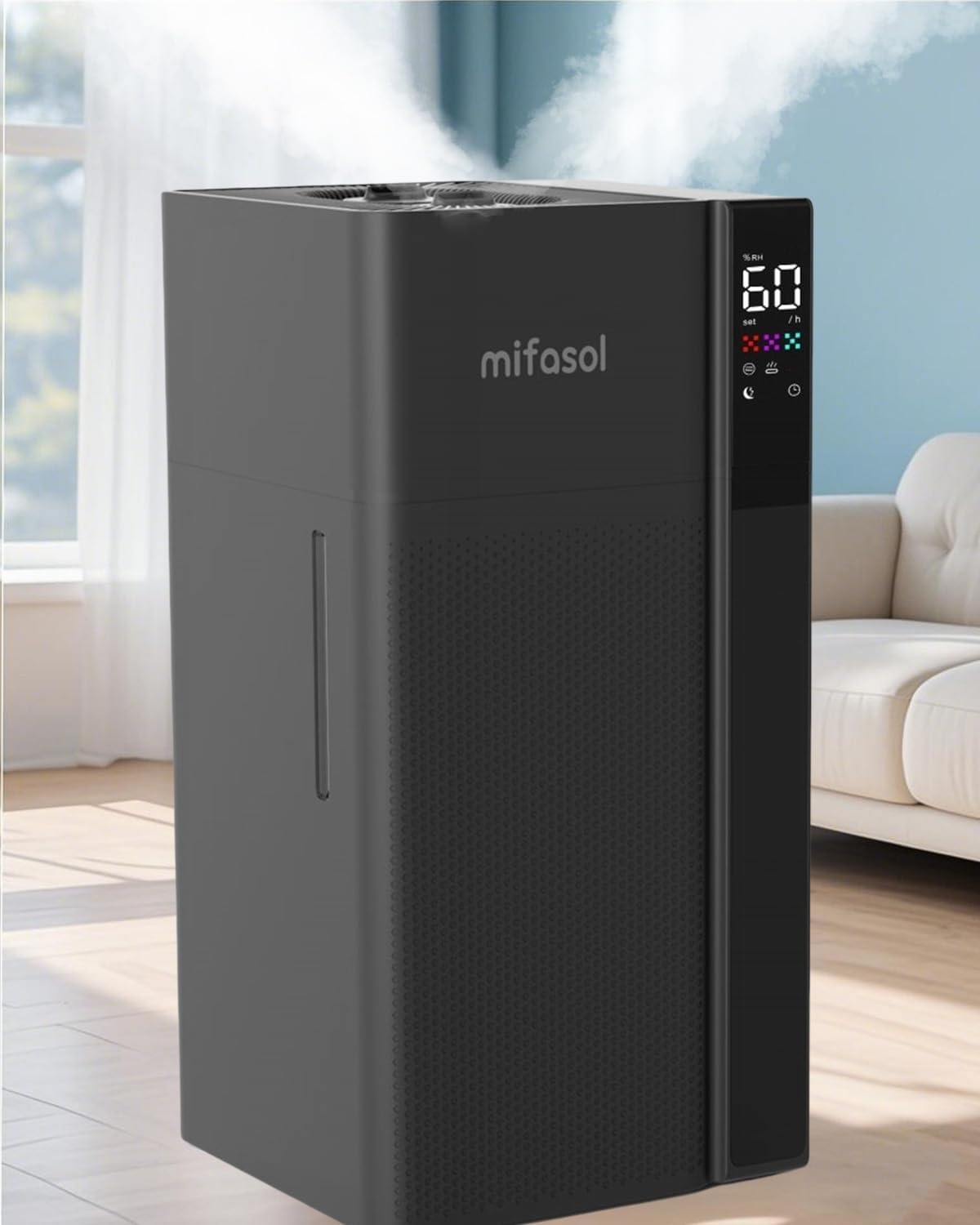
Figure 1: Mifasol LCD-MH-J18 Humidifier, a large capacity unit designed for extensive coverage.
Setup
1. Unboxing and Initial Assembly
Carefully remove all components from the packaging. Ensure all accessories are present before discarding packaging materials. The main body, water tank, user manual, remote control, and cleaning cloth should be included.
Video 1: J18 Usage Instructions. This video demonstrates the unboxing and initial assembly steps for the humidifier.
2. Water Pump Connection
Before first use, locate the water pump and remove any packaging material. Ensure the hose and inlet port are not cracked or damaged. Connect both ends of the hose to the water pump's inlet and the main unit's inlet, ensuring they are securely attached up to the root.
Video 2: Troubleshooting Weak Mist or Even No Mist LCD-MH-J18. This video includes steps for checking the water pump connection, which is crucial for proper setup.
3. Filling the Water Tank
The humidifier features a top-fill design for convenience. You can add water directly to the tank by removing the top cover. Alternatively, the main body can be removed to fill the tank separately. Do not exceed the maximum water line (20L/5.3Gal). Use tap water below 104°F (40°C).

Figure 2: The humidifier's top-fill design allows for easy water replenishment.
4. Connecting to Power
Connect the humidifier to a power supply. Ensure the rated voltage of your power outlet matches the product's voltage (120 Volts). After plugging in, mist will typically appear after 15-30 seconds as the water pump transports water from the tank to the upper head.
Operation
The humidifier can be operated using the LED touch panel or the included remote control. Insert 2 AAA batteries (purchased separately) into the remote control before use.
Video 3: How to Use J18 Humidifier. This video demonstrates the basic operational functions of the humidifier.
1. Power On/Off
Press the "Power" button on the control panel or remote to turn the humidifier on or off.
2. Mist Modes and Levels
The humidifier offers both cool and warm mist options. Select your preferred mist type. There are 3 adjustable mist levels: Low, Medium, and High. The dual mist outlets and 360° rotatable nozzle allow for customizable mist dispersion.
- Cool Mist: Provides refreshing humidity without affecting room temperature.
- Warm Mist: Creates a cozy atmosphere and can reach 104°F in approximately 5 minutes for faster humidification.

Figure 3: The humidifier offers three distinct mist output levels for varied needs.
3. Humidity Settings
Adjust the desired humidity level using the humidistat function. The humidifier maintains a constant humidity range of 45%–90% and will automatically shut off once the target humidity is reached.
4. Timer Function
Set the operating time from 1 to 24 hours using the timer function. The humidifier will automatically turn off after the set duration.
5. Sleep Mode
Activate sleep mode for quiet operation and dimmed display lights, ideal for overnight use.
Maintenance
Regular cleaning and maintenance are essential for optimal performance and longevity of your humidifier. Always unplug the humidifier before cleaning or performing any maintenance.
1. General Cleaning
When not in use for an extended period (more than 24 hours), pour out any remaining water from the tank and sink to prevent mold or impurities. Use a cleaning brush or soft cloth to dry out all surfaces.
Video 4: How to Clean the Humidifier LCD-MH-J18. This video provides a comprehensive guide to cleaning your humidifier.
2. Descaling the Atomizer and Sink
To remove mineral buildup (scale) from the atomizer and water sink, pour a solution of distilled white vinegar or citric acid into the sink and let it soak for 15 minutes. Use the included cleaning brush to gently scrub all parts. Rinse thoroughly with clean water, ensuring no water enters the air outlet. Wipe the atomizer gently with a cotton swab if it becomes dirty or mist output weakens.
3. Water Pump Replacement
If the water pipe is dirty or damaged, it may need replacement. Unscrew the knob to remove the head, then pull out the two side hoses connected to the water pump. Install the new water pump, ensuring proper alignment of contacts and slots. Refer to the troubleshooting video for visual guidance on pump connections.
Troubleshooting
If you encounter issues with your humidifier, please refer to the following common solutions:
1. Weak Mist or No Mist Output
If the humidifier produces weak mist or no mist, check the following:
- Ensure the water tank is not empty.
- Verify that the packaging bag of the water pump has been removed.
- Check the water pump hose and inlet port for cracks or damage.
- Confirm that both ends of the hose are securely connected to the water pump's inlet and the main unit's inlet up to the root.
- Remove the top cover and check the atomizer and float. Ensure the float is moving freely in the water.
- Turn on the power and check if water is pumping from the water tank to the upper head. Ensure the atomizer is working properly.
Video 5: Troubleshooting Weak Mist or Even No Mist LCD-MH-J18. This video guides you through diagnosing and resolving issues related to mist output.
2. Red Blinking Light
A red blinking light typically indicates a specific issue. Refer to the troubleshooting video for detailed steps to diagnose and resolve this warning.
Video 6: Troubleshooting Red Blinking LCD-MH-J18. This video explains how to address the red blinking indicator on your humidifier.
If the humidifier is still not functioning after following these steps, please capture the condition of the humidifier head with your mobile phone and send the video to customer service for consultation.
Specifications
| Feature | Detail |
|---|---|
| Brand | Mifasol |
| Model Name | LCD-MH-J18 |
| Special Feature | Cool Mist and Warm Humidifier |
| Color | Black |
| Floor Area Coverage | Up to 1500 Square Feet |
| Operation Mode | Ultrasonic |
| Product Dimensions | 9.85"D x 9.45"W x 19.98"H |
| Item Weight | 3 Pounds |
| Room Type | Bedroom, Living Room, Nursery, Office, Yoga Room |
| Included Components | Humidifier |
| Voltage | 120 Volts |
| Wattage | 50 watts |
| Shape | Rectangular |
| Capacity | 20 Liters (5.3 Gallons) |
Warranty & Support
Your Mifasol Humidifier is backed by a 30-day replacement guarantee and a 1-year assurance. We stand firmly behind our products and are committed to your satisfaction.
For any questions, concerns, or technical assistance, please contact our dedicated customer service team at info@mifasol.vip.