
1. Introduction
The AdaLov CPE366 Wireless Bridge is designed to provide long-range, high-speed wireless connectivity for various outdoor applications. This manual provides detailed instructions for the installation, operation, and maintenance of your CPE366 devices, ensuring optimal performance and reliability.
1.1 Package Contents
Before proceeding with installation, please verify that all items listed below are present in your package:

Figure 1: Package Contents. Includes two wireless bridges, two adjustable mounting brackets, two PoE adapters, metal cable ties, network cables, and a user manual.
| Item | Quantity |
|---|---|
| Wireless Bridge (CPE366) | 2 |
| Adjustable Mounting Bracket | 2 |
| PoE Adapter | 2 |
| Metal Cable Ties | Included |
| Network Cable | 2 |
| User Manual | 1 |
| Screws | 8 |
| Tube Clamp for Bridge | 2 |
| Tube Clamp for Bracket | 4 |
2. Safety Information
Please read and follow these safety guidelines to prevent damage to the device or injury to yourself:
- Ensure proper grounding for all electrical connections.
- Do not open the device casing; refer all servicing to qualified personnel.
- Install the device in a location that provides clear line of sight between units for optimal performance.
- Use only the provided PoE adapters and network cables.
- Mount the devices securely to prevent them from falling, especially in windy conditions.
3. Setup and Installation
This section guides you through the physical installation and initial configuration of the CPE366 Wireless Bridge.
3.1 Device Overview

Figure 2: Wireless Bridge Details. Shows the Reset Button, A-B Button, DC Power port, LAN (100Mbps) port, LAN (1000Mbps) port, Digital Tube display, and B Light indicator.
3.2 Mounting the Devices
The CPE366 comes with adjustable mounting brackets for flexible installation on walls or poles. Ensure the devices are mounted securely and have a clear line of sight to each other for optimal signal transmission.

Figure 3: Versatile Mount. The bracket features anti-slip design, a waterproof cap, and 150-degree adjustability.
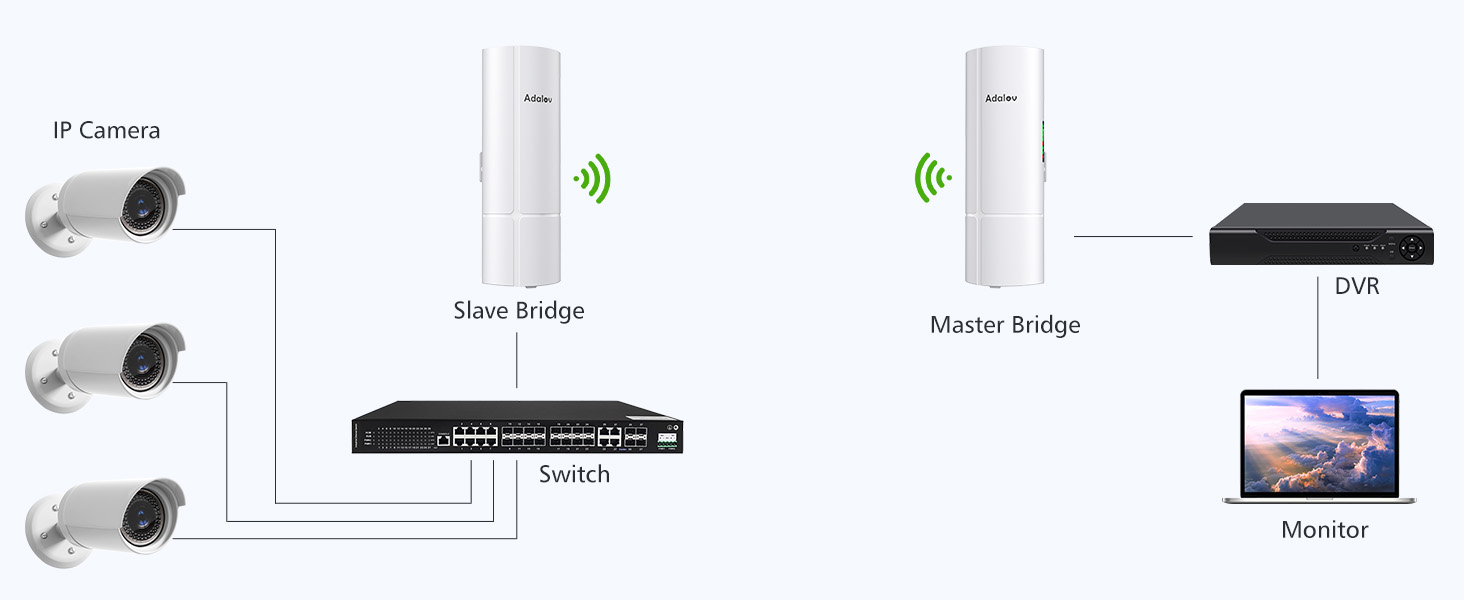
Figure 4: Bracket Mounts and Wide Application. Shows various mounting scenarios for the wireless bridge.
3.3 Wiring and Power
Connect the CPE366 devices using the provided PoE adapters and network cables. The PoE adapter supplies power and data over a single Ethernet cable.
- Connect one end of a network cable to the LAN port of the CPE366.
- Connect the other end of the network cable to the PoE port of the PoE adapter.
- Connect a second network cable from the LAN port of the PoE adapter to your router, switch, or computer.
- Plug the PoE adapter into a power outlet.
3.4 One-Key Pairing
The CPE366 supports one-key pairing for easy setup of a wireless link between two devices.

Figure 5: One-Key Pairing. Switch the slider to 'A' for the Master Bridge and 'B' for the Slave Bridge. Ensure both bridges are placed face-to-face during pairing.
3.5 Connection Diagrams
The CPE366 supports various network extension scenarios:
Point-to-Point (PTP) Connection

Figure 6: PTP Internet Extension. Connects a router to a remote network via Master and Slave CPE units.
Point-to-Multipoint (PTMP) Connection

Figure 7: PTP and PTMP Configurations. Illustrates connecting multiple IP cameras to a Master Bridge via Slave Bridges or a switch.
Security Camera System Integration
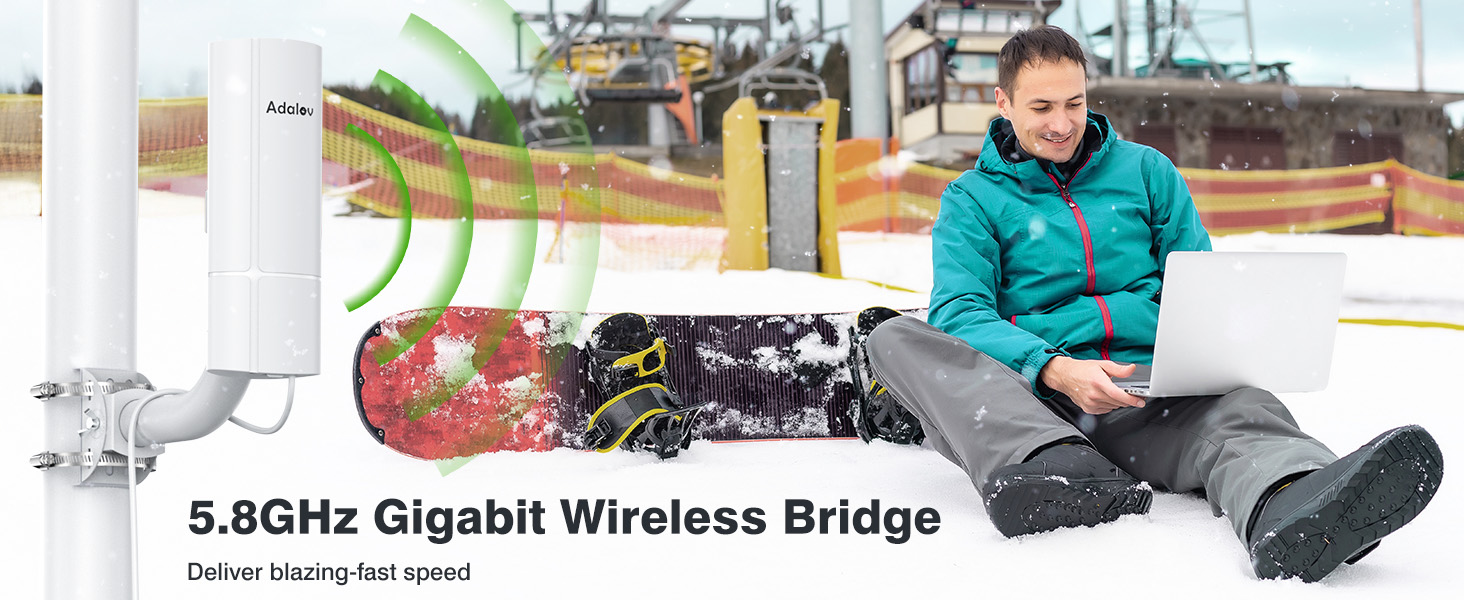
Figure 8: Security Camera Integration. Shows an IP camera connected to a Slave CPE, linking wirelessly to a Master CPE connected to an NVR/Switch.
Starlink Integration

Figure 9: Starlink Integration. Connects a Starlink satellite dish via its Ethernet adapter to a Master Wireless Bridge, extending the network to a Slave Wireless Bridge and a remote router/computer.
4. Operating Modes and Configuration
The CPE366 supports multiple operating modes to suit various networking requirements.
4.1 Supported Modes
- PTP (Point-to-Point): Establishes a direct wireless link between two CPE devices.
- PTMP (Point-to-Multipoint): A master CPE communicates with multiple slave CPE devices.
- AP (Access Point): Functions as a wireless access point.
- Bridge: Connects two wired networks wirelessly.
4.2 Network Performance
The CPE366 operates on the 5.8GHz frequency band, offering speeds up to 900Mbps and a LAN data rate of 433Mbps. It provides a long-range transmission of up to 3 kilometers (1.9 miles) with a clear line of sight, ensuring high-speed connectivity with excellent anti-interference capabilities and low latency.
5. Maintenance
The CPE366 is designed for outdoor durability and requires minimal maintenance.
5.1 Weather Resistance
The device features an IP65 waterproof and dustproof rating, making it suitable for harsh outdoor conditions. It can withstand various weather elements, including rain, snow, and dust.

Figure 10: Waterproof Design. The CPE366 is built to withstand severe weather conditions.

Figure 11: IP65 Wireless Bridge. Weather resistance ready for any weather, operating from -30°C to 65°C.
5.2 Cleaning
Periodically inspect the device for any accumulation of dirt or debris. Clean the exterior with a soft, damp cloth. Do not use harsh chemicals or abrasive cleaners.
6. Troubleshooting
If you encounter issues with your CPE366 Wireless Bridge, refer to the following troubleshooting tips:
- No Power: Ensure the PoE adapter is properly connected to a power outlet and the network cable is securely plugged into the PoE port of the adapter and the CPE.
- No Link/Poor Signal:
- Verify that there is a clear line of sight between the two CPE devices. Obstructions like trees or buildings can significantly degrade signal quality.
- Check the alignment of the devices. Slight adjustments can improve signal strength.
- Ensure the devices are correctly configured as Master and Slave.
- Power cycle both CPE devices and the connected network equipment (router/switch).
- Slow Speed:
- Confirm clear line of sight.
- Check for potential sources of interference in the 5.8GHz band.
- Ensure all network cables are Cat5e or higher and are in good condition.
- Network Not Accessible: Verify that the network settings (IP addresses, subnet masks) are correctly configured for your network environment.
7. Specifications
Detailed technical specifications for the AdaLov CPE366 Wireless Bridge:
| Feature | Specification |
|---|---|
| Model Number | CPE366 |
| Brand | AdaLov |
| Connectivity Protocol | Wi-Fi, Ethernet |
| Wireless Frequency | 5.8GHz |
| Max Wireless Speed | Up to 900Mbps |
| LAN Data Rate | 433Mbps |
| LAN Ports | 100Mbps, 1000Mbps (Gigabit) |
| Antenna | 16dBi High-Gain |
| Coverage/Range | Up to 3KM (1.9 miles) Line of Sight |
| Waterproof Rating | IP65 |
| Operating Temperature | -30°C to 65°C |
| Power Supply | 12V DC (not included), 24V PoE (adapters included) |
| Product Dimensions | 8.5 x 6 x 24.5 cm |
| Weight | 2.3 kg |
8. Warranty and Support
For warranty information and technical support, please refer to the documentation included with your product or contact AdaLov customer service through their official channels. Keep your purchase receipt for warranty claims.


