1. Introduction
This manual provides detailed instructions for the installation, operation, and maintenance of your YGZGting DC12V/24V 5050 SMD RGB LED Smart Pixel Strip Light. Please read this manual thoroughly before use to ensure proper function and safety. This product is designed for dynamic, full-color lighting applications, featuring individual pixel control for advanced lighting effects.
2. Safety Information
- Power Supply: Ensure the power supply matches the strip's voltage (DC 12V or DC 24V) and provides sufficient current. Using an incorrect voltage or an underpowered supply can damage the strip and pose a fire hazard.
- Installation: Disconnect power before installation or maintenance. Avoid bending the strip sharply, as this can damage the circuit board and LEDs.
- Environment: The IP20 rated strips are not waterproof and should only be used in dry indoor environments. IP67 rated strips are suitable for outdoor use but should not be submerged in water.
- Cutting: Only cut the LED strip at designated cutting marks to avoid damaging the circuit.
- Heat: Ensure adequate ventilation around the LED strip to prevent overheating, especially when operating at full brightness for extended periods.
3. Product Overview
The YGZGting Smart Pixel LED Strip Light features high-quality 5050 SMD RGB LEDs with integrated WS2811 or UCS2903 ICs, allowing for individual pixel control and a wide range of dynamic lighting effects. Each meter contains 120 LEDs, arranged in double rows for enhanced brightness and density.
Key Features:
- Input Voltage: DC 12V or DC 24V options available.
- LED Type: 5050 SMD RGB LEDs.
- IC Type: WS2811 or UCS2903 integrated circuits for individual pixel control.
- LED Quantity: 120 LEDs per meter (double rows), 600 LEDs per 5-meter roll.
- Color Depth: 256 grayscale levels per color, 24-bit color for full RGB spectrum.
- PCB Width: 20mm wide white FPC (Flexible Printed Circuit) for robust installation.
- Protection Rate: Available in IP20 (non-waterproof) and IP67 (silicone tube waterproof) versions.
Product Components:
The product package typically includes:
- 1 x YGZGting Smart Pixel LED Strip Light (5 meters roll)
- Connector cable (pre-attached to the strip)

Image: Detail of the 12V LED strip, highlighting the 5050 SMD RGB LEDs and the integrated control ICs, along with connection points for power and data.

Image: Detail of the 24V LED strip, showing similar components to the 12V version but with '24V' markings for power input.

Image: Example of the LED strip displaying primary RGB colors, demonstrating its full-color capability.
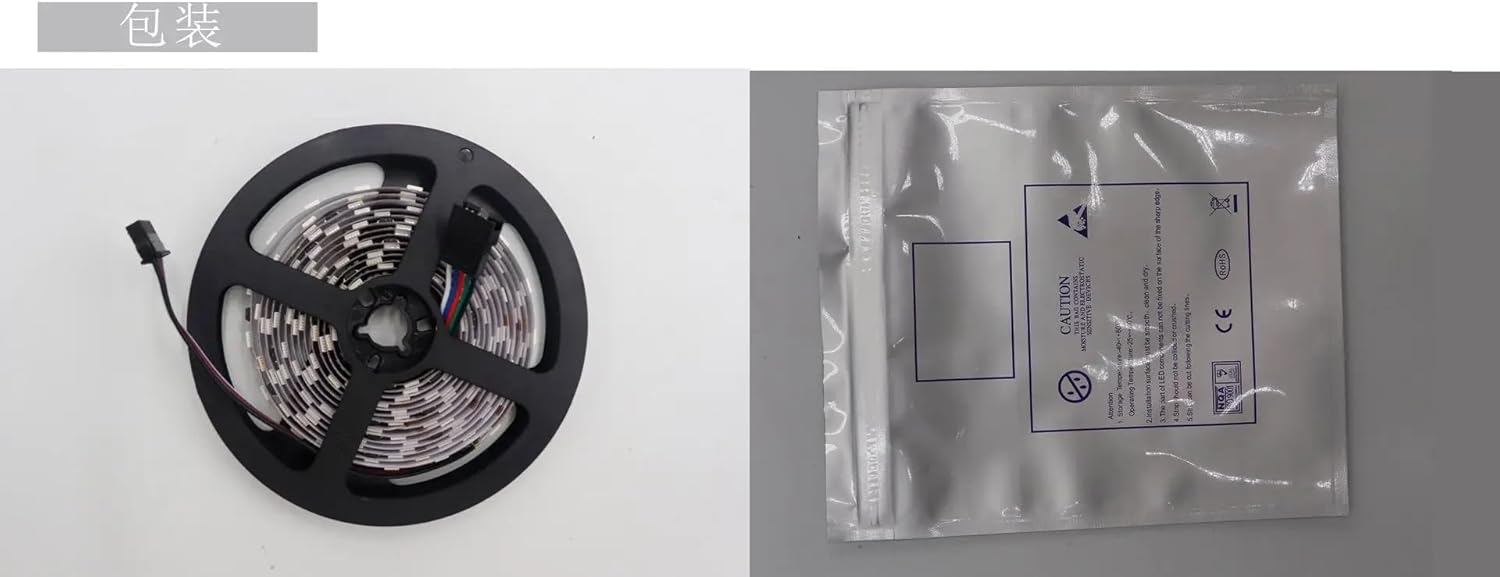
Image: The LED strip as packaged, showing a coiled roll with its connector and a protective anti-static bag.
4. Specifications
| Attribute | Detail |
|---|---|
| Brand | YGZGting |
| Model Name | JTSF9648 |
| Input Voltage | DC 12V / DC 24V |
| Power | 24 watts/meter, 120 watts/roll (5 meters) |
| LED Resources | UCS2903 / WS2811 IC; 5050 Surface Mount Lamp |
| LED Quantity | 120 LEDs/meter, 600 LEDs/roll (5 meters) |
| IC Type | UCS2903 / WS2811 Integrated Circuit |
| Number of ICs (12V) | 20 pixels (1 IC controls 6 LEDs) |
| Number of ICs (24V) | 10 pixels (1 IC controls 12 LEDs) |
| Grayscale | 256 levels |
| Digits/Color | 8 digits/color; 24 for 3 colors |
| FPC Size | Width: 20mm, Height: 2.5mm |
| FPC Color | White PCB |
| Protection Rate | IP20 (Not waterproof); IP67 (Silicone tube waterproofing) |
| Length of each roll | 5 meters |
| Color | Full color RGB, Dreamy color change |
| Manufacturer | JTSF |
| Item Weight | 50 Grams (1.76 ounces) |
| Assembly Required | No |
5. Setup Instructions
Follow these steps to properly set up your LED strip light:
- Prepare the Surface: Ensure the installation surface is clean, dry, and smooth. For IP20 strips, the adhesive backing requires a suitable surface for secure attachment.
- Determine Length and Cut (if necessary): If you need a shorter length, locate the designated cutting marks on the strip (usually indicated by a copper pad and a scissor icon). Cut only at these marks to avoid damaging the circuit.
- Connect to Controller: The LED strip requires a compatible digital LED controller (e.g., SP107E, SP110E, K-1000C, or similar controllers compatible with WS2811/UCS2903 ICs) to function. Connect the strip's data input (DIN), power (12V/24V), and ground (GND) wires to the corresponding outputs on your controller. Refer to your controller's manual for specific wiring diagrams.
- Connect to Power Supply: Connect the controller to a suitable DC 12V or DC 24V power supply. Ensure the power supply's voltage matches the LED strip's voltage and its current rating is sufficient for the total wattage of your LED strip(s).
- Test Functionality: Before final installation, briefly power on the system to verify that the strip lights up and responds to the controller.
- Mount the Strip: For IP20 strips, peel off the adhesive backing and firmly press the strip onto the prepared surface. For IP67 strips, use mounting clips (not included) or other appropriate methods to secure the strip.
6. Operating Instructions
Once installed and powered, the operation of your YGZGting Smart Pixel LED Strip Light is controlled entirely by the connected digital LED controller. Refer to your specific controller's user manual for detailed instructions on:
- Power On/Off: How to turn the strip on and off.
- Mode Selection: Changing between various pre-programmed lighting effects (e.g., static colors, fading, chasing, twinkling).
- Color Adjustment: Selecting specific colors from the full RGB spectrum.
- Brightness Control: Adjusting the intensity of the light.
- Speed Adjustment: Modifying the speed of dynamic lighting effects.
- Custom Programming: For advanced controllers, instructions on creating and uploading custom lighting sequences.
The WS2811/UCS2903 ICs enable individual pixel addressing, allowing for complex and dynamic
no relevant documents