
Oclean X Ultra S
Oclean X Ultra S Electric Toothbrush User Manual
Model: X Ultra S | Brand: Oclean
Introduction
Thank you for choosing the Oclean X Ultra S Electric Toothbrush. This smart toothbrush is designed to provide a superior brushing experience with its advanced features, including a screen display, AI voice guidance, and powerful cleaning capabilities. This manual provides essential information for the proper setup, operation, and maintenance of your new toothbrush to ensure optimal oral hygiene.

Image: The Oclean X Ultra S Electric Toothbrush, showing the handle, multiple brush heads, and the travel case.
Safety Information
Please read all safety instructions carefully before using the Oclean X Ultra S Electric Toothbrush.
- Do not use this product for purposes other than oral hygiene.
- Keep out of reach of children to prevent choking hazards from small parts.
- Do not submerge the toothbrush or charging base in water for prolonged periods, despite its IPX7 waterproof rating. The IPX7 rating ensures protection against temporary immersion, but not continuous submersion.
- Consult a dentist before use if you have severe periodontal disease or oral surgery.
- Do not modify or attempt to repair the device yourself. Contact customer support for assistance.
Package Contents
Verify that all items are present in the package:
- Oclean X Ultra S Toothbrush Handle
- 3 x Flexfit Brush Heads
- Travel Case
- Magnetic Charging Base / USB Charging Cable
- User Manual (this document)
Product Features
The Oclean X Ultra S is equipped with several innovative features for an enhanced brushing experience:
- Smart Touch Screen: Allows easy mode switching, battery status monitoring, and personalized settings for a superior brushing experience. Provides instant brushing feedback on screen, reminding users not to miss any brushing areas.
- AI Voice Reminder: With built-in AI voice guidance, it offers real-time instructions and feedback, ensuring you follow the best brushing technique and achieve optimal oral care results.
- Superior Motor: Equipped with a high-performance motor, the toothbrush delivers up to 84,000 vibrations per minute for deep cleaning, effectively removing plaque and promoting healthy gums.
- Premium Brush Head: The package comes with 3 premium brush heads designed for gentle yet effective cleaning, perfect for maintaining a healthy and bright smile.
- IPX7 Waterproof: Ensures the toothbrush is safe to use in the shower or rinse under water for easy cleaning and hygiene maintenance.

Image: Internal view of the Oclean X Ultra S motor, highlighting its Maglev 3.0 Power capable of 84,000 movements per minute for powerful cleaning.

Image: Detailed view of the FlexFit Tech Brush Head, illustrating its motion fitting and shock-absorbing rubber coating for comfortable and effective brushing.
Setup
- Initial Charge: Before first use, fully charge the toothbrush. Connect the USB charging cable to the magnetic charging base and plug it into a power source. Place the toothbrush handle onto the magnetic base. The screen will indicate charging status. A full charge typically takes approximately 3.5 hours.
- Attach Brush Head: Align the brush head with the metal shaft on the toothbrush handle and push it down firmly until it clicks into place.
- Download Oclean Care+ App (Optional): For personalized brushing reports and advanced settings, download the Oclean Care+ app from your device's app store. The toothbrush supports Bluetooth connectivity for syncing data.
Operating Instructions
- Power On/Off: Press the power button on the handle to turn the toothbrush on or off.
- Select Brushing Mode: Use the smart touchscreen to swipe and select your desired brushing mode. The toothbrush offers 5 default modes and exclusive customizable modes.
- Brushing Technique:
- Wet the brush head and apply a small amount of toothpaste.
- Place the brush head against your teeth at a slight angle towards the gumline.
- Move the brush slowly from tooth to tooth, allowing the bristles to clean each surface.
- The AI voice reminder will provide real-time guidance and feedback on pressure and coverage.
- The screen display will show brushing results, indicating areas that are not fully clean (yellow) or unclean (red).
- Smart Screen Feedback: The interactive touchscreen provides real-time information during and after brushing.
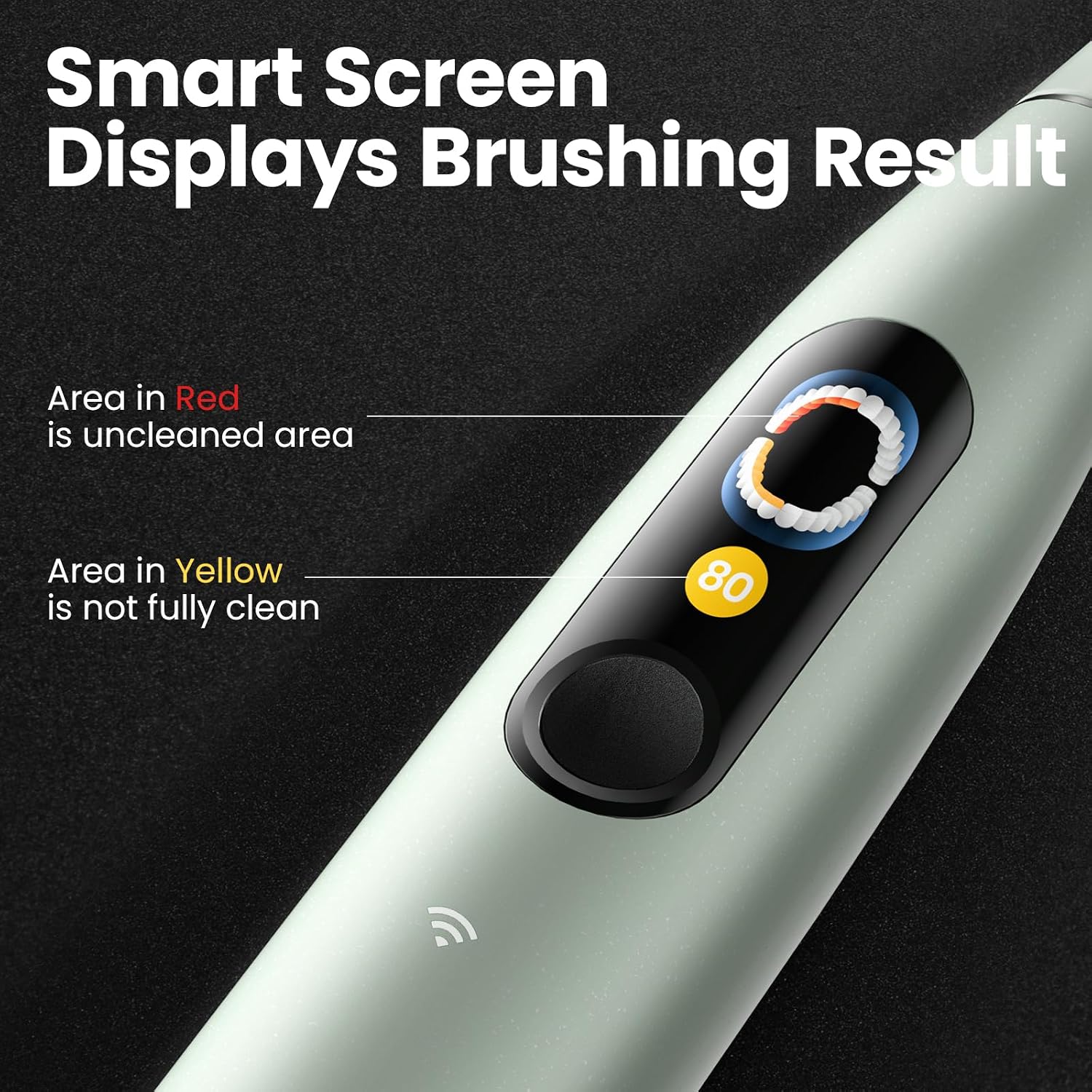
Image: The Oclean X Ultra S screen displaying brushing results, highlighting areas that are unclean (red) or not fully clean (yellow) for improved brushing habits.

Image: The interactive touchscreen of the Oclean X Ultra S, showing various display options including default modes, festival greetings, and weather forecast service.
- AI Voice Guidance: Pay attention to the voice prompts for optimal brushing. This feature helps in gum protection and developing better brushing habits.

Image: A woman using the Oclean X Ultra S toothbrush, illustrating the voice brushing guide feature for gum protection and improved brushing habits.
- Personalized Brushing Report (via App): Sync your toothbrush with the Oclean Care+ app to receive detailed brushing reports, including a 3D tooth model and expert interpretation of your brushing activity.

Image: Screenshot of the Oclean Care+ app displaying a personalized brushing report, including a 3D tooth model and expert interpretation of brushing coverage.

Image: A graphic representation of the Brushing Activity Clover, showing key metrics like brushing time, score, and number of times brushed.
Maintenance
- Cleaning the Brush Head: After each use, rinse the brush head thoroughly under running water.
- Cleaning the Handle: Wipe the toothbrush handle with a damp cloth. Do not use abrasive cleaners or harsh chemicals.
- Charging: Recharge the toothbrush when the battery indicator shows low power. Ensure the charging base is dry before placing the toothbrush on it.
- Brush Head Replacement: Replace brush heads every 3 months, or sooner if the bristles become frayed or worn.
- Storage: Store the toothbrush in a dry place when not in use. Use the provided travel case for hygienic storage during travel.
Troubleshooting
| Problem | Possible Cause | Solution |
|---|---|---|
| Toothbrush does not turn on. | Low battery; device malfunction. | Charge the toothbrush fully. If it still doesn't turn on, contact customer support. |
| Toothbrush not charging. | Improper placement on charger; faulty charger/cable; dirty charging contacts. | Ensure toothbrush is correctly seated on the magnetic base. Check if the charging cable is securely connected. Clean charging contacts on both the brush and base. Try a different USB power adapter. |
| AI voice reminder gives "too much pressure" warning frequently. | Applying excessive pressure during brushing; sensor sensitivity. | Reduce pressure while brushing. Ensure the brush head is making gentle contact with teeth and gums. If the issue persists even when not in use, contact customer support for potential sensor calibration or service. |
| Screen display is blank or unresponsive. | Low battery; software glitch. | Charge the toothbrush. Try restarting the toothbrush by holding the power button for 10 seconds. If the problem continues, contact customer support. |
Specifications
| Feature | Detail |
|---|---|
| Brand | Oclean |
| Model | X Ultra S |
| Motor Type | Maglev 3.0 Power (up to 84,000 movements/min) |
| Waterproof Rating | IPX7 |
| Display | Smart Touch Screen |
| Connectivity | Wi-Fi, Bluetooth |
| Power Source | Battery Powered |
| Age Range | Adult |
| Item Firmness Description | Medium |
| Package Dimensions | 9.06 x 5.55 x 3.5 inches |
| Item Weight | 1.81 Pounds |
| Manufacturer | Shenzhen Yunding Information Technology Co., Ltd. |
Warranty and Support
Oclean products typically come with a limited warranty. Please refer to the warranty card included in your product packaging or visit the official Oclean website for detailed warranty terms and conditions.
For technical support, troubleshooting assistance, or warranty claims, please contact Oclean Customer Service through their official website or the contact information provided in your product documentation.
Online Resources: www.oclean.com
Related documentsX Ultra S

Ask a question about this manual
Ask about setup, troubleshooting, compatibility, parts, safety, or missing instructions. Manuals+ will review the question and use this page’s manual context to help answer it.