
1. Introduction
The Esky Ultra Slim Key Finder (Model KF02E) is a radio frequency (RF) based item locator designed to help you quickly find misplaced items such as keys, wallets, TV remotes, and more. This system operates without the need for a smartphone app or Bluetooth, offering a simple and direct solution for locating your belongings. It features a compact remote transmitter and two ultra-slim receivers that emit an audible alert and flashing light when activated.

Image 1.1: The Esky Ultra Slim Key Finder system, showing the remote transmitter and two compact receivers.
2. Package Contents
Please verify that all items listed below are included in your package:
- 1 x Remote Transmitter
- 2 x Ultra-slim Receivers (one with pink button, one with blue button)
- 2 x Keyrings
- 3 x CR2032 Batteries (pre-installed)
- 2 x Hook-and-Loop Sticker Sets
- 2 x Adhesive Pads
- 1 x User Manual (this document)

Image 2.1: All components included in the Esky Key Finder package, including the remote, receivers, keyrings, stickers, and adhesive pads.
3. Product Features
- Ultra-slim Design: Receivers are approximately 0.2 inches (5.4mm) thick, suitable for various items without adding significant bulk.
- Audible Alert: Receivers emit a loud sound (75-80dB) to help locate items.
- Visual Indicator: Built-in LED light flashes on the receiver when activated, aiding visibility in low-light conditions.
- Extended Range: RF technology allows tracking up to 100 feet (30 meters) in unobstructed areas, even through walls and furniture.
- Long Battery Life: Each receiver uses a CR2032 coin battery, lasting up to one year.
- Simple Operation: One-button activation from the remote, no complex setup or app required.
- Versatile Attachment: Includes keyrings, hook-and-loop stickers, and adhesive pads for various attachment options.

Image 3.1: Visual representation of the ultra-slim design and dimensions of the Esky Key Finder receiver and remote.

Image 3.2: A receiver emitting a loud beep and flashing light, indicating its location.
4. Setup
4.1. Battery Installation (Receivers and Remote)
The Esky Key Finder comes with pre-installed batteries. If replacement is needed, follow these steps:
- For Receivers:
a. Use a small screwdriver (not included) to gently open the receiver casing.
b. Carefully remove the old CR2032 battery.
c. Insert a new CR2032 battery with the positive (+) side facing up.
d. Close the receiver casing securely. - For Remote Transmitter:
a. Locate the battery compartment on the back of the remote.
b. Use a small screwdriver (not included) to open the battery cover.
c. Remove the old CR2032 battery.
d. Insert a new CR2032 battery with the positive (+) side facing up.
e. Close the battery cover securely.

Image 4.1: Step-by-step guide for replacing the CR2032 battery in a receiver.

Image 4.2: Step-by-step guide for replacing the CR2032 battery in the remote transmitter.
4.2. Attaching Receivers to Items
Choose the most suitable method for your item:
- Keyrings: Attach a receiver to keys, backpacks, or pet collars using the provided keyrings.
- Hook-and-Loop Stickers: Use these for items you might want to remove the receiver from occasionally, such as TV remotes or small gadgets.
- Adhesive Pads: For a more permanent attachment to flat surfaces like the back of a wallet or a remote control.

Image 4.3: Illustration of using keyrings, sticker sets, and adhesive tapes to attach receivers to various items.
5. Operation
5.1. Finding Your Items
To locate a misplaced item:
- Identify which button on the remote transmitter corresponds to the color of the receiver attached to your lost item (e.g., pink button for the pink-coded receiver).
- Press the corresponding button on the remote transmitter.
- The assigned receiver will emit a loud beep and its LED light will flash, guiding you to the item's location.

Image 5.1: The remote transmitter can activate receivers up to 100 feet away, even through household obstacles.
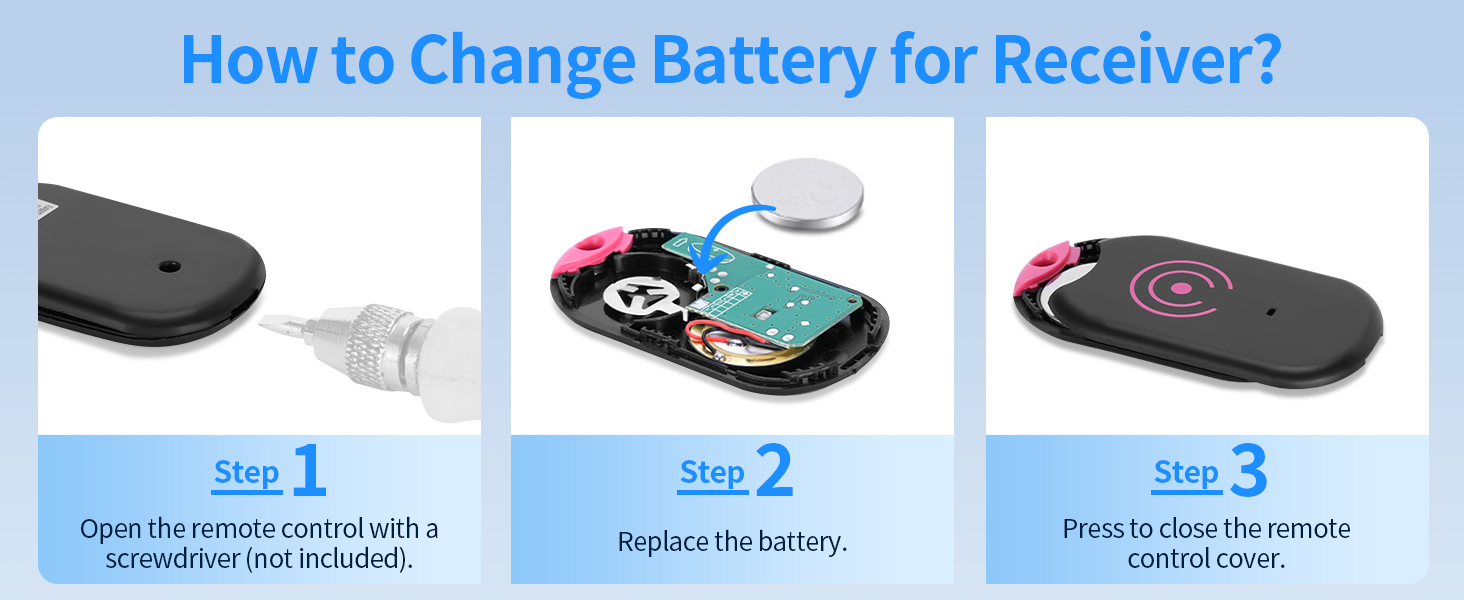
Image 5.2: Examples of items the Esky Key Finder can be attached to, including keys, remote controls, backpacks, bags, wallets, and luggage.
6. Maintenance
6.1. Battery Replacement
As detailed in Section 4.1, replace the CR2032 batteries in both the receivers and the remote transmitter when the sound becomes faint or the device fails to respond. Regular battery checks ensure optimal performance.
7. Troubleshooting
- Receiver does not beep or flash:
a. Check if the battery in the receiver needs replacement (refer to Section 4.1).
b. Ensure the remote transmitter has a working battery.
c. Verify that you are pressing the correct button on the remote for the specific receiver. - Reduced tracking range or weak signal:
a. Obstacles such as thick walls, metal objects, or large appliances can reduce the effective range. Try moving closer to the general area of the lost item.
b. Ensure both the remote and receiver have fresh batteries. - Accidental activation of receiver:
The receivers themselves do not have buttons for activation. They only respond to the remote transmitter. If a receiver is beeping unexpectedly, it may be due to interference or a faulty remote button.
8. Specifications
| Model | KF02E |
| Brand | Esky |
| Receiver Dimensions (approx.) | 1.28 x 2.27 inches (32.59 x 57.54 mm) |
| Receiver Thickness (approx.) | 0.2 inches (5.4 mm) |
| Receiver Weight (approx.) | 0.02 lbs (9 g) |
| Remote Dimensions (approx.) | 1.46 x 3.31 inches (37 x 84 mm) |
| Remote Weight (approx.) | 0.04 lbs (20 g) |
| Battery Type | CR2032 (for both remote and receivers) |
| Battery Life | Up to 1 year (receivers) |
| Sound Level | 75-80 dB |
| Tracking Range | Up to 100 ft (30 m) in unobstructed areas |
| Material | Plastic |
9. Safety Information
WARNING:
- This product contains a button or coin cell battery.
- A swallowed button or coin cell battery can cause severe internal chemical burns in as little as 2 hours and lead to death.
- Keep new and used batteries away from children.
- Seek immediate medical attention if a battery is suspected to have been swallowed or inserted into any part of the body.
- Battery type: CR2032 (or CR2025).
- Nominal voltage: DC 3V.
Always dispose of used batteries responsibly and keep them out of reach of children.
10. Warranty and Support
For warranty information or technical support, please refer to the contact details provided on the product packaging or visit the official Esky website. Keep your purchase receipt for warranty claims.


