
JYMIPA XD-1800FJ
JYMIPA Pedestal Fan User Manual
Model: XD-1800FJ
Introduction
Thank you for purchasing the JYMIPA Pedestal Fan. This manual provides important information regarding the assembly, operation, maintenance, and troubleshooting of your new fan. Please read it thoroughly before use and retain it for future reference.
This fan is designed to offer customizable breeze options with an adjustable height range of 34.5" - 49.5" and a 20° head tilt for personalized cooling. It features 3 effective speed settings and a 75° auto-oscillation range for broad coverage.
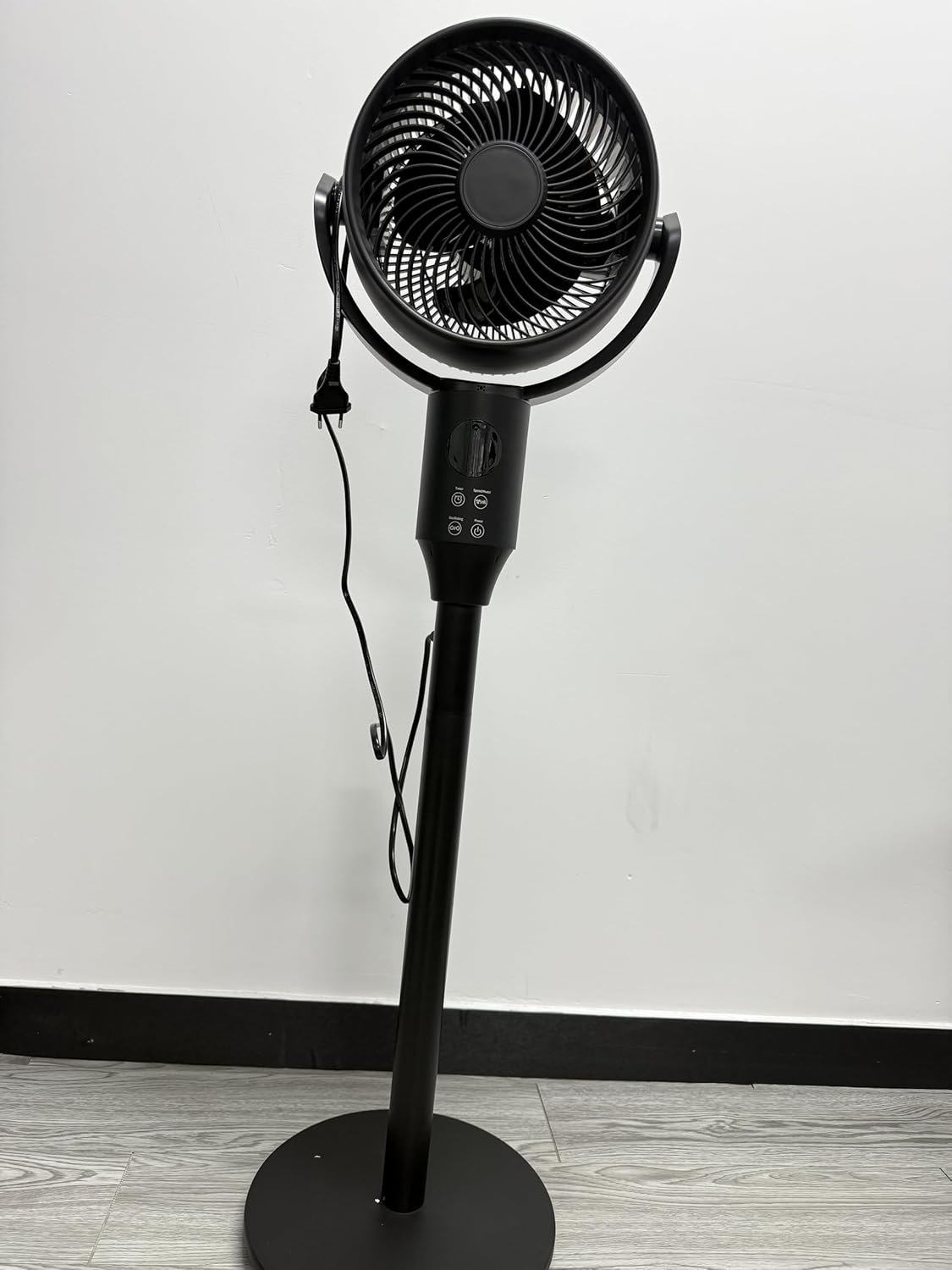
Figure 1: JYMIPA Pedestal Fan. This image shows the complete black pedestal fan with its round base, adjustable pole, and circular fan head. The power cord is visible hanging from the fan head.
Important Safety Instructions
When using electrical appliances, basic precautions should always be followed to reduce the risk of fire, electric shock, and injury to persons, including the following:
- Read all instructions before using this fan.
- Use this fan only as described in this manual. Other uses not recommended may cause fire, electric shock, or injury to persons.
- To reduce the risk of fire or electric shock, do not expose this fan to water or rain.
- Do not operate any fan with a damaged cord or plug. Discard fan or return to an authorized service facility for examination and/or repair.
- Do not run cord under carpeting. Do not cover cord with throw rugs, runners, or similar coverings. Do not route cord under furniture or appliances. Arrange cord away from traffic area and where it will not be tripped over.
- Always unplug the fan when moving it, or whenever the fan is not in use.
- Do not insert or allow foreign objects to enter any ventilation or exhaust opening as this may cause an electric shock or fire, or damage the fan.
- Do not block air openings or exhaust in any manner.
- Always place the fan on a stable, flat surface during operation to prevent the fan from overturning.
- This fan is not intended for use by persons (including children) with reduced physical, sensory or mental capabilities, or lack of experience and knowledge, unless they have been given supervision or instruction concerning use of the fan by a person responsible for their safety.
- Children should be supervised to ensure that they do not play with the fan.
Parts List
Please ensure all parts are present before assembly:
- Fan Head Assembly (includes front and rear grilles, fan blades, motor)
- Adjustable Stand Pole
- Weighted Base
- Base Fixing Screw/Nut
- Power Cord (attached to fan head assembly)
- Control Knob/Panel
Assembly Instructions
Assembly of the JYMIPA Pedestal Fan is quick and hassle-free. Follow these steps:
- Attach the Stand Pole to the Base: Place the weighted base on a flat surface. Insert the bottom end of the adjustable stand pole into the hole in the center of the base. Secure it from underneath the base using the provided fixing screw/nut, tightening firmly.
- Attach the Fan Head Assembly to the Stand Pole: Carefully place the fan head assembly onto the top of the adjustable stand pole. Ensure it clicks securely into place or is fastened with any provided screws/clips.
- Adjust Height (Optional): Loosen the height adjustment collar on the stand pole, extend or retract the pole to your desired height (between 34.5" and 49.5"), and then tighten the collar firmly to secure the height.
- Position the Power Cord: Route the power cord neatly to avoid tripping hazards.
- Plug In: Once fully assembled, plug the fan into a standard electrical outlet.
Ensure all connections are secure before operating the fan.
Operating Instructions
Your JYMIPA Pedestal Fan offers several features for optimal comfort:
- Power On/Off and Speed Settings: Locate the control knob on the fan's body. Turn the knob to select one of the 3 available speed settings (Low, Medium, High) or to turn the fan off.
- Oscillation Feature: The fan is equipped with a 75° auto-oscillation range. To activate or deactivate oscillation, press the oscillation button (often indicated by an arrow icon or "OSC") on the control panel. When activated, the fan head will sweep from side to side, distributing air across a wider area.
- Adjustable Height: To change the fan's height, loosen the height adjustment collar on the stand pole, slide the pole to the desired height (between 34.5" and 49.5"), and then tighten the collar securely.
- Head Tilt Adjustment: The fan head can be tilted up or down by 20° to direct airflow precisely where needed. Gently push or pull the fan head to adjust its vertical angle.
Maintenance and Cleaning
Regular cleaning will help maintain the fan's optimal performance and extend its lifespan. Always unplug the fan before cleaning.
- Exterior Cleaning: Use a soft, damp cloth to wipe the exterior surfaces of the fan. Do not use abrasive cleaners or solvents as they may damage the finish.
- Blade and Grille Cleaning: The fan features a removable cover and blades for effortless cleaning.
- Unplug the fan from the power outlet.
- Carefully remove the front grille by unscrewing any retaining clips or screws.
- Unscrew the blade cap and remove the fan blade.
- Wipe the fan blades and both grilles with a soft, damp cloth or a mild detergent solution. Ensure they are completely dry before reassembling.
- Reassemble the fan by attaching the blade, then the front grille, ensuring all parts are securely fastened.
- Storage: When not in use for extended periods, store the fan in a cool, dry place, preferably in its original packaging, to protect it from dust and damage.
Troubleshooting Guide
If your fan is not operating correctly, please check the following common issues before contacting support:
| Problem | Possible Cause | Solution |
|---|---|---|
| Fan does not turn on. | Not plugged in; power outlet not working; control knob is off. | Ensure the fan is securely plugged into a working outlet. Turn the control knob to a speed setting. Check your home's circuit breaker. |
| Weak airflow. | Fan blades or grilles are dirty; fan speed is too low. | Clean the fan blades and grilles as per the Maintenance section. Increase the fan speed setting. |
| Fan is noisy. | Loose parts; fan not on a stable surface; dirt accumulation. | Ensure all parts are securely assembled. Place the fan on a flat, stable surface. Clean the fan thoroughly. |
| Oscillation not working. | Oscillation feature is deactivated. | Press the oscillation button to activate the feature. |
If the problem persists after checking these points, please contact customer support.
Product Specifications
| Brand | JYMIPA |
| Model Name | Air Circulator Fan |
| Item Model Number | XD-1800FJ |
| Color | black |
| Power Source | AC/DC |
| Product Dimensions | 2.4"D x 5"W x 6"H (Note: This refers to package dimensions, actual fan height is adjustable) |
| Adjustable Height Range | 34.5" - 49.5" |
| Head Tilt Angle | 20° |
| Oscillation Range | 75° |
| Speed Settings | 3 (Low, Medium, High) |
| Mounting Type | Free Standing |
| Recommended Uses | Living Room, Office, Basement, Bedroom |
Note: Product specifications are subject to change without notice for product improvement.
Warranty Information
JYMIPA products are manufactured to the highest quality standards. This product is covered by a limited warranty against defects in materials and workmanship from the date of purchase. Please retain your proof of purchase for warranty claims. The warranty does not cover damage caused by misuse, neglect, unauthorized repair, or normal wear and tear.
Customer Support
For technical assistance, troubleshooting, or warranty inquiries, please contact JYMIPA customer support. Refer to the product packaging or the official JYMIPA website for the most current contact information.
Online Support: Visit JYMIPA Store on Amazon for FAQs and product information.
Related Documents - XD-1800FJ
 |
RacksBrax Outback Tourer Awning & Accessory Compatibility Guide Comprehensive compatibility guide for RacksBrax Outback Tourer awnings and accessories, detailing hitch and bracket requirements, and wall mount options. Includes models like the 180, 270, 270 Plus, and Shower Awning. |
 |
RACKS BRAX 30 SECOND WING AWNING Compatibility Guide Comprehensive compatibility guide for RACKS BRAX 30 SECOND WING AWNING and 30 SECOND STORMCHASER models. Details required hitches, optional brackets, and wall mount solutions for various vehicle and roof rack configurations. |
 |
PreSonus Air XD Series Active Loudspeakers Owner's Manual Official owner's manual for the PreSonus Air XD Series, covering setup, Bluetooth pairing, DSP features, and technical specifications for full-range and subwoofer models. |
 |
Domus Line X-DRIVER LED Lighting System Comprehensive guide to the Domus Line X-DRIVER system, featuring LED drivers, control modules, sensors, and kinetic switches for smart lighting solutions. Explore features, specifications, and applications for various lighting control needs. |
 |
RacksBrax Compatibility Pocket Guide for James Baroud Awnings A concise guide detailing RacksBrax compatibility for James Baroud 270 and 270 Frontier awnings, including necessary hitches, brackets, and wall mounts. |
 |
Domus Line X-DRIVER and Accessories: Technical Manual and Installation Guide Comprehensive guide to Domus Line X-DRIVER LED power supplies, IR-XD, PIR XD, IR WI-XD, PIR WI-XD, CALL ME, RC3, and KINY UL lighting control systems. Includes specifications, installation, and operation instructions. |
Ask a question about this manual
Ask about setup, troubleshooting, compatibility, parts, safety, or missing instructions. Manuals+ will review the question and use this page’s manual context to help answer it.