Introduction
The UAYESOK ET01 2.5mm Listen Only Earpiece is designed to provide clear and reliable audio reception for two-way radio communication. Featuring a balanced armature driver, this earpiece is suitable for various professional environments requiring discreet and high-quality listening, such as security, law enforcement, and amateur radio operations. This manual will guide you through the proper setup, operation, and maintenance of your ET01 earpiece.
Product Overview
Key Features
- Balanced Armature Driver: Delivers clear sound quality, typically found in professional audio equipment.
- Standard 2.5mm Audio Jack: Compatible with most speaker microphones and audio accessories featuring a 2.5mm audio output. The electroplating anti-oxidation design helps prevent poor contact.
- Compact and Lightweight Design: Incorporates balanced armature technology for a discreet and comfortable fit, ideal for surveillance.
- Enhanced Durability: Constructed with high-quality materials and a one-piece design for extended service life. The communication cable is reinforced with Kevlar filling, compliant with ROHS 2.0 standards.
- Environmental Resistance: Tested for extreme environments, tensile strength, vibration, and swing, ensuring stable reception regardless of ambient temperature and humidity.
- Comfortable Wear: Features an ear-hook and elastic coil made with precise forming technology, along with a soft, safe silicone earbud for a snug fit. Designed for all-day use without ear fatigue and can be worn on either the left or right ear.
- Sound Isolation: Provides good sound insulation, making it suitable for noisy environments and protecting hearing by reducing the need for maximum radio volume.
- Tubeless Design: Eliminates concerns about sound distortion or low volume caused by debris or condensation clogging an acoustic tube.
Package Contents
- 1x UAYESOK ET01 2.5mm Listen Only Earpiece (Black)
Setup
Follow these steps to properly set up your UAYESOK ET01 earpiece:
- Inspect Components: Unpack the earpiece and ensure all components are present and undamaged.

Image: The UAYESOK ET01 earpiece, showing the 2.5mm jack, coiled cable, clothing clip, and the ear-hook with silicone earbud.
- Connect to Device: Insert the 2.5mm audio jack of the ET01 earpiece into the corresponding 2.5mm audio output port on your speaker microphone or two-way radio. Ensure the connection is firm.

Image: A hand connecting the 2.5mm audio jack of the earpiece into the side port of a speaker microphone, demonstrating compatibility.
Video: A demonstration of connecting the ET01 earpiece to a speaker microphone, highlighting the 2.5mm jack insertion.
- Wear the Earpiece: Place the ear-hook over your ear, positioning the silicone earbud comfortably inside your ear canal. The ear-hook is designed to fit either the left or right ear. Adjust for a secure and comfortable fit.
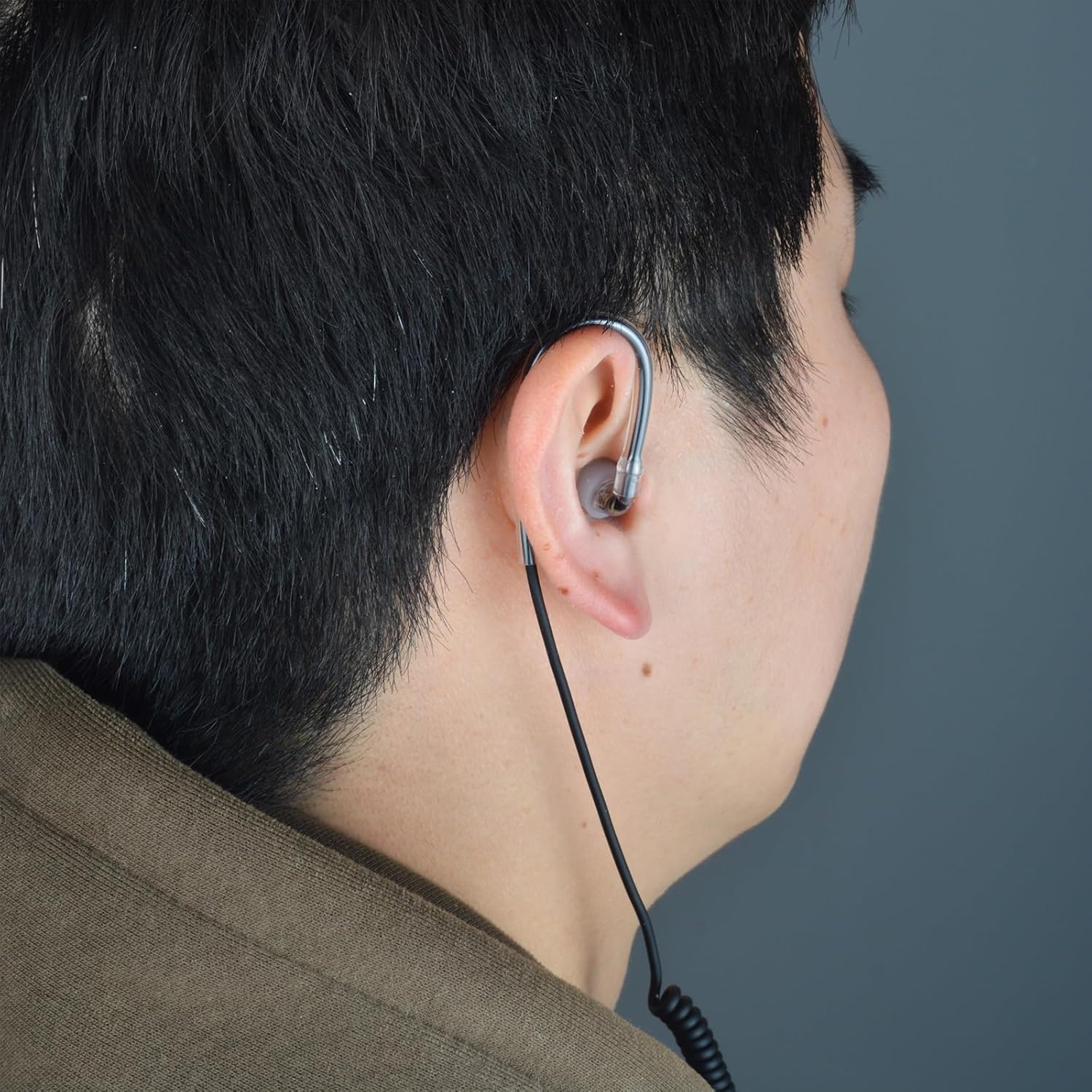
Image: A person wearing the ET01 earpiece, demonstrating the over-ear hook and in-ear placement for comfortable and secure use.
- Secure the Cable: Use the integrated clothing clip to attach the coiled cable to your collar or clothing. This helps manage the cable and reduces strain on the earpiece connection.

Image: A close-up of the black clothing clip attached to the coiled cable of the earpiece, used for securing it to clothing.
Operating Instructions
Once the earpiece is connected and comfortably worn, operate your two-way radio or speaker microphone as usual. The ET01 earpiece will transmit audio directly to your ear.
- Volume Control: Adjust the volume directly on your connected two-way radio or speaker microphone to a comfortable listening level. The ET01 earpiece itself does not have volume controls.
- Sound Clarity: The balanced armature driver is designed for clear audio. If sound quality is poor, ensure the earpiece is fully inserted into the audio jack and the earbud is properly seated in your ear.
- Earbud Rotation: The earbud assembly can rotate 360 degrees, allowing for optimal positioning and comfort.

Image: A close-up of the earpiece's earbud and ear-hook, illustrating the 360-degree rotation capability for customized fit.
Maintenance
Proper maintenance ensures the longevity and optimal performance of your ET01 earpiece.
- Cleaning: Regularly clean the silicone earbud with a soft, damp cloth. For deeper cleaning, the earbud can be carefully removed and washed with mild soap and water, then thoroughly dried before reattaching. Do not use harsh chemicals or abrasive materials.
- Cable Care: Avoid sharp bends or excessive pulling on the cable. The Kevlar-reinforced cable is durable but can be damaged by improper handling.
- Storage: When not in use, store the earpiece in a clean, dry place, away from direct sunlight and extreme temperatures.
- Temperature Range: The earpiece is designed to operate within a temperature range of -20°C to 60°C (-4°F to 140°F).

Image: A close-up of the earpiece's 2.5mm jack and ear-hook against a wet, dark surface, with text indicating an operating temperature range of -20°C to 60°C.
Troubleshooting
If you encounter issues with your ET01 earpiece, refer to the following common problems and solutions:
| Problem | Possible Cause | Solution |
|---|---|---|
| No sound or very low volume |
|
|
| Distorted or unclear sound |
|
|
| Earpiece falls out or is uncomfortable |
|
|
Specifications
| Feature | Detail |
|---|---|
| Model Name | ET01-B-2.5 |
| Connectivity Technology | Wired |
| Headphones Jack | 2.5 mm Jack |
| Audio Driver Type | Balanced Armature Driver |
| Ear Placement | In Ear |
| Form Factor | In Ear |
| Noise Control | Sound Isolation |
| Material | Silicone (Ear Bud), High Quality Material (Other Parts) |
| Item Weight | 0.02 Kilograms (0.528 ounces) |
| Operating Temperature | -20°C to 60°C (-4°F to 140°F) |
| Special Features | Balanced Armature Driver, Noise Isolation, Tubeless Design, Comfortable Ear Hook, Durable, Extreme Environment Resistant |
Warranty and Support
The UAYESOK ET01 earpiece comes with a 1-year warranty from the date of purchase. This warranty covers manufacturing defects and ensures the product meets its specified performance standards under normal use.
For technical support, warranty claims, or any questions regarding your UAYESOK ET01 earpiece, please contact UAYESOK customer service. Refer to the contact information provided with your purchase or visit the official UAYESOK website for assistance.
UAYESOK is committed to providing support and will respond to inquiries within 12 hours.


