Introduction
This user manual provides comprehensive instructions for the installation, operation, and maintenance of your 7-Inch 2-Wire Video Door Phone Intercom System Kit. This system is designed to enhance security and communication for homes and apartments, featuring a video intercom, electronic door lock control, and night vision capabilities.
Package Contents
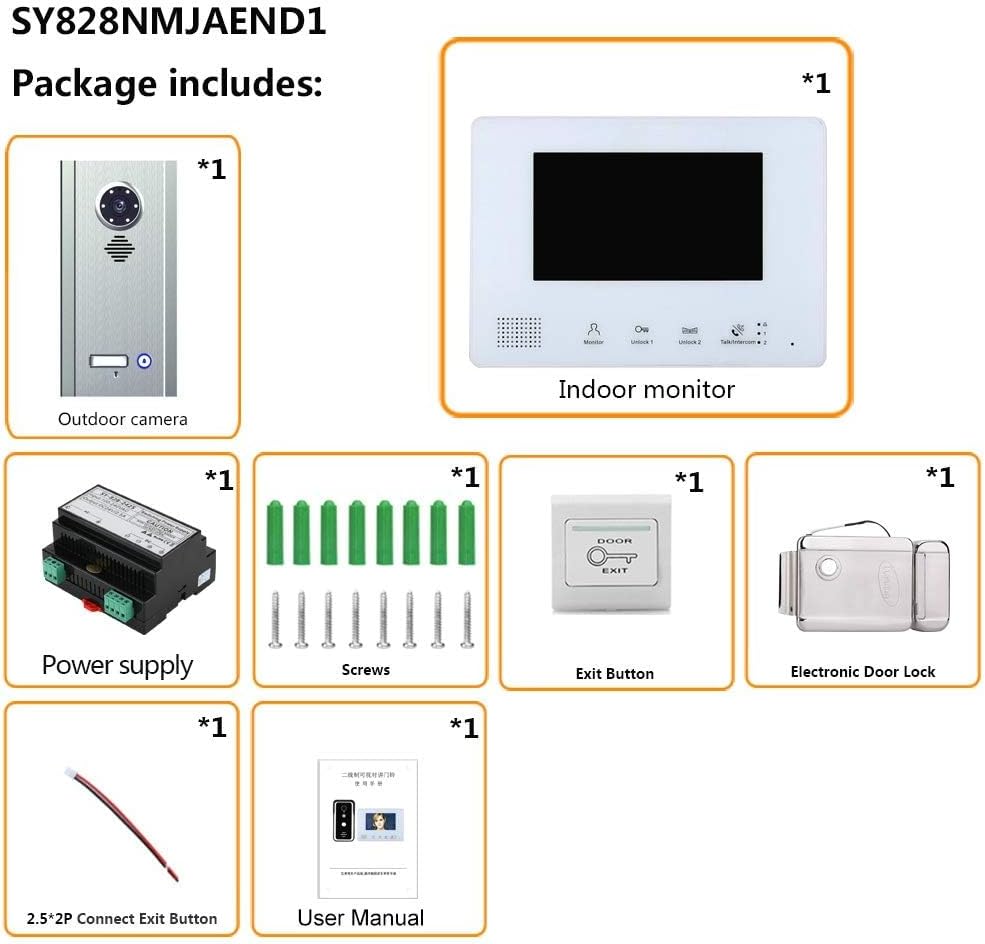
Please verify that all items listed below are included in your package:
- 1 x Outdoor Unit (Embedded mounted Camera)
- 1 x Indoor Unit (Monitor)
- 1 x DC24V2.5A Power Supply
- 1 x Electronic Door Lock
- 1 x Exit Button
- 1 x 2.5*2P 2-core Connection Terminal Wire
- 1 x Screws (Set)
- 1 x User Manual
Product Features
- 2-Wire System: Simplifies installation by transmitting power, audio, video, and control signals through a single 2-wire cable.
- Integrated Power Supply: Supports up to 2 outdoor units and 4 indoor monitors.
- Durable Outdoor Unit: Constructed from aluminum alloy, resistant to rain and oxidation, featuring White LED Night Vision for clear visibility in low light.
- 7-inch Color TFT LCD Monitor: Radiation-free, low power consumption, and high-definition display (800 * 480 effective pixels).
- Dual Lock Control: Capable of unlocking two electronic locks simultaneously.
- Hands-free Intercom: Convenient communication without needing to hold the handset.
- Mute Indoor Intercom: Allows for private conversations within the indoor unit.
- Door Monitoring: Enables real-time monitoring of the area outside the door.
- Adjustable Settings: Volume, brightness, and contrast can be adjusted on the indoor monitor.
Specifications
| Component | Specification |
|---|---|
| Outdoor Camera | |
| Material | Aluminum alloy |
| Camera Sensor | 1/3" CMOS 1000TV line |
| View Angle | 130° |
| Connection Way | BUS 2-wire |
| Installation | Embedded mounted |
| Dimensions | 238 x 141 x 41 mm |
| Indoor Monitor | |
| Screen | 7-inch LCD |
| Effective Pixels | 800 x 480 |
| Connection Way | BUS 2-wire |
| Dimensions | 151 x 80 x 38 mm |
| Electronic Door Lock | |
| Working Voltage | 12VDC |
| Working Current | 150mA |
| Material | Stainless steel |
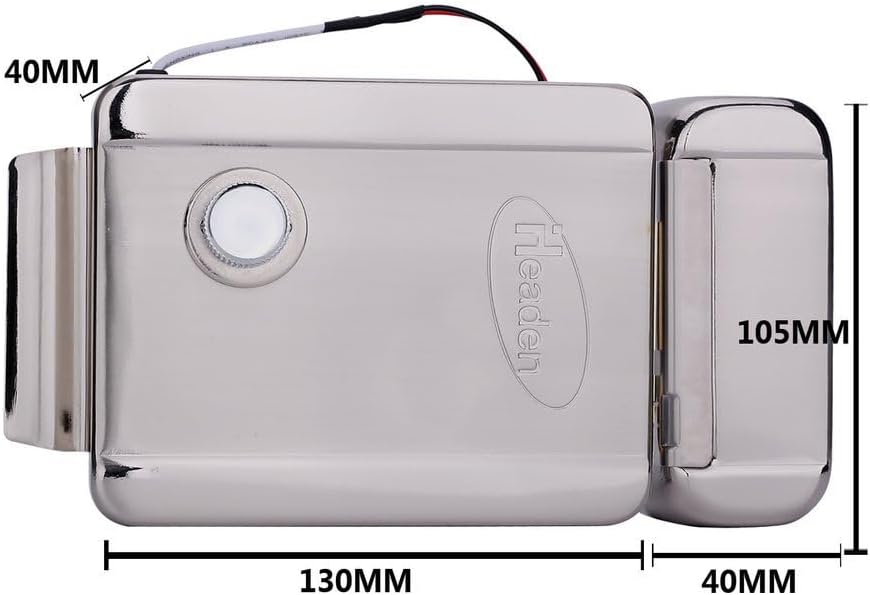
| Dimensions | 130mm (L) x 105mm (W) x 37mm (H) |
| Life Time | 500,000 times |
| General | |
| Manufacturer | EHSA651D |
| Country of Origin | China |
| Batteries Required | No |
Setup and Installation
This system utilizes a 2-wire connection for simplified installation. Ensure power is disconnected before beginning installation.
1. Outdoor Unit Installation
The outdoor unit is designed for embedded mounting. Choose a suitable location near your entrance, ensuring it is protected from direct heavy rain and accessible for visitors. The unit should be mounted at a height that allows the camera to capture visitors' faces clearly.

2. Indoor Monitor Installation
Select a convenient indoor location for the monitor, such as a hallway or living room, where it can be easily accessed. Mount the monitor at eye level for comfortable viewing and operation.

3. Electronic Door Lock Installation
The electronic door lock is compatible with various door types, including wooden doors, metal doors, anti-theft doors, and fire doors. Ensure proper alignment and secure fastening for optimal performance.


4. Wiring Connections
Connect the outdoor unit, indoor monitor, power supply, and electronic door lock using the provided 2-wire cable and connection terminal wire. Follow the wiring diagram in the included user manual for precise connections. Ensure all connections are secure to prevent signal loss or malfunction.

Operating Instructions
1. Answering a Call
When a visitor presses the call button on the outdoor unit, the indoor monitor will ring. Press the 'Answer' button on the monitor to establish two-way hands-free communication.
2. Monitoring Outside
To view the area outside your door at any time, press the 'Monitor' button on the indoor unit. The screen will display the live video feed from the outdoor camera.
3. Unlocking the Door
During a call or while monitoring, press the 'Unlock' button on the indoor monitor to remotely open the connected electronic door lock(s). The system supports unlocking up to two locks simultaneously.
4. Adjusting Settings
Use the control buttons on the indoor monitor to adjust the volume of the intercom, as well as the brightness and contrast of the display for optimal viewing.
5. Mute Indoor Intercom
If your system includes multiple indoor monitors, you can use the mute function for private conversations between indoor units without broadcasting to the outdoor unit.
Maintenance
To ensure the longevity and optimal performance of your intercom system, follow these maintenance guidelines:
- Cleaning: Use a soft, dry cloth to clean the surfaces of the outdoor unit and indoor monitor. Avoid abrasive cleaners or solvents that could damage the finish or electronic components.
- Outdoor Unit: Regularly check the outdoor camera lens for dirt, dust, or spiderwebs that might obstruct the view. Clean gently if necessary.
- Connections: Periodically inspect all wiring connections to ensure they remain secure and free from corrosion.
- Power Supply: Ensure the power supply unit is in a well-ventilated area and not covered, to prevent overheating.
Troubleshooting
If you encounter issues with your intercom system, refer to the following common problems and solutions:
- No Video/Audio:
- Check all 2-wire connections between the outdoor unit, indoor monitor, and power supply. Ensure they are correctly wired and secure.
- Verify that the power supply is receiving power and is functioning correctly.
- Ensure the monitor is turned on and not in standby mode.
- Poor Video Quality (Blurry/Dark):
- Clean the camera lens on the outdoor unit.
- Adjust the brightness and contrast settings on the indoor monitor.
- Check for sufficient lighting at the outdoor unit's location, especially at night (verify night vision LEDs are active).
- Door Lock Not Unlocking:
- Check the wiring connection between the indoor monitor and the electronic door lock.
- Ensure the electronic door lock is receiving power and is functioning mechanically.
- Verify the lock's working voltage and current match the system's output.
- No Ringing from Outdoor Unit:
- Check the connection of the call button on the outdoor unit.
- Ensure the volume on the indoor monitor is not set to minimum or muted.
If the problem persists after attempting these solutions, please contact customer support.
Warranty Information
This product comes with a 3-month warranty from the date of purchase. The warranty covers manufacturing defects and malfunctions under normal use. It does not cover damage caused by misuse, accidents, unauthorized modifications, or improper installation. Please retain your proof of purchase for warranty claims.
Customer Support
For further assistance, technical support, or inquiries regarding your 7-Inch 2-Wire Video Door Phone Intercom System Kit, please refer to the contact information provided by your retailer or the manufacturer's official website. When contacting support, please have your product model and purchase details ready.


