
1. Introduction
This manual provides comprehensive instructions for the installation, operation, maintenance, and troubleshooting of your Road Top 8.9 Inch Car Radio Wireless CarPlay Touchscreen. This unit is designed to upgrade your vehicle's original screen, integrating advanced features while retaining existing functionalities.
The 8.9-inch display offers a 1920 x 720 HD resolution for an enhanced visual experience. It is designed for user-friendly interaction and responsiveness.

Image 1.1: Road Top 8.9 Inch Car Radio Wireless CarPlay Touchscreen
2. Compatibility
This Carplay Touchscreen is compatible with Audi A4 models manufactured between 2009 and 2015, specifically those equipped with the 2G MMI system. It is designed for vehicles with a Concert or Symphony radio. This unit is not compatible with 3G MMI systems or Audi Q5/A5 models from the same years.
Before purchase and installation, verify your car's factory knob position and radio type by referring to the images below.

Image 2.1: Vehicle Compatibility Check
3. Product Features
The Road Top 8.9 Inch Car Radio Touchscreen offers the following functionalities:
- Wireless CarPlay & Android Auto: Seamlessly integrate your smartphone for navigation, calls, messages, and music. Supports both wireless and wired connections.
- Voice Control: Utilize voice commands for safer operation while driving.
- Mirror Link: Display your smartphone screen content directly on the 8.9-inch HD screen. Supports Wireless Airplay for iPhone and Autolink for Android phones.
- Retained Original Functions: Preserves the original car radio, amplifier function, and original reversing camera.
- Touchscreen Control: The interface supports hand touch control for intuitive operation.
- Camera Functions: Supports factory original reverse camera parking radar and aftermarket reverse cameras. Does not support aftermarket front cameras or aftermarket 360 cameras.

Image 3.1: Product Homescreen Display and Feature Icons

Image 3.2: Wireless CarPlay, Android Auto, Mirrorlink, and Navigation in Use

Image 3.3: Retained Original CANBUS Protocol Functions and Touch Control

Image 3.4: Camera Function Display
4. Setup and Installation
Professional installation is recommended for this product. The installation process involves removing parts of the car dashboard to connect the necessary wires. No original wires need to be cut or broken. It is crucial to test all functions of the unit before reassembling the dashboard to avoid secondary disassembly.
4.1 Package Contents
Verify that all components are present in the package:
- 8.9 inch Linux Screen
- Power cable
- USB cable
- AMI cable
- Bracket for 2013-2016 Year Car
- Bracket for 2009-2012 Year Car
- Iron frame and screws
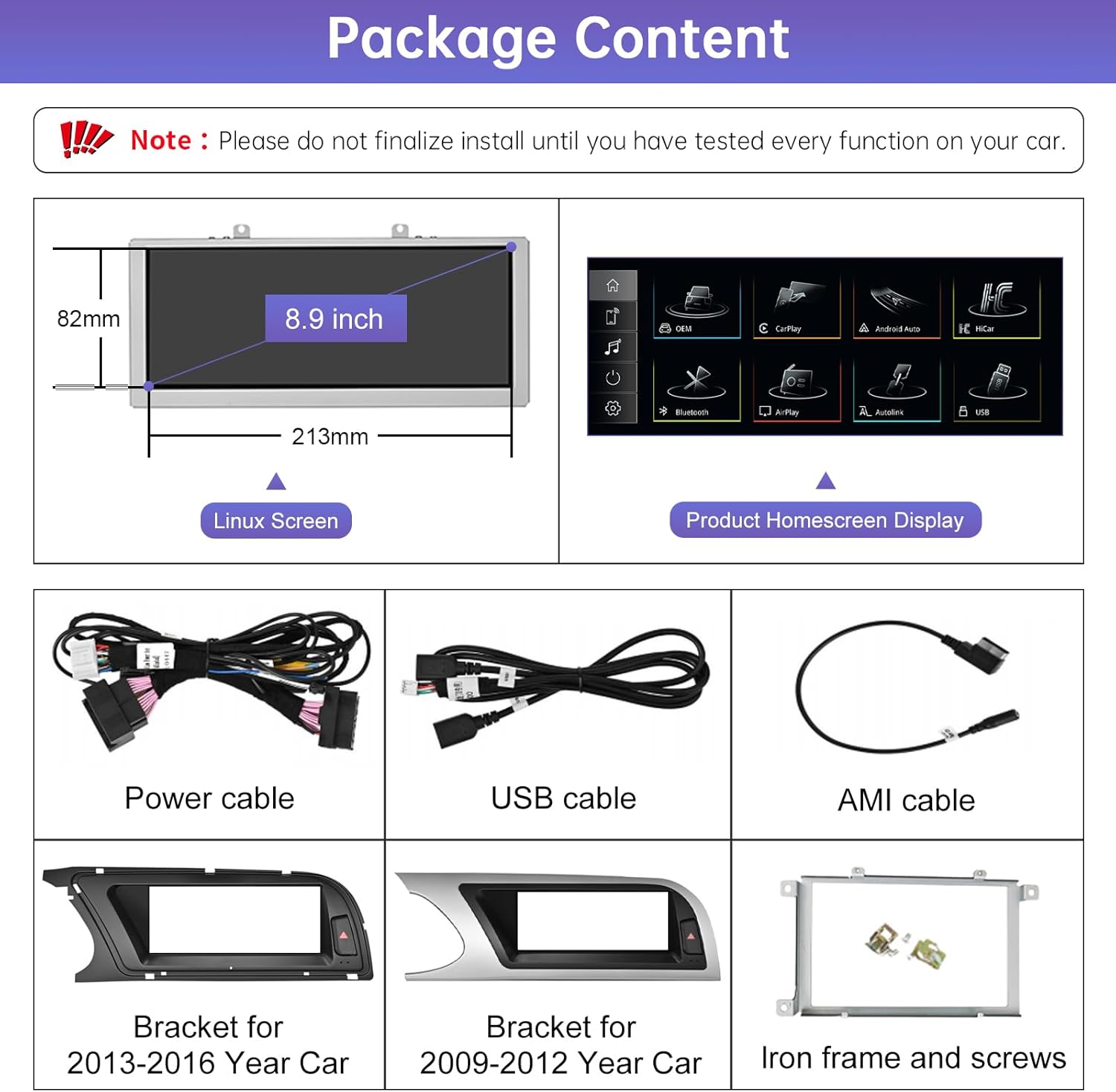
Image 4.1: Package Content Overview
4.2 Installation Overview
The installation replaces the original car screen with the new 8.9-inch touchscreen. The image below illustrates the visual transformation after installation.

Image 4.2: Before and After Installation Comparison
5. Operating Instructions
5.1 Switching Between Systems
The unit allows seamless switching between the new Linux system (with CarPlay/Android Auto) and your car's original MMI system. To switch to the OEM MMI system, click the "OEM" button on the homescreen menu. To return to the Linux system, touch the screen.

Image 5.1: Switching Between Systems
5.2 Wireless CarPlay and Android Auto
Connect your smartphone wirelessly or via a wired connection to access Apple CarPlay or Android Auto. This enables features such as:
- Navigation: Use your preferred mapping applications.
- Calls: Make and receive phone calls hands-free.
- Messages: Send and receive messages.
- Music: Enjoy your favorite audio content.

Image 5.2: CarPlay, Android Auto, and Mirrorlink Functionality
5.3 Mirror Link
Mirror Link allows you to display your smartphone's screen on the 8.9-inch unit. Use Wireless Airplay for iPhones and Autolink for Android phones. This feature enables viewing movies, maps, pictures, and other content from your phone on the larger display.
6. Maintenance
To ensure the longevity and optimal performance of your Road Top touchscreen, follow these general maintenance guidelines:
- Cleaning: Use a soft, lint-free cloth to clean the screen. For stubborn marks, lightly dampen the cloth with water or a screen-safe cleaner. Avoid abrasive materials or harsh chemicals.
- Temperature: Avoid exposing the unit to extreme temperatures for extended periods.
- Physical Damage: Protect the screen from impacts and sharp objects.
7. Troubleshooting
Many issues can be resolved by checking cable connections and settings. If you encounter problems, consider the following:
- No Power/Display: Ensure all power cables are securely connected. Check vehicle's fuse box if necessary.
- No Audio: Verify that the car stereo sound is routed correctly via AUX or Bluetooth channel. Check volume settings on both the unit and your car's audio system.
- Connectivity Issues (CarPlay/Android Auto): Ensure your smartphone's Bluetooth and Wi-Fi are enabled. Try reconnecting the device. For wired connections, check the USB cable.
- System Freezing/Unresponsive: Try restarting the unit (if a reset button is available) or turning off the car ignition and restarting after a few minutes.
- Original Functions Not Working: Confirm that the CANBUS protocol connections are correct during installation.
If problems persist after basic troubleshooting, please contact Road Top technical support.
8. Specifications
| Feature | Specification |
|---|---|
| Screen Size | 8.9 inches |
| Resolution | 1920 x 720 HD |
| Item Weight | 4.54 pounds |
| Package Dimensions | 19.53 x 8.03 x 6.77 inches |
| Model Number | c3f9bf66-64bf-4e35-80b5-2cc7cd77e442 |
| Connectivity Technology | Bluetooth |
| Controller Type | Hand Control |
| Special Feature | Built-In Bluetooth |
| Compatible Devices | Smartphone |
| Connector Type | 3.5mm Jack, RCA, USB |
| Audio Output Mode | Stereo |
| Surround Sound Channel Configuration | 5.1 |
| Video Encoding | H.264, H.265/HEVC |
| Number of Channels | 6 |
9. Warranty and Support
Road Top is committed to product quality and customer satisfaction. Most issues can be resolved through proper cable connection and settings. It is recommended to confirm all features are working correctly before final reassembly of your vehicle's dashboard.
For technical assistance, Road Top offers 24-hour technical support. If you require help with installation or troubleshooting, please contact the seller directly through the platform where you purchased the product. This ensures your inquiry reaches the support team efficiently.

Image 9.1: How to Contact Technical Support