Introduction
The Kaschun K1-N is a professional-grade 4-channel audio mixer designed for a variety of audio applications, including stage performances, live gigs, PC recording, and karaoke. It features a durable steel chassis, built-in Bluetooth connectivity, 99 DSP effects, and advanced equalization capabilities. This manual provides detailed instructions for setting up, operating, maintaining, and troubleshooting your K1-N mixer to ensure optimal performance and longevity.

Image: The Kaschun K1-N 4-Channel Professional Audio Mixer, showcasing its compact design and control layout.
Setup
1. Unpacking and Inspection
Carefully remove the mixer from its packaging. Inspect all components for any signs of damage. Ensure all listed accessories are present.
2. Power Connection
Connect the provided 100V-240V (+/-15V DC) power adapter to the mixer's power input. Plug the adapter into a suitable electrical outlet. The mixer is designed for global use with its multi-voltage power supply.
3. Audio Input Connections
The K1-N mixer supports various input types:
- XLR/1/4" Combo Inputs: Use these for microphones (dynamic or condenser with 48V phantom power enabled) and line-level sources.
- 48V Phantom Power: Activate the dedicated 48V phantom power switch for condenser microphones. Ensure phantom power is off before connecting or disconnecting condenser microphones to prevent damage.
- Stereo RCA Input: Connect external audio devices such as CD players or media players to the stereo RCA input.
- USB/PC Connection: Connect the mixer to a computer via USB for direct audio playback and recording.
- Bluetooth: Pair your smartphone or other Bluetooth-enabled device for wireless audio streaming. The effective range is approximately 3 feet.

Image: Detailed view of the K1-N mixer's left side, showing composite interfaces, gain knobs, EQ controls, channel mute switches, and channel volume faders.
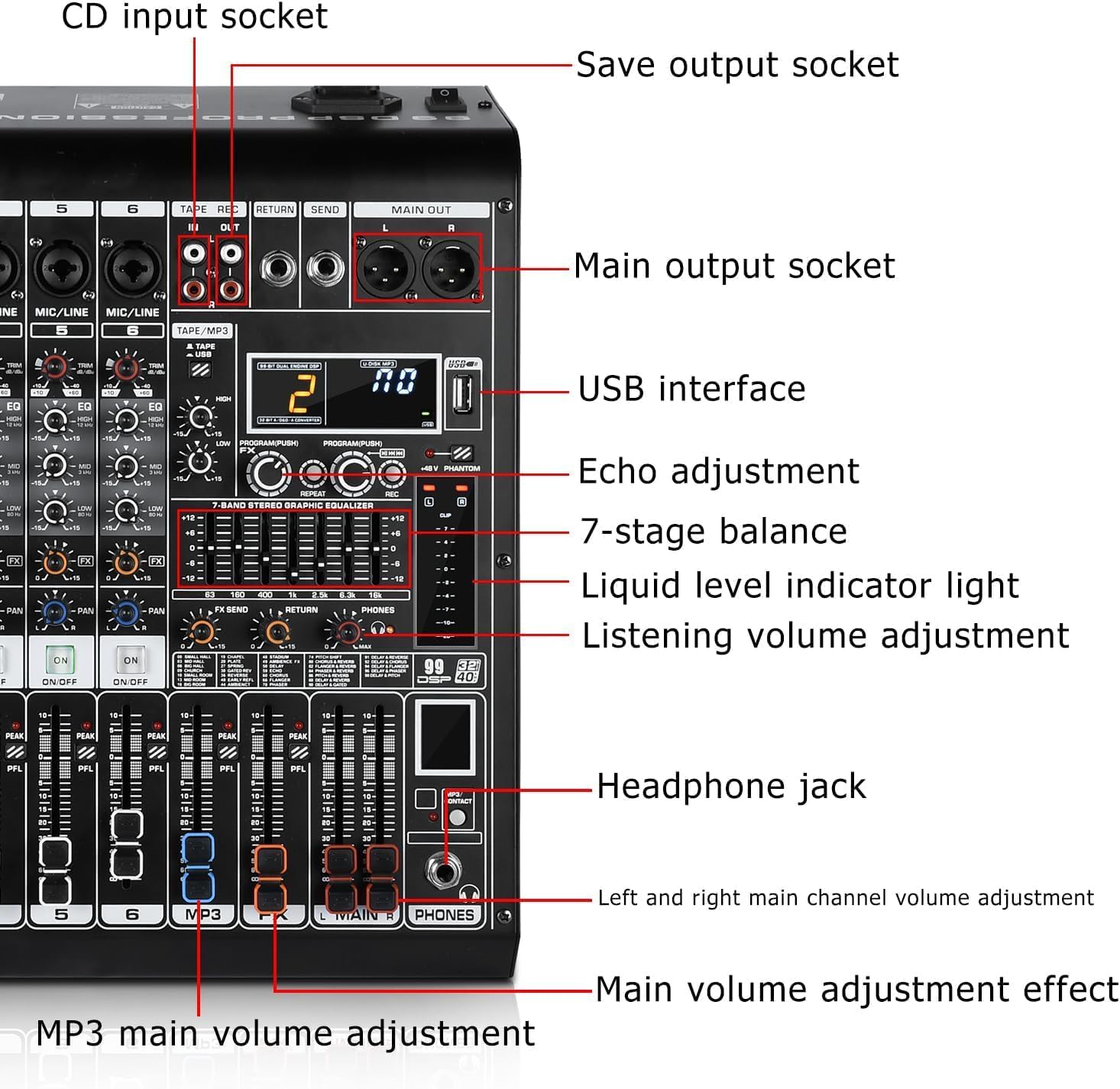
Image: Detailed view of the K1-N mixer's right side, highlighting the USB interface, main output sockets, echo adjustment, 7-band graphic equalizer, liquid level indicator, headphone jack, and main volume controls.
4. Audio Output Connections
- Main Outputs: Connect the main outputs (XLR or 1/4" TRS) to your powered speakers, power amplifier, or recording interface.
- Headphone Jack: Plug in headphones for monitoring your mix.
- Tape/REC Out: Use the RCA outputs for recording your mix to an external device.
Operating Instructions
1. Channel Controls
Each input channel (1-4) features dedicated controls:
- Gain Knob: Adjusts the input sensitivity for the connected microphone or line source. Set this to achieve a strong signal without clipping (indicated by the PEAK LED).
- 3-Band EQ: Controls the High, Mid, and Low frequencies for each channel, allowing you to shape the tone of individual inputs.
- FX Send: Adjusts the amount of signal sent from the channel to the internal DSP effects processor.
- Pan: Positions the channel's sound within the stereo field (left to right).
- Channel Mute Switch: Mutes or unmutes the individual channel.
- PFL (Pre-Fader Listen) / Solo: Allows you to monitor the channel's signal independently through headphones, before the fader affects the main mix.
- Channel Volume Fader: Adjusts the output level of the individual channel to the main mix.
2. DSP Effects
The K1-N features 99 built-in Digital Signal Processing (DSP) effects to enhance your audio. Use the PROGRAM/PUSH knob to select an effect and adjust its parameters. The digital display shows the selected effect number.

Image: A list of the 99 available DSP effects, including various hall, room, church, plate, spring, delay, chorus, flanger, phaser, and reverb effects.
3. Master Controls
- 7-Band Stereo Graphic Equalizer: Provides precise control over the overall frequency response of your main mix. Adjust the sliders to boost or cut specific frequency bands.
- Echo Adjustment: Controls the overall level of the selected DSP effect applied to the main mix.
- Main Volume Faders (L/R): Controls the overall output level of the stereo main mix.
- Phones Volume: Adjusts the volume level for the headphone output.

Image: An overhead view of the K1-N 4-channel mixing console, highlighting the layout of controls and the 7-band stereo graphic equalizer.
4. USB/Bluetooth Operation
The K1-N allows for flexible audio playback:
- USB Playback: Insert a USB flash drive with audio files into the USB port. Use the built-in controls (play/pause/skip) to navigate your tracks.
- Bluetooth Streaming: Enable Bluetooth on your device and select the K1-N mixer from the list of available devices. Once paired, you can stream audio wirelessly.
- PC Connection: Connect the mixer to your PC via USB to use it as an audio interface for recording or playback.

Image: The K1-N mixer demonstrating its professional audio console capabilities, supporting multiple device connections including USB and Bluetooth for wireless streaming from a smartphone.
Maintenance
Proper maintenance ensures the longevity and optimal performance of your K1-N mixer:
- Cleaning: Regularly wipe down the mixer with a soft, dry cloth to remove dust and grime. Avoid using liquid cleaners or abrasive materials. The sealed rotary controls are designed to resist dust.
- Storage: When not in use, store the mixer in a cool, dry place away from direct sunlight and extreme temperatures.
- Cable Management: Ensure cables are neatly organized and not under strain to prevent damage to connectors and ports.
Troubleshooting
If you encounter issues with your K1-N mixer, refer to the following common problems and solutions:
| Problem | Possible Cause | Solution |
|---|---|---|
| No sound output | Power off; incorrect connections; volume levels too low; muted channels. | Ensure power is on; check all audio cable connections; increase main and channel volume faders; verify no channels are muted. |
| Distorted or noisy audio | Input gain too high; faulty cables; impedance mismatch; fan noise. | Reduce input gain (ensure PEAK LED does not light consistently); try different cables; ensure correct impedance matching for connected devices. Note: Some users have reported fan noise; ensure the mixer is in a well-ventilated area. |
| Microphone not working | 48V phantom power off (for condenser mics); incorrect mic type; faulty mic/cable. | Activate 48V phantom power for condenser mics; ensure dynamic mics are connected correctly; test with a different microphone or cable. |
| USB/Bluetooth audio bypasses effects | Design characteristic. | The USB/Bluetooth input signal is routed directly to the main outputs and does not pass through the internal DSP effects. This is normal operation. |
| Sound quality degrades at high fader levels | Overdriving the mixer's internal circuitry. | Ensure input gain levels are set correctly (not too high). Avoid pushing channel or main faders to their maximum limits if distortion occurs. Adjust levels gradually. |
If the problem persists after attempting these solutions, please contact Kaschun customer support for further assistance.
Specifications
| Feature | Detail |
|---|---|
| Model Number | K1-N |
| Brand | Kaschun |
| Number of Channels | 4 (input channels) / 8 (total channels including USB/Bluetooth) |
| Connectivity Technology | USB, Bluetooth |
| Output Connector Type | USB Type B, XLR, 1/4" TRS, RCA |
| Power Source | Corded Electric (100V-240V +/-15V DC adapter) |
| DSP Effects | 99 Bit DSP effects |
| Equalization | Per-channel 3-band EQ, 7-band master EQ |
| Phantom Power | 48V (switchable) |
| Item Weight | 8 pounds |
| Package Dimensions | 18 x 14 x 8 inches |
| Country of Origin | China |

Image: The K1-N mixer with its dimensions labeled: 13.7cm width, 37cm height, and 25.3cm depth.
Warranty and Support
For warranty information or technical support regarding your Kaschun K1-N mixer, please contact the Kaschun Store directly. Refer to your purchase documentation for specific warranty terms and contact details. Ensure you have your model number (K1-N) and purchase date available when seeking support.


