
1. Introduction
Thank you for choosing the XINFUTE HUAYU RM-L1335 Plus Universal Remote Control. This product is designed to be a universal replacement remote for Hisense brand LCD/LED TVs. It offers direct compatibility with many models and includes a simple setup process for broader use. This manual provides essential information for setup, operation, maintenance, and troubleshooting to ensure optimal performance of your remote control.
2. Setup
2.1 Battery Installation
The remote control requires two AAA batteries (not included) for operation.
- Locate the battery compartment cover on the back of the remote control.
- Slide the cover downwards or press the latch and lift to open the compartment.
- Insert two AAA batteries, ensuring the positive (+) and negative (-) terminals align correctly with the markings inside the compartment.
- Replace the battery compartment cover by sliding it back into place until it clicks securely.
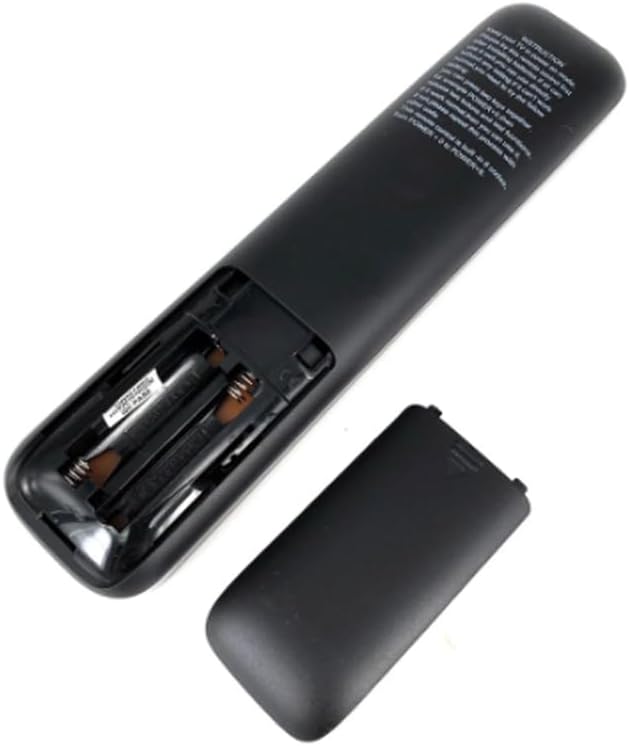
Image Description: A black remote control is shown with its battery compartment cover removed, revealing two empty slots for AAA batteries. The positive and negative terminals are visible, indicating the correct orientation for battery insertion.
2.2 Initial Use and Programming
This universal remote control is designed to work directly with most Hisense LCD/LED TV models without any prior setup. If the remote does not function correctly with your TV immediately after battery installation, follow the programming steps below.

Image Description: The HUAYU RM-L1335 Plus remote control is displayed within its retail packaging. The packaging includes text detailing product characteristics, a list of compatible TV types, and programming instructions.
Programming Method (Inputting Code):
If direct use is unsuccessful or some functions do not work, you can program the remote using a specific code:
- Press and hold the POWER key and a corresponding digital key (0-9) simultaneously.
- Release both keys. The remote should now be programmed.
- Test the remote's functions with your TV. If it still does not work correctly, try another code from the list below.
Known Codes:
- POWER + 001, 002, 003, 004
- POWER + 1 (for 005), POWER + 2 (for 006)
- POWER + 3 (for 007), POWER + 4 (for 008)
- POWER + 5 (for 009), POWER + 6 (for 010)
- POWER + 7 (for 011), POWER + 8 (for 012)
For additional codes or specific model compatibility, please refer to the manufacturer's website: http://www.huayu.cc/en/
2.3 Compatible TV Types
The RM-L1335 Plus is compatible with a wide range of Hisense TV models. Below are examples of compatible remote models, indicating the broad compatibility of this universal remote.
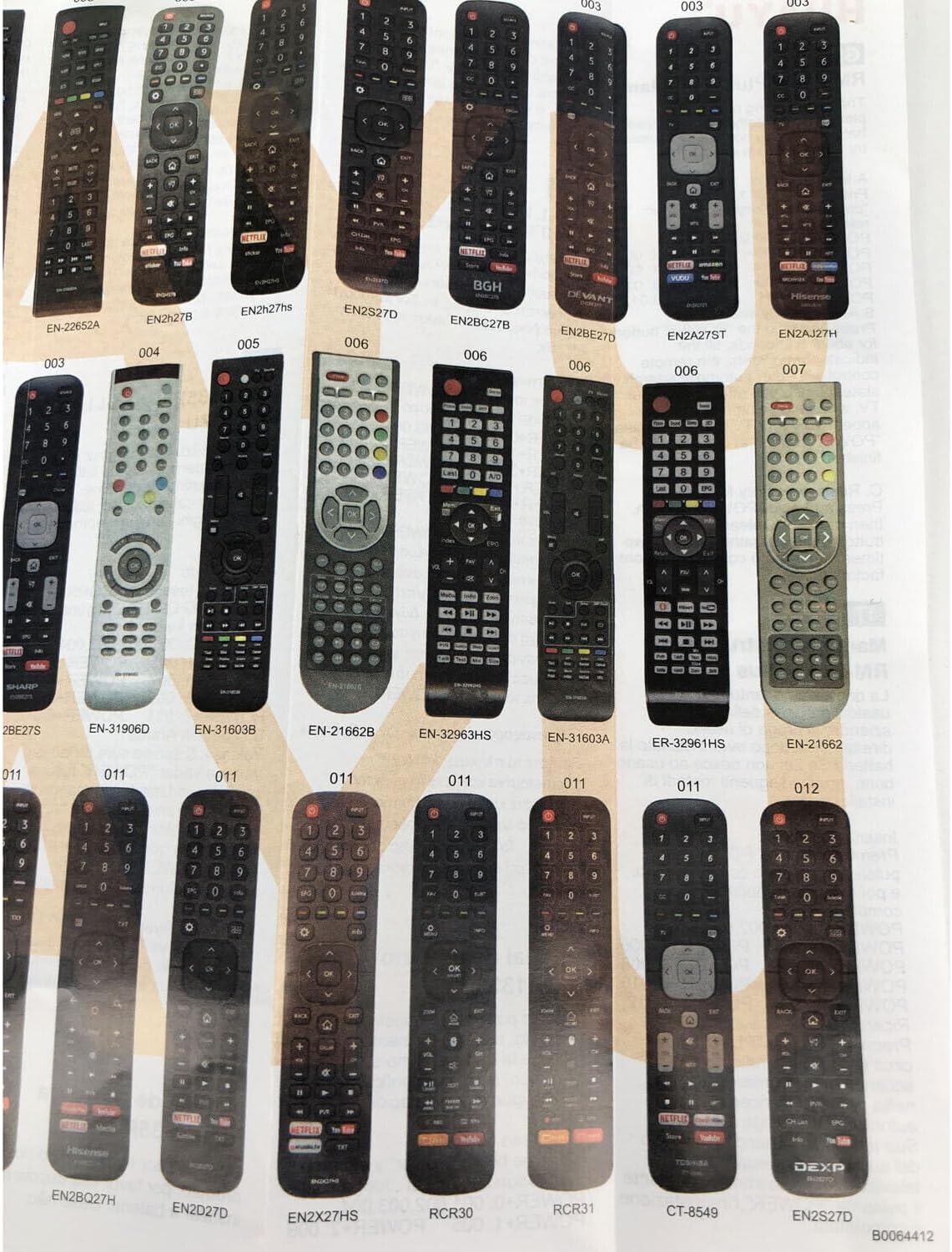
Image Description: A page from a compatibility guide displaying numerous Hisense remote control models. Each remote is labeled with its model number, such as EN2B27, EN2BB27H, and others, illustrating the range of remotes this universal model can replace.

Image Description: Another section of a compatibility guide, featuring more Hisense remote control models. This image further demonstrates the extensive compatibility of the RM-L1335 Plus with different Hisense TV remote designs and model numbers.
3. Operating Instructions
The RM-L1335 Plus remote control features a standard layout for easy navigation and control of your Hisense TV.

Image Description: A dual view of the HUAYU RM-L1335 Plus remote control, showing its front face with all buttons clearly visible, and its plain black back. Key buttons include Power, Input, Number Pad, Volume, Channel, Navigation, Back, Exit, Home, Netflix, Amazon, Google Play, and YouTube.
3.1 Button Functions
- POWER: Turns the TV on or off.
- INPUT: Selects the input source (HDMI, AV, etc.).
- Number Pad (0-9): Direct channel selection.
- VOL +/-: Adjusts the volume level.
- CH +/-: Changes channels.
- MUTE: Mutes or unmutes the TV sound.
- Navigation (Up/Down/Left/Right/OK): Navigates menus and confirms selections.
- BACK: Returns to the previous screen or menu.
- EXIT: Exits the current menu or application.
- HOME: Accesses the TV's home screen or smart TV interface.
- NETFLIX, amazon, Google Play, YouTube: Direct access buttons for these streaming services.
- Settings (Gear icon): Opens the TV's settings menu.
- Media Playback Controls (Play, Pause, Stop, Rewind, Fast Forward): Controls media playback.
4. Maintenance
Proper maintenance ensures the longevity and reliable performance of your remote control.
- Cleaning: Use a soft, dry cloth to clean the remote control. Do not use liquid cleaners or abrasive materials, as they may damage the surface or internal components.
- Battery Replacement: Replace batteries when the remote's response becomes sluggish or it stops functioning. Always replace both batteries at the same time with new AAA batteries. Do not mix old and new batteries or different types of batteries.
- Storage: Store the remote control in a cool, dry place away from direct sunlight, extreme temperatures, and high humidity. If the remote will not be used for an extended period, remove the batteries to prevent leakage.
- Handling: Avoid dropping the remote control or subjecting it to strong impacts, which can damage internal circuitry.
5. Troubleshooting
If you encounter issues with your remote control, please refer to the following troubleshooting steps:
- Remote Not Responding:
- Check if the batteries are inserted correctly with the correct polarity.
- Replace the batteries with fresh AAA batteries.
- Ensure there are no obstructions between the remote control and the TV's infrared receiver.
- Make sure you are within the effective range of the TV's IR receiver.
- Some Functions Not Working:
- If certain buttons or functions do not work, the remote may need to be reprogrammed for your specific TV model. Refer to Section 2.2 for programming instructions.
- Verify that your TV model is compatible with the RM-L1335 Plus.
- Remote Control Indicator Light Not Flashing:
- This usually indicates dead or incorrectly inserted batteries. Replace or reinsert batteries.
6. Specifications
- Model Number: RM-L1335 Plus
- Brand: XINFUTE (HUAYU)
- Compatible Devices: Television (Hisense LCD/LED TVs)
- Max Number of Supported Devices: 1
- Batteries Required: 2 x AAA batteries
- Product Dimensions: 6 x 3 x 1 inches
- Item Weight: 2.82 ounces
- Special Feature: Ergonomic design
- Color: As shown (typically black)
7. Warranty and Support
7.1 Warranty Information
This product comes with a one-year warranty from the date of purchase. This warranty covers manufacturing defects under normal use.
7.2 Customer Support
All products are inspected before shipment. If you are not satisfied with your purchase or require assistance, please contact the seller (Xinfute) within 24 hours of receiving your product. For general information or additional support regarding HUAYU products, you may visit the manufacturer's website: http://www.huayu.cc/en/