
DEVAISE ABGY015
DEVAISE Ergonomic Mesh Office Chair with Footrest
Model: ABGY015
1. Introduction
Thank you for choosing the DEVAISE Ergonomic Mesh Office Chair with Footrest, Model ABGY015. This manual provides essential information for the safe assembly, operation, and maintenance of your new office chair. Designed for comfort and support, this chair features an ergonomic backrest, adjustable headrest, lumbar support, and a retractable footrest to enhance your work or relaxation experience.

Image 1.1: The DEVAISE Ergonomic Mesh Office Chair with Footrest, showcasing its design and features.
2. Safety Information
- Read all instructions carefully before assembly and use.
- Ensure all components are securely fastened before using the chair.
- Do not stand on the chair or use it as a step stool.
- Do not exceed the maximum weight capacity of 300 pounds.
- Keep children and pets away from the chair during assembly.
- Avoid exposing the chair to direct sunlight or extreme temperatures to prevent material degradation.
- Use on a level surface to prevent tipping.
3. Package Contents
Please verify that all parts are present before beginning assembly. If any parts are missing or damaged, contact customer support.
- Backrest Assembly
- Seat Cushion with Armrests and Footrest
- Headrest
- Star Base
- Gas Lift Cylinder (SGS Class 4)
- Casters (5 pieces)
- Mechanism Plate
- Hardware Pack (screws, washers, Allen wrench)
- Instruction Manual
4. Assembly Instructions
Assembly typically takes approximately 20 minutes. Follow these steps carefully.
Step 1: Assemble the Base
- Insert the five casters into the holes at the end of each leg of the star base. Push firmly until they click into place.
- Insert the gas lift cylinder into the center hole of the star base.

Image 4.1: The assembled chair base with casters.

Image 4.2: The SGS Class 4 Gas Lift cylinder.
Step 2: Attach the Mechanism Plate to the Seat Cushion
- Align the mechanism plate with the pre-drilled holes on the underside of the seat cushion.
- Secure the mechanism plate using the provided screws and Allen wrench. Ensure the front of the mechanism faces the front of the seat.
Step 3: Attach the Backrest to the Seat Cushion
- Align the backrest with the mounting brackets on the seat cushion.
- Secure the backrest using the designated screws.
Step 4: Attach the Headrest
- Slide the headrest into the designated slot at the top of the backrest.
- Adjust to your preferred height and angle.
Step 5: Connect the Seat Assembly to the Base
- Carefully place the assembled seat and backrest onto the gas lift cylinder, ensuring it is centered and stable.
- Apply downward pressure to secure the connection.
Once assembled, test all functions and adjustments to ensure proper operation.
5. Operating Instructions
Your DEVAISE office chair offers multiple adjustments for personalized comfort.
5.1. Chair Height Adjustment
To adjust the chair height, locate the lifting handle under the right side of the seat. Pull the handle up while seated to lower the chair, or pull it up while standing to raise the chair. Release the handle at the desired height.
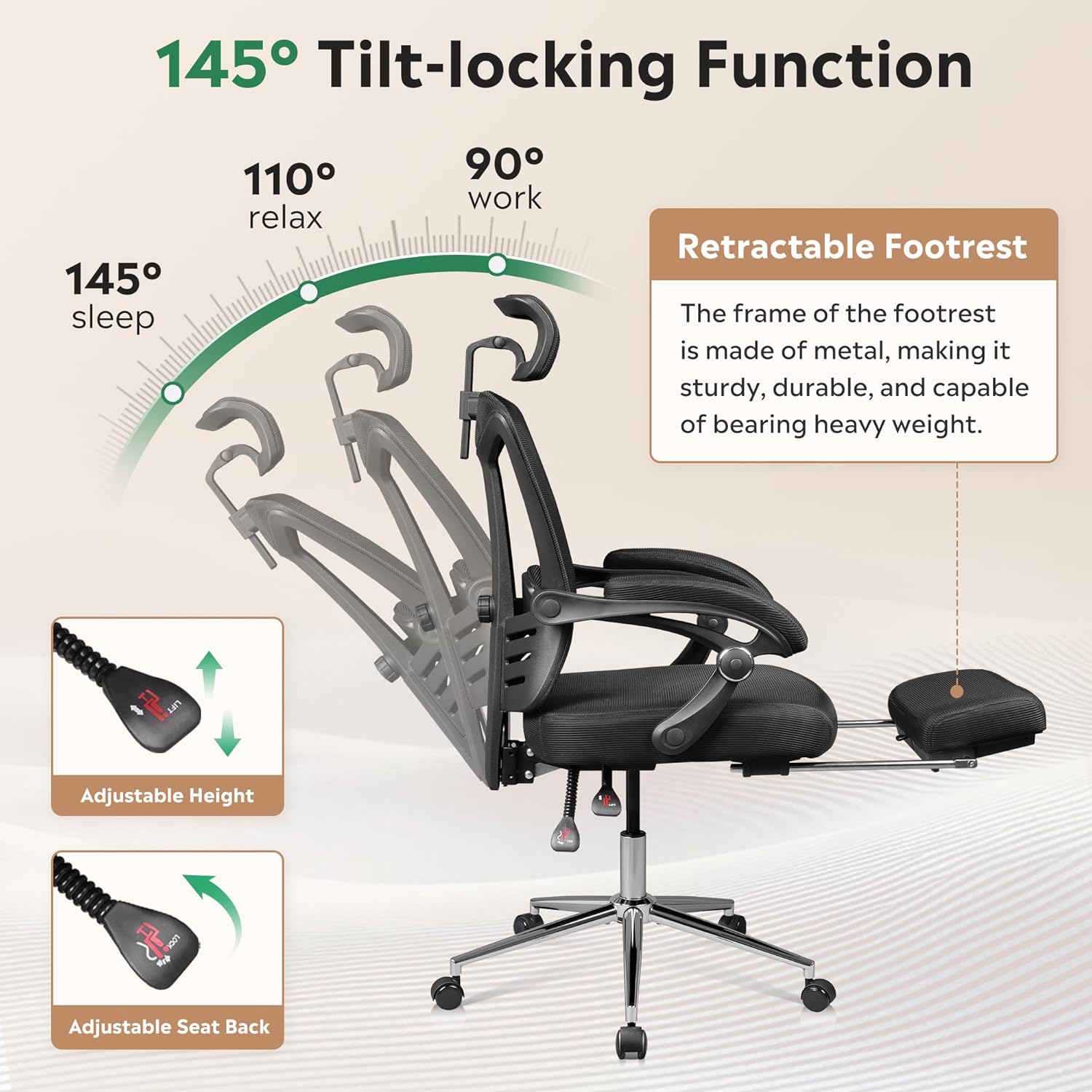
Image 5.1: Illustration of the adjustable height and tilt-locking functions.
5.2. Backrest Recline and Tilt-Lock Function
The backrest can recline and lock at any angle within 145°. To recline, pull the tilt handle (usually located next to the height adjustment lever) outwards. Lean back to the desired angle, then push the handle inwards to lock the position. To unlock and return to an upright position, pull the handle outwards again and lean forward slightly.
5.3. Adjustable Headrest
The headrest can be adjusted vertically by pulling it up or pushing it down (up to 3.7 inches). It can also rotate 45° to provide optimal neck support. Adjust it to align with the curve of your neck.

Image 5.2: Visual guide for adjusting the headrest's height and rotation.
5.4. Adjustable Lumbar Support
The chair features adjustable lumbar support to help maintain proper spinal alignment. Locate the adjustment knob or lever on the backrest and rotate or slide it to increase or decrease the lumbar curve to suit your preference.
5.5. Retractable Footrest
For relaxation, pull out the footrest located under the seat. Extend it fully and place your legs on it. When not in use, push it back under the seat until it is fully retracted.
6. Maintenance
- Cleaning: Wipe clean with a damp cloth. Avoid harsh chemicals or abrasive cleaners that may damage the mesh or other materials.
- Inspection: Periodically check all screws and bolts to ensure they are tight. Re-tighten if necessary.
- Casters: Keep casters free of debris (hair, dust) to ensure smooth movement and prevent floor scratches.
- Gas Lift: Do not attempt to disassemble the gas lift cylinder.
7. Troubleshooting
| Problem | Possible Cause | Solution |
|---|---|---|
| Chair does not adjust height | Gas lift not engaged or faulty | Ensure the lifting handle is fully pulled. If the issue persists, contact customer support. |
| Chair wobbles | Loose screws or uneven assembly | Check and tighten all assembly screws. Ensure the chair is on a level surface. |
| Casters not rolling smoothly | Debris in casters or damaged casters | Clean any hair or debris from the casters. Replace damaged casters if necessary. |
| Backrest does not recline or lock | Tilt mechanism locked or faulty | Ensure the tilt handle is pulled outwards to unlock. If still not functioning, contact support. |
8. Specifications
- Brand: DEVAISE
- Model Name: ABGY015 Home Office Desk Chair
- Color: Black
- Product Dimensions: 23.2"D x 24"W x 48"H
- Maximum Weight Recommendation: 300 Pounds
- Back Style: Solid Back (Mesh)
- Seat Depth: 19.9 inches
- Fill Material: Foam (28D high-density)
- Gas Lift: SGS Class 4
- Reclining Position: Up to 145° with tilt-lock
- Item Weight: 36.6 pounds
- Assembly Time: Approximately 20 minutes

Image 8.1: Detailed product dimensions.
9. Warranty and Support
This DEVAISE office chair is backed by a two-year warranty from the date of purchase. This warranty covers manufacturing defects and material flaws under normal use.
For warranty claims, missing parts, or any other inquiries, please contact DEVAISE customer support. Have your purchase receipt and model number (ABGY015) ready when contacting support.
You can find more information and contact details on the official DEVAISE website or through your retailer's customer service portal.
Related documentsABGY015

Ask a question about this manual
Ask about setup, troubleshooting, compatibility, parts, safety, or missing instructions. Manuals+ will review the question and use this page’s manual context to help answer it.