1. Introduction
This manual provides comprehensive instructions for the ALLIMITY RC933 FUB1 Replacement Voice Remote Control. This remote is designed to be compatible with various TCL 4K Smart TV models, offering a seamless replacement experience with voice control capabilities.
Compatible TCL TV Models include: 85C755, 85Q10B, 85X955, 98Q10B, 98X955, 75C855, 85C855, 65C89B, 75C89B, 85C89B, 98C89B, 115X955, 85Q10BX, 50C755, 55C755, 65C755, 98C755, 98C855, 65Q10B, 75Q10B, 75C755, 65C855.
2. Setup
2.1 Battery Installation
The remote control requires two AAA batteries (not included). Follow these steps to install them:
- Locate the battery compartment cover on the back of the remote control.
- Slide the cover downwards or press the latch (if present) to open the compartment.
- Insert two AAA batteries, ensuring the positive (+) and negative (-) terminals align correctly with the markings inside the compartment.
- Replace the battery compartment cover until it clicks securely into place.

Image: Rear view of the remote control, illustrating the battery compartment and its cover. This view helps users identify where to insert batteries.
2.2 Pairing with Your TV
This remote control needs to be paired with your TCL 4K Smart TV before use. The pairing process may vary slightly depending on your specific TV model. Generally, follow these steps:
- Ensure your TV is powered on.
- On your TV, navigate to the Settings menu. This is often accessible via a dedicated button on your original remote or through the TV's on-screen menu.
- Look for options such as Remotes & Accessories, Bluetooth, or System.
- Select Add Accessory or Pair Remote.
- On the ALLIMITY RC933 FUB1 remote, press and hold the Home button and the Back button simultaneously for a few seconds until an indicator light on the remote (if present) flashes, or a pairing message appears on your TV screen.
- Once the remote appears in the list of available devices on your TV screen, select it to complete the pairing process.
- A confirmation message should appear on your TV, indicating successful pairing.
If you encounter difficulties, refer to your TCL TV's specific user manual for detailed pairing instructions.
3. Operating Instructions
To ensure proper function, aim the remote control directly at the remote control sensor on your TCL TV. Avoid any obstacles between the remote and the TV sensor.
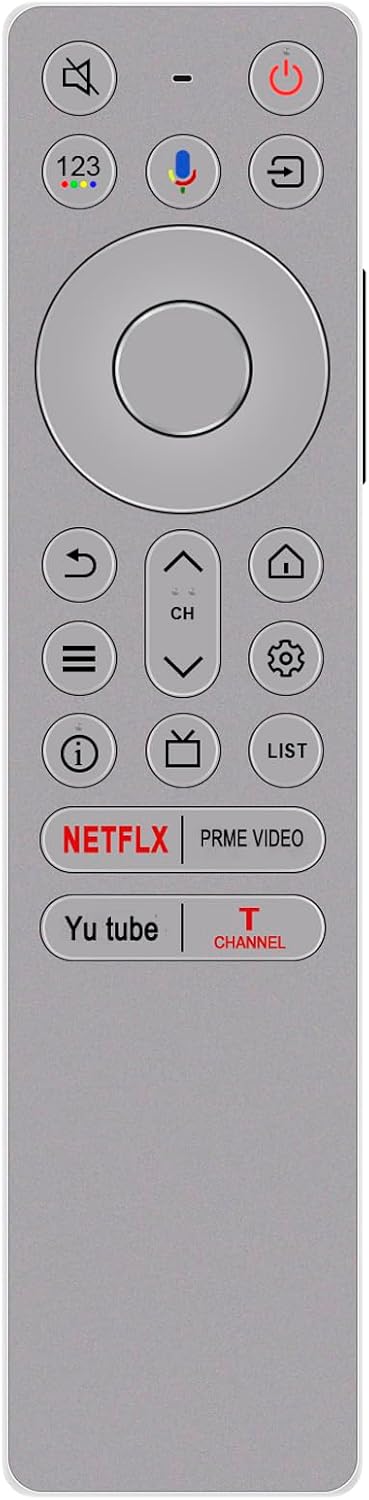
Image: Front view of the ALLIMITY RC933 FUB1 remote control, displaying all buttons and their layout for general operation.
3.1 Button Functions
- Power Button (⏻): Turns the TV on or off.
- Mute Button (🔇): Mutes or unmutes the TV audio.
- Volume Up/Down (- / +): Adjusts the TV volume.
- Channel Up/Down (CH ▲ / ▼): Changes TV channels.
- Number Pad (123): Accesses the on-screen number pad for direct channel input or other numerical entries.
- Home Button (🏠): Returns to the TV's main home screen or smart TV interface.
- Back Button (↩): Returns to the previous screen or menu.
- Settings Button (⚙️): Opens the TV's settings menu.
- Input/Source Button (📺): Cycles through available input sources (HDMI, AV, etc.).
- List Button (LIST): Accesses channel lists or other content lists.
- Info Button (ⓘ): Displays information about the current program or content.
- Navigation Pad (Circular): Used to navigate through on-screen menus and select items. The central button acts as 'OK' or 'Enter'.
- Dedicated App Buttons (NETFLIX, PRIME VIDEO, Yu tube, T CHANNEL): Provide direct access to these streaming applications.
3.2 Voice Control Function
The ALLIMITY RC933 FUB1 remote features a voice control function, allowing you to issue commands to your TV using your voice.

Image: The remote control highlighting the microphone button and the 'VOICE CONTROL' feature, indicating its capability for voice commands.
- Press the Microphone Button (🎤) located on the remote control.
- Hold the remote approximately 6-12 inches from your mouth.
- Speak your command clearly into the microphone. Examples include:
- "Open Netflix"
- "Switch to HDMI 1"
- "Search for action movies"
- "What's the weather like?"
- Release the Microphone Button after speaking your command.
4. Maintenance
To ensure the longevity and optimal performance of your remote control, follow these maintenance guidelines:
- Cleaning: Use a soft, dry cloth to clean the surface of the remote. For stubborn dirt, slightly dampen the cloth with water or a mild, non-abrasive cleaner. Avoid using harsh chemicals or abrasive materials.
- Battery Care: If the remote will not be used for an extended period, remove the batteries to prevent leakage, which can damage the remote. Replace batteries when the remote's performance diminishes.
- Storage: Store the remote in a cool, dry place, away from direct sunlight, extreme temperatures, and high humidity.
- Avoid Drops: Protect the remote from physical impact, as drops can damage internal components.
5. Troubleshooting
If you experience issues with your ALLIMITY RC933 FUB1 remote control, refer to the following troubleshooting tips:
- Remote Not Responding:
- Check if the batteries are correctly inserted and have sufficient charge. Replace them if necessary.
- Ensure there are no obstructions between the remote and the TV's IR sensor.
- Confirm the remote is paired with your TV. If not, repeat the pairing process (Section 2.2).
- Voice Control Not Working:
- Ensure the remote is properly paired, as voice functionality often relies on a Bluetooth connection.
- Speak clearly and hold the remote close to your mouth when pressing the microphone button.
- Check your TV's settings to ensure voice control is enabled.
- Intermittent Functionality:
- Weak batteries can cause inconsistent performance. Try replacing them.
- Environmental interference from other electronic devices might affect the signal. Try moving the remote or TV.
- Remote Does Not Pair:
- Ensure your TV model is listed as compatible.
- Restart your TV and try the pairing process again.
- If your TV has a 'forget device' or 'unpair remote' option in its Bluetooth settings, try unpairing any old remotes before attempting to pair the new one.
6. Specifications
Key specifications for the ALLIMITY RC933 FUB1 Replacement Voice Remote Control:

Image: The remote control displayed with its approximate dimensions in both centimeters and inches, providing a visual reference for its size.
- Model Number: RC933 FUB1
- Product Material: Plastic
- Product Dimensions: Approximately 5 x 1 x 0.5 inches (17 cm x 4 cm)
- Item Weight: Approximately 1 ounce
- Special Feature: Voice Search
- Color: White
- Max Number of Supported Devices: 1
- Compatible Devices: Television (TCL 4K Smart TVs)
- Power Source: 2 x AAA Batteries (not included)
7. Warranty and Support
For warranty information or technical support regarding your ALLIMITY RC933 FUB1 Replacement Voice Remote Control, please contact the manufacturer or your point of purchase. Refer to the packaging or product documentation for specific contact details.

