1. Introduction
This manual provides comprehensive instructions for the proper installation and basic operation of the QSZN HYK-RZ-13 Android Car Radio Wiring Harness and Canbus Box. This product is specifically designed to integrate an aftermarket Android head unit into a 2012 Kia K3 vehicle, ensuring compatibility with existing vehicle systems such as steering wheel controls and power supply.
Please read this manual thoroughly before beginning installation to ensure correct setup and to prevent damage to your vehicle or the product. Professional installation is recommended.
2. Product Overview
The QSZN HYK-RZ-13 kit includes a specialized wiring harness and a Canbus decoder box. These components facilitate the connection of an aftermarket Android car radio to your vehicle's electrical system and data network.
2.1 Components
- Main Wiring Harness: Connects the Android head unit to the vehicle's power, speaker, and data lines.
- Canbus Decoder Box (HYK-RZ-13): Translates vehicle data (e.g., steering wheel controls, ignition status) into a format compatible with the Android head unit.
- Accessory Cables: May include USB adapters, antenna adapters, or camera input cables depending on the specific kit configuration.
2.2 Product Images

Figure 1: Overview of the QSZN HYK-RZ-13 wiring harness and Canbus box components. This image displays the main wiring loom with various connectors and the rectangular Canbus decoder module.
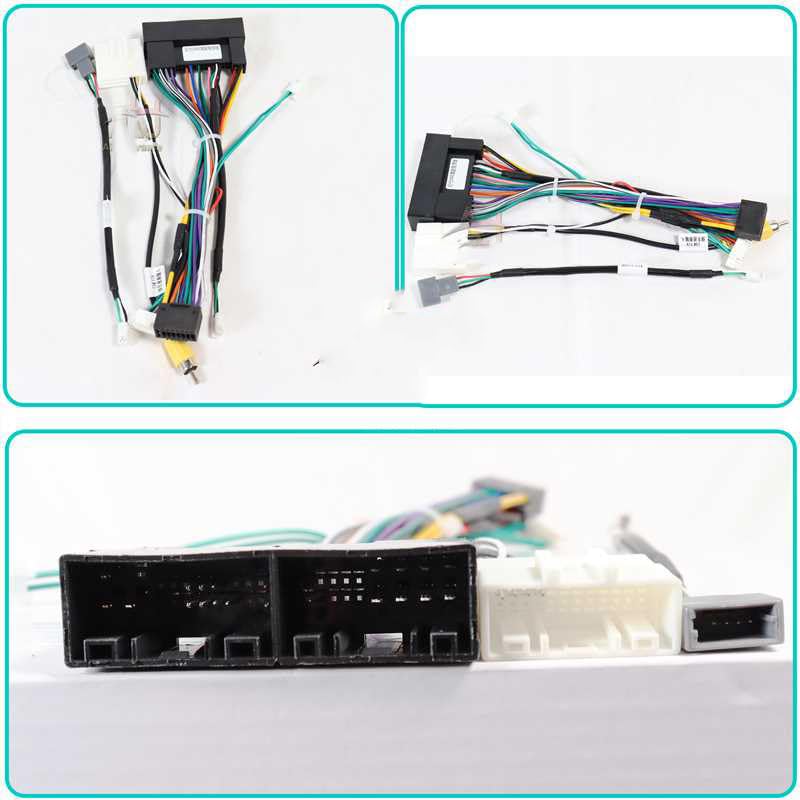
Figure 2: Detailed view of the HYK-RZ-13 Canbus decoder box. The label shows the model number P/N: HYK-RZ-13 and other identification markings, indicating its specific function for vehicle data interpretation.
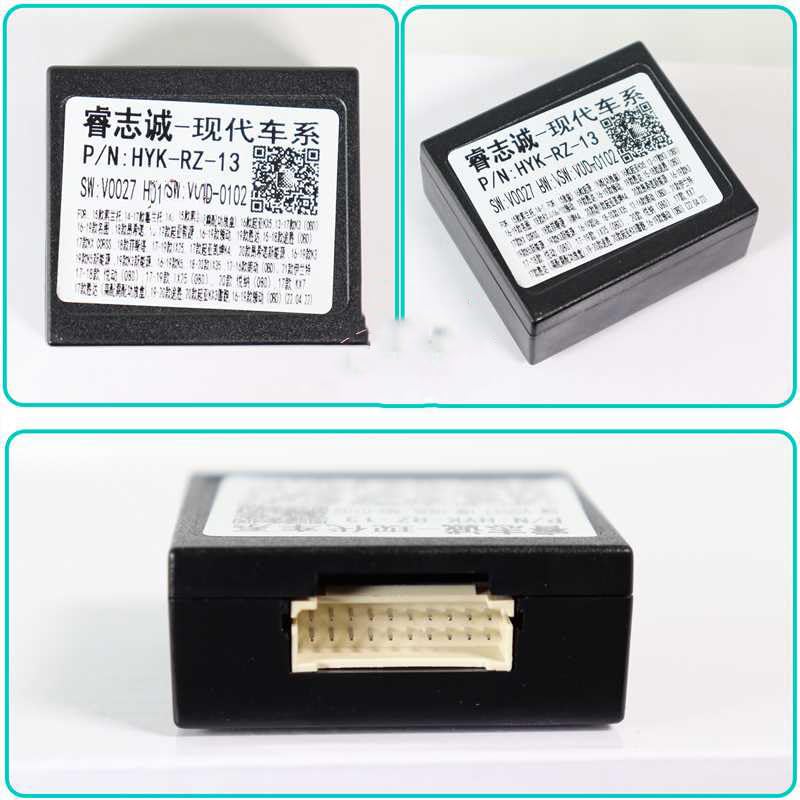
Figure 3: Close-up of various connectors on the wiring harness. This image highlights the different types of plugs and sockets designed to interface with the vehicle's existing wiring and the new Android head unit.
3. Setup and Installation
The installation process involves connecting the wiring harness and Canbus box to your vehicle's existing wiring and the new Android head unit. Ensure the vehicle's battery is disconnected before starting any electrical work.
3.1 Pre-Installation Steps
- Disconnect Battery: Always disconnect the negative terminal of your vehicle's battery to prevent electrical shorts.
- Remove Old Head Unit: Carefully remove the factory car radio from the dashboard. Refer to your vehicle's service manual for specific removal instructions.
- Inspect Wiring: Familiarize yourself with the vehicle's factory wiring connectors.
3.2 Connection Procedure
- Connect Canbus Box: Plug the Canbus decoder box (HYK-RZ-13) into the designated connector on the main wiring harness. Ensure it clicks securely into place.
- Connect to Android Head Unit: Connect the appropriate end of the wiring harness to the corresponding ports on your aftermarket Android head unit. This typically includes power, speaker, and data connectors.
- Connect to Vehicle: Plug the vehicle-specific connectors of the wiring harness into the factory wiring harnesses in your dashboard. These should match the connectors that were previously attached to your old head unit.
- Accessory Connections: Connect any additional accessory cables (e.g., USB, GPS antenna, reverse camera input) to your Android head unit as required.
- Secure Wiring: Route and secure all wiring to prevent pinching or interference once the head unit is reinstalled.
3.3 Post-Installation Check
- Reconnect Battery: Reconnect the negative terminal of your vehicle's battery.
- Test Functionality: Turn on the vehicle and the Android head unit. Verify that the head unit powers on, audio plays, and all integrated features (e.g., steering wheel controls, reverse camera) function correctly.
- Reinstall Head Unit: Once all functions are confirmed, carefully reinstall the Android head unit into the dashboard.
4. Operating Instructions
The QSZN HYK-RZ-13 Canbus box primarily facilitates communication between your 2012 Kia K3 and the aftermarket Android head unit. Its main function is to ensure that vehicle-specific features operate correctly.
- Steering Wheel Controls: After installation, the Canbus box should enable your vehicle's factory steering wheel controls to operate the Android head unit (e.g., volume up/down, track skip, mode). Configuration may be required within the Android head unit's settings. Refer to your Android head unit's manual for specific instructions on mapping steering wheel buttons.
- Ignition/ACC Signal: The Canbus box provides the correct ignition (ACC) signal to the Android head unit, allowing it to power on and off with the vehicle's ignition.
- Illumination Signal: It may also provide an illumination signal, allowing the head unit's display brightness to adjust with the vehicle's headlights.
No direct user interaction is required with the Canbus box itself once installed. Its operation is automatic.
5. Maintenance
The QSZN HYK-RZ-13 wiring harness and Canbus box are designed for long-term, maintenance-free operation. However, the following general guidelines can help ensure continued reliability:
- Secure Connections: Ensure all connections remain tight and free from corrosion.
- Avoid Moisture: Keep the components dry and away from excessive moisture.
- Physical Damage: Avoid physical stress or damage to the wiring and the Canbus box.
No user-serviceable parts are contained within the Canbus box.
6. Troubleshooting
If you encounter issues after installation, review the following common troubleshooting steps:
- No Power to Head Unit:
- Check all power connections from the harness to the head unit and the vehicle.
- Verify the vehicle's fuses are intact.
- Ensure the battery is properly reconnected.
- Steering Wheel Controls Not Working:
- Confirm the Canbus box is securely connected to the harness.
- Check the settings within your Android head unit for steering wheel control configuration. Many units require manual mapping of buttons.
- Ensure the Canbus box is compatible with your specific Android head unit model (though generally universal for Android units).
- No Sound:
- Verify all speaker wires are correctly connected from the harness to the head unit.
- Check the audio settings on your Android head unit.
- Intermittent Operation:
- Inspect all connections for looseness or poor contact.
- Ensure no wires are pinched or damaged.
If issues persist, consult a professional car audio installer or contact the product seller for further assistance.
7. Specifications
| Feature | Detail |
|---|---|
| Model Number | HYK-RZ-13 |
| Compatibility | 2012 Kia K3 (for Android head units) |
| Item Type | Cables, Adapters & Sockets (Canbus Decoder) |
| Voltage | 12V |
| Item Weight | 0.2 kg |
| Item Size | 10 x 10 x 10 cm (approximate packaging dimensions) |
| Origin | Mainland China |
| Manufacturer | HUNTAN |
8. Warranty and Support
For warranty information, technical support, or assistance with installation, please contact the retailer or seller from whom you purchased this product. Keep your purchase receipt as proof of purchase.
The manufacturer, HUNTAN, provides this product. For specific technical inquiries, refer to the contact information provided by your seller.


