
Tribesigns HL0180
Tribesigns HL0180 White L-Shaped Computer Desk User Manual
Model: HL0180
1. Introduction
Thank you for choosing the Tribesigns HL0180 White L-Shaped Computer Desk. This manual provides essential information for the safe assembly, operation, and maintenance of your new desk. Please read these instructions carefully before beginning assembly and retain them for future reference.
Important Safety Information
- Always follow assembly instructions carefully.
- Keep the desk away from heat sources.
- Avoid placing heavy objects on the edges to prevent tipping.
- Do not use the desk if any parts are damaged or missing.
- Ensure all connections are secure before use.
2. Package Contents
Before assembly, verify that all components listed below are present and undamaged. If any parts are missing or damaged, please contact customer service.
- Desk Panels (various sizes)
- Drawer Components (fronts, sides, backs, bottoms)
- Shelf Panels
- LED Light Strip with Remote Control
- Hardware Kit (screws, dowels, cam locks, drawer slides, etc.)
- Assembly Instructions (this manual)
- Tools for Assembly (e.g., screwdriver)

Image 1: Overview of the Tribesigns L-Shaped Computer Desk, showcasing its white glossy finish, integrated LED lighting in the open shelves, and three drawers on the right side. A computer monitor and various office accessories are displayed on the desk surface.
3. Assembly Instructions
Assembly is required for this product. It is recommended that two people assemble the desk. Please clear a spacious area and lay out all parts before beginning. Refer to the numbered parts and diagrams in the included assembly guide for detailed steps.
General Assembly Steps:
- Prepare the Workspace: Unpack all components and verify against the package contents list. Ensure you have the recommended tools (screwdriver is included).
- Assemble the Main Desk Sections: Connect the primary desktop panels and leg supports according to the diagrams. Ensure all cam locks and screws are tightened securely.
- Construct the Storage Unit: Assemble the frame for the drawers and open shelves. Attach the shelf panels.
- Install Drawers: Assemble each drawer box. Attach drawer slides to both the drawer boxes and the storage unit frame. Insert the assembled drawers into the unit.
- Attach LED Light Strip: Adhere the LED light strip to the designated area within the open shelves. Connect the power supply and remote receiver.
- Final Connections: Securely join the main desk sections with the storage unit to form the L-shape.
- Final Check: Ensure all screws are tight and the desk is stable.

Image 2: An illustrative diagram showing the various components of the L-shaped desk, including the main desktop, side panels, and the storage unit with shelves and drawers, indicating how they fit together during assembly.
4. Operating Instructions
LED Light Strip Operation
The desk features an integrated LED light strip with a remote control for customizable ambiance.
- Power On/Off: Use the power button on the remote to turn the LED lights on or off.
- Color Selection: Select from various static colors using the color buttons on the remote.
- Dynamic Modes: Choose from pre-programmed dynamic lighting effects.
- Music Sync: Activate the music sync function to make the lights react to sound.
- Timing Function: Set a timer for the lights to automatically turn off.

Image 3: The L-shaped desk with its LED lights illuminated in a vibrant color, accompanied by a remote control in the foreground, illustrating the customizable lighting features.
Drawer and Shelf Usage
- Drawers: The three drawers are designed for smooth operation. Pull gently to open and push firmly to close. Ideal for storing documents, stationery, and personal items.
- Open Shelves: The two open shelves provide accessible storage for books, decorative items, or frequently used office supplies.

Image 4: A close-up view of the desk's storage unit, showing the three drawers partially open to reveal their contents and the two open shelves filled with books and office supplies.
5. Maintenance
Proper care will ensure the longevity and appearance of your Tribesigns desk.
- Cleaning: Wipe the desk surfaces with a damp cloth, then immediately follow with a dry cloth to prevent water marks. Avoid abrasive cleaners or harsh chemicals.
- Spills: Clean spills immediately to prevent staining or damage to the glossy finish.
- Hardware: Periodically check and tighten all screws and fasteners to maintain stability.
- LED Lights: Keep the LED strip and remote clean and dry. Avoid direct exposure to water.
6. Troubleshooting
If you encounter any issues with your desk, refer to the following common problems and solutions:
| Problem | Possible Cause | Solution |
|---|---|---|
| Desk is wobbly/unstable. | Loose fasteners or uneven floor. | Check and tighten all screws and cam locks. Ensure the desk is on a level surface. |
| Drawers do not slide smoothly. | Improperly installed drawer slides or obstruction. | Verify drawer slide installation. Check for any objects obstructing the drawer path. |
| LED lights are not working. | Power connection issue, remote battery, or faulty strip. | Ensure the power adapter is securely plugged in. Check the remote control battery. If issues persist, contact customer support. |
7. Specifications
| Feature | Detail |
|---|---|
| Brand | Tribesigns |
| Model Number | HL0180 |
| Product Dimensions (D x W x H) | 39.37"D x 55.12"W x 29.53"H |
| Color | White |
| Style | Modern |
| Material | Engineered Wood (MDF) |
| Finish Type | Glossy |
| Special Feature | Heavy Duty, LED Lights |
| Number of Drawers | 3 |
| Number of Open Shelves | 2 |
| Maximum Weight Recommendation | 350 Pounds |
| Assembly Required | Yes (Recommended 2 people) |
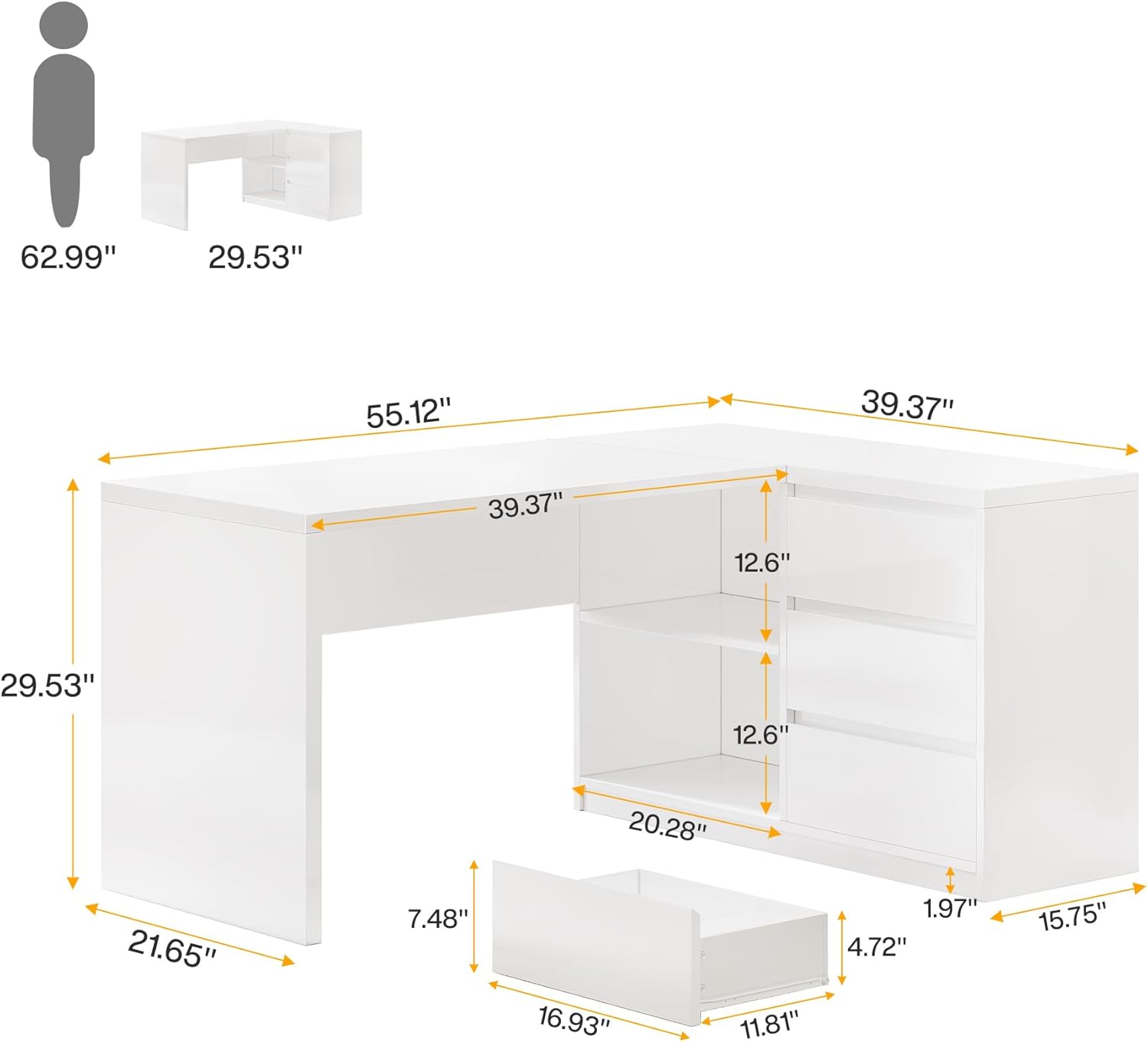
Image 5: A technical drawing illustrating the precise dimensions of the L-shaped desk, including width, depth, height, and internal measurements for drawers and shelves.
8. Warranty and Support
This Tribesigns product comes with a Limited Warranty. Please refer to the warranty documentation included with your purchase for specific terms and conditions.
For any questions, missing parts, or assistance with assembly or operation, please contact Tribesigns customer service. Contact information can typically be found on the product packaging or the official Tribesigns website.
Related documentsHL0180


Ask a question about this manual
Ask about setup, troubleshooting, compatibility, parts, safety, or missing instructions. Manuals+ will review the question and use this page’s manual context to help answer it.