
CMF BY NOTHING Buds 2
CMF Buds 2 Wireless Earbuds User Manual
Model: Buds 2 | Brand: CMF BY NOTHING

Image: CMF Buds 2 Wireless Earbuds in Dark Grey with their charging case.
1. Introduction
Welcome to the user manual for your CMF Buds 2 Wireless Earbuds. These earbuds are designed to provide a superior audio experience with advanced features such as Hybrid Active Noise Cancellation, Ultra Bass Technology, and seamless integration with the Nothing X App. Please read this manual carefully to ensure proper use and maintenance of your device.
Video: An official overview of the CMF BY NOTHING Buds 2, showcasing their design and key features like Active Noise Cancellation.
2. Setup
2.1 Package Contents
- CMF Buds 2 Wireless Earbuds (Left and Right)
- Charging Case
- User Manual
Ensure all items are present before proceeding with setup.
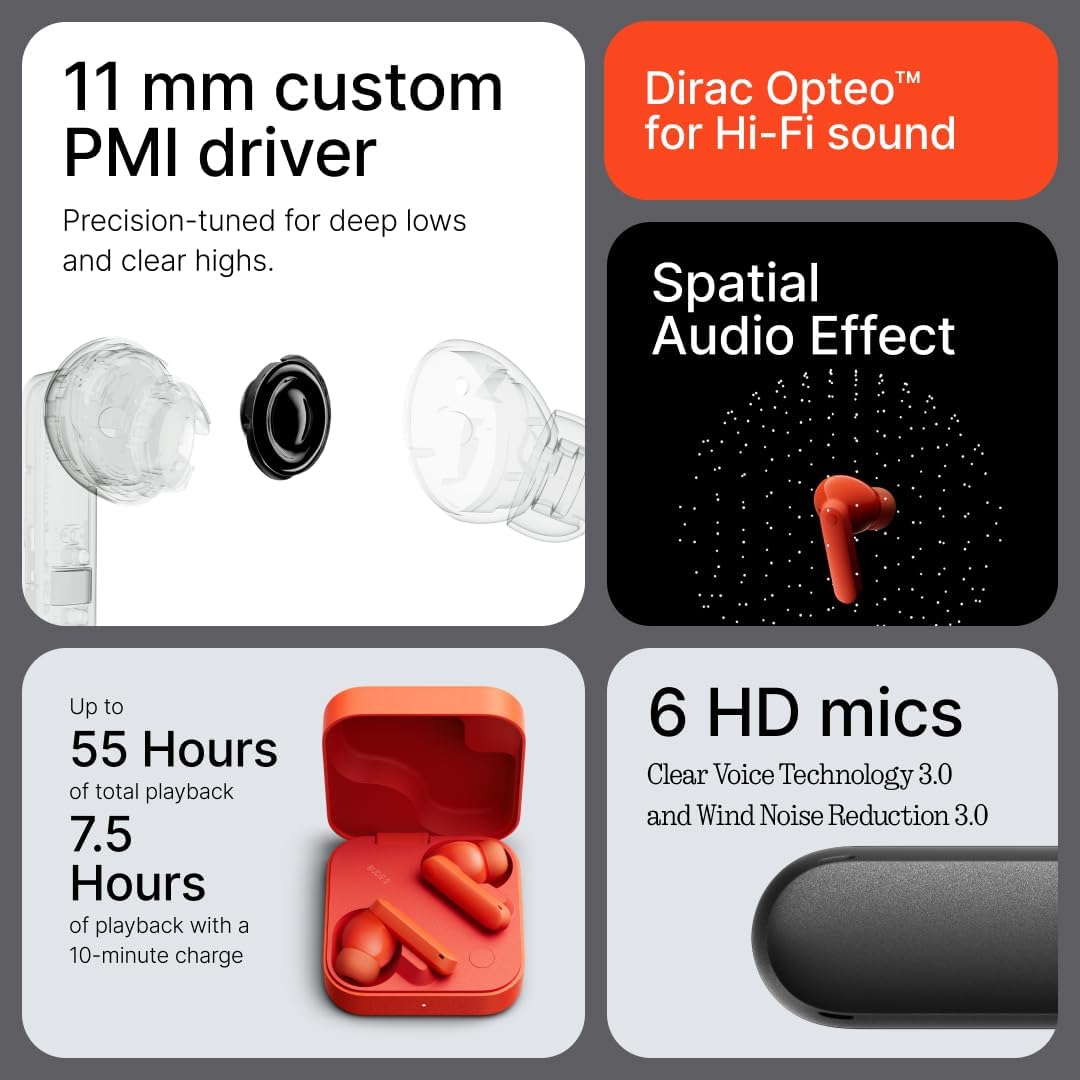
Image: CMF Buds 2 earbuds neatly placed inside their open charging case, ready for use or charging.
2.2 Charging the Earbuds and Case
Before first use, fully charge the earbuds and charging case. Connect the USB-C charging cable (not included) to the charging port on the case and a power source. The indicator light on the case will show charging status.
A full charge takes approximately 62 minutes. A quick 10-minute charge provides up to 7.5 hours of playback.
2.3 Initial Pairing
- Open the charging case. The earbuds will automatically enter pairing mode.
- On your device (smartphone, tablet, etc.), enable Bluetooth.
- Search for 'CMF Buds 2' in the list of available Bluetooth devices and select it to connect.
- Once connected, a voice prompt will confirm successful pairing.
The earbuds support Bluetooth 5.4 for stable and efficient wireless communication. They also feature dual device connection, allowing seamless switching between two paired devices.

Image: Diagram illustrating the dual connection feature of CMF Buds 2, showing simultaneous connection to a laptop and a smartphone.
2.4 Nothing X App Installation
For full customization and advanced features, download the Nothing X App from your device's app store. The app allows you to adjust EQ settings, Ultra Bass, Active Noise Cancellation levels, enable Low Lag Mode for gaming, and integrate with ChatGPT for voice interactions.

Image: Screenshot of the Nothing X App interface, showing various settings and customization options for the CMF Buds 2.
3. Operating the Earbuds
3.1 Touch Controls
The CMF Buds 2 feature intuitive touch controls on each earbud. These controls can be customized via the Nothing X App.
- Double Tap: Play/Pause music, Answer/End calls.
- Triple Tap: Skip track forward/backward (customizable).
- Tap & Hold: Switch between ANC/Transparency modes, Decline incoming calls.
- Double Tap & Hold: Adjust volume (customizable).
3.2 Active Noise Cancellation (ANC) and Transparency Mode
The CMF Buds 2 feature 48dB Hybrid Active Noise Cancellation, effectively blocking a wide range of unwanted sounds with a 5200Hz ultra-wide frequency range. Environmental Adaptive mode adjusts noise reduction levels in real-time.

Image: Graphic representation of sound waves being actively cancelled by the CMF Buds 2, highlighting the 48dB Hybrid ANC feature.
Transparency Mode allows you to hear your surroundings without removing the earbuds, useful for conversations or situational awareness.
3.3 Sound Features
Experience precision audio with the 11mm PMI driver and Dirac Opteo tuning, ensuring crystal-clear vocals and precise instrument separation. Ultra Bass Technology 2.0 provides deep, impactful bass.

Image: Exploded view diagram of the CMF Buds 2 internal components, focusing on the 11mm PMI driver for high-fidelity sound.
Enjoy 360° Cinematic Sound powered by an HRTF-based algorithm, creating an immersive listening experience for movies, games, and music.

Image: Artistic rendering depicting the 360° Cinematic Sound experience provided by CMF Buds 2, with sound points surrounding an earbud.
3.4 Call Functions
The earbuds are equipped with 6HD microphones and AI-powered Clear Voice Technology 3.0 for crystal-clear calls. Wind Noise Reduction 3.0 minimizes interference in windy environments.

Image: A person wearing CMF Buds 2, with a visual representation of clear voice transmission, emphasizing the 6HD mics and Clear Voice Technology.
3.5 Water Resistance
With an IP55 water and dust resistance rating, the CMF Buds 2 are built to withstand sweat, light rain, and dust, making them suitable for workouts and outdoor activities.

Image: A CMF Buds 2 earbud being sprayed with water, demonstrating its IP55 water resistance.
4. Maintenance
4.1 Cleaning
- Gently wipe the earbuds and charging case with a soft, dry, lint-free cloth.
- Remove ear tips and clean them with mild soap and water. Ensure they are completely dry before reattaching.
- Use a dry cotton swab to clean the charging contacts on both the earbuds and the case.
4.2 Storage
Store the earbuds in their charging case when not in use to protect them and keep them charged. Avoid storing in extreme temperatures or humid environments.
5. Troubleshooting
5.1 Pairing Issues
- Ensure both earbuds are in the charging case and have sufficient battery.
- Make sure Bluetooth is enabled on your device and the earbuds are in pairing mode.
- Try forgetting the device from your phone's Bluetooth settings and re-pairing.
- If issues persist, try resetting the earbuds (refer to Nothing X App for specific reset instructions).
5.2 Sound Quality Issues
- Check ear tip fit; ensure a snug seal for optimal sound and ANC performance.
- Clean the earbud nozzles and ear tips to remove any debris.
- Adjust EQ settings in the Nothing X App.
5.3 Microphone Issues
If you experience microphone issues, ensure your earbuds' firmware is up to date via the Nothing X App. For critical calls, consider using your phone's built-in microphone if issues persist.
6. Specifications
| Model Name | Buds 2 |
| Brand | CMF BY NOTHING |
| Noise Control | Hybrid Noise Cancellation (48dB) |
| Frequency Response | 5200 Hz |
| Connectivity Technology | Wireless (Bluetooth 5.4) |
| Audio Driver Size | 11 Millimeters (PMI driver) |
| Battery Life (Earbuds) | Up to 13.5 hours (single charge) |
| Total Playtime (with case) | Up to 55 hours |
| Charging Time | 62 minutes |
| Water Resistance Level | IP55 (Water Resistant) |
| Item Weight | 3.52 ounces |
7. Warranty and Support
CMF BY NOTHING products come with a standard manufacturer's warranty. For detailed warranty information, product registration, or technical support, please visit the official CMF BY NOTHING website or contact their customer service. Keep your proof of purchase for warranty claims.
Related documentsBuds 2


Ask a question about this manual
Ask about setup, troubleshooting, compatibility, parts, safety, or missing instructions. Manuals+ will review the question and use this page’s manual context to help answer it.