
1. Introduction
Thank you for choosing the NHOPEEW 2G+64G Android Car Stereo. This manual provides detailed instructions for the installation, operation, and maintenance of your new car stereo system. Please read this manual thoroughly before installation and use to ensure proper function and to maximize your user experience.
This car stereo is designed for specific vehicle models:
- Isuzu DMAX: 2012, 2013, 2014, 2015, 2016, 2017, 2018 models
- Isuzu MUX: 2013, 2014, 2015, 2016, 2017 models
Before purchasing or installing, verify your car's model, year, and the shape of its center console. If you are unsure about compatibility, please contact customer support.
2. Product Overview
The NHOPEEW Android Car Stereo is an advanced infotainment system designed to enhance your driving experience. Key features include:
- 9-inch Touchscreen: High-resolution 1080p 2.5D tempered glass display for clear visuals.
- Android System: Latest Android operating system for versatile app support.
- Memory & Storage: 2GB RAM + 64GB internal storage for smooth performance and ample space.
- Wireless & Wired CarPlay/Android Auto: Seamless smartphone integration with voice control.
- Bluetooth Connectivity: Hands-free calling and audio streaming.
- Wi-Fi & Hotspot: Internet access for online navigation, streaming, and app downloads.
- GPS Navigation: Supports both offline and online maps for accurate positioning.
- FM Radio: Access to real-time traffic, news, and various radio stations.
- Steering Wheel Control (SWC): Compatible with your vehicle's existing steering wheel controls after proper configuration.
- EQ Audio: Customizable audio equalizer for personalized sound.
- AHD Backup Camera Support: Enhanced safety with a clear reverse camera display.

Image: The NHOPEEW Android Car Stereo showcasing its Android operating system, 2GB RAM + 64GB storage, and Wi-Fi/Hotspot connection capabilities.
3. Setup and Installation
Proper installation is crucial for the optimal performance of your car stereo. It is recommended that installation be performed by a qualified professional.
3.1. Pre-Installation Check
- Ensure the vehicle's ignition is off and the battery is disconnected before starting installation.
- Verify all included components are present.
- Confirm compatibility with your vehicle's specific model and year.
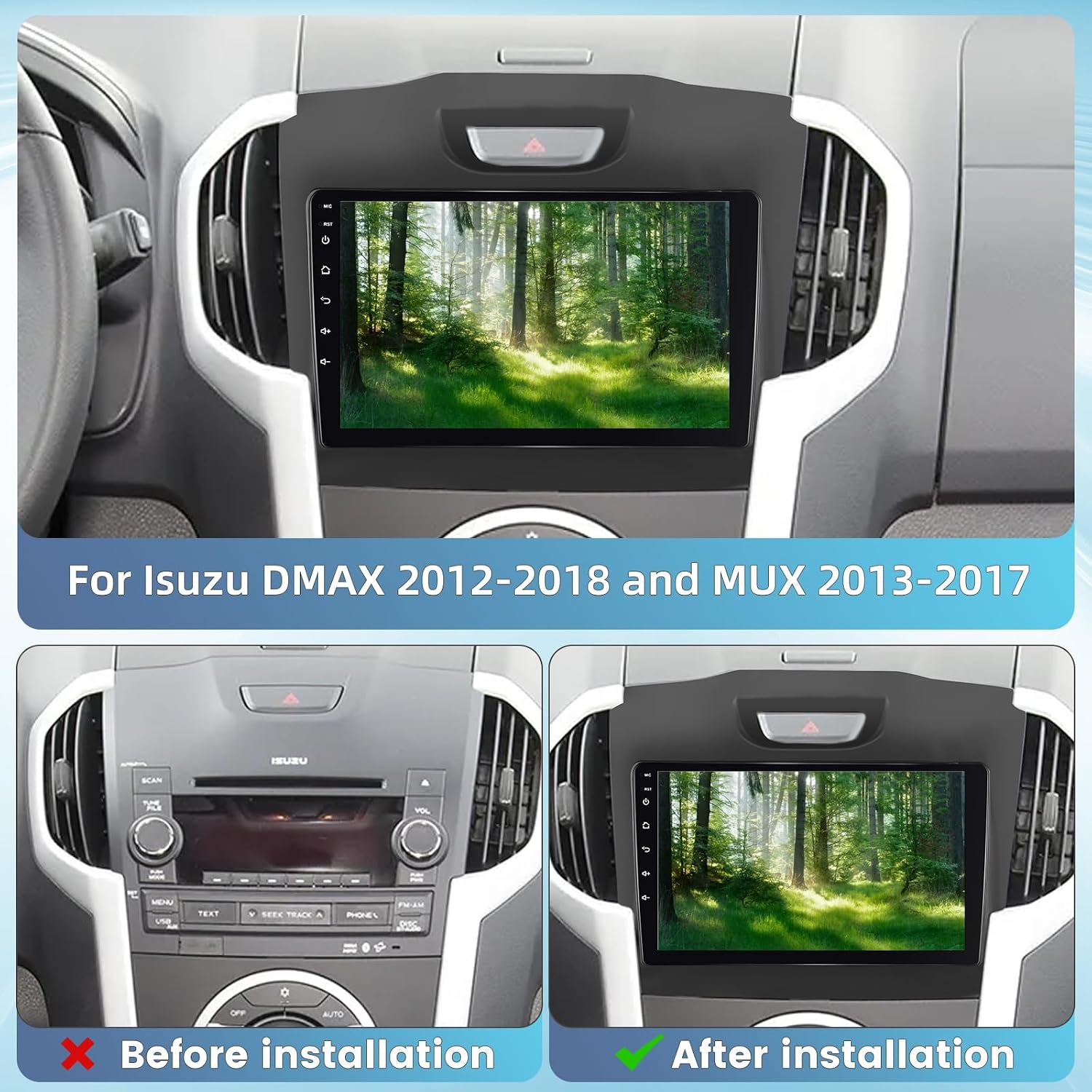
Image: A visual comparison showing the vehicle's dashboard before and after the NHOPEEW car stereo installation, highlighting the integrated fit.
3.2. Wiring Instructions (Backup Camera Example)
The following steps outline the connection for the backup camera. Refer to the full wiring diagram for all connections.
- Red Cable 1: Connect to your reverse light positive harness.
- Black Cable 2: Connect to your reverse light negative harness.
- Cables 3 & 4: These cables are typically controlled by the radio and do not require separate connection.
Important: The white plug must be connected to the radio. Failure to do so may prevent Bluetooth and Wi-Fi functionality.

Image: A detailed diagram illustrating the wiring connections for the backup camera, including positive and negative reverse light connections.
3.3. Compatibility Note
NOTE: This product may not be compatible with original cars that have 7 seats and a specific CD player back configuration as shown in the image below. If your vehicle matches this description, please contact customer service before installation.

Image: Rear view of an original car CD player unit, highlighting a specific connector layout that might indicate incompatibility with the NHOPEEW car stereo.
4. Operating Instructions
This section covers the main functions and how to operate your NHOPEEW Android Car Stereo.
4.1. CarPlay and Android Auto
The stereo supports both wired and wireless CarPlay and Android Auto. This allows you to integrate your smartphone for navigation, music, calls, messages, and more, all controlled via the stereo's touchscreen or voice commands.
- Connection: Connect your smartphone via USB for wired connection or wirelessly via Bluetooth and Wi-Fi.
- Voice Control: Use voice commands to access phone functions while keeping your focus on the road.

Image: The car stereo screen demonstrating both Apple CarPlay and Android Auto interfaces, with icons for various applications like maps, music, and phone calls.
4.2. Bluetooth Functions
Pair your mobile phone via Bluetooth for hands-free calling and wireless music playback. Access your phone's contacts and call history directly from the stereo.
4.3. Wi-Fi and Hotspot
Connect the stereo to a Wi-Fi network or your phone's hotspot to access online features such as web browsing, app downloads, and real-time online navigation.
4.4. GPS Navigation
The built-in GPS module provides accurate navigation. You can use pre-installed offline maps or download online navigation apps via Wi-Fi for real-time traffic updates and routing.
4.5. FM Radio
Tune into your favorite FM radio stations. The system allows you to save presets for quick access to news, music, and traffic broadcasts.
4.6. Steering Wheel Control (SWC)
After proper configuration through the Canbus settings, you can use your vehicle's existing steering wheel controls to manage the stereo's functions, such as volume adjustment, track skipping, and answering calls. This enhances driving safety and convenience.
Note: After entering the touch button settings, any previously learned or existing buttons will be cleared. You will need to re-learn them. The procedure is typically: Click Settings -> CarType Setting -> Raise -> and then select the model and confirm.

Image: The car stereo interface displaying options for steering wheel control setup, alongside an illustration of a hand using steering wheel buttons to control the unit.
4.7. EQ Audio
Customize your audio experience with the built-in equalizer. Adjust frequency bands to match your musical preferences and vehicle acoustics, providing a concert-like listening environment.

Image: The car stereo screen showing both GPS navigation with route details and the graphical interface of the audio equalizer for sound customization.
4.8. Mirror Link
Supports both wired and wireless mirror link functionality, allowing you to display your smartphone's screen content directly onto the car stereo's display.
5. Maintenance
To ensure the longevity and optimal performance of your NHOPEEW car stereo, follow these maintenance guidelines:
- Screen Cleaning: Use a soft, lint-free cloth to gently wipe the touchscreen. For stubborn smudges, slightly dampen the cloth with water or a screen-safe cleaner. Avoid harsh chemicals or abrasive materials.
- Software Updates: Periodically check for available software updates to ensure your system has the latest features and security patches. Follow the on-screen instructions for any updates.
- Environmental Care: Avoid exposing the unit to extreme temperatures, direct sunlight for prolonged periods, or excessive moisture.
6. Troubleshooting
If you encounter issues with your car stereo, refer to the following common problems and solutions:
| Problem | Possible Cause | Solution |
|---|---|---|
| Unit does not power on | Incorrect wiring, blown fuse, power supply issue. | Check power connections, vehicle fuse box, and ensure proper grounding. Consult a professional if unsure. |
| GPS not working properly | GPS antenna not connected or faulty, software issue, poor satellite signal. | Ensure GPS antenna is securely connected and placed in an unobstructed location. Restart the unit. If the problem persists, contact customer support. |
| Android Auto/CarPlay connection issues | Loose cable, software glitch, phone compatibility, incorrect settings. | Try a different USB cable. Unpair and re-pair your phone. Reset the stereo's network settings. Ensure your phone's OS is up to date. |
| No sound | Volume too low, mute activated, speaker wiring issues. | Check volume levels and mute status. Verify speaker connections. |
| Steering Wheel Controls not working | Canbus not configured, incorrect wiring. | Ensure Canbus is correctly wired and configured in the stereo's settings (refer to section 4.6). |
For issues not listed here or if solutions do not resolve the problem, please contact NHOPEEW customer support.
7. Specifications
| Feature | Specification |
|---|---|
| Brand | NHOPEEW |
| Model Name | NHOPEEW (2G+64G Android Car Stereo) |
| Screen Size | 9 Inches |
| Display Resolution | 1080p (Full HD video playback) |
| Memory Storage Capacity | 64 GB |
| RAM | 2 GB |
| Human Interface Input | Touchscreen |
| Supported Satellite Navigation System | GPS |
| Included Components | Car radio unit |
| Batteries Included | No |
| Package Dimensions | 26 x 20 x 11 cm |
| Item Weight | 1.52 Kilograms |
8. Warranty and Support
NHOPEEW is committed to providing quality products and excellent customer service. While specific warranty details are not provided in this manual, please retain your proof of purchase for any warranty claims.
If you have any questions, require technical assistance, or experience issues with your NHOPEEW car stereo, please contact our customer service team. You can typically reach us through your Amazon order page by clicking on our store name and selecting 'Ask a Question' or 'Send a message to the seller'.


