
1. Important Safety Guidelines
Read this manual thoroughly before operating the Ruitoo T2 Max Electric Scooter. Failure to follow instructions can result in serious injury or damage to the scooter.
- Always wear a helmet and appropriate protective gear (knee pads, elbow pads, gloves) when riding.
- Do not ride in wet conditions, heavy rain, or through standing water. The scooter has IPX5 water resistance, meaning it is protected against low-pressure water jets from any direction, but it is not fully waterproof for submersion.
- Ensure all bolts and quick releases are securely fastened before each ride.
- Familiarize yourself with local laws and regulations regarding electric scooter use.
- Maintain a safe speed and distance from other vehicles and pedestrians.
- Avoid sudden acceleration or braking.
- Do not allow children under the age of 16 to operate the scooter.
- The maximum load capacity is 265 lbs (120 kg). Do not exceed this limit.
- Regularly inspect tires, brakes, and battery for any signs of wear or damage.
2. Product Overview
The Ruitoo T2 Max is an electric scooter designed for urban commuting and off-road use, featuring a 1000W motor, 10-inch off-road tires, and dual suspension for a comfortable ride.

Image 2.1: The Ruitoo T2 Max Electric Scooter, showcasing its robust design and off-road capabilities.
3. Assembly and Initial Setup
The Ruitoo T2 Max Electric Scooter comes largely pre-assembled. Minimal setup is required before first use.
- Unpacking: Carefully remove the scooter and all accessories from the packaging. Retain packaging for future transport or storage.
- Handlebar Installation:
- Lift the handlebar stem to its upright position until it locks securely.
- Attach the handlebars to the stem, ensuring all cables are not pinched. Secure with the provided screws and tools.
- Initial Battery Charge:
- Before the first ride, fully charge the scooter's battery. Connect the charger to the charging port and then to a power outlet.
- The charging indicator on the charger will change color (e.g., red to green) when fully charged. This may take several hours.
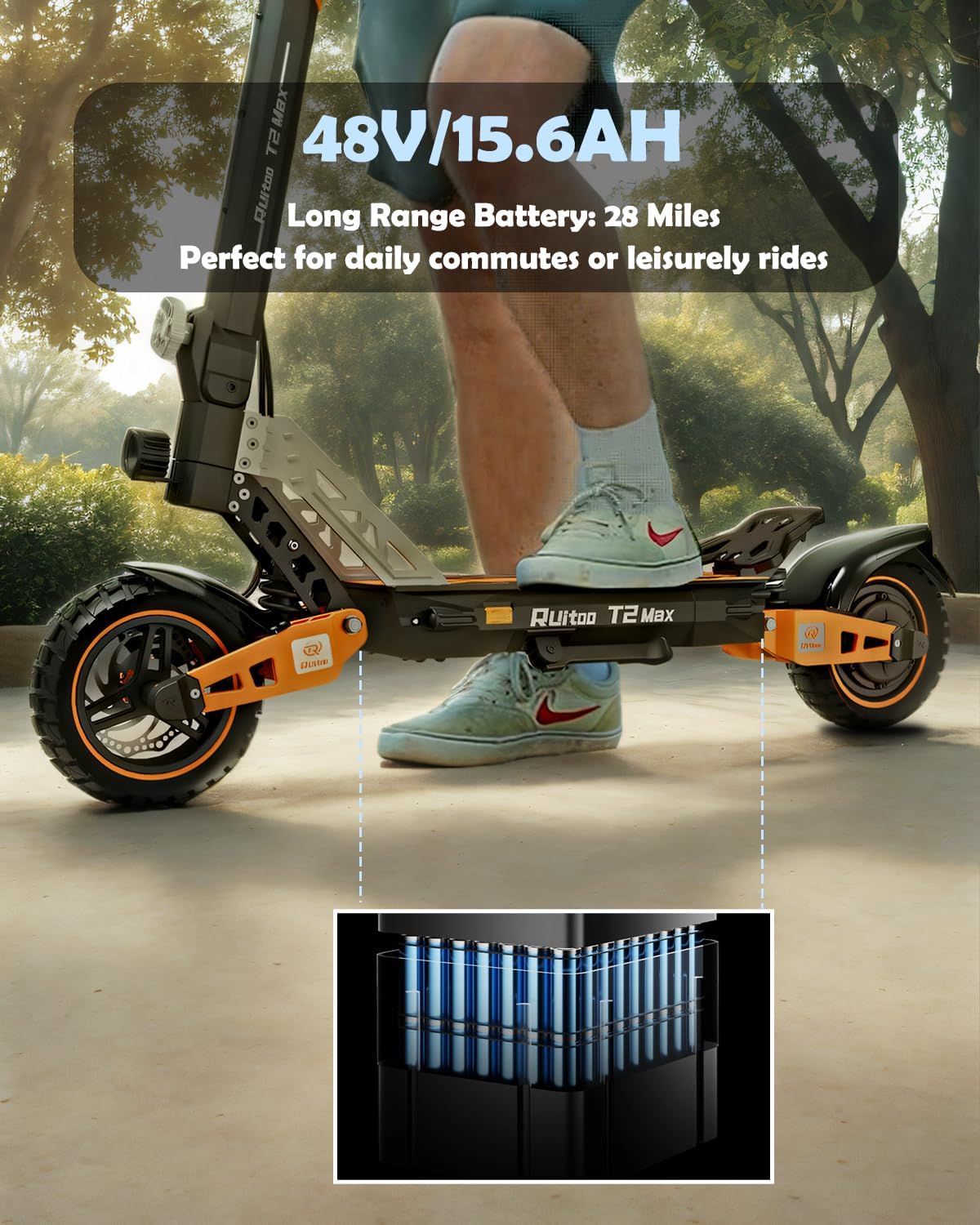
Image 3.1: Illustration of the 48V/15.6Ah battery, providing up to 28 miles of range.
- Tire Pressure Check: Ensure tires are inflated to the recommended pressure (refer to tire sidewall or specifications section).
- Brake Check: Test both front and rear brakes to ensure they are functioning correctly.
4. Operating Instructions
4.1 Controls and Display
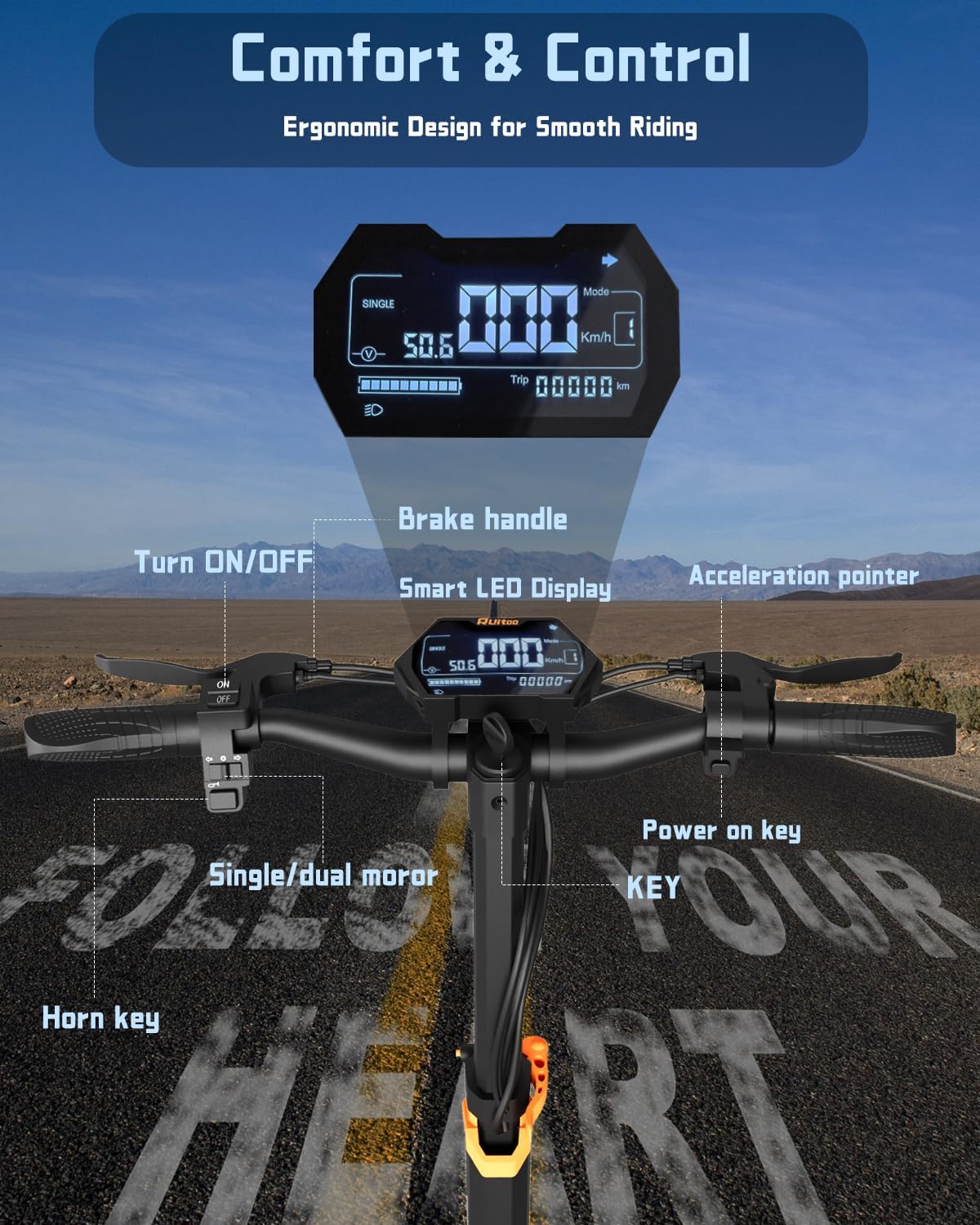
Image 4.1: Overview of the handlebar controls and smart LCD display, showing power on/off, horn, single/dual motor switch, brake handle, acceleration pointer, and key ignition.
- Power On/Off: Use the key to turn the scooter on. Press the ON/OFF button on the handlebar to activate the display.
- LCD Display: The smart LCD display shows real-time data including speed, battery level, and riding mode.
- Acceleration: Use the acceleration pointer (throttle) to control speed.
- Brake Handles: The scooter features dual brake handles for reliable stopping power.
- Horn Key: Press to activate the horn for signaling.
- Single/Dual Motor Switch: Select between single or dual motor operation for varying power and efficiency needs.
4.2 Riding Performance
The T2 Max is equipped with a powerful 1000W motor, enabling it to reach a top speed of 27 mph and tackle inclines of up to 30%.

Image 4.2: A rider on the T2 Max, highlighting the 1000W motor's capability for swift rides and hill climbing.
Its 10-inch pneumatic off-road tires and dual suspension system provide a stable and comfortable ride across various surfaces, from urban streets to unpaved trails.

Image 4.3: The Ruitoo T2 Max being ridden on diverse terrains, demonstrating its versatility and off-road capability.
4.3 General Riding Guidelines
- Starting: With the scooter powered on, place one foot on the deck and push off with the other foot to gain initial momentum. Then, gently press the acceleration throttle.
- Speed Control: Adjust the acceleration throttle to control your speed.
- Braking: Apply both brake handles smoothly to slow down or stop. Avoid sudden, hard braking, especially at high speeds.
- Night Riding: The scooter is equipped with a 360° lighting system, including a front light, brake light, and turn signals for enhanced visibility. Ensure all lights are functional before riding at night.

Image 4.4: The scooter's comprehensive lighting system ensures safety and visibility during night rides.
- Folding Mechanism: The T2 Max is designed for portability and can be folded in approximately 3 seconds for easy storage or transport. Locate the folding latch mechanism on the stem, release it, and fold the stem down until it locks into place.

Image 4.5: The scooter folded for compact storage, demonstrating its portability.
5. Maintenance
Regular maintenance ensures the longevity and safe operation of your Ruitoo T2 Max Electric Scooter.
- Tires: Check tire pressure weekly. Maintain recommended PSI for optimal performance and safety. Inspect for wear, punctures, or damage. The 10-inch pneumatic off-road tires are designed for various terrains.
- Brakes: Regularly inspect brake pads and discs for wear. Ensure brake levers operate smoothly and provide adequate stopping power. Adjust as necessary.
- Battery Care:
- Charge the battery fully after each use, especially if storing for extended periods.
- Avoid completely draining the battery.
- Store the scooter in a cool, dry place, away from direct sunlight and extreme temperatures.
- Cleaning: Use a damp cloth to wipe down the scooter. Do not use high-pressure water jets or immerse the scooter in water.
- Fasteners: Periodically check all screws, bolts, and quick-release mechanisms to ensure they are tight and secure.
6. Troubleshooting
This section addresses common issues you might encounter with your Ruitoo T2 Max Electric Scooter.
| Problem | Possible Cause | Solution |
|---|---|---|
| Scooter does not power on. | Battery is low or depleted; power key not inserted/turned; loose connections. | Charge the battery; ensure key is fully inserted and turned to ON; check all visible connections. |
| Reduced range or speed. | Low tire pressure; battery degradation; riding uphill frequently; heavy load. | Inflate tires to correct pressure; ensure battery is fully charged; consider riding conditions and load. |
| Brakes feel weak. | Worn brake pads; loose brake cable; air in hydraulic system (if applicable). | Inspect and replace brake pads if worn; adjust brake cable tension; consult a professional for hydraulic brake issues. |
| Unusual noises during operation. | Loose components; debris in wheels/motor; worn bearings. | Inspect scooter for loose parts and tighten; clear any debris; if noise persists, seek professional inspection. |
If you encounter issues not listed here or if solutions do not resolve the problem, please contact Ruitoo customer support.
7. Specifications
Key technical specifications for the Ruitoo T2 Max Electric Scooter.
| Feature | Specification |
|---|---|
| Brand | Ruitoo |
| Model Name | T2 Max |
| Motor Power | 1000W |
| Top Speed | 27 Mph |
| Max Range | 28 Miles |
| Battery | 48V/15.6Ah |
| Weight Limit | 265 Pounds |
| Wheel Size | 10 Inches |
| Wheel Type | Pneumatic Off-Road |
| Frame Material | Aluminum |
| Suspension Type | Dual Suspension |
| Brake Style | Rear Braking and Regenerative |
| Hill Climb Capability | Up to 30% incline |
| Water Resistance | IPX5 |
8. Warranty and Support
The Ruitoo T2 Max Electric Scooter comes with a limited warranty. Please refer to the warranty card included with your product for specific terms and conditions.
For technical support, parts, or warranty claims, please contact Ruitoo customer service through the official website or your point of purchase. When contacting support, please have your model name (T2 Max) and purchase information readily available.
Online Resources: For additional information, FAQs, and video tutorials, visit the official Ruitoo website: Ruitoo Official Store
9. Video Resources
No official product videos from the seller were provided in the product data for embedding in this manual.
