1. Introduction
The Furrion Vision S+ RV Backup Camera System (Model FCNFDTASF) is designed to enhance safety and convenience for RV owners. This system provides a clear, wide-angle view of your surroundings, assisting with backing up, parking, and general observation. It features high-resolution video, infrared night vision, and motion detection capabilities for added security.
This manual provides essential information for the proper installation, operation, and maintenance of your Furrion Vision S+ camera.
2. Important Safety Information
Please read all safety instructions carefully before installing or operating the camera system. Failure to follow these instructions may result in injury or damage to the product or vehicle.
- Professional Installation Recommended: For optimal performance and safety, professional installation by a qualified technician is recommended.
- Power Disconnection: Always disconnect the RV's power supply (both 12V DC and shore power) before beginning any installation or maintenance.
- Wiring: Ensure all wiring is correctly connected and insulated to prevent short circuits or electrical hazards.
- Waterproof Design: While the camera is waterproof, ensure all connections are sealed properly to maintain integrity.
- Operating Temperature: Do not operate the camera outside its specified temperature range.
- Cleaning: Use only a soft, damp cloth for cleaning. Avoid abrasive cleaners or solvents.
- Compatibility: This camera is only compatible with Furrion Vision S+ camera systems. It is NOT compatible with Vision 1, Vision 2, or Vision S systems.
3. What's in the Box
Verify that all components are present before beginning installation:
- Sharkfin camera
- Bracket
Note: This product includes the camera only. A compatible Furrion Vision S+ monitor is required for operation and is sold separately.

Image: The Furrion Vision S+ Sharkfin Camera, showing its compact design and integrated antenna.
4. Setup and Installation
This section outlines the general steps for installing the Furrion Vision S+ Sharkfin Camera. Specific installation procedures may vary depending on your RV model and existing wiring. Consult your RV's manual or a professional installer if unsure.
4.1 Pre-Installation Checklist
- Ensure the RV's power is disconnected.
- Gather necessary tools (screwdriver, drill, sealant, wire crimpers, etc.).
- Identify the pre-wired Furrion mounting bracket location on your RV (typically at the rear).
4.2 Mounting the Camera
- Locate the pre-installed Furrion mounting bracket on your RV. This bracket is designed for direct compatibility with the Sharkfin camera.
- Remove any existing cover plate from the bracket.
- Connect the camera's power cable to the corresponding wiring from the RV's pre-installed bracket. Ensure correct polarity (positive to positive, negative to negative).
- Secure the Sharkfin camera to the mounting bracket using the provided screws. Ensure a tight and secure fit.
- Apply a weather-resistant sealant around the base of the camera and screw holes to prevent water intrusion.
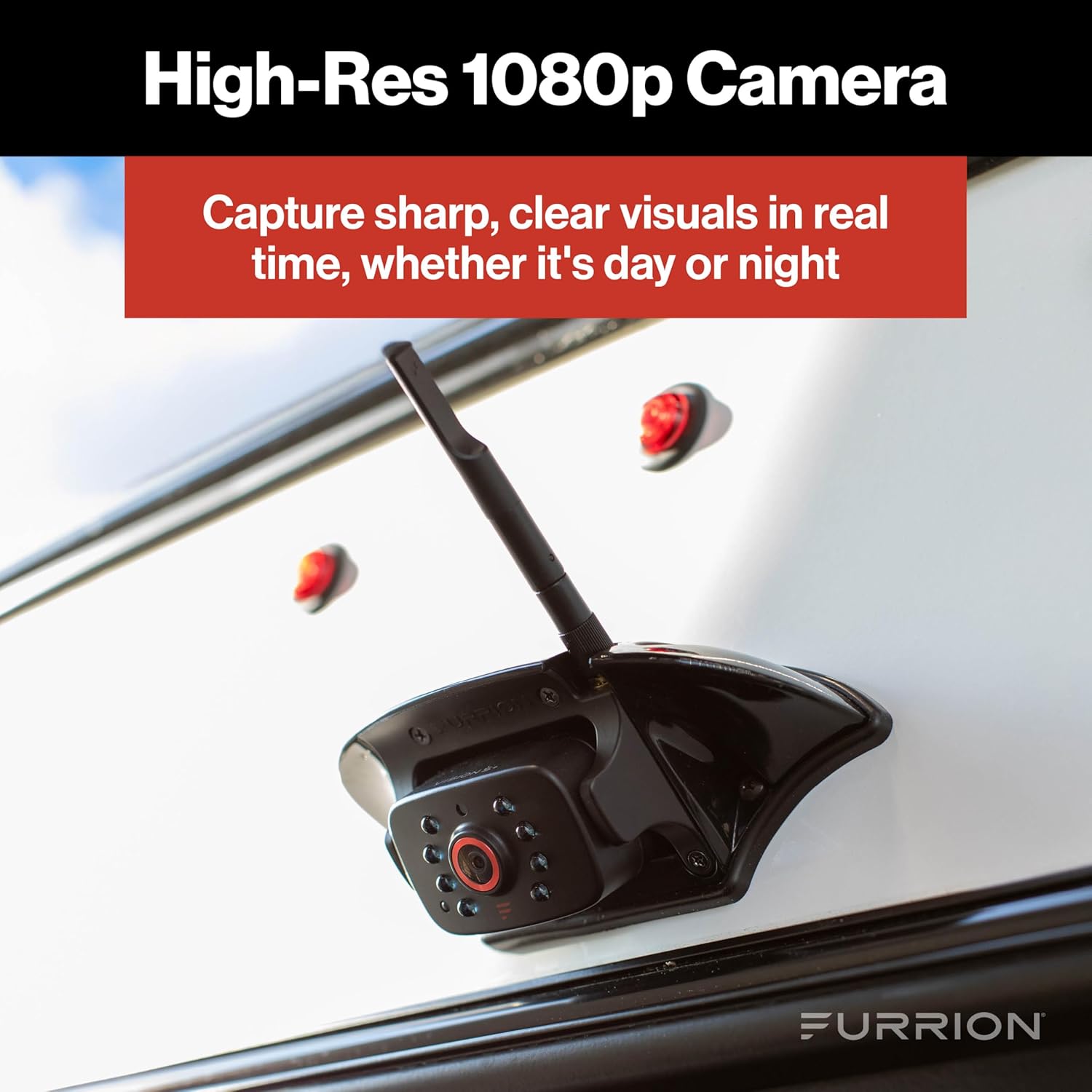
Image: The Furrion Vision S+ Sharkfin Camera mounted on the rear of an RV, demonstrating its typical installation position.

Image: Diagram showing the approximate dimensions of the Furrion Vision S+ Rear Sharkfin Camera, with a depth of 2.625 inches and width of 6.625 inches.
5. Operating Instructions
The Furrion Vision S+ camera operates wirelessly with a compatible Furrion Vision S+ monitor (sold separately). Once installed and powered, the camera will transmit video to the paired monitor.
5.1 Pairing with a Monitor
Refer to your Furrion Vision S+ monitor's user manual for specific pairing instructions. Generally, the process involves:
- Power on the Furrion Vision S+ monitor.
- Ensure the camera is receiving power from the RV.
- Navigate to the pairing menu on the monitor.
- Initiate the pairing process. The camera should automatically connect to the monitor.
5.2 Key Features in Operation
- 1080p HD Resolution: Provides sharp, clear visuals for detailed observation.

Image: A Furrion Vision S+ monitor displaying a wide-angle view of a road with cyclists, demonstrating the camera's broad field of view.
- 140° Wide Angle: Minimizes blind spots and enhances situational awareness.
- Infrared Night Vision: Automatically activates in low-light conditions to provide clear images in darkness.

Image: A Furrion Vision S+ monitor displaying a black and white infrared night vision view of a dark road, illustrating its low-light capability.
- Motion Detection for Security: When parked, the camera can detect motion and alert you via the monitor, acting as a security system.

Image: A Furrion Vision S+ monitor displaying a night view with an animal detected, highlighting the motion detection feature for security.
6. Maintenance
Proper maintenance ensures the longevity and optimal performance of your Furrion Vision S+ camera.
- Cleaning the Lens: Regularly clean the camera lens with a soft, lint-free cloth and mild glass cleaner. Avoid abrasive materials that could scratch the lens.
- Inspect Wiring: Periodically check all wiring connections for signs of wear, corrosion, or loose connections. Ensure seals remain intact.
- Check Mounting: Verify that the camera remains securely mounted to the RV, especially after long trips or exposure to rough terrain.
- Waterproof Integrity: Although designed to be waterproof, inspect the camera body and seals for any cracks or damage that could compromise its water resistance.

Image: The Furrion Vision S+ camera installed on an RV during rainfall, demonstrating its durable waterproof design.
7. Troubleshooting
If you experience issues with your Furrion Vision S+ camera, refer to the following common problems and solutions:
| Problem | Possible Cause | Solution |
|---|---|---|
| No image on monitor |
|
|
| Poor image quality (blurry, distorted) |
|
|
| Motion detection not working |
|
|
If the problem persists after trying these solutions, please contact Furrion customer support or consult a qualified technician.
8. Specifications
| Feature | Detail |
|---|---|
| Model Number | FCNFDTASF |
| Video Capture Resolution | 1080p |
| Real Angle of View | 140 Degrees |
| Optical Sensor Technology | Infrared |
| Lens Type | Wide Angle, Fixed |
| Connector Type | Wireless |
| Installation Type | Bracket Mount |
| Item Weight | 14.1 ounces |
| Product Dimensions | 15 x 12 x 12 inches |
| Date First Available | February 18, 2025 |
9. Warranty and Support
For detailed warranty information and customer support, please refer to the official Furrion website or contact their customer service directly. Keep your purchase receipt as proof of purchase for any warranty claims.
Furrion Contact Information: Please visit www.furrion.com for the most up-to-date support resources, FAQs, and contact details.