
Candy EY294DWM5/1-S
Candy EY294DWM5/1-S Washing Machine User Manual
Model: EY294DWM5/1-S | Brand: Candy
1. Introduction
This manual provides essential information for the safe and efficient operation, installation, and maintenance of your Candy EY294DWM5/1-S washing machine. Please read these instructions carefully before using the appliance and keep them for future reference.
This appliance is designed for domestic use only. Any other use may void the warranty and be dangerous.
2. Safety Instructions
Important: Read all instructions before using the appliance to reduce the risk of fire, electric shock, or injury to persons.
- Ensure the appliance is properly earthed.
- Do not allow children to play with or operate the appliance.
- Keep packaging materials out of reach of children.
- Do not install the appliance in a damp place or where it may be exposed to rain.
- Always unplug the appliance before cleaning or performing maintenance.
- Do not overload the washing machine.
- Use only detergents suitable for automatic washing machines.
- In case of malfunction, do not attempt to repair the appliance yourself. Contact authorized service personnel.
3. Setup and Installation
3.1 Unpacking
Carefully remove all packaging materials, including the polystyrene base and any protective films. Retain packaging for future transport if needed.
3.2 Removing Transit Bolts
Before use, it is essential to remove the transit bolts located at the rear of the machine. These bolts secure the drum during transport and must be removed to prevent damage during operation.
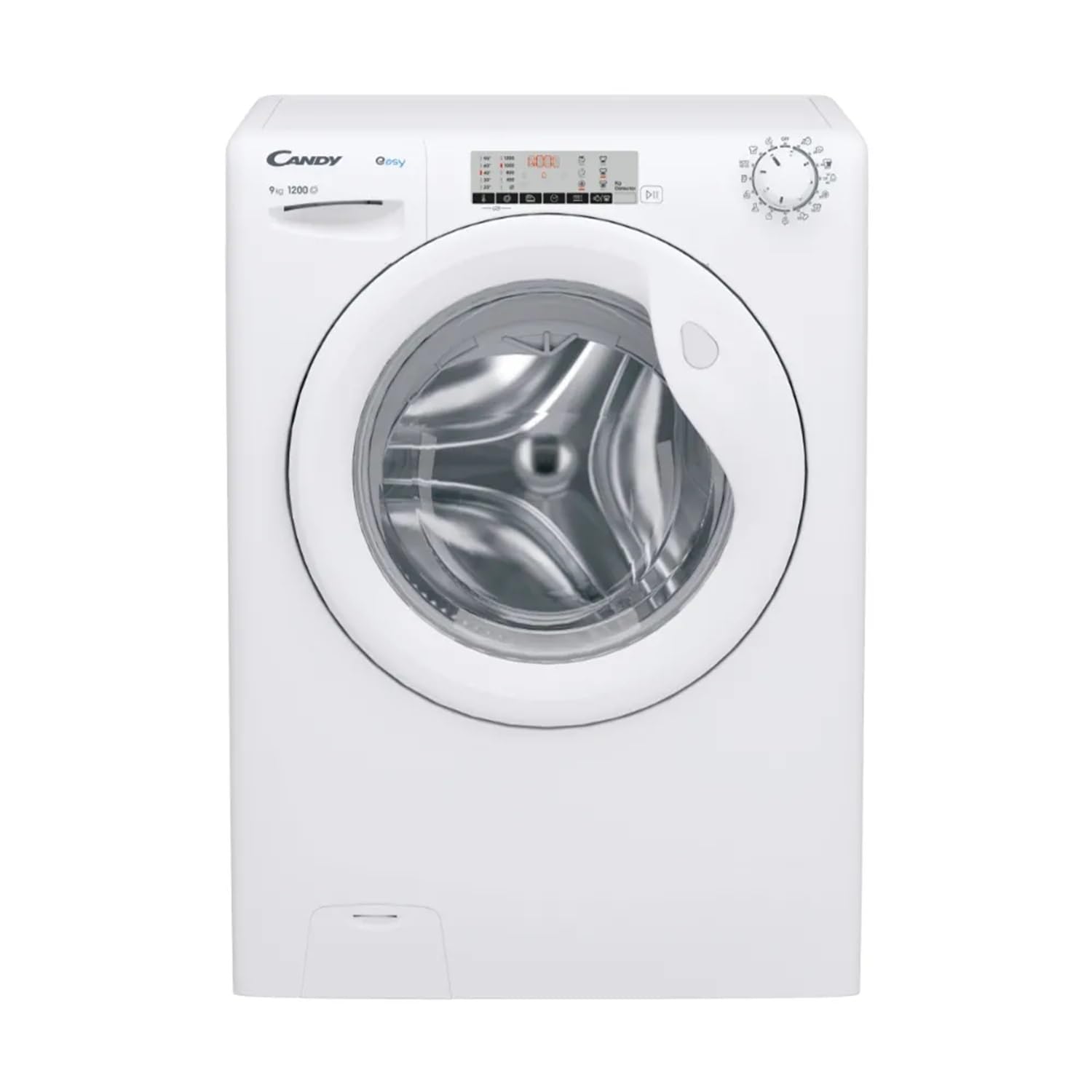
Image: Rear view of the Candy EY294DWM5/1-S washing machine, showing the location of the transit bolts. These bolts must be removed before the first use to allow the drum to move freely.
- Unscrew the bolts using a suitable wrench.
- Pull out the bolts along with their rubber spacers.
- Insert the plastic caps provided into the holes.
3.3 Leveling the Appliance
Ensure the washing machine is perfectly level to prevent vibrations and noise during operation. Adjust the adjustable feet at the bottom of the appliance.
- Use a spirit level to check the machine's stability.
- Turn the adjustable feet clockwise or counter-clockwise until the machine is stable and level.
- Tighten the lock nuts on the feet to secure them in position.
3.4 Water Connection
Connect the water inlet hose to a cold water tap with a 3/4" thread. Ensure the connection is tight to prevent leaks.
- Do not use old hoses; always use the new hoses supplied with the appliance.
- Connect the curved end of the drain hose to a standpipe or secure it over a sink, ensuring it is not kinked.
3.5 Electrical Connection
Connect the power cord to a properly earthed electrical outlet. Ensure the voltage and frequency match the specifications on the appliance rating plate.
- Do not use extension cords or multiple adapters.
- The power cord should not be trapped or crushed.
4. Operating Instructions
4.1 Control Panel Overview
Image: Front view of the Candy EY294DWM5/1-S washing machine, highlighting the control panel with its program selector knob, display, and function buttons.
The control panel features a program selector knob, a digital display, and various function buttons for customizing your wash cycle.
4.2 Loading Laundry
- Sort laundry by fabric type, color, and degree of soiling.
- Open the door and load items loosely into the drum, ensuring not to overload. The maximum capacity is 9 kg.
- Close the door firmly.
4.3 Adding Detergent and Additives
Pull out the detergent drawer located on the top left of the control panel.
- Compartment I: Pre-wash detergent (if applicable).
- Compartment II: Main wash detergent.
- Compartment III: Fabric softener or other additives.
Refer to detergent packaging for recommended dosages. The Mix Power System feature optimizes detergent dissolution.
4.4 Selecting a Program
Turn the program selector knob to choose the desired wash program. The display will show the default temperature and spin speed for the selected program.
Available Programs:
| Program | Description | Max Load | Temp. Range |
|---|---|---|---|
| Cotton | For durable cotton items. | 9 kg | 30-90°C |
| Synthetics | For synthetic or mixed fabrics. | 4 kg | 30-60°C |
| Delicates | For delicate items like silk or lace. | 2 kg | 20-40°C |
| Wool/Hand Wash | For woolens and hand-washable items. | 2 kg | Cold-30°C |
| Eco 40-60 | Standard program for normally soiled cotton, linen, or mixed fiber items washable at 40°C or 60°C. | 9 kg | 40-60°C |
| Rapid 14/30/44 min | Quick wash programs for lightly soiled items. | 1.5-3.5 kg | 20-40°C |
4.5 Customizing the Wash Cycle
After selecting a program, you can adjust settings using the function buttons:
- Temperature Button: Press to change the wash temperature.
- Spin Speed Button: Press to adjust the spin speed (up to 1200 rpm).
- Delay Start Button: Set a delay for the program to start.
- Extra Rinse Button: Add an additional rinse cycle.
4.6 Starting and Pausing a Program
- Press the "Start/Pause" button to begin the cycle. The indicator light will illuminate.
- To pause, press the "Start/Pause" button again. The indicator light will flash.
- To resume, press "Start/Pause" once more.
4.7 End of Cycle
At the end of the program, the display will show "End" or a similar indication. The door will unlock after a short delay. Unload the laundry and leave the door slightly ajar to allow the drum to dry.
5. Maintenance and Cleaning
Regular maintenance ensures optimal performance and extends the lifespan of your washing machine.
5.1 Cleaning the Exterior
Wipe the exterior surfaces with a soft, damp cloth. Do not use abrasive cleaners or solvents.
5.2 Cleaning the Detergent Drawer
Periodically remove and clean the detergent drawer to prevent detergent residue buildup.
- Pull the drawer out completely.
- Rinse under running water to remove all residue.
- Clean the drawer housing with a brush.
- Reinsert the drawer.
5.3 Cleaning the Door Seal
Wipe the rubber door seal after each wash to remove lint and moisture, preventing mold and odors.
5.4 Cleaning the Filter
The filter should be cleaned regularly to prevent blockages and ensure proper drainage.
- Place a shallow container under the filter cover to collect any residual water.
- Open the filter cover (usually at the bottom front of the machine).
- Slowly unscrew the filter, allowing water to drain.
- Remove any foreign objects (coins, buttons, lint) from the filter.
- Rinse the filter under running water.
- Screw the filter back in tightly and close the cover.
5.5 Descaling
In areas with hard water, periodic descaling may be necessary. Use a descaling product suitable for washing machines and follow the manufacturer's instructions.
6. Troubleshooting
Before contacting service, refer to the following table for common issues and their solutions.
| Problem | Possible Cause | Solution |
|---|---|---|
| Machine does not start | No power supply; Door not closed; Program not selected; Start/Pause button not pressed. | Check power plug and fuse; Ensure door is firmly closed; Select a program; Press Start/Pause. |
| Water not filling | Water tap closed; Inlet hose kinked; Water filter blocked. | Open water tap; Straighten hose; Clean inlet filter. |
| Water not draining | Drain hose kinked; Drain filter blocked; Pump malfunction. | Straighten hose; Clean drain filter; Contact service if pump is faulty. |
| Excessive vibration/noise | Transit bolts not removed; Machine not level; Overloaded drum; Small items trapped. | Remove transit bolts; Adjust feet to level machine; Reduce load; Check drum for foreign objects. |
| Detergent residue in drawer | Insufficient water pressure; Detergent drawer blocked; Too much detergent. | Check water pressure; Clean detergent drawer; Use recommended detergent amount. |
If the problem persists after attempting these solutions, please contact authorized service personnel.
7. Technical Specifications
- Model: EY294DWM5/1-S
- Brand: Candy
- Type: Front-load, Free-standing Washing Machine
- Capacity: 9 kg
- Maximum Spin Speed: 1200 rpm
- Energy Efficiency Class: A
- Spin-drying Efficiency Class: B
- Noise Level (Spin): 74 dB
- Dimensions (H x W x D): 850 mm x 600 mm x 540 mm
- Weight: 65 kg
- Special Feature: Mix Power System
- Control Type: Knob
- Power Supply: [Voltage] V, [Frequency] Hz (Refer to rating plate)
8. Warranty Information
This appliance is covered by a manufacturer's warranty. The warranty period and terms may vary by region and retailer. Please retain your proof of purchase for any warranty claims.
The warranty typically covers manufacturing defects and faulty materials under normal domestic use. It does not cover damage caused by improper installation, misuse, neglect, unauthorized repairs, or normal wear and tear.
For detailed warranty terms and conditions, please refer to the warranty card included with your appliance or visit the official Candy website.
9. Customer Support
If you require assistance, have questions, or need to report a fault, please contact Candy customer support.
- Online Support: Visit the official Candy website for FAQs, troubleshooting guides, and contact forms.
- Telephone Support: Refer to your warranty documentation or the Candy website for local service numbers.
- Service Appointments: Authorized service technicians can be scheduled through customer support.
When contacting support, please have your appliance model number (EY294DWM5/1-S) and serial number ready. This information can usually be found on a label inside the door or at the rear of the appliance.
Related documentsEY294DWM5/1-S


Ask a question about this manual
Ask about setup, troubleshooting, compatibility, parts, safety, or missing instructions. Manuals+ will review the question and use this page’s manual context to help answer it.