
Important Safety Instructions
Read all instructions before using the appliance. Follow all warnings and instructions provided in this manual to reduce the risk of fire, electric shock, or injury to persons. Keep this manual for future reference.
- Do not allow children to play on or in the appliance. Close supervision of children is necessary when the appliance is used near children.
- Do not install or store this appliance where it will be exposed to the weather or to freezing temperatures.
- Do not tamper with controls.
- Do not repair or replace any part of the appliance or attempt any servicing unless specifically recommended in the user-maintenance instructions or in published user-repair instructions that you understand and have the skills to carry out.
1. Setup and Installation
1.1 Unpacking
Carefully remove all packaging materials, including the polystyrene base and any protective film. Remove the transit bolts from the rear of the machine. Keep the transit bolts for future transport of the appliance.
1.2 Location Requirements
Place the washing machine on a firm, level surface. Ensure there is adequate space around the machine for ventilation and maintenance. Avoid direct sunlight or extreme temperatures.
1.3 Connecting Water Hoses
Connect the cold water inlet hose to the cold water tap and the corresponding inlet valve on the back of the washing machine. Ensure all connections are tight to prevent leaks.

Image: Front view of the LG F84N15WHS washing machine, showing the control panel, detergent drawer, and door. This image illustrates the general appearance of the appliance.
1.4 Connecting Drain Hose
The drain hose should be routed to a standpipe or a sink. Ensure the end of the drain hose is positioned at a height between 60 cm and 100 cm from the floor. Do not submerge the end of the hose in water.
1.5 Electrical Connection
Plug the power cord into a grounded electrical outlet. Do not use extension cords or adapters. Ensure the voltage and frequency match the specifications of the appliance.
1.6 Leveling the Machine
Use a spirit level to check if the machine is perfectly level. Adjust the leveling feet at the bottom of the machine as necessary. A properly leveled machine reduces vibration and noise during operation.
2. Operating Instructions
2.1 Control Panel Overview
The control panel consists of a program selector dial, various function buttons (e.g., Temperature, Spin, Rinse), and a digital display showing cycle information.
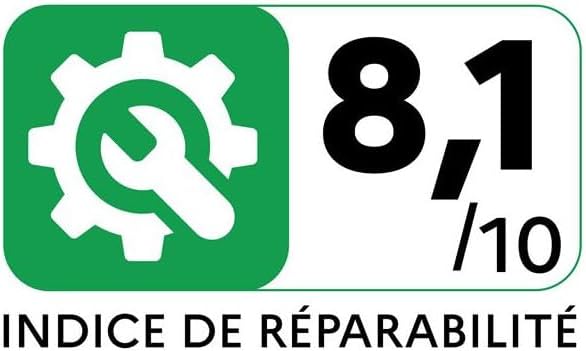
Image: The LG F84N15WHS washing machine with its front door open, revealing the drum. This image demonstrates the loading access for laundry.
2.2 Loading Laundry
Open the door and load laundry into the drum. Do not overload the machine; leave enough space for clothes to tumble freely. Close the door firmly.
2.3 Adding Detergent and Fabric Softener
Pull out the detergent drawer. Add the appropriate amount of detergent to the main wash compartment and fabric softener to its designated compartment. Refer to detergent packaging for dosage recommendations.
2.4 Selecting a Wash Program
Turn the program selector dial to choose the desired wash program (e.g., Cotton, Synthetics, Delicates). The display will show the default temperature and spin speed for the selected program.
2.5 Starting a Wash Cycle
Press the Start/Pause button to begin the wash cycle. The machine will automatically fill with water and start the selected program.
2.6 End of Cycle
When the wash cycle is complete, an audible signal will sound, and the display will indicate 'End'. Open the door and remove the laundry promptly.
3. Maintenance
3.1 Cleaning the Detergent Dispenser
Periodically remove the detergent drawer and rinse it under running water to remove any detergent residue. Use a brush if necessary to clean stubborn buildup.
3.2 Cleaning the Drum
Run a 'Tub Clean' or 'Drum Clean' cycle (if available) regularly to prevent odors and maintain drum hygiene. Alternatively, run an empty cycle with hot water and a cup of white vinegar or a washing machine cleaner.
3.3 Cleaning the Drain Pump Filter
Locate the drain pump filter cover at the bottom front of the machine. Open the cover, place a shallow tray underneath to catch water, and slowly unscrew the filter. Clean any lint or debris from the filter and screw it back in securely.
3.4 Cleaning the Water Inlet Filter
Turn off the water supply and disconnect the inlet hoses from the machine. Use pliers to pull out the mesh filters from the inlet valves. Rinse them under running water and reinsert them. Reconnect the hoses and turn on the water supply.
4. Troubleshooting
Before contacting service, check the following common issues and solutions:
| Problem | Possible Cause | Solution |
|---|---|---|
| Machine does not start | Power cord unplugged; Door not closed properly; No water supply. | Check power connection; Ensure door is latched; Check water taps. |
| Water not draining | Drain hose kinked or blocked; Drain pump filter clogged. | Straighten drain hose; Clean drain pump filter (see Maintenance). |
| Excessive vibration | Machine not level; Transit bolts not removed; Uneven load. | Adjust leveling feet; Remove transit bolts; Redistribute laundry. |
| Error code displayed | Specific issue indicated by code. | Refer to the full error code list in the comprehensive manual or LG support website. |
5. Specifications
The following are the key specifications for the LG F84N15WHS washing machine:
- Model: F84N15WHS
- Manufacturer Model Number: 8806096212660
- Type of Load: Front-Load
- Nominal Capacity: 8 kg
- Maximum Spin Speed: 1400 rpm
- Spin-drying Efficiency Class: B
- Noise Level (Spin): 74 dB
- Energy Efficiency Class: A
- Annual Energy Consumption: 47 kWh / 100 cycles (based on energy label)
- Water Consumption: 48 L / cycle (based on energy label)
- Dimensions (W x D x H): 600 mm x 470 mm x 850 mm
- Weight: 63 kg

Image: Energy label for the LG F84N15WHS washing machine, displaying its energy efficiency class (A), energy consumption (47 kWh/100 cycles), capacity (8.0 kg), water consumption (48 L), and noise level (74 dB).

Image: Reparability Index for the LG F84N15WHS, showing a score of 8.1/10. This indicates the ease of repair for the appliance.
6. Warranty and Support
6.1 Warranty Information
This appliance is covered by a limited warranty. The terms and conditions of the warranty may vary by region and retailer. Please refer to the warranty card included with your purchase or visit the official LG website for detailed information regarding warranty coverage and duration.
6.2 Customer Support
For technical assistance, service requests, or further inquiries, please contact LG Customer Service. Contact details can typically be found on the official LG website or in the documentation provided with your appliance.