1. Introduction
This manual provides detailed instructions for the setup, operation, and maintenance of your SUNKTA Smart Watch TX3-B. Designed for durability and advanced functionality, this smartwatch features a 1.73-inch AMOLED display, a 900mAh battery, 5ATM waterproofing, and comprehensive health and fitness tracking capabilities. Please read this manual thoroughly to ensure optimal use of your device.
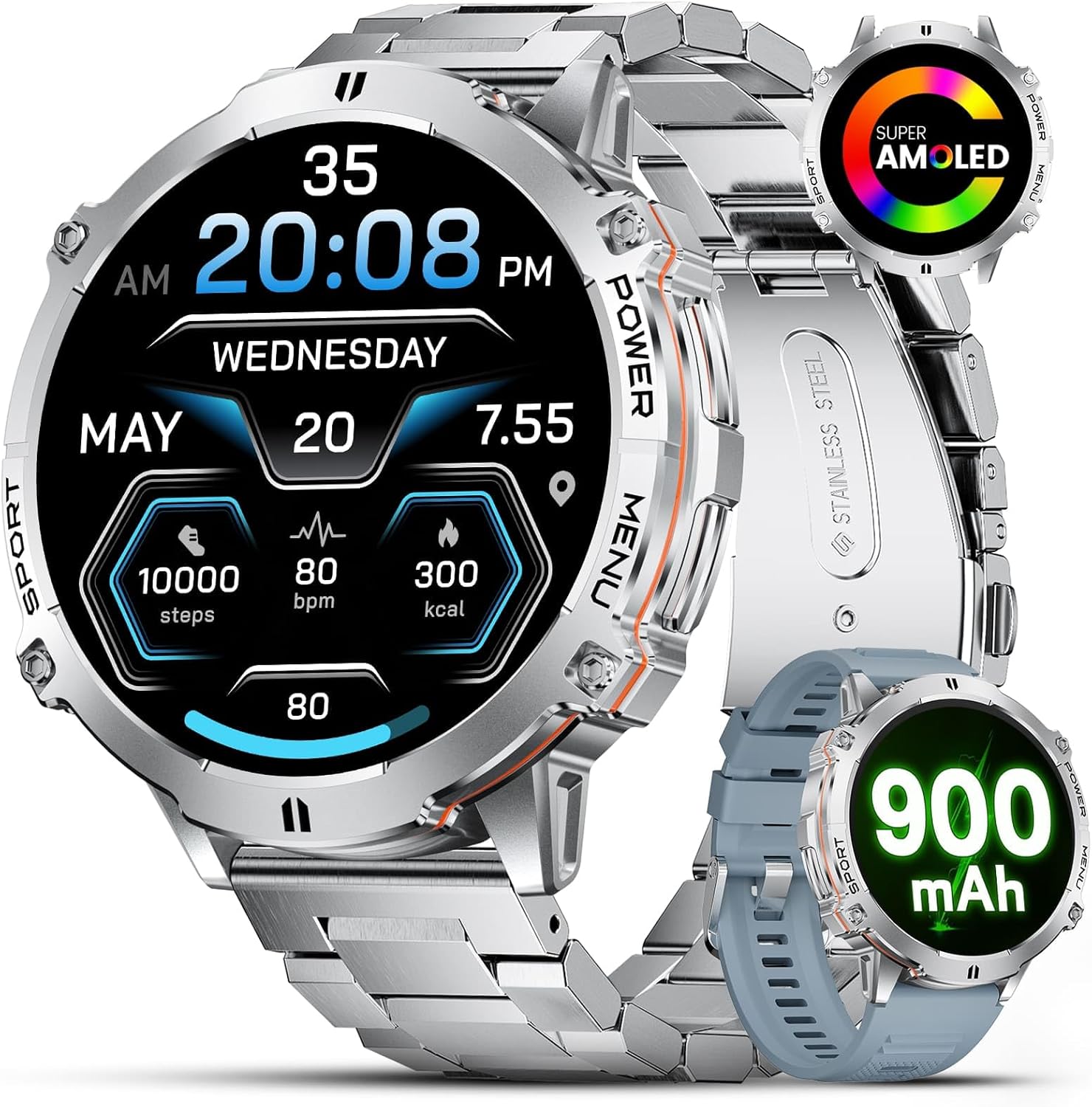
Image: The SUNKTA Smart Watch TX3-B with its main display showing various metrics and a secondary image highlighting its AMOLED screen and 900mAh battery.
2. Setup
2.1 Package Contents
- SUNKTA Smart Watch TX3-B
- Stainless Steel Strap
- Silicone Strap
- Charging Cable
- User Manual
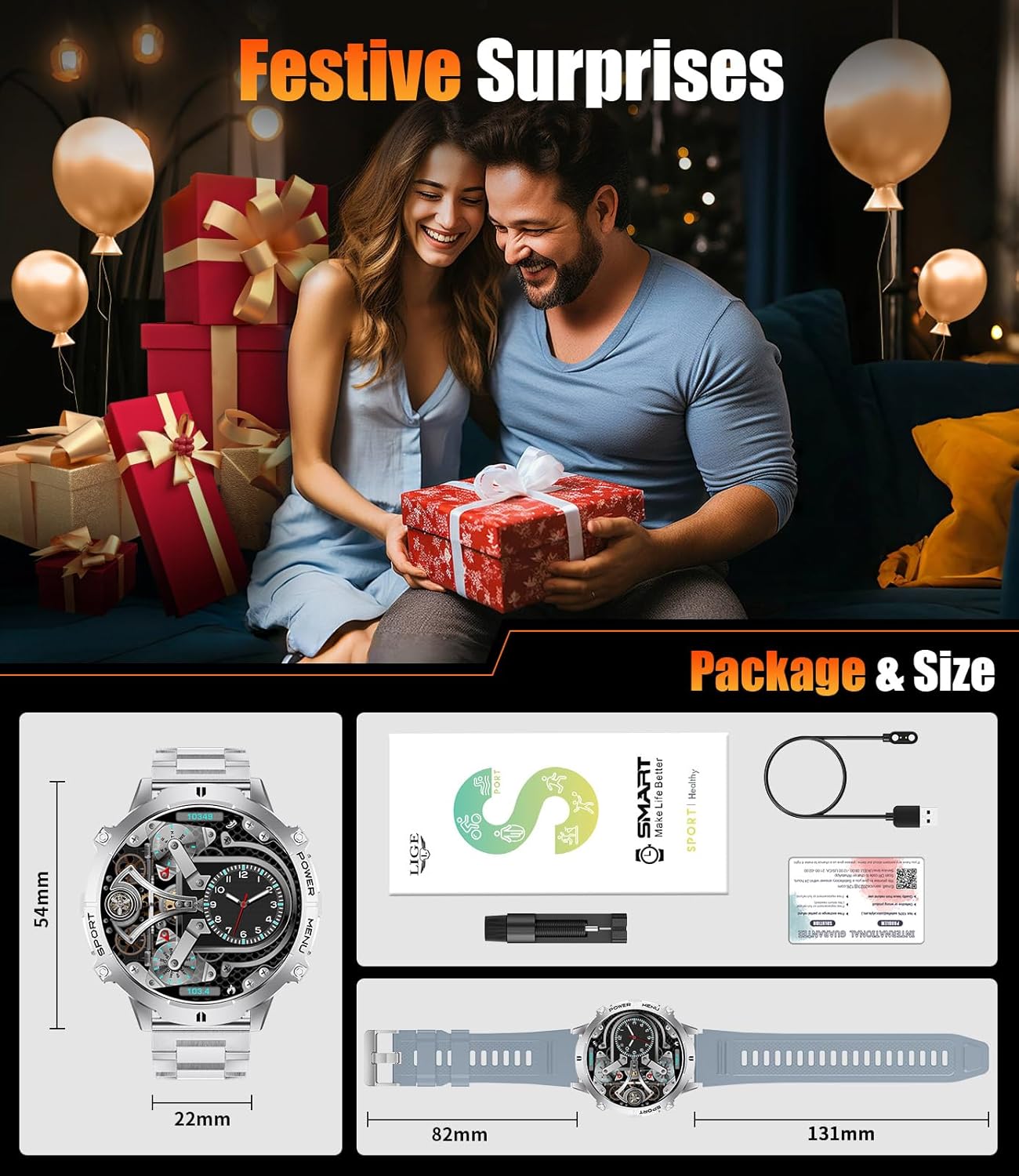
Image: An illustration of the SUNKTA Smart Watch TX3-B package contents, including the watch, two different straps, a charging cable, and documentation.
2.2 Charging the Device
Before first use, fully charge your smartwatch. Connect the magnetic charging cable to the charging port on the back of the watch and plug the USB end into a compatible power adapter (not included). A full charge typically takes 2-3 hours. The watch features a 900mAh battery, providing extended usage time.

Image: The smartwatch connected to its charging cable, illustrating the 900mAh battery and its long-lasting performance.
2.3 App Installation and Pairing
- Download the "FitCloudPro" or "Dafit" app from your smartphone's app store (compatible with Android 4.4+ and iOS 9.0+).
- Enable Bluetooth on your smartphone.
- Open the app and follow the on-screen instructions to create an account and pair your smartwatch. Ensure the watch is sufficiently charged and within Bluetooth range of your phone.
2.4 Attaching Straps
Your smartwatch comes with two interchangeable straps: a durable stainless steel band and a soft silicone strap. To attach a strap, align the spring bar with the lug holes on the watch body and slide the pin into place. Ensure both sides are securely fastened before wearing.
3. Operating Instructions
3.1 Display and Navigation
The watch features a 1.73-inch AMOLED display with a 466 x 466 resolution for clear visuals. It supports an Always-On Display feature, allowing you to check time and basic information without activating the screen. Note that activating Always-On Display increases battery consumption.
- Swipe Down: Access quick settings (DND, brightness, battery, phone finder).
- Swipe Up: View message/app notifications.
- Swipe Left/Right: Navigate through various widgets and features (steps, heart rate, blood oxygen, music controls, compass, barometer).
- Press Side Buttons: Access menus or specific functions as labeled (e.g., 'POWER', 'MENU', 'SPORT').

Image: A visual comparison demonstrating the clarity and vibrancy of the 1.73-inch AMOLED display.
3.2 Watch Faces
Personalize your watch with 10 pre-installed watch faces. Over 200 additional watch faces are available through the companion app. You can also create custom watch faces using your own photos to showcase individuality.

Image: A selection of diverse watch faces, illustrating the customization options available through the app.
3.3 Call Handling and Notifications
Once connected to your phone via Bluetooth, you can manage incoming and outgoing calls directly from your smartwatch. The watch also displays SMS and app notifications from platforms like WhatsApp, Facebook, Instagram, and Twitter.

Image: The smartwatch showing an incoming call and options for call management.

Image: The smartwatch displaying a message notification, with icons representing supported social media platforms.
3.4 Additional Smart Features
- AI Voice Assistant: Wake up your phone's voice assistant directly from the watch.
- Music Playback: Control music playing on your smartphone.
- Find Phone: Locate your misplaced phone by making it ring.
- Alarm Clock: Set and manage alarms.
- Weather Display: Get real-time weather updates.
- Sedentary Reminder: Receive alerts to move after periods of inactivity.
- Water Reminder: Get reminders to drink water throughout the day.
- Remote Camera: Use your watch as a remote shutter for your phone's camera.
- Stopwatch: Utilize the built-in stopwatch function.

Image: A user interacting with the AI Voice Assistant feature on the smartwatch.

Image: A collage of icons illustrating various smart features such as remote camera, sedentary reminder, find phone, and more.
4. Health Tracking
The SUNKTA Smart Watch TX3-B is equipped with the VC30F-S sensor for low-power, quick monitoring of various health metrics. Access detailed health information via the companion app.
NOTE: The measurement data is for reference only and not intended for medical monitoring.
4.1 Heart Rate Monitor
The watch provides real-time heart rate monitoring, helping you track your cardiovascular health throughout the day and during workouts.

Image: The smartwatch displaying 24-hour heart rate data, with a graph showing heart rate zones.
4.2 Blood Oxygen Monitor
Monitor your blood oxygen saturation (SpO2) levels. This feature can be accessed directly on the watch or through the app.

Image: The smartwatch displaying blood oxygen levels, with a graph showing trends.
4.3 Sleep Monitor
The sleep monitor tracks your sleep patterns, including deep sleep and light sleep, providing insights into your sleep quality through the app.

Image: The smartwatch displaying sleep data, including deep and light sleep durations.
5. Sports Modes
Elevate your fitness journey with over 100 sports modes, including walking, running, cycling, tennis, and more. The watch tracks key metrics such as steps, distance, and calories burned for each activity.

Image: The smartwatch displaying sports mode data, including steps, calories, distance, and heart rate.
6. Durability and Waterproofing
The SUNKTA Smart Watch TX3-B is built with military-grade durability, featuring a robust zinc alloy middle frame, PC+ABS back cover, and Gorilla Glass lens. It is designed to withstand tough environments and impacts.
- 5ATM Waterproof: Withstands depths up to 50 meters, suitable for swimming and water sports.
- Anti-Scratch: Gorilla Glass lens provides strong protection against scratches.
- Dustproof: Designed to prevent dust ingress.
- Drop-proof: Engineered for enhanced resistance against drops.

Image: The smartwatch being used underwater, emphasizing its 5ATM waterproof rating and other durability features.
7. Maintenance
7.1 Cleaning
Regularly clean your smartwatch and straps with a soft, damp cloth. Avoid using harsh chemicals or abrasive materials, which can damage the device's finish or sensors. Ensure the watch is dry before charging.
7.2 Battery Care
To prolong battery life, avoid exposing the watch to extreme temperatures (hot or cold). Charge the device using the provided cable and a compatible power source. Do not attempt to replace the battery yourself.
8. Troubleshooting
- Watch not turning on/charging: Ensure the charging cable is securely connected to both the watch and a working power source. Allow a few minutes for the watch to respond if the battery was completely depleted.
- Bluetooth connectivity issues: Ensure Bluetooth is enabled on your phone and the watch is within range. Restart both your phone and the watch, then attempt to re-pair through the app.
- App syncing problems: Check your phone's internet connection. Ensure the app has all necessary permissions enabled in your phone's settings. Restart the app and the watch.
- Inaccurate health data: Ensure the watch is worn snugly on your wrist, not too tight or too loose. Clean the sensor area on the back of the watch. Remember that data is for reference only.
- Rapid battery drain: Deactivating the "Always-On Display" feature can significantly improve battery life. Reduce screen brightness and the frequency of heart rate monitoring if not needed constantly.
9. Specifications
| Feature | Specification |
|---|---|
| Model | TX3-B |
| Brand | SUNKTA |
| Display | 1.73-inch AMOLED, 466 x 466 resolution |
| Battery Capacity | 900mAh Lithium Polymer |
| Waterproof Rating | 5ATM (up to 50 meters) |
| Compatibility | Android 4.4+, iOS 9.0+ |
| Operating System | Wear OS |
| Sensors | VC30F-S (Heart Rate, Blood Oxygen) |
| Connectivity | Bluetooth |
| Product Dimensions | 15 x 7 x 2 cm; 210 g |
10. Warranty and Support
SUNKTA provides a lifetime replacement warranty for this smartwatch. If you encounter any issues related to accessories, quality, operation, or charging, please do not hesitate to contact our dedicated customer service team for assistance. For support, please refer to the contact information provided with your product packaging or visit the official SUNKTA website.


