1. Safety Instructions
Please read these safety instructions carefully before using your Audizio Toledo turntable. Keep this manual for future reference.
- Power Source: Connect the turntable only to a power supply of the type described in this manual or on the unit.
- Water and Moisture: Do not use this apparatus near water or in damp environments.
- Cleaning: Clean only with a dry cloth.
- Ventilation: Do not block any ventilation openings. Install in accordance with the manufacturer's instructions.
- Heat: Do not install near any heat sources such as radiators, heat registers, stoves, or other apparatus (including amplifiers) that produce heat.
- Power Cord Protection: Protect the power cord from being walked on or pinched, particularly at plugs, convenience receptacles, and the point where they exit from the apparatus.
- Servicing: Refer all servicing to qualified service personnel. Servicing is required when the apparatus has been damaged in any way, such as power-supply cord or plug is damaged, liquid has been spilled or objects have fallen into the apparatus, the apparatus has been exposed to rain or moisture, does not operate normally, or has been dropped.
2. Package Contents
Ensure all items are present in the box:
- Audizio Toledo Turntable Unit
- Dust Cover
- Platter
- Felt Mat
- Counterweight
- 45 RPM Adapter
- Power Adapter
- RCA Cable
- User Manual (this document)
- Audio Technica Cartridge (pre-installed)
3. Setup
3.1. Placement
Place the turntable on a firm, level surface away from direct sunlight, heat sources, and excessive vibration.
3.2. Platter and Drive Belt Installation
The Audizio Toledo turntable features a belt-drive system for stable rotation.
- Carefully place the platter onto the center spindle.
- Locate the drive belt, which is usually pre-installed around the inner rim of the platter.
- Using the red ribbon (if provided), gently pull the belt over the motor pulley. Ensure the belt is not twisted.
- Remove the red ribbon once the belt is correctly positioned.
- Place the felt mat on top of the platter.
Video: Belt Installation Guidelines. This video demonstrates the correct procedure for installing the platter and drive belt on a turntable, ensuring proper function and preventing belt twisting.
Video: Step-By-Step Installation Guide. This video provides a general guide for turntable setup, including platter and belt installation, and counterweight adjustment.
3.3. Counterweight Installation and Adjustment
The adjustable counterweight ensures optimal tracking force for the Audio Technica cartridge.
- Slide the counterweight onto the rear of the tonearm.
- With the stylus guard removed, carefully balance the tonearm so it floats freely and horizontally.
- Once balanced, hold the counterweight steady and rotate the numbered ring to '0' (zero).
- Rotate the entire counterweight (including the numbered ring) to the recommended tracking force for the Audio Technica cartridge (typically 3.5 grams for the ATN3600L stylus).
3.4. Dust Cover Installation
Carefully place the dust cover onto the hinges at the rear of the turntable unit.

Image: The Audizio Toledo turntable with its protective dust cover open, showcasing the platter and tonearm. The dust cover helps protect the unit from dust and debris when not in use.
3.5. Connections
The Audizio Toledo offers versatile connectivity options.
- Power: Connect the power adapter to the DC IN 12V port on the rear of the turntable and then to a wall outlet.
- RCA Output: For wired connection to an amplifier or powered speakers, connect the RCA cable to the AUDIO OUT (R/L) ports on the rear of the turntable. Use the PHONO/LINE switch to select the appropriate output level for your amplifier.
- Grounding: If experiencing hum, connect a grounding wire from the GND terminal on the turntable to the grounding terminal on your amplifier.
- Bluetooth Output: To connect wirelessly to Bluetooth headphones or speakers, ensure the Bluetooth switch on the rear is set to 'ON'.
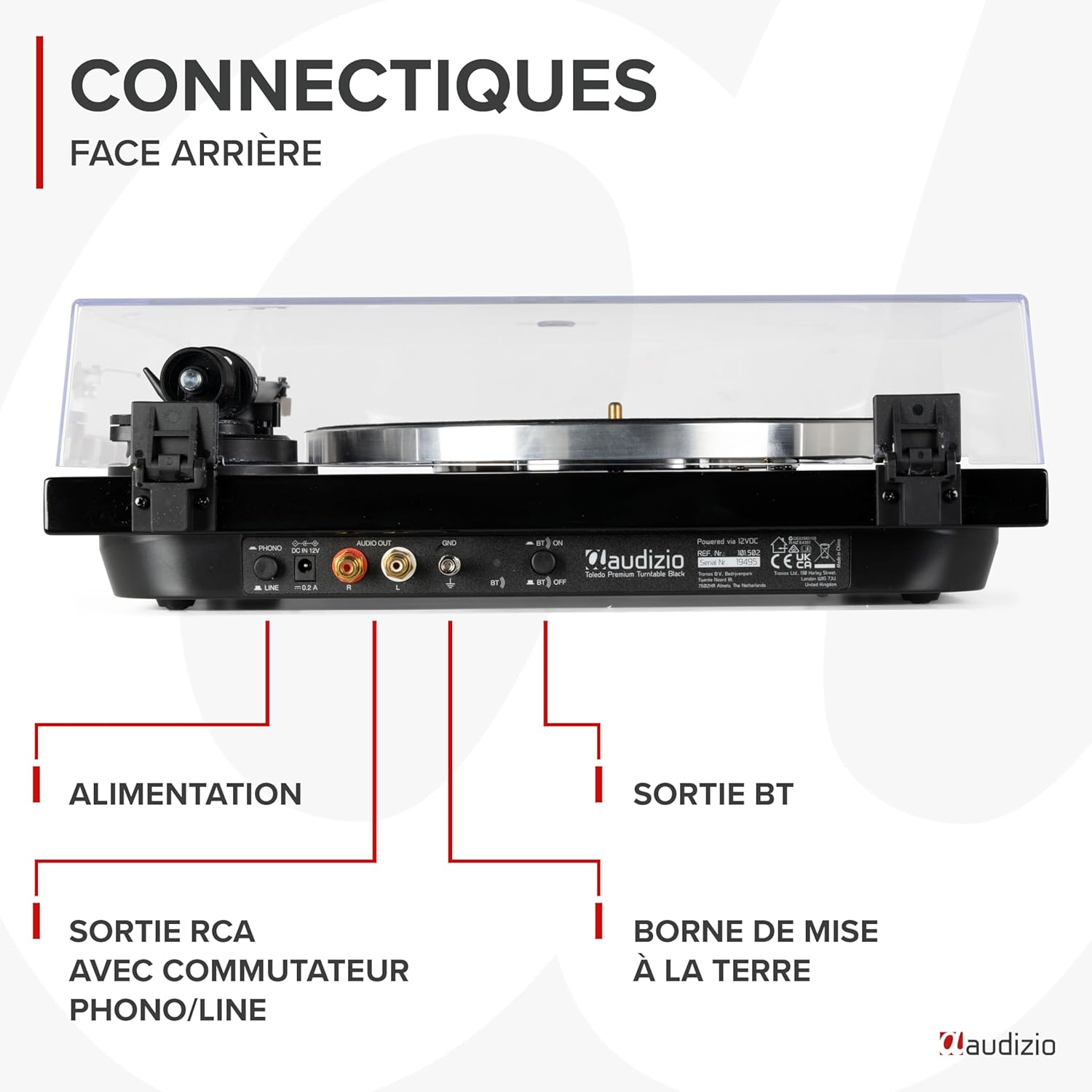
Image: A detailed view of the rear panel of the Audizio Toledo turntable, highlighting the power input, RCA audio outputs (R/L), grounding terminal (GND), and the Bluetooth ON/OFF switch. This panel allows for both wired and wireless audio connections.
4. Operating
4.1. Playing a Record
- Place a vinyl record on the felt mat on the platter.
- Select the appropriate speed (33 or 45 RPM) using the speed selector switch. For 45 RPM records with a large center hole, use the included 45 RPM adapter.
- Release the tonearm clamp.
- Gently lift the tonearm using the cueing lever.
- Position the tonearm over the desired track on the record.
- Lower the cueing lever to slowly drop the stylus onto the record.
- At the end of the record, the turntable may feature an auto-stop function. Manually lift the tonearm and return it to its rest position.

Image: A top-down view of the Audizio Toledo turntable with a vinyl record spinning on the platter. The tonearm is positioned on the record, indicating active playback. The speed selector and pitch control knobs are visible on the right side of the unit.

Image: A top-down view of the Audizio Toledo turntable illustrating compatibility with 7", 10", and 12" records. The image also highlights the two available speeds (33 and 45 RPM) and the pitch control for fine-tuning playback speed.
4.2. Bluetooth Output
To stream audio wirelessly:
- Ensure the Bluetooth switch on the rear panel is set to 'ON'.
- Activate Bluetooth pairing mode on your headphones or speaker.
- The turntable will automatically search for and connect to the nearest Bluetooth device.

Image: The Audizio Toledo turntable wirelessly connected to a pair of Bluetooth headphones, demonstrating its Bluetooth OUT capability. This feature allows users to enjoy their vinyl collection through wireless audio devices.
4.3. RCA Output
For a wired connection to an external audio system:
- Connect the RCA cable from the turntable's AUDIO OUT ports to the corresponding input on your amplifier or powered speakers.
- Set the PHONO/LINE switch on the turntable's rear panel according to your amplifier's input type. Use 'PHONO' if your amplifier has a dedicated phono input, or 'LINE' if it has a standard auxiliary input.
5. Maintenance
5.1. Cleaning
- Turntable Unit: Wipe the unit with a soft, dry cloth. Do not use abrasive cleaners or solvents.
- Stylus: Use a soft brush designed for stylus cleaning, brushing gently from back to front.
- Dust Cover: Clean with a soft, damp cloth. Avoid harsh chemicals that may scratch or cloud the plastic.
5.2. Stylus Replacement
The Audizio Toledo uses a replaceable Audio Technica cartridge. A worn stylus can damage your records and degrade sound quality. Replace the stylus after approximately 300-500 hours of playback.
- Gently grasp the front of the cartridge and pull the old stylus assembly downwards and forwards to remove it.
- Align the new stylus assembly with the cartridge body and push it upwards and backwards until it clicks into place.

Image: A close-up view of the Audio Technica cartridge and stylus on the tonearm of the Audizio Toledo turntable. This image highlights the precision component responsible for reading the grooves of a vinyl record, ensuring high-quality audio reproduction.
6. Troubleshooting
| Problem | Possible Cause | Solution |
|---|---|---|
| No power | Power adapter not connected or faulty. | Check power connections. Try a different outlet. |
| No sound via RCA | RCA cables not connected correctly; PHONO/LINE switch incorrect; amplifier input incorrect. | Ensure RCA cables are firmly connected. Set PHONO/LINE switch correctly. Select correct input on amplifier. |
| No sound via Bluetooth | Bluetooth not enabled; device not paired. | Ensure Bluetooth switch is ON. Put Bluetooth headphones/speaker into pairing mode. |
| Skipping or distorted sound | Dust on record/stylus; incorrect tracking force; turntable not level. | Clean record and stylus. Re-adjust counterweight. Ensure turntable is on a level surface. |
| Speed issues (too fast/slow) | Incorrect speed selected; pitch control misadjusted. | Select correct 33/45 RPM speed. Adjust pitch control knob. |
7. Specifications
| Feature | Specification |
|---|---|
| Brand | Audizio |
| Model Name | Toledo |
| Color | Black |
| Material | Wood |
| Item Weight | 5.5 Kilograms |
| Maximum Rotation Speed | 45 RPM (supports 33 and 45 RPM) |
| Connections | Bluetooth, RCA (Phono/Line switchable) |
| Special Features | Automatic belt-drive design, Audio Technica Cartridge, Adjustable Tonearm, Anti-vibration feet |
| Compatible Devices | Bluetooth speakers, headphones, external speakers |
| Rechargeable Battery | No |

Image: The Audizio Toledo turntable with its dimensions indicated: 43cm (length), 33cm (width), and 14cm (height). This provides a clear visual reference for the physical size of the unit.
8. Warranty and Support
The Audizio Toledo turntable comes with a 2-year manufacturer warranty. For technical support, troubleshooting beyond this manual, or warranty claims, please contact your retailer or the official Audizio support channels.
Spare parts are available for 2 years.


