
1. Introduction
The SMALLRIG Magnetic Neck Mount 5128 is designed to provide comfortable, hands-free POV (Point-of-View) shooting for action cameras and smartphones. Its ergonomic design and magnetic quick-release system allow for easy attachment and versatile shooting angles, making it suitable for various activities.

Figure 1: Examples of multi-scenario POV usage with the neck mount.
2. Package Contents
Verify that all components are present in the package:
- Neck Mount x 1
- 2-Prong Mount Adapter x 1
- Phone Holder x 1

Figure 2: Package contents and basic specifications.
3. Setup Instructions
3.1 Attaching the Mount Adapter or Phone Holder
- Identify the magnetic interface on the neck mount.
- Align either the 2-prong mount adapter (for action cameras) or the phone holder with the magnetic interface.
- Press the mount adapter or phone holder firmly onto the magnetic interface until it clicks securely into place. The magnetic attraction will assist in proper alignment.

Figure 3: Magnetic attachment of the mount adapter.
3.2 Wearing the Neck Mount
- To open the neck mount, locate the "OPEN" button on the main body.
- Press the "OPEN" button to release the neckband, allowing it to expand.
- Place the neck mount around your neck. The ergonomic silicone padding is designed for comfort and even pressure distribution.
- Close the neck mount by bringing the ends together until they click securely.

Figure 4: Opening the neck mount for wear.
3.3 Attaching Your Device
- For Action Cameras: Attach your action camera (e.g., GoPro Hero series, DJI Osmo Action) to the 2-prong mount adapter using its standard mounting screw. Ensure it is tightened securely.
- For Smartphones: Open the phone holder clamps and insert your smartphone (compatible with widths 59-92mm / 2.3-3.6in). Ensure the phone is centered and held firmly by the clamps.

Figure 5: Compatibility with action cameras and smartphones.
4. Operating Instructions
4.1 Switching Shooting Orientation (Horizontal/Vertical)
The magnetic interface allows for quick transitions between horizontal (landscape) and vertical (portrait) shooting modes. Simply detach your camera or phone holder from the magnetic base, rotate it to the desired orientation, and re-attach it securely.
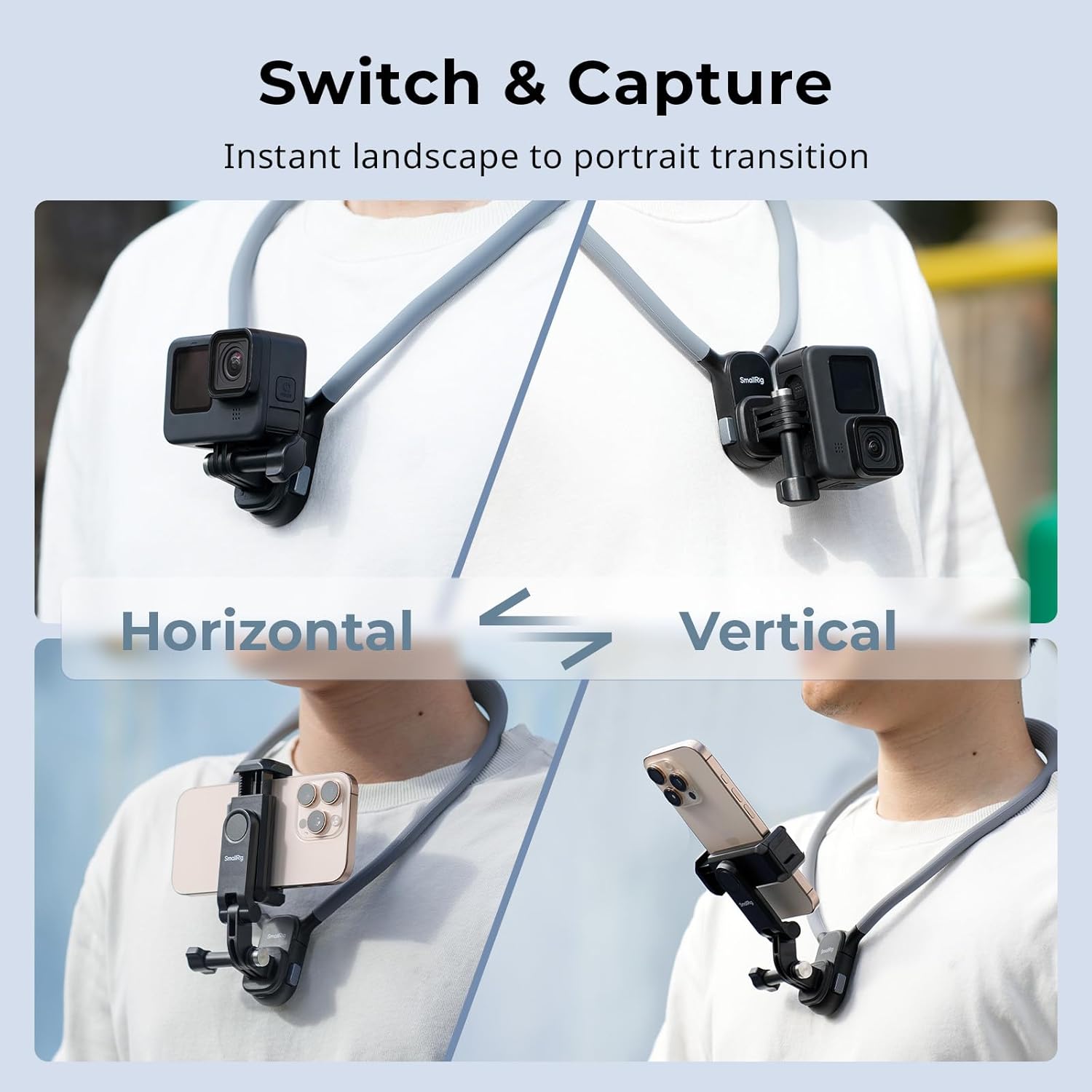
Figure 6: Switching between horizontal and vertical orientations.
4.2 Quick Release Function
To quickly detach your action camera or phone holder from the neck mount, press the release button located on the side of the magnetic interface. This allows for instant removal of your device for handheld use or storage.
5. Maintenance
- Cleaning: Wipe the silicone neckband and plastic components with a soft, damp cloth. Avoid harsh chemicals or abrasive cleaners.
- Storage: Store the neck mount in a cool, dry place away from direct sunlight when not in use.
- Inspection: Regularly inspect the magnetic connection points and the 2-prong mount for any signs of wear or damage. Ensure all screws are tight before each use.

Figure 7: Material features for durability and comfort.
6. Troubleshooting
| Problem | Possible Cause | Solution |
|---|---|---|
| Device feels loose on the mount. | Magnetic connection not fully engaged or mounting screw loose. | Ensure the magnetic mount clicks securely. For action cameras, tighten the mounting screw. For phones, ensure clamps are holding firmly. |
| Neck mount feels too tight or uncomfortable. | Incorrect positioning or individual neck size. | Adjust the position of the neck mount. While designed for comfort, individual fit may vary. |
| Phone slips from the holder. | Phone not securely clamped or outside compatible size range. | Ensure the phone is centered and the clamps are fully engaged. Verify phone width is within 59-92mm (2.3-3.6in). |
7. Specifications
| Feature | Detail |
|---|---|
| Model Name | 5128 |
| Product Dimensions | 335.0 x 165.0 x 49.5mm (13.2 x 6.5 x 1.9in) |
| Product Weight | 236.5 ± 5.0g (8.3 ± 0.2oz) |
| Material(s) | Silicone, Plastic, Aluminum Alloy |
| Compatible Devices | Action Cameras, Smartphones |
| Compatible Phone Width | 59-92mm (2.3-3.6in) |
| Mounting Type | Wearable |
| Special Feature | Adjustable, Magnetic Quick Release |
8. Warranty and Support
This product comes with a 2-year manufacturer's warranty. For warranty claims, technical support, or any inquiries regarding the product, please contact SMALLRIG customer service through their official website or the retailer where the product was purchased.
Please retain your proof of purchase for warranty validation.