
usmile CY0
Usmile CY0 Portable Water Flosser User Manual
Model: CY0
1. Introduction
Thank you for choosing the Usmile CY0 Portable Water Flosser. This device is designed to provide effective oral hygiene by using a high-pressure water stream to remove plaque and food debris from between teeth and below the gumline. It is suitable for daily use and particularly beneficial for individuals with braces, implants, or sensitive gums. Please read this manual thoroughly before first use to ensure proper operation and maintenance.
2. Product Overview
2.1 Key Features
- Ultra-Portable Design: Lightweight and collapsible for travel and daily convenience.
- Long Battery Life: Up to 95 days of use on a single charge, with USB-C fast charging.
- High-Pressure Water Pulses: Effectively removes plaque and debris.
- 4 Customizable Modes: Soft, Normal, Pulse, and Strong (or Intense) for varied oral care needs.
- 360° Rotating Nozzle: Ensures comprehensive cleaning of all areas of the mouth.
- 200ml Water Tank: Sufficient capacity for a single cleaning session.
- IPX7 Waterproof: Safe for use in the shower.
2.2 Package Contents
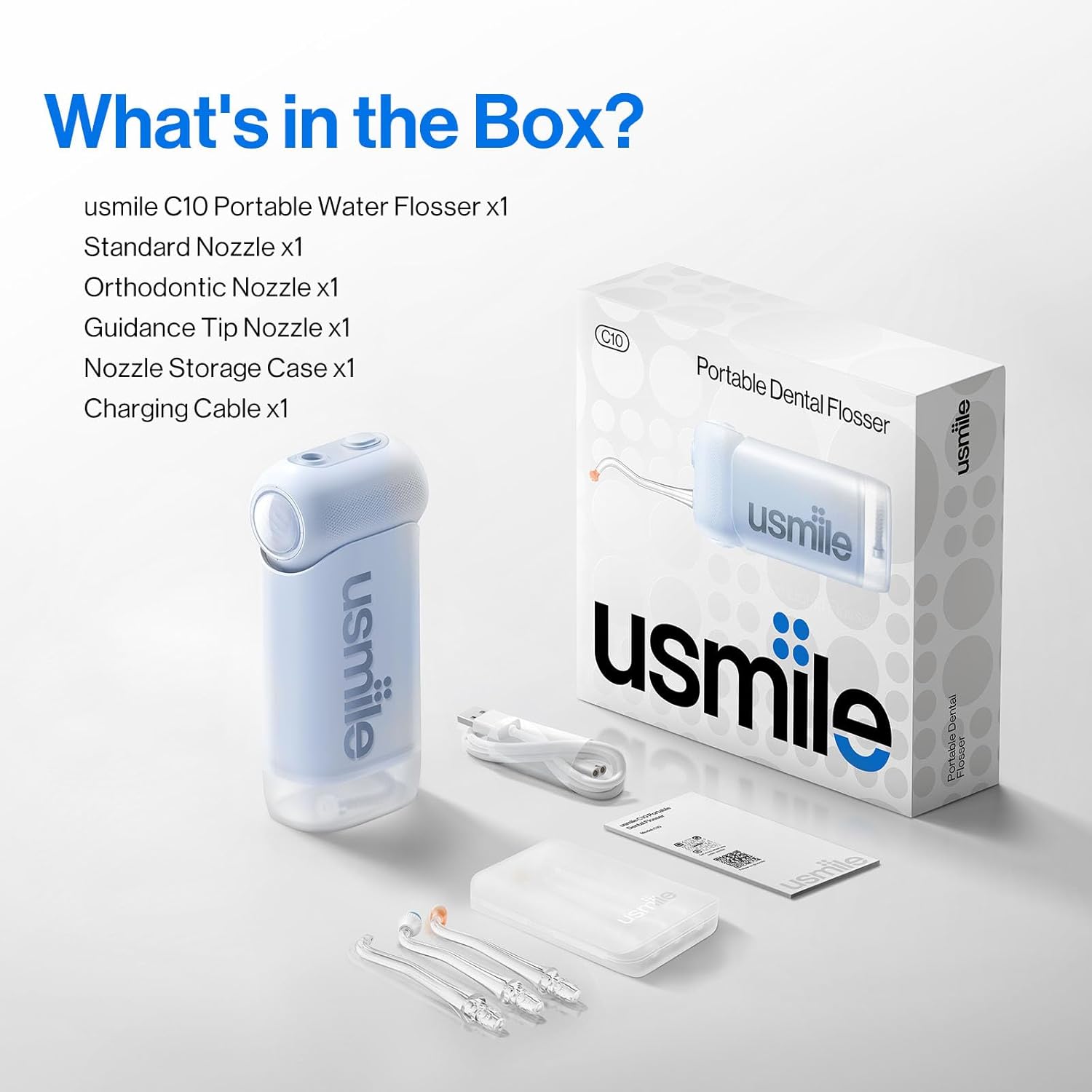
Image: What's in the Box?
The Usmile CY0 Portable Water Flosser package typically includes:
- Usmile CY0 Portable Water Flosser unit x1
- Standard Nozzle x1
- Orthodontic Nozzle x1
- Guidance Tip Nozzle x1
- Nozzle Storage Case x1
- USB-C Charging Cable x1
- User Manual x1
3. Setup
3.1 Initial Charging
- Before first use, fully charge the device. Connect the USB-C charging cable to the charging port on the flosser and to a suitable USB power adapter (not included).
- The battery indicator lights will show the charging status. A full charge typically takes a few hours.
- Once fully charged, the device can provide up to 95 days of use, depending on usage frequency and mode.
3.2 Attaching the Nozzle
- Select the desired nozzle (Standard, Orthodontic, or Guidance Tip).
- Insert the nozzle into the opening at the top of the flosser unit until it clicks securely into place.
- To remove, press the nozzle release button (if present) and pull the nozzle upwards.
3.3 Filling the Water Tank
- Open the water tank cover.
- Fill the 200ml water tank with lukewarm water. Distilled water is recommended to prevent mineral buildup.
- Close the water tank cover securely to prevent leaks.
4. Operating Instructions
4.1 Powering On/Off and Mode Selection
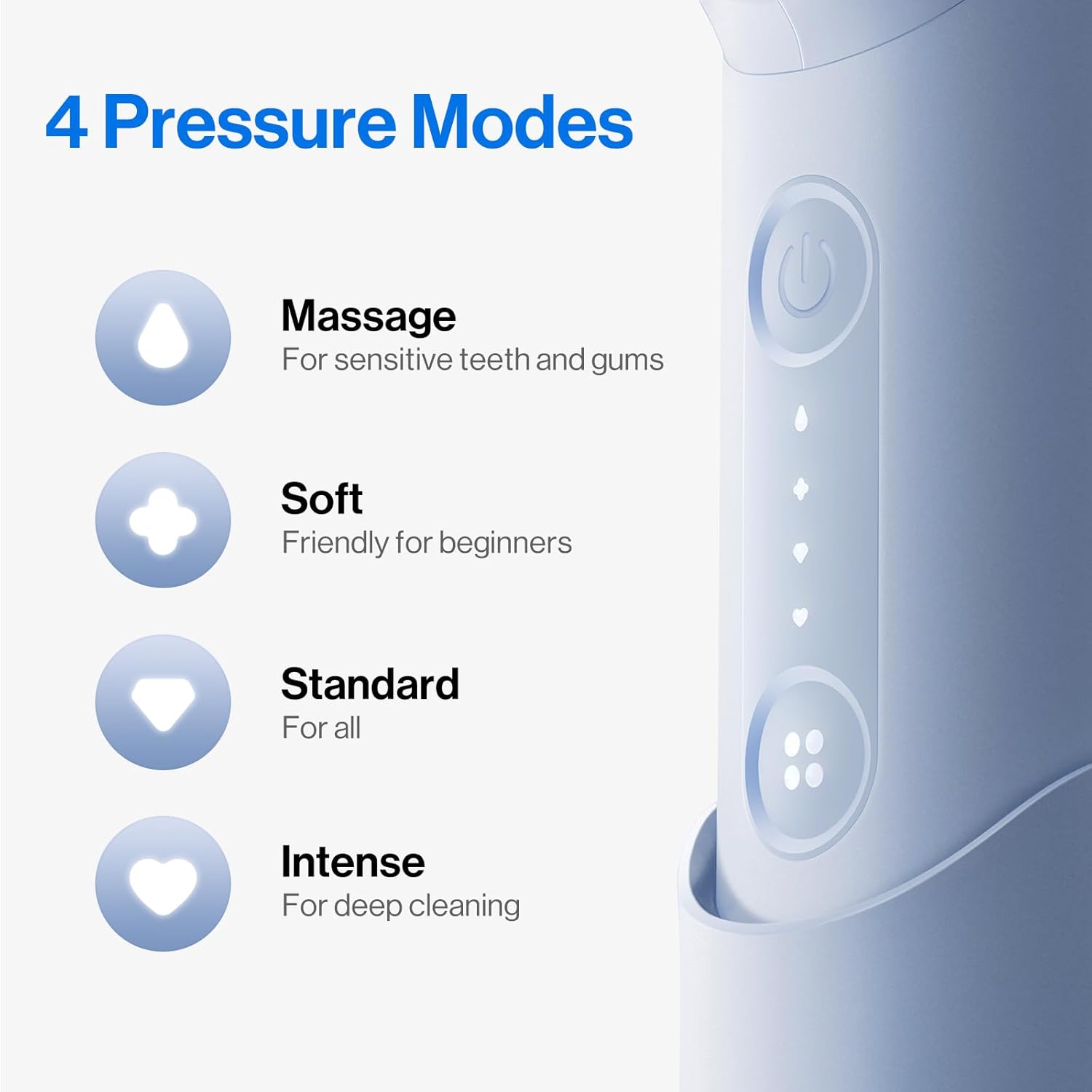
Image: Usmile CY0 Water Flosser Pressure Modes
- Press the power button to turn the device on. It will start in the last used mode.
- Press the mode button to cycle through the available modes:
- Massage: For sensitive teeth and gums.
- Soft: Gentle cleaning, friendly for beginners.
- Standard: Regular cleaning for most users.
- Intense: Deep cleaning for stubborn plaque.
- Press and hold the power button to turn the device off.
4.2 Flossing Technique

Image: Precision Flossing with Positioning Nozzle
- Lean over a sink and place the nozzle tip into your mouth, aiming it at the gumline at a 90-degree angle.
- Turn on the device and allow the water to flow from your mouth into the sink.
- Start with your back teeth and work your way forward, pausing briefly between each tooth.
- Ensure the 360° rotating nozzle reaches all areas, including the front and back surfaces of your teeth and around any dental work.
- Continue until you have cleaned all areas of your mouth or the water tank is empty.
5. Maintenance
5.1 Cleaning the Water Tank
- After each use, empty any remaining water from the tank.
- Rinse the tank thoroughly with clean water.
- For deeper cleaning, the tank can be detached and washed with mild soap and water. Ensure it is completely dry before reattaching.
5.2 Cleaning the Nozzles
- Remove the nozzle from the device.
- Rinse the nozzle under running water.
- Periodically, soak nozzles in a solution of 2 parts water to 1 part white vinegar for 5-10 minutes to remove mineral deposits. Rinse thoroughly afterward.
- Replace nozzles every 3-6 months, or sooner if they show signs of wear.
5.3 External Cleaning
Wipe the exterior of the flosser with a soft, damp cloth. Do not use abrasive cleaners or harsh chemicals. The device is IPX7 waterproof, allowing for safe rinsing under a faucet or use in the shower.
5.4 Storage
Store the Usmile CY0 in a cool, dry place away from direct sunlight. Ensure the water tank is empty and dry before storing for extended periods.
6. Troubleshooting
If you encounter issues with your Usmile CY0 Portable Water Flosser, please refer to the following common solutions:
- Device not turning on: Ensure the device is fully charged. If the battery is low, connect it to the charger.
- Weak water pressure: Check if the water tank is sufficiently filled. Ensure the nozzle is securely attached and not clogged. Clean the nozzle if necessary.
- Water leakage: Verify that the water tank cover is closed tightly and the nozzle is properly seated.
- Device stops during use: The battery might be low. Recharge the device.
If the problem persists after attempting these solutions, please contact Usmile customer support for further assistance.
7. Specifications
| Feature | Detail |
|---|---|
| Model Name | CY0 Portable Oral Irrigator |
| Power Source | Battery Powered (USB-C) |
| Water Tank Capacity | 200ml |
| Battery Life | Up to 95 days |
| Pressure Modes | 4 (Massage, Soft, Standard, Intense) |
| Waterproof Rating | IPX7 |
| Product Benefits | Removes 99.99% of Plaque from Treated Areas |
| Item Dimensions (L x W x H) | 7.1 x 5.1 x 14.5 centimeters |
| Recommended Use | Daily Cleaning for Teeth |
8. Warranty and Support
8.1 Warranty Information
The Usmile CY0 Portable Water Flosser comes with a 1-year manufacturer's warranty from the date of purchase. This warranty covers defects in materials and workmanship under normal use. It does not cover damage caused by misuse, accidents, unauthorized repairs, or normal wear and tear.
Additionally, a 30-day hassle-free return policy is offered for worry-free shopping.
8.2 Customer Support
For any questions, concerns, or warranty claims, please contact Usmile customer support. You can typically reach support by:
- Logging into your Amazon account.
- Navigating to "Your Orders".
- Finding your specific order ID for the Usmile CY0 Water Flosser.
- Clicking on "Contact Seller" to send a message directly to Usmile support.
Please have your purchase details and model information ready when contacting support.
Related documentsCY0

Ask a question about this manual
Ask about setup, troubleshooting, compatibility, parts, safety, or missing instructions. Manuals+ will review the question and use this page’s manual context to help answer it.