
1. Introduction
Thank you for choosing the Sunffice Wireless Bluetooth 5.3 Earbuds. This manual provides essential information for setting up, operating, and maintaining your new earbuds and charging case. Please read it carefully to ensure optimal performance and longevity of your device.
2. Package Contents
Please verify that all items listed below are present in your package:
- Sunffice Wireless Bluetooth Earbuds (Left and Right)
- LED Touch Screen Charging Case
- USB Charging Cable (Type-C)
- User Manual

Image: Contents of the Sunffice Earbuds package, including the earbuds, charging case, USB cable, and user manual.
3. Product Overview
Familiarize yourself with the components of your Sunffice Wireless Earbuds and Charging Case.

Image: The Sunffice Wireless Earbuds placed in their charging case, showcasing the LED touch screen.
Image: Detailed diagram illustrating the various components of the earbuds and charging case, including the flashlight, USB interface, Type-C port, earplug, charging port, left/right charging compartments, magnetic edge, charging compartment cover, screen off button, multi-functional screen, time display, and battery levels for both earbuds and the charging case.
- Earbuds: In-ear design with touch control.
- Charging Case: Features a full-color LED touch screen, USB-A output for phone charging, and a Type-C input for charging the case.
- LED Touch Screen: Displays date, time, battery levels, Bluetooth connection status, and provides access to various functions like music control, equalizer, illumination, camera trigger, alarm, volume adjustment, and games.
4. Setup
4.1 Charging the Charging Case and Earbuds
Before first use, fully charge the charging case and earbuds.
- Connect the provided Type-C USB cable to the charging port on the case and a power source.
- The LED screen will indicate the charging status.
- Place the earbuds into their respective slots in the charging case. They will automatically begin charging.
The 5000mAh charging case can charge the earbuds approximately 4-5 times, providing extended listening time. The case can also be used as a power bank to charge your phone.

Image: The Sunffice charging case connected to a laptop, illustrating the charging process for the case itself.
4.2 Bluetooth Pairing
The earbuds utilize Bluetooth 5.3 for a fast and stable connection.
- Open the charging case. The earbuds will automatically enter pairing mode.
- On your device (smartphone, tablet, laptop), enable Bluetooth and search for available devices.
- Select "Bluetooth Earbuds" (or similar name) from the list to connect.
- Once paired, the earbuds will automatically connect to your device when removed from the case in the future.

Image: A smartphone displaying its Bluetooth settings, showing a successful connection to the earbuds, labeled as 'A98 TWS'.
5. Operating Instructions
5.1 LED Touch Screen Functions
The charging case features an intelligent LED touch screen for various controls and information.

Image: The LED touch screen of the charging case displaying various functions, including music control, system settings, calculator, stopwatch, equalizer, and lock screen wallpaper options.
- Time and Date: Check current date and time.
- Battery Level: View battery status of both earbuds and the charging case.
- Music Control: Play, pause, skip tracks, and adjust volume directly from the screen.
- Equalizer: Select different audio profiles (e.g., Pop, Rock, Class, Jazz, Rural, Normal).
- Illumination: Control lighting features (if applicable).
- Camera Trigger: Use as a remote shutter for your phone's camera.
- Alarm: Set alarms.
- Games: Access built-in games.
- Flashlight: Activate the built-in flashlight.
5.2 Earbud Touch Controls
The earbuds feature touch-sensitive areas for controlling playback and calls. Specific functions can often be customized via a mobile application (if available).
- Single Tap: Play/Pause music, Answer/End call.
- Double Tap: Next track (Right earbud), Previous track (Left earbud).
- Triple Tap: Activate voice assistant.
- Long Press: Reject call, Switch between Noise Cancellation/Transparency modes (if applicable).
5.3 Charging Your Phone with the Case
The charging case can act as a portable power bank for your mobile phone.
- Connect your phone's charging cable to the USB-A output port on the charging case.
- The charging case will begin to charge your phone.
Video: This video demonstrates the various features of the Sunffice Wireless Earbuds and Charging Case, including unboxing, navigating the touch screen for games and calculators, and using the charging case to charge a smartphone. It also shows the flashlight function.
6. Maintenance
To ensure the longevity and optimal performance of your earbuds, follow these maintenance guidelines:
- Cleaning: Regularly clean the earbuds and charging case with a soft, dry, lint-free cloth. Avoid using harsh chemicals or abrasive materials.
- Water Resistance: The earbuds feature IPX waterproof coating technology, protecting them from sweat and rain. However, they are not designed for submersion in water. Do not use them while swimming or showering.
- Storage: When not in use, store the earbuds in their charging case to protect them and keep them charged. Store in a cool, dry place away from extreme temperatures.
- Charging: Use only the provided charging cable or a certified equivalent. Avoid overcharging.

Image: Sunffice earbuds with water droplets, illustrating their water-resistant design suitable for sports activities.
7. Troubleshooting
If you encounter issues with your earbuds, refer to the following common solutions:
- No Sound: Ensure earbuds are charged, properly paired, and volume is turned up on both the earbuds and your connected device.
- Cannot Pair: Make sure Bluetooth is enabled on your device and the earbuds are in pairing mode. Try turning Bluetooth off and on again on your device, or resetting the earbuds (refer to manufacturer's website for specific reset instructions if needed).
- Intermittent Connection: Ensure you are within the Bluetooth range (up to 10 meters) and there are no significant obstructions between the earbuds and your device.
- Charging Issues: Check that the charging cable is securely connected and the power source is active. Clean the charging contacts on both the earbuds and the case.
- Touch Screen Unresponsive: Ensure the screen is clean and dry. Try restarting the charging case by holding the screen off button (if available) or allowing the battery to drain and recharge.
8. Specifications
| Feature | Specification |
|---|---|
| Model Name | Wireless Bluetooth Earbuds with charging case |
| Bluetooth Version | 5.3 |
| Bluetooth Range | 10 Meters |
| Earbud Battery Life | Approx. 5 Hours |
| Charging Case Capacity | 5000mAh (approx. 4-5 earbud charges) |
| Water Resistance Level | Water Resistant (IPX) |
| Control Type | Touch Control |
| Compatible Devices | Cellphones, Laptops, Music Production Equipment, Smart Speaker, Tablets |
| Item Weight | 100 Grams (3.53 ounces) |
| Material | Plastic |
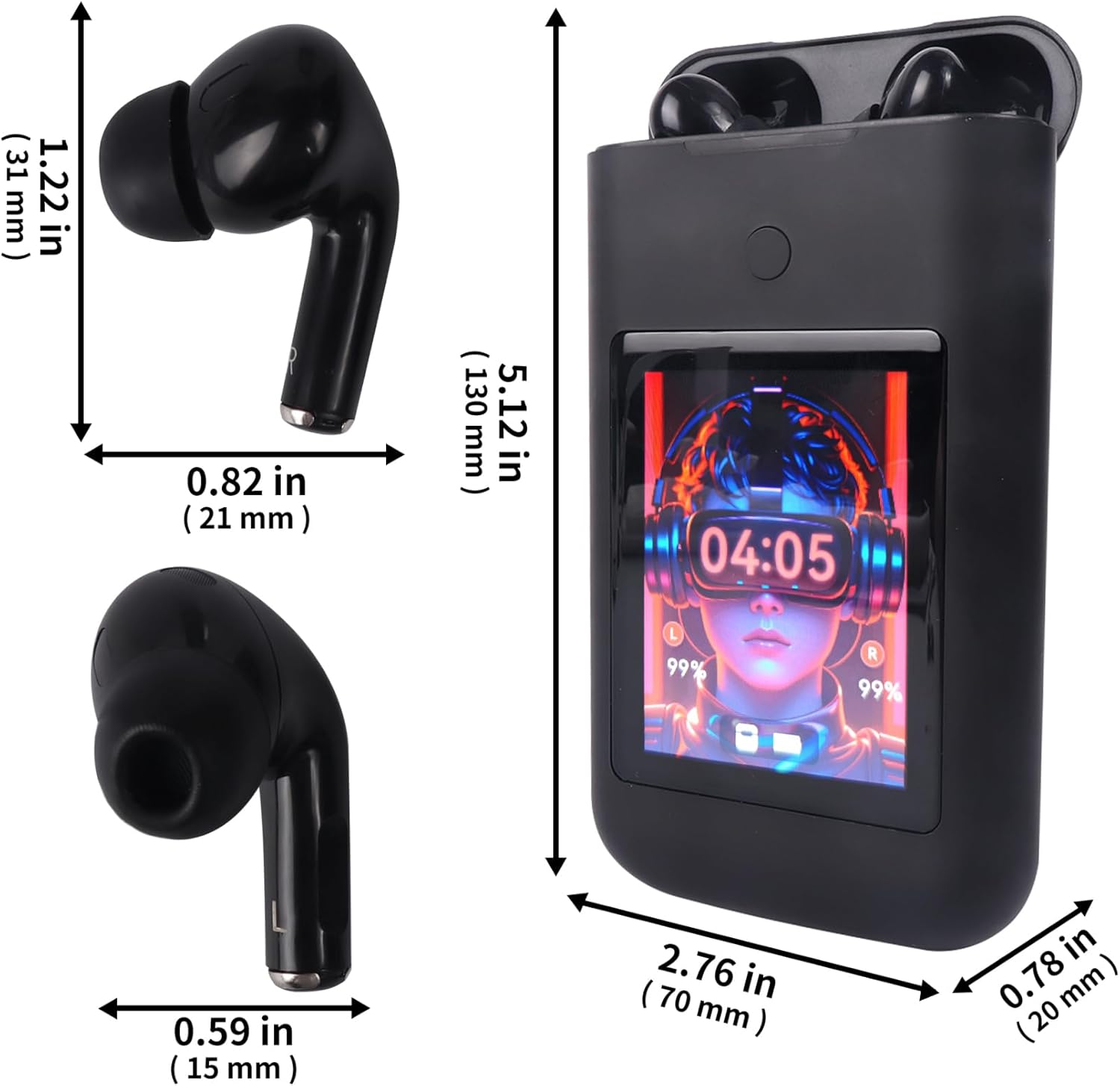
Image: Diagram showing the dimensions of the Sunffice Wireless Earbuds and their charging case in inches and millimeters.
9. Safety Information
- Do not disassemble, repair, or modify the product.
- Keep the product away from extreme temperatures, direct sunlight, and open flames.
- Avoid exposing the product to excessive moisture or liquids beyond its water resistance rating.
- Do not use the earbuds at high volume for extended periods to prevent hearing damage.
- Keep out of reach of children and pets.
10. Warranty and Support
For warranty information and customer support, please refer to the documentation provided with your purchase or contact the seller directly. Keep your proof of purchase for any warranty claims.
