
Introduction
This manual provides comprehensive instructions for the safe and efficient operation of your Hisense H34MOBS17 Electronic Microwave Oven. Please read this manual thoroughly before using the appliance and retain it for future reference. Proper use and maintenance will ensure optimal performance and extend the lifespan of your microwave oven.
Important Safety Instructions
When using electrical appliances, basic safety precautions should be followed, including the following:
- Read all instructions before using the appliance.
- Do not attempt to operate this oven with the door open as this can result in harmful exposure to microwave energy.
- Do not place any object between the oven front face and the door or allow soil or cleaner residue to accumulate on sealing surfaces.
- Do not operate the oven if it is damaged. It is particularly important that the oven door closes properly and that there is no damage to the: (1) door (bent), (2) hinges and latches (broken or loosened), (3) door seals and sealing surfaces.
- The oven should not be adjusted or repaired by anyone except properly qualified service personnel.
- Liquids such as water, coffee, or tea can be overheated beyond the boiling point without appearing to boil. This can result in very hot liquids suddenly boiling over when a spoon or other utensil is inserted into the liquid.
- Do not heat whole eggs or hard-boiled eggs in the microwave oven as they may explode, even after microwave heating has ended.
- Use only utensils that are suitable for use in microwave ovens.
- This appliance is intended for household use only.
Product Overview
The Hisense H34MOBS17 is a 1000W electronic microwave oven with a 34-liter capacity, designed for efficient cooking and reheating. It features a white LED touch control display for intuitive operation and offers 10 microwave power levels for precise control.
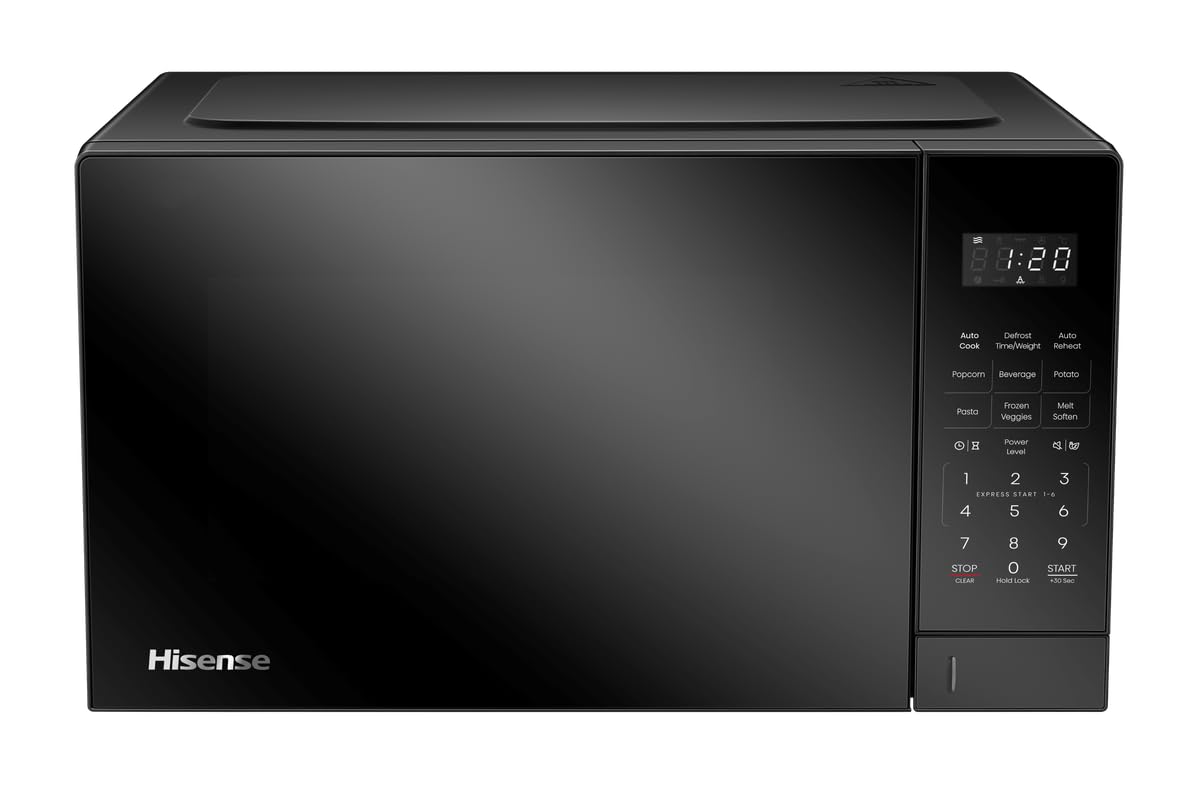
Figure 1: Hisense 1000W Electronic Microwave Oven, front view. This image shows the Hisense 1000W Electronic Microwave Oven from a slight angle, highlighting its black finish, digital display, and control panel on the right side. The Hisense logo is visible on the lower left of the door.
Control Panel Features
The control panel, located on the right side of the microwave, includes a digital display and various touch buttons for operation. Key features include:
- Digital Display: Shows time, cooking settings, and indicators.
- Number Pad (0-9): Used to enter cooking times, clock settings, and quantities.
- START Button: Initiates cooking or confirms settings.
- STOP/CANCEL Button: Stops cooking, clears settings, or cancels an operation.
- Power Level Buttons: Allows selection of 10 different microwave power levels.
- Defrost Function: Dedicated button for thawing frozen foods.
- Clock Setting: For setting the 12/24-hour clock.
Setup and Installation
Unpacking
- Remove all packaging materials from inside and outside the microwave oven.
- Check the oven for any damage, such as dents or a misaligned door. Do not operate the oven if it is damaged.
- Ensure all accessories are present: turntable, turntable ring, and glass tray.
Placement
- Place the microwave oven on a flat, stable surface that can support its weight and the heaviest food item likely to be cooked in it.
- Ensure adequate ventilation. Maintain a minimum clearance of 20 cm above the oven, 10 cm at the rear, and 5 cm on each side.
- Keep the oven away from heat sources, steam, or splashing liquids.
- Do not block air vents.
- Product dimensions: 43.6D x 51W x 28.2H centimetres.
Electrical Connection
- Ensure the power supply matches the requirements: 230V/50Hz.
- Plug the oven into a properly installed and grounded wall outlet. Do not use an extension cord.
Turntable Installation
- Place the turntable ring in the circular indentation on the oven floor.
- Place the glass turntable tray on top of the turntable ring, ensuring it sits securely on the center hub.
- Ensure the turntable rotates freely.
Operating Instructions
Setting the Clock (12/24-hour)
- Press the "Clock" button once for 12-hour format or twice for 24-hour format.
- Use the number pad to enter the current time.
- Press "Clock" again to confirm.
Microwave Cooking
- Place food in a microwave-safe container on the turntable. Close the door.
- Press the "Power Level" button repeatedly to select the desired power level (1-10).
- Use the number pad to enter the cooking time (up to 95 minutes).
- Press the "START" button to begin cooking.
- The oven will beep when cooking is complete, and the display will show "End".
Defrost Function
The defrost function allows for quick and even thawing of frozen foods.
- Place the frozen food in the oven.
- Press the "Defrost" button.
- Use the number pad to enter the weight of the food in grams (refer to food packaging for guidance).
- Press "START" to begin defrosting.
Using the Timer
The 95-minute cooking timer can be used independently of cooking functions.
- Press the "Timer" button.
- Use the number pad to enter the desired time.
- Press "START". The timer will count down without activating the microwave.
Stop/Cancel Function
Press the "STOP/CANCEL" button once to pause cooking or twice to cancel the current program and return to standby mode.
Maintenance and Cleaning
Regular cleaning and maintenance will ensure the longevity and efficient operation of your microwave oven.
Cleaning the Interior
- Always unplug the oven before cleaning.
- Wipe the interior cavity (grey interior) with a damp cloth after each use to prevent food splatters from drying.
- For stubborn stains, use a mild detergent or a microwave-safe cleaner. Avoid abrasive cleaners or scouring pads.
- Remove the glass turntable and turntable ring for separate cleaning with warm, soapy water. Rinse and dry thoroughly before replacing.
Cleaning the Exterior
- Wipe the exterior surfaces with a soft, damp cloth.
- Clean the control panel gently with a damp cloth. Avoid excessive moisture.
Troubleshooting Guide
Before contacting customer service, please refer to the following table for common issues and their solutions.
| Problem | Possible Cause | Solution |
|---|---|---|
| Oven does not start | Power cord not plugged in; Door not closed properly; Fuse blown or circuit breaker tripped. | Ensure power cord is securely plugged in; Close the door firmly; Check household fuse or reset circuit breaker. |
| Food not heating | Incorrect cooking time or power level set; Microwave-safe dish not used. | Adjust cooking time and power level; Use only microwave-safe cookware. |
| Turntable not rotating | Turntable not properly placed; Obstruction under turntable. | Ensure turntable and ring are correctly positioned; Remove any obstructions. |
| Display shows "End" but food is not cooked | Cooking time was too short. | Increase cooking time as needed. |
Specifications
| Model Number | H34MOBS17 |
| Brand | Hisense |
| Capacity | 34 Liters |
| Wattage | 1000 Watts |
| Power Source | Electric (230V/50Hz) |
| Product Dimensions (D x W x H) | 43.6D x 51W x 28.2H centimetres |
| Material | Glass, Stainless Steel |
| Door Style | Side Swing |
| Special Features | Indicator Light, LED Display, Timer, Defrost Function, 10 Power Levels |
| Included Components | 1 x Hisense 1000W Electronic Microwave Oven |
Warranty and Support
For warranty information or technical support, please refer to the warranty card included with your product or contact Hisense customer service. Keep your purchase receipt as proof of purchase for any warranty claims.
For further assistance, visit the official Hisense website or contact their authorized service centers.