
1. Introduction
Thank you for choosing the FULEN WL11 LED Wall Sconce. This product is designed to provide versatile and convenient lighting for your indoor spaces. Featuring a powerful 8000mAh rechargeable battery, 18 color modes including 3 color temperatures, 4 brightness levels, and both touch and remote control, this wall sconce offers flexible illumination. Its 360° rotatable and 90° tiltable design allows for precise light direction. Please read this manual carefully before installation and use to ensure optimal performance and safety.
2. Package Contents
Please check the package to ensure all items are present:
- 2 x FULEN WL11 LED Wall Sconces
- 1 x Remote Control (requires 1 AAA battery, not included)
- 2 x USB Charging Cables
- 2 x Sets of Wall Plugs and Screws
- 3 x Mounting Bases
- 3 x Double-sided Adhesive Pads
- 1 x User Manual
3. Key Features
- High-Capacity Rechargeable Battery: Built-in 8000mAh battery provides up to 11 hours of continuous use at maximum brightness after a full charge (approximately 3 hours).
- Versatile Lighting Modes: Choose from 3 color temperatures (3000K Warm White, 4500K Neutral White, 6000K Cold White) and 15 vibrant RGB colors.
- Adjustable Brightness: Features 4 brightness levels, dimmable via touch control or remote control. Equipped with 40 LED beads for optimal and uniform light distribution.
- Flexible Positioning: Innovative joystick damping design allows for precise 360° rotation and 90° tilt, ensuring stable and accurate light direction.
- Easy Installation: Tool-free installation in minutes using either adhesive pads or screws. The light can be easily detached from its base for portable use.
- Convenient Timer & Memory Function: Set a timer for 30, 60, or 90 minutes via remote control. The light automatically remembers the last used mode and brightness setting.
4. Setup and Installation
The FULEN WL11 LED Wall Sconce offers two installation methods: adhesive or screw mounting. Choose the method best suited for your wall surface and desired permanence.
4.1 Installation Methods

Figure 1: Easy Installation Methods
- Adhesive Installation:
- Clean the desired wall surface thoroughly to ensure it is dry and free of dust or grease.
- Peel off the protective film from one side of the double-sided adhesive pad and attach it firmly to the back of the mounting base.
- Peel off the remaining protective film and press the mounting base firmly onto the cleaned wall surface for at least 30 seconds.
- Wait for 24 hours before attaching the light to the base to ensure maximum adhesion.
- Screw Installation:
- Choose the desired location on the wall.
- Mark the positions for drilling using the mounting base as a template.
- Drill holes and insert the wall plugs.
- Align the mounting base with the drilled holes and secure it to the wall using the provided screws.
4.2 Attaching the Light to the Base
Once the base is securely installed, align the light unit with the base and gently push it into place until it clicks. The innovative joystick damping design ensures a secure fit and allows for precise angle adjustments.

Figure 2: Joystick Damping Design for Precise Angle
The light can be easily removed from the base by pulling it gently, allowing it to be used as a portable lamp.
5. Operating Instructions
5.1 Charging the Wall Sconce
Before first use, fully charge the wall sconce. Connect the provided USB charging cable to the charging port on the light and to a standard USB power adapter (not included).

Figure 3: Charging and Battery Life
- A full charge takes approximately 3 hours.
- The indicator light will change color to show charging status (e.g., red for charging, green for fully charged).
- A full charge provides up to 11 hours of continuous use at maximum brightness.
5.2 Touch Control
The wall sconce features a touch-sensitive button for basic operations:
- Short Press: Turn the light ON/OFF.
- Long Press: Adjust brightness levels (cycle through 4 levels).
- Double Tap: Switch between color temperature modes (Warm White, Neutral White, Cold White) or activate RGB color mode.
5.3 Remote Control
The included remote control provides full functionality for the wall sconce. Ensure the remote control has a working AAA battery installed.

Figure 4: Remote Control Functionality
- Power Button: Turn the light ON/OFF.
- Brightness Buttons (+/-): Increase or decrease brightness.
- Color Temperature Buttons: Select Warm White (3000K), Neutral White (4500K), or Cold White (6000K).
- RGB Color Buttons: Cycle through 15 RGB colors or select a specific color if available.
- Timer Buttons (30/60/90 min): Set the light to turn off automatically after the selected duration.

Figure 5: Color Temperatures and Brightness Settings

Figure 6: 15 RGB Colors
5.4 Memory Function
The wall sconce will automatically recall the last used brightness level and color mode when turned back on.
6. Maintenance
- Cleaning: Use a soft, dry cloth to wipe the surface of the wall sconce. Do not use abrasive cleaners or solvents, as they may damage the finish.
- Battery Care: To prolong battery life, avoid fully discharging the battery frequently. Charge the device regularly, even if not in constant use.
- Storage: If storing the device for an extended period, charge it to about 50% and store it in a cool, dry place. Recharge every 3-6 months to prevent deep discharge.
7. Troubleshooting
- Light does not turn on:
- Ensure the battery is charged. Connect the charging cable and try again.
- Check if the touch sensor or remote control is functioning correctly.
- Remote control not working:
- Replace the AAA battery in the remote control.
- Ensure there are no obstructions between the remote and the light.
- Make sure you are within the effective range (4-8 meters).
- Light flickers or dims unexpectedly:
- The battery might be low. Recharge the wall sconce.
- Ensure the charging cable is securely connected if charging.
- Adhesive base not holding:
- Ensure the wall surface was clean and dry before application.
- Allow 24 hours for the adhesive to cure before attaching the light.
- For heavier or textured surfaces, consider using screw installation.
8. Specifications
| Feature | Specification |
|---|---|
| Model Number | WL11 |
| Brand | FULEN |
| Dimensions (L x W x H) | 14 x 9.5 x 6 cm |
| Weight | 470 Grams |
| Material | Acrylonitrile Butadiene Styrene (ABS) |
| Power Source | Battery Powered (8000mAh rechargeable) |
| Voltage | 5 Volts |
| Wattage | 3 Watts |
| Light Source | LED |
| Luminous Flux | 360 Lumens (Max) |
| Color Temperatures | 3000K (Warm White), 4500K (Neutral White), 6000K (Cold White) |
| Light Colors | 18 (3 CCT + 15 RGB) |
| Control Method | Touch, Remote Control (Infrared) |
| Mounting Type | Wall Mount (Removable) |
| Indoor/Outdoor Use | Indoor Only |
| Features | Dimmable, Timer, Rechargeable, Wireless, Energy Saving, 360° Rotation |
| Remote Battery | 1 x AAA (not included) |
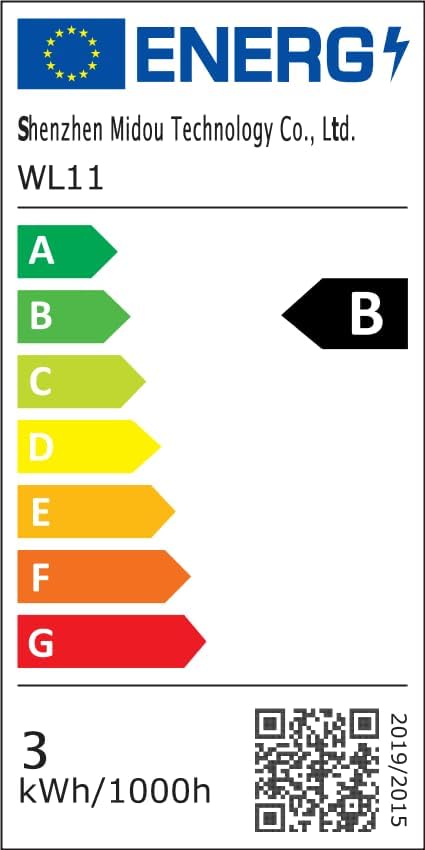
Figure 7: EU Energy Label (Click to view details)
9. Warranty and Support
FULEN offers an extended warranty for this product. If you encounter any issues or are not satisfied with your FULEN LED Wall Sconce, please contact us directly. We are committed to responding within 12 hours and providing a satisfactory solution.
For support, please refer to the contact information provided with your purchase or visit the official FULEN website.