
Ohniyou GLX100
Ohniyou 52'' Low Profile Ceiling Fan with Light and Remote/APP Control User Manual
Model: GLX100
1. Important Safety Information
Please read and understand all instructions before installing or operating this product. Failure to follow these instructions may result in electric shock, fire, or serious personal injury.
- Ensure power is disconnected at the circuit breaker before installation or servicing.
- All electrical connections must be in accordance with local codes, ordinances, or national electrical codes.
- Consult a qualified electrician if you are unsure about the installation process.
- Mounting structure must be capable of supporting the fan's weight (10 pounds).
- Do not operate the fan with damaged blades.
- Keep hands, hair, and clothing clear of moving fan blades.
2. Package Contents
Verify that all components are present before beginning installation:
- Ceiling Fan with Light
- Manual
- Mounting Hardware
- Remote Control

Figure 2.1: Exploded view of Ohniyou Ceiling Fan components, showing the all-in-one fan motor, mounting bracket, integrated light kit, leaf forks, and engineered wood blades.
3. Setup and Installation
The Ohniyou Ceiling Fan is designed for easy installation, typically within 30 minutes. All necessary mounting hardware and detailed instructions are included.
3.1 Physical Installation
Follow the step-by-step instructions provided in the included manual for secure mounting to a flat ceiling. For visual guidance, refer to the instructional video:
Video 3.1: Official installation guide for the Ohniyou Ceiling Fan. This video demonstrates the process of mounting the fan and connecting its components.
For additional installation support, you may also refer to this external video guide: https://www.youtube.com/watch?v=-b6PFxq8aHo
3.2 App Connection and Pairing
The fan can be controlled via a smartphone application. Follow these steps to download and connect the app:
- Scan the QR code provided in the manual or search for "FanLamp Pro" in your app store.
- Open the app and add a new device for your fan, naming it (e.g., "Fan 1").
- Ensure your phone's Bluetooth is turned on.
- In the app, read and agree to the terms for Bluetooth access.
- Allow nearby devices to connect.
- Reset the fan (IMPORTANT): Turn off the wall switch controlling the fan's power, wait about 5 seconds, then turn it back on.
- Pair to the APP: Hit the pair button on the app approximately 3 times till you hear a beep from the fan and the light flashes.
- Try using the app to control the fan.

Figure 3.1: The FanLamp Pro app interface for controlling fan speed, light brightness, and color temperature.
For app download and pairing instructions, you can also visit: http://www.jasonghost.com/fanlamppro/
4. Operating Instructions
4.1 Remote Control Functions
The included remote control provides comprehensive control over your ceiling fan and light. Ensure 2x AAA batteries (not included) are installed.
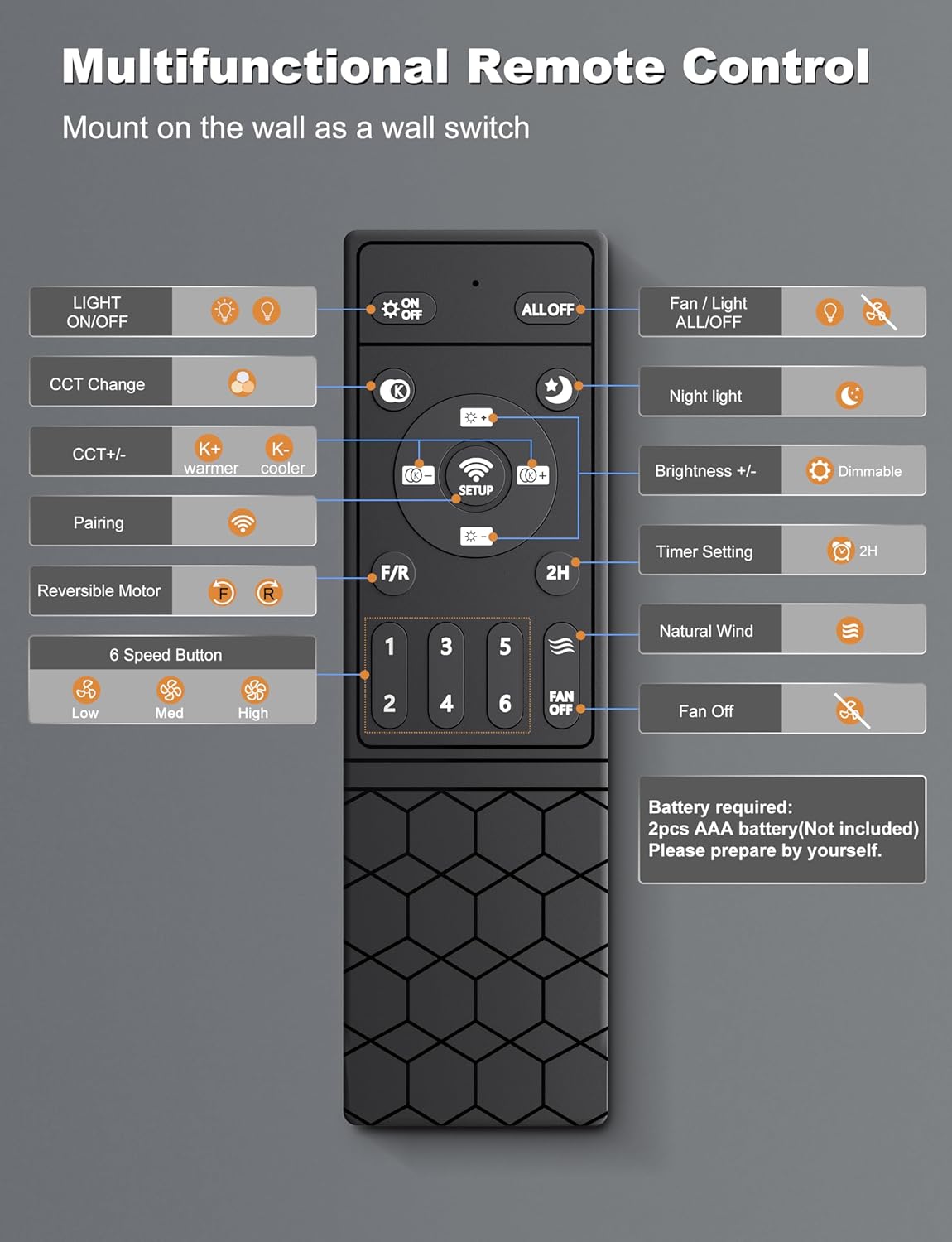
Figure 4.1: Multifunctional Remote Control layout with button descriptions.
- Light ON/OFF: Toggles the light.
- ALL ON/OFF: Toggles both fan and light.
- CCT Change: Cycles through color temperatures (Warm, Natural, Cool White).
- CCT +/-: Adjusts color temperature (Warmer/Cooler).
- Pairing: Used for initial pairing with the fan.
- F/R (Reversible Motor): Changes fan direction for summer (downward airflow) or winter (upward airflow).
- 6 Speed Button: Selects fan speed from 1 to 6.
- Night Light: Activates a low-brightness night light mode.
- Brightness +/-: Adjusts light brightness (dimmable 5%-100%).
- Timer Setting (2H): Sets a 2-hour auto-off timer.
- Natural Wind: Simulates natural breeze by varying fan speed.
- Fan ON/OFF: Toggles the fan.
4.2 App Control
The "FanLamp Pro" app offers advanced control features, including fan speed adjustment, light brightness and color temperature control, and timer settings. Refer to Section 3.2 for app connection instructions.
4.3 Light Features
The integrated 18W LED light source offers three color temperatures (3000K Warm, 4500K Natural, 6000K Cool White) and is 5%-100% dimmable. It provides up to 1600 lumens, comparable to an 18W light bulb.
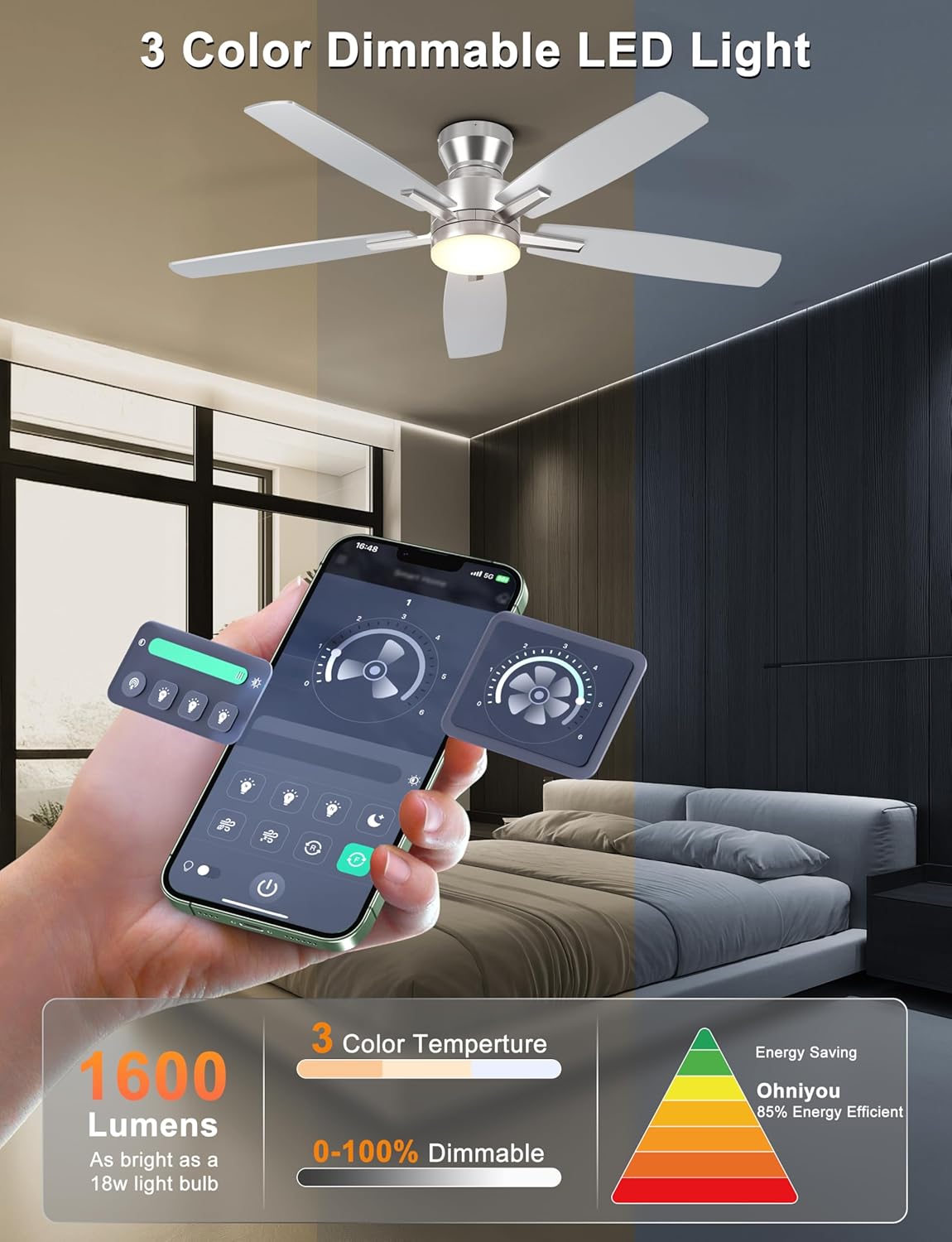
Figure 4.2: Dimmable LED light with 3 color temperature options.
4.4 Fan Operation
The fan features a quiet DC motor with 6-speed settings, delivering up to 4,580 CFM airflow. The reversible motor allows for year-round comfort:
- Summer Mode: Downward airflow creates a cooling breeze.
- Winter Mode: Upward airflow circulates warm air trapped near the ceiling.

Figure 4.3: Reversible wind function for all-season comfort.
4.5 Memory Function
The fan's light has a memory function. If the light is turned off for at least 10 seconds, it will return to the last used color temperature and brightness when turned back on. If turned on again within 10 seconds, the color temperature will switch.

Figure 4.4: Light Memory Function behavior.
5. Maintenance
Regular maintenance ensures optimal performance and longevity of your Ohniyou Ceiling Fan.
- Cleaning: Use a soft, damp cloth to clean the fan blades and motor housing. Do not use abrasive cleaners or solvents.
- Blade Inspection: Periodically check the fan blades for any signs of damage or warping.
- Tightness: Ensure all screws and connections remain tight.
6. Troubleshooting
If you encounter issues with your Ohniyou Ceiling Fan, refer to the following common solutions:
| Problem | Possible Cause | Solution |
|---|---|---|
| Fan does not operate. | No power, loose wiring, remote/app not paired. | Check circuit breaker. Ensure all connections are secure. Re-pair remote/app (refer to Section 3.2). |
| Light does not turn on. | Light switch off, loose connection, LED failure. | Ensure light is toggled on via remote/app. Check wiring. Contact customer support if LED is faulty. |
| Fan wobbles. | Loose blades, uneven blade balance, improper mounting. | Ensure all blade screws are tight. Check blade balance. Verify secure mounting to ceiling. |
| Remote/App not responding. | Low batteries (remote), app not connected, interference. | Replace remote batteries. Re-pair app. Reduce interference from other devices. |
7. Product Specifications
| Feature | Detail |
|---|---|
| Brand | Ohniyou |
| Model Name | GLX100 |
| Color | Sliver |
| Electric Fan Design | Ceiling Fan |
| Power Source | AC |
| Style | Flush Mount |
| Product Dimensions | 52"D x 52"W x 10.62"H |
| Room Type | Bedroom, Dining Room, Home Office, Kids Room, Living Room |
| Special Features | App Operable, Dimmable Light, Quiet DC Motor, Remote Controlled |
| Recommended Uses | Air Circulation, Cooling |
| Noise Level | 20 dB |
| Wattage | 35 watts |
| Number of Blades | 5 |
| Air Flow Capacity | 4580 Cubic Meters per Minute |
| Blade Length | 20.7 Inches |
| Theme | Modern |
| Speed | 200 RPM |
| Voltage | 120 Volts |
| Switch Type | Remote Control |
| Item Weight | 10 Pounds |
| Indoor/Outdoor Usage | Indoor (suitable for covered patio) |
| Control Method | App, Remote |
| Light Type | LED |
| Blade Material | Engineered Wood |
8. Warranty and Support
Ohniyou values customer satisfaction and stands behind the quality of its products. If you encounter any issues or require replacement parts, please contact us directly.
For any concerns or questions, please reach us at: ohniyou@ledphy.com
Related documentsGLX100


Ask a question about this manual
Ask about setup, troubleshooting, compatibility, parts, safety, or missing instructions. Manuals+ will review the question and use this page’s manual context to help answer it.