
CallToU HW12-1
CallToU Wireless Motion Sensor Alarm User Manual
Model: HW12-1
1. Product Overview
The CallToU Wireless Motion Sensor Alarm (Model HW12-1) is designed to detect motion within its detection range and transmit a signal wirelessly. This device is primarily intended for monitoring individuals, such as seniors or dementia patients, to assist caregivers with fall prevention and general oversight. It can also be used for securing various indoor and outdoor properties.
Important Note: This motion sensor is a standalone unit and requires pairing with a CallToU receiver (sold separately) to function as an alarm system.

Figure 1: CallToU Wireless Motion Sensor Alarm
2. Product Components
The package includes the following items:
- 1 x CallToU Wireless Motion Sensor (Model HW12-1)
- 3 x AAA 1.5V Alkaline Batteries (pre-installed or included separately)
- 1 x Universal Adjustment Base/Bracket
- 1 x Screw Kit for mounting
- 1 x Double-sided Sticker for mounting

Figure 2: Detailed view of the motion sensor with labeled parts and dimensions.
- A. Infrared Sensor Window: Detects motion.
- B. Work Signal Light: Indicates operational status.
- C. Universal Adjustment Base/Bracket: For mounting and angle adjustment.
- D. Micro USB Power Supply Port (DC 5V): Optional power input.
- E. Power Switch: Turns the device on/off.
- F. Battery Compartment: Holds 3 AAA batteries.
3. Specifications
| Model Number | HW12-1 |
| Manufacturer | CallToU |
| Dimensions (L x W x H) | 3.94 x 3.54 x 2.17 inches |
| Weight | 4.2 ounces |
| Power Source | 3 x AAA 1.5V Alkaline Batteries (included) or Micro USB (DC 5V) |
| Motion Detection Range | Up to 33 feet (10 meters) |
| Wireless Transmission Range | Up to 500+ feet (150+ meters) to CallToU receiver |
| Adjustable Angle | 180° Adjustment, 360° Rotation |
| Detection Angle | 120° (wide) or 60° (narrow), depending on orientation/setting |
4. Setup and Installation
Follow these steps to set up and install your CallToU Wireless Motion Sensor:
4.1. Battery Installation
- Locate the battery compartment on the back of the motion sensor (refer to Figure 2, part F).
- Open the battery compartment cover.
- Insert 3 AAA 1.5V Alkaline batteries, ensuring correct polarity (+/-).
- Close the battery compartment cover securely.
4.2. Mounting the Motion Sensor
The motion sensor can be mounted using either the included screw kit or the double-sided sticker.
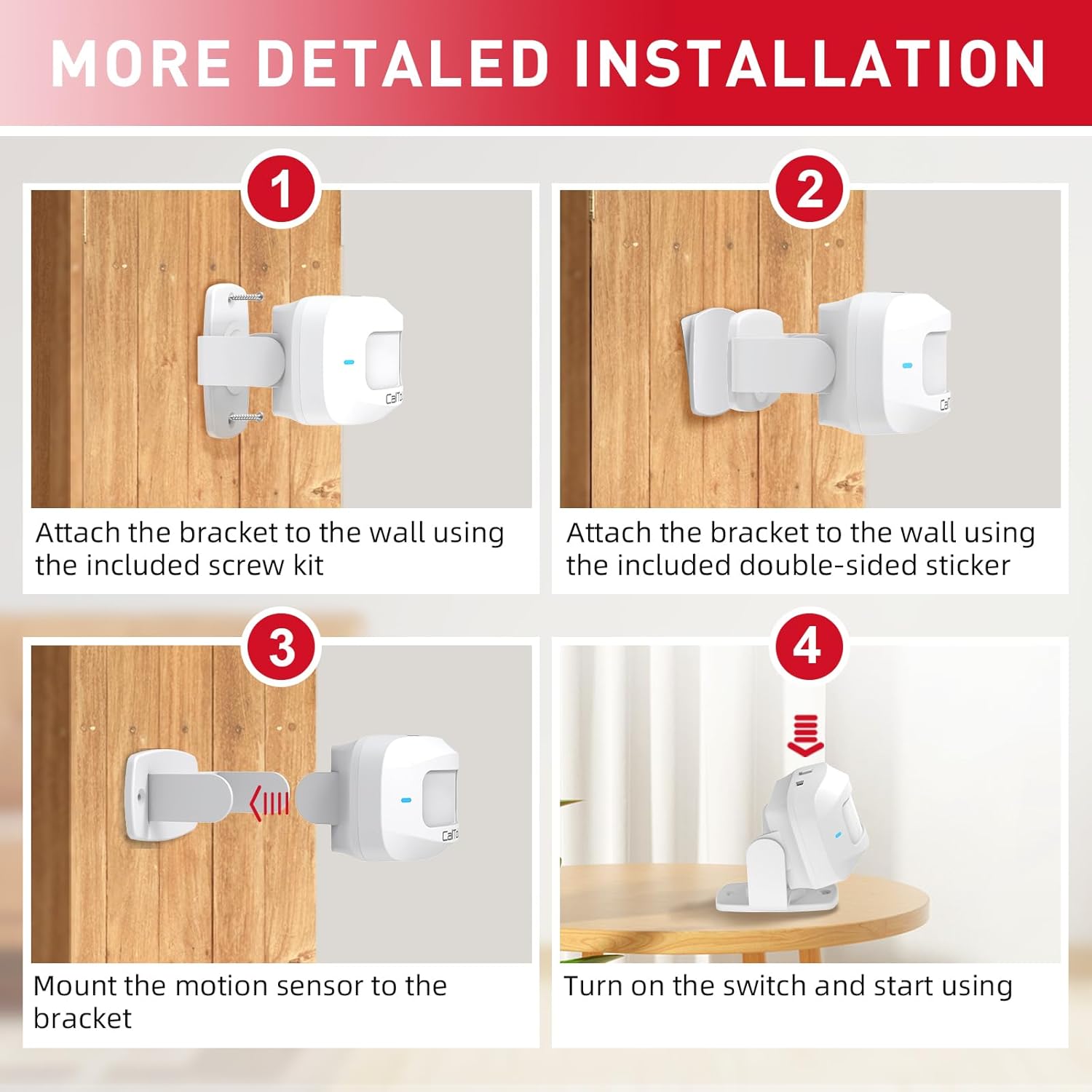
Figure 3: Step-by-step installation process.
- Attach the bracket to the wall:
- Using Screw Kit: Choose a suitable location. Mark the drilling points for the bracket. Drill pilot holes if necessary and secure the bracket to the wall using the provided screws.
- Using Double-sided Sticker: Ensure the surface is clean, dry, and smooth. Peel off the protective film from one side of the double-sided sticker and apply it firmly to the back of the bracket. Peel off the other side and press the bracket firmly onto the desired wall surface for at least 30 seconds.
- Mount the motion sensor to the bracket: Slide the motion sensor onto the attached bracket until it clicks securely into place.
- Adjust the angle: The sensor features a 180° adjustment angle and 360° rotation on its swivel mount. Adjust the sensor to cover the desired detection area. Consider the detection angles (120° wide or 60° narrow) for optimal coverage.
- Turn on the switch: Locate the power switch (refer to Figure 2, part E) and slide it to the "ON" position. The work signal light (Figure 2, part B) may illuminate briefly.
4.3. Pairing with CallToU Receiver
For the motion sensor to trigger an alarm, it must be paired with a compatible CallToU receiver. Refer to the instruction manual of your CallToU receiver for specific pairing procedures. Generally, this involves putting the receiver into pairing mode and then activating the motion sensor to send a pairing signal.
5. Operation
Once installed and paired with a CallToU receiver, the motion sensor operates automatically.
- Motion Detection: The infrared sensor continuously monitors the detection area. When motion is detected within its 33-foot range, the sensor will transmit a wireless signal to the paired CallToU receiver.
- Signal Transmission: The sensor can transmit signals up to 500+ feet (150+ meters) in open areas to the receiver. Walls and obstacles may reduce this range.
- Receiver Response: Upon receiving a signal, the CallToU receiver will activate its programmed alert (e.g., sound an alarm, flash lights, vibrate).
5.1. Applications
The CallToU Wireless Motion Sensor is versatile and can be used in various scenarios:
- Caregiving: Monitor seniors or dementia patients getting out of bed, leaving a room, or approaching stairs to prevent falls and provide timely assistance.
- Child Safety: Alert caregivers if a child enters an unsupervised area.
- Property Security: Use as an entrance alarm for front doors, back doors, mailboxes, garages, or driveways to detect unauthorized entry.

Figure 4: Examples of wide range application for the motion sensor.
6. Maintenance
6.1. Battery Replacement
When the signal light on the sensor becomes dim or the sensor fails to transmit signals reliably, it may be time to replace the batteries. Use 3 new AAA 1.5V Alkaline batteries. Follow the battery installation steps in Section 4.1.
6.2. Cleaning
To ensure optimal performance, periodically clean the infrared sensor window with a soft, dry cloth. Do not use abrasive cleaners or solvents, as these may damage the device.
7. Troubleshooting
| Problem | Possible Cause | Solution |
|---|---|---|
| Sensor not detecting motion. |
|
|
| Receiver not alarming when motion is detected. |
|
|
| False alarms. |
|
|
8. Warranty and Support
For information regarding product warranty, returns, or technical support, please refer to the documentation provided with your purchase or visit the official CallToU website or Amazon brand store.
CallToU Amazon Store: https://www.amazon.com/stores/CallToU/page/3E2F64D7-2B85-4C52-BCB5-7BD8EC118E7E
Related Documents - HW12-1
 |
CallToU Motion Detector System User Manual User manual for the CallToU Motion Detector System, including receiver model CC28 and transmitter model HW12. Covers functions, installation, specifications, and troubleshooting. |
 |
CallToU Caregiver Pager System User Manual User manual for the CallToU Caregiver Pager System, including receiver model CC28, transmitter model BT009, and wrist call button E-05W. Learn about features, operation, pairing, troubleshooting, and specifications. |
 |
VIMAR BY-ALARM PLUS 01741 PET Immune IR Motion Detector - Installation and Specifications Comprehensive technical guide and installation manual for the VIMAR BY-ALARM PLUS 01741, a 12+12m PET immune IP55 infrared motion detector. Features include detailed installation steps, coverage diagrams, connection schematics, technical specifications, and safety guidelines. Ideal for security system integrators. |
 |
Tynetec 869MHz Alerting Floor PIR Detector (ZXT860) - User Manual Comprehensive user manual for the Tynetec 869MHz Alerting Floor PIR Detector (ZXT860). Learn about its features, installation, operation modes, DIP switch configuration, and integration with Reach IP, Advent XT2, and Carer Response systems for assisted living and security. |
 |
SATEL MPD-310 Wireless PIR Motion Detector - Installation and Technical Manual Comprehensive guide for the SATEL MPD-310 wireless passive infrared motion detector, covering installation, features, operation, and technical specifications. Learn how to set up and integrate this security device. |
 |
Rondish PIR-21 Wireless Motion Sensor Product Specification Detailed product specification for the Rondish PIR-21 Wireless Motion Sensor, including features, technical specifications, standards, and operation instructions. This sensor is designed for fall management and can function as a standalone alarm or transmit signals to a receiving alarm. |
Ask a question about this manual
Ask about setup, troubleshooting, compatibility, parts, safety, or missing instructions. Manuals+ will review the question and use this page’s manual context to help answer it.