
KLIM K7
KLIM K7 Portable Cassette Player and MP3 Converter User Manual
Model: K7
1. Introduction
The KLIM K7 is a versatile portable cassette player designed for both playback of audio cassettes and conversion of cassette audio to digital MP3 format. It features a built-in microphone for recording, an integrated speaker, and a rechargeable battery for on-the-go use. This manual provides detailed instructions for setting up, operating, and maintaining your KLIM K7 device.

Image: Overview of KLIM K7 features including cassette to MP3 conversion, tape playback, built-in microphone, earphone jack, speaker, and compact size.
2. Package Contents
Please verify that all items listed below are included in your package:
- KLIM K7 Portable Cassette Player and Converter
- KLIM Fusion Earphones
- 32GB Micro SD Card
- Micro SD Card Reader (USB adapter)
- Type-C USB Charging Cable
- User Manual (this document)

Image: A visual representation of all items included in the KLIM K7 package: the cassette player, Type-C USB cable, 32GB Micro SD card, SD card reader, and Fusion earphones.
3. Product Overview
Familiarize yourself with the various parts and controls of your KLIM K7 device.

Image: Front view of the KLIM K7 cassette player, showing the cassette compartment, control buttons, built-in speaker, display, and included earphones, SD card, and USB adapter.
Controls and Ports:
- Cassette Compartment: Insert your audio cassettes here.
- Display Screen: Shows track time, SD card status, and recording indicator.
- Play/Pause Button: Starts or pauses cassette playback/MP3 playback.
- Stop Button: Stops playback or recording.
- Fast Forward/Rewind Buttons: Navigates through cassette tape or MP3 tracks.
- Record Button: Initiates recording from cassette or microphone to SD card.
- Mode Button: Switches between cassette playback, MP3 playback, and recording modes.
- Volume Control: Adjusts audio output level.
- 3.5mm Earphone Jack: Connect included earphones or other standard headphones.
- Microphone: Built-in microphone for voice recording.
- SD Card Slot: Insert the provided 32GB Micro SD card for storage.
- Type-C USB Port: For charging the device.
- Power Switch (ON/OFF): Turns the device on or off.
4. Setup
4.1 Charging the Device
The KLIM K7 is equipped with a 1000mAh rechargeable battery. Before first use, or when the battery is low, charge the device using the provided Type-C USB cable.
- Connect the Type-C end of the USB cable to the charging port on the KLIM K7.
- Connect the standard USB-A end of the cable to a USB power adapter (not included) or a computer's USB port.
- The charging indicator on the device will illuminate. A full charge typically takes approximately 2 hours.
- Once fully charged, disconnect the cable.

Image: The KLIM K7 device shown with its Type-C USB charging cable, illustrating the rechargeable battery feature.
4.2 Inserting the Micro SD Card
The included 32GB Micro SD card is essential for converting cassettes to MP3 and for recording audio. Ensure it is properly inserted before use.
- Locate the Micro SD card slot on the side of the KLIM K7.
- Gently insert the 32GB Micro SD card into the slot with the gold contacts facing down, until it clicks into place.
- To remove, gently push the card inward until it clicks, then release, and it will spring out.

Image: The KLIM K7 with its cassette compartment open, illustrating the insertion of the 32GB Micro SD card into its designated slot.
4.3 Inserting an Audio Cassette
- Open the cassette compartment door.
- Insert your audio cassette with the open edge facing the playback head.
- Close the cassette compartment door firmly until it clicks.
5. Operating Instructions
5.1 Powering On/Off
Slide the Power Switch (ON/OFF) located on the side of the device to the 'ON' position to power on. Slide it to 'OFF' to power off.
5.2 Playing a Cassette Tape
- Ensure a cassette tape is inserted and the device is powered on.
- Press the Play button (►). The tape will begin to play.
- Adjust the volume using the volume control.
- To pause, press the Play/Pause button again.
- To stop, press the Stop button (■).
- Use the Fast Forward (►►) and Rewind (◄◄) buttons to navigate the tape.
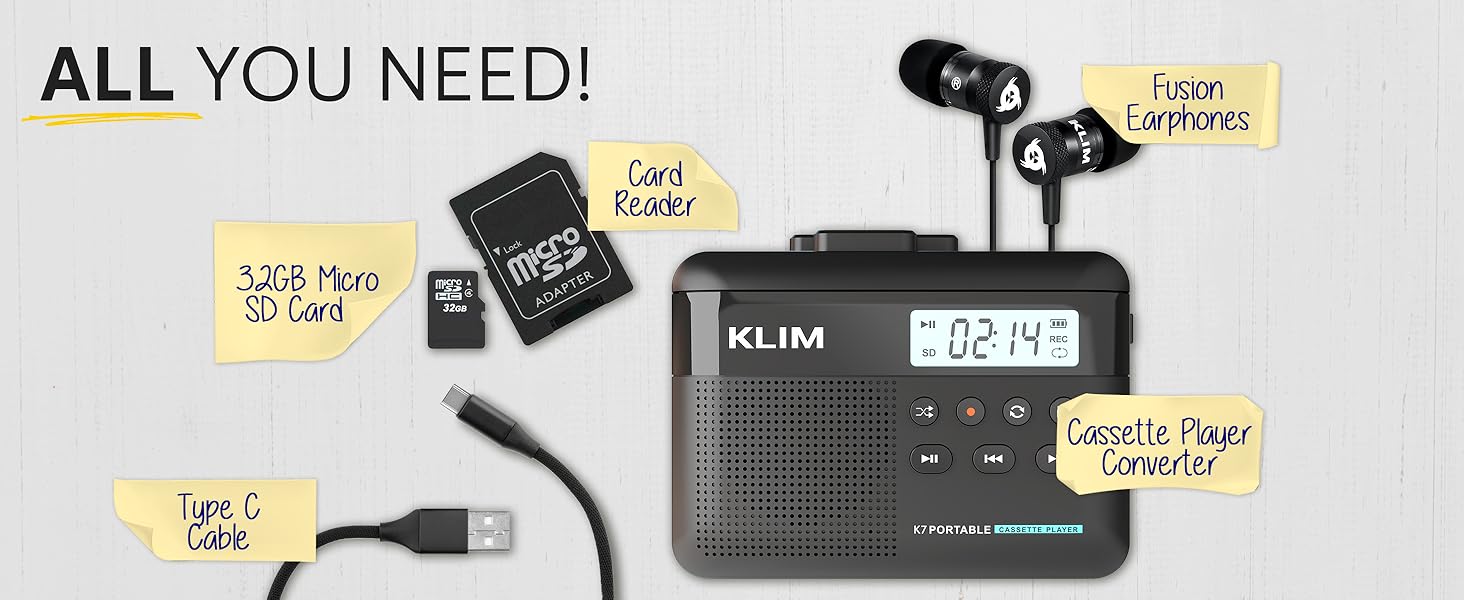
Image: A mother and child sharing earphones connected to the KLIM K7, demonstrating the device's use for listening to cassette tapes.
5.3 Converting Cassette to MP3
The KLIM K7 allows you to convert your cassette tapes directly to MP3 files on the inserted Micro SD card without needing a computer.
- Ensure a cassette tape is inserted and the 32GB Micro SD card is in its slot.
- Power on the device.
- Press the Play button (►) to start playing the cassette.
- Long press the Record button (●) to begin recording. The display will show a recording indicator.
- The device will convert the audio from the cassette to an MP3 file on the SD card. Each side of the tape will typically be saved as one MP3 file.
- To stop recording, press the Record button (●) again.
- After recording, you can remove the SD card and use the provided USB adapter to transfer the MP3 files to a computer or other device.

Image: A five-step visual guide demonstrating how to convert cassette audio to MP3 files on the Micro SD card using the KLIM K7.
5.4 Using the Built-in Microphone for Recording
The KLIM K7 allows you to record external audio using its built-in microphone directly to the Micro SD card.
- Ensure the 32GB Micro SD card is inserted.
- Power on the device.
- Press the Mode button until the device is in microphone recording mode (indicated on the display).
- Press the Record button (●) to start recording.
- Speak clearly towards the built-in microphone.
- To stop recording, press the Record button (●) again.
Note: The KLIM K7 does not support recording onto cassette tapes.

Image: A woman singing into a microphone, with the KLIM K7 and its SD card slot visible, illustrating the high-quality sound recording capability to the SD card.
5.5 Playing MP3 Files from SD Card
The KLIM K7 can also function as an MP3 player, playing files stored on the Micro SD card.
- Ensure the Micro SD card with MP3 files is inserted.
- Power on the device.
- Press the Mode button until the device is in MP3 playback mode.
- Press the Play button (►) to start playing the first MP3 file.
- Use the Fast Forward (►►) and Rewind (◄◄) buttons to skip tracks.
- Adjust the volume using the volume control.
5.6 Using Earphones and Speaker
The KLIM K7 offers flexible listening options:
- Earphones: For private listening, plug the included KLIM Fusion earphones into the 3.5mm earphone jack. The built-in speaker will automatically mute.
- Built-in Speaker: For shared listening, ensure no earphones are plugged in. The audio will play through the integrated speaker.

Image: A man wearing earphones, connected to the KLIM K7, highlighting the universal 3.5mm jack port for personal listening.
6. Maintenance
Proper care and maintenance will ensure the longevity and optimal performance of your KLIM K7.
- Cleaning: Use a soft, dry cloth to clean the exterior of the device. Do not use liquid cleaners or abrasive materials. For the playback head and pinch rollers, use a specialized cassette head cleaner if necessary, following its instructions.
- Storage: When not in use, store the device in a cool, dry place away from direct sunlight and extreme temperatures.
- Battery Care: To prolong battery life, avoid fully discharging the battery frequently. Charge the device regularly, even if not in constant use.
- Cassette Tapes: Use clean, well-maintained cassette tapes to prevent damage to the playback head and ensure good audio quality.
7. Troubleshooting
If you encounter issues with your KLIM K7, refer to the following common problems and solutions:
| Problem | Possible Cause | Solution |
|---|---|---|
| Device does not power on. | Low or depleted battery. | Charge the device using the provided USB-C cable. |
| No sound during cassette playback. | Volume too low; earphones not properly connected; dirty playback head. | Increase volume; ensure earphones are fully plugged in or removed for speaker; clean playback head. |
| Cassette to MP3 conversion not working. | SD card not inserted or full; cassette not playing. | Ensure SD card is correctly inserted and has free space; verify cassette playback is active before recording. |
| Poor audio quality during playback or recording. | Dirty playback head/pinch rollers; damaged cassette tape; low battery. | Clean playback head and pinch rollers; try a different cassette; ensure device is charged. |
| MP3 files not visible on computer after transfer. | SD card not properly read by computer/adapter. | Ensure SD card is fully inserted into the card reader; try a different USB port on your computer. |
8. Specifications
| Feature | Detail |
|---|---|
| Product Dimensions | 4.76 x 3.61 x 1.56 inches |
| Item Weight | 7.7 ounces |
| Manufacturer | KLIM |
| Model Number | K7 |
| Battery | 1000mAh Lithium Ion (rechargeable, included) |
| Charging Port | Type-C USB |
| Storage | 32GB Micro SD Card (included) |
| Audio Output | Built-in Speaker, 3.5mm Earphone Jack |
| Recording Function | Cassette to MP3, Built-in Microphone to MP3 (to SD card) |

Image: The KLIM K7 device with its compact dimensions (4.7" x 3.5" x 1.4") and weight (8 oz), highlighting its portability.
9. Warranty and Support
KLIM is committed to producing quality electronics. The KLIM K7 comes with a 5-year assurance against manufacturing defects. If you encounter any problems with your device, please contact KLIM customer support for assistance.
For further support, product registration, or to view frequently asked questions, please visit the official KLIM website:
10. Safety Information
- Do not expose the device to water, moisture, or extreme temperatures.
- Avoid dropping or subjecting the device to strong impacts.
- Do not attempt to disassemble or repair the device yourself. Refer to qualified service personnel.
- Keep out of reach of children.
- Dispose of the device and its battery responsibly according to local regulations.
Related documentsK7


Ask a question about this manual
Ask about setup, troubleshooting, compatibility, parts, safety, or missing instructions. Manuals+ will review the question and use this page’s manual context to help answer it.